Quantcast
Channel: Planet Python
Viewing all 24356 articles
Browse latest View live

Red Hat Developers: What, No Python in RHEL 8 Beta?

$
0
0

TL;DR Of course we have Python! You just need to specify if you want Python 3 or 2 as we didn’t want to set a default. Give yum install python3 or yum install python2 a try. Or, if you want to see what we recommend you install yum install @python36 or yum install @python27. Read on for why.

For prior versions of Red Hat Enterprise Linux, and most Linux Distributions, users have been locked to the system version of Python unless they got away from the system package manager. While this can be true for a lot of tools (ruby: rvm; node: nvm) the Python use case is worse because so many Linux tools (like yum) rely on Python.

In order to improve this experience for RHEL8 users, we have moved the Python used by the system “off to the side”. In RHEL 8 we also introduced Modularity. As a result, in combination with Python’s ability to be parallel installed, we can now make multiple versions of Python available and installable, from the standard repositories, installing to the standard locations. Now, users can choose what version of Python they want to run in any given userspace and it simply works. For more info, see my article, Introducing Application Streams in RHEL 8.

To be honest, the system maintainers also get some advantages of not being locked to an aging version of Python for our system tools. With users not relying on a particular version of Python coming with the system installation, we have the freedom to take advantage of new language features, performance improvements, and all the other goodness a developer gets when tracking near the upstream version.

However, this has resulted in a dilemma. When a user sits down at a fresh installation of RHEL8 they will naturally expect that /usr/bin/python will run some version of Python. If you follow the recommendation in Python Enhancement Proposal (PEP) 394, that will be Python 2. However, at some point, a new PEP will likely want to change that recommendation to Python 3, probably during, the typically *10* year, life of RHEL 8!

So, what do we do? Well, if we follow the current recommendation, we make some present day users happy. However, when the Python Community shifts to recommending Python 3 as the default, we will make new users unhappy.

As a result, we came to the tough conclusion, don’t provide bare Python at all. Instead, ask our users from the beginning to choose which version of Python they actually want. So, yum install python results in a 404.

However, we do try to make it as easy as possible to get Python 2 or 3 (or both) on to your system. We recommend using yum install @python36 or yum install @python27 to take advantage of the recommended set of packages to install. If you really want *just* the Python binary, you can use yum install python3 or yum install python2.

We have also setup the alternatives infrastructure so that when you install either (or both) you can easily make /usr/bin/python point to the right place using alternatives --config python. However, as we explained above, and aligned with the Python PEP, we don’t recommend relying on /usr/bin/python being the correct python for your application.

To conclude, yes, Python is included in RHEL 8! And, it will be even better than in the past! If you want more details on anything in this post, please see the How To Guide on Red Hat Developers.

Oh and if you haven’t downloaded RHEL 8 yet—go to developers.redhat.com/rhel8 now.

Additional Information


Share

The post What, No Python in RHEL 8 Beta? appeared first on RHD Blog.


Mike Driscoll: Python 101: Episode #35 – The virtualenv Package

Semaphore Community: Dockerizing a Python Django Web Application

$
0
0

This article is brought with ❤ to you by Semaphore.

Introduction

This article will cover building a simple 'Hello World'-style web application written in Django and running it in the much talked about and discussed Docker. Docker takes all the great aspects of a traditional virtual machine, e.g. a self contained system isolated from your development machine, and removes many of the drawbacks such as system resource drain, setup time, and maintenance.

When building web applications, you have probably reached a point where you want to run your application in a fashion that is closer to your production environment. Docker allows you to set up your application runtime in such a way that it runs in exactly the same manner as it will in production, on the same operating system, with the same environment variables, and any other configuration and setup you require.

By the end of the article you'll be able to:

  • Understand what Docker is and how it is used,
  • Build a simple Python Django application, and
  • Create a simple Dockerfile to build a container running a Django web application server.

What is Docker, Anyway?

Docker's homepage describes Docker as follows:

"Docker is an open platform for building, shipping and running distributed applications. It gives programmers, development teams, and operations engineers the common toolbox they need to take advantage of the distributed and networked nature of modern applications."

Put simply, Docker gives you the ability to run your applications within a controlled environment, known as a container, built according to the instructions you define. A container leverages your machines resources much like a traditional virtual machine (VM). However, containers differ greatly from traditional virtual machines in terms of system resources. Traditional virtual machines operate using Hypervisors, which manage the virtualization of the underlying hardware to the VM. This means they are large in terms of system requirements.

Containers operate on a shared Linux operating system base and add simple instructions on top to execute and run your application or process. The difference being that Docker doesn't require the often time-consuming process of installing an entire OS to a virtual machine such as VirtualBox or VMWare. Once Docker is installed, you create a container with a few commands and then execute your applications on it via the Dockerfile. Docker manages the majority of the operating system virtualization for you, so you can get on with writing applications and shipping them as you require in the container you have built. Furthermore, Dockerfiles can be shared for others to build containers and extend the instructions within them by basing their container image on top of an existing one. The containers are also highly portable and will run in the same manner regardless of the host OS they are executed on. Portability is a massive plus side of Docker.

Continuous Delivery with Kubernetes

Prerequisites

Before you begin this tutorial, ensure the following is installed to your system:

Setting Up a Django web application

Starting a Django application is easy, as the Django dependency provides you with a command line tool for starting a project and generating some of the files and directory structure for you. To start, create a new folder that will house the Django application and move into that directory.

$ mkdir project
$ cd project

Once in this folder, you need to add the standard Python project dependencies file which is usually named requirements.txt, and add the Django and Gunicorn dependency to it. Gunicorn is a production standard web server, which will be used later in the article. Once you have created and added the dependencies, the file should look like this:

$ cat requirements.txt
Django==1.9.4
gunicorn==19.6.0

With the Django dependency added, you can then install Django using the following command:

$pipinstall-rrequirements.txt

Once installed, you will find that you now have access to the django-admin command line tool, which you can use to generate the project files and directory structure needed for the simple "Hello, World!" application.

$ django-admin startproject helloworld

Let's take a look at the project structure the tool has just created for you:

.
├── helloworld
│   ├── helloworld
│   │   ├── __init__.py
│   │   ├── settings.py
│   │   ├── urls.py
│   │   └── wsgi.py
│   └── manage.py
└── requirements.txt

You can read more about the structure of Django on the official website. django-admin tool has created a skeleton application. You control the application for development purposes using the manage.py file, which allows you to start the development test web server for example:

$ cd helloworld
$ python manage.py runserver

The other key file of note is the urls.py, which specifies what URL's route to which view. Right now, you will only have the default admin URL which we won't be using in this tutorial. Lets add a URL that will route to a view returning the classic phrase "Hello, World!".

First, create a new file called views.py in the same directory as urls.py with the following content:

fromdjango.httpimportHttpResponsedefindex(request):returnHttpResponse("Hello, world!")

Now, add the following URL url(r'', 'helloworld.views.index') to the urls.py, which will route the base URL of / to our new view. The contents of the urls.py file should now look as follows:

fromdjango.conf.urlsimporturlfromdjango.contribimportadminurlpatterns=[url(r'^admin/',admin.site.urls),url(r'','helloworld.views.index'),]

Now, when you execute the python manage.py runserver command and visit http://localhost:8000 in your browser, you should see the newly added "Hello, World!" view.

The final part of our project setup is making use of the Gunicorn web server. This web server is robust and built to handle production levels of traffic, whereas the included development server of Django is more for testing purposes on your local machine only. Once you have dockerized the application, you will want to start up the server using Gunicorn. This is much simpler if you write a small startup script for Docker to execute. With that in mind, let's add a start.sh bash script to the root of the project, that will start our application using Gunicorn.

#!/bin/bash# Start Gunicorn processesechoStartingGunicorn.execgunicornhelloworld.wsgi:application \
    --bind0.0.0.0:8000 \
    --workers3

The first part of the script writes "Starting Gunicorn" to the command line to show us that it is starting execution. The next part of the script actually launches Gunicorn. You use exec here so that the execution of the command takes over the shell script, meaning that when the Gunicorn process ends so will the script, which is what we want here.

You then pass the gunicorn command with the first argument of helloworld.wsgi:application. This is a reference to the wsgi file Django generated for us and is a Web Server Gateway Interface file which is the Python standard for web applications and servers. Without delving too much into WSGI, the file simply defines the application variable, and Gunicorn knows how to interact with the object to start the web server.

You then pass two flags to the command, bind to attach the running server to port 8000, which you will use to communicate with the running web server via HTTP. Finally, you specify workers which are the number of threads that will handle the requests coming into your application. Gunicorn recommends this value to be set at (2 x $num_cores) + 1. You can read more on configuration of Gunicorn in their documentation.

Finally, make the script executable, and then test if it works by changing directory into the project folder helloworld and executing the script as shown here. If everything is working fine, you should see similar output to the one below, be able to visit http://localhost:8000 in your browser, and get the "Hello, World!" response.

$ chmod +x start.sh
$ cd helloworld
$ ../start.sh
Starting Gunicorn.
[2016-06-26 19:43:28 +0100] [82248] [INFO]
Starting gunicorn 19.6.0
[2016-06-26 19:43:28 +0100] [82248] [INFO]
Listening at: http://0.0.0.0:8000 (82248)
[2016-06-26 19:43:28 +0100] [82248] [INFO]
Using worker: sync
[2016-06-26 19:43:28 +0100] [82251] [INFO]
Booting worker with pid: 82251
[2016-06-26 19:43:28 +0100] [82252] [INFO]
Booting worker with pid: 82252
[2016-06-26 19:43:29 +0100] [82253] [INFO]
Booting worker with pid: 82253

Dockerizing the Application

You now have a simple web application that is ready to be deployed. So far, you have been using the built-in development web server that Django ships with the web framework it provides. It's time to set up the project to run the application in Docker using a more robust web server that is built to handle production levels of traffic.

Installing Docker

One of the key goals of Docker is portability, and as such is able to be installed on a wide variety of operating systems.

For this tutorial, you will look at installing Docker Machine on MacOS. The simplest way to achieve this is via the Homebrew package manager. Instal Homebrew and run the following:

$ brew update && brew upgrade --all && brew cleanup && brew prune
$ brew install docker-machine

With Docker Machine installed, you can use it to create some virtual machines and run Docker clients. You can run docker-machine from your command line to see what options you have available. You'll notice that the general idea of docker-machine is to give you tools to create and manage Docker clients. This means you can easily spin up a virtual machine and use that to run whatever Docker containers you want or need on it.

You will now create a virtual machine based on VirtualBox that will be used to execute your Dockerfile, which you will create shortly. The machine you create here should try to mimic the machine you intend to run your application on in production. This way, you should not see any differences or quirks in your running application neither locally nor in a deployed environment.

Create your Docker Machine using the following command:

$ docker-machine create development --driver virtualbox
--virtualbox-disk-size "5000" --virtualbox-cpu-count 2
--virtualbox-memory "4096"

This will create your machine and output useful information on completion. The machine will be created with 5GB hard disk, 2 CPU's and 4GB of RAM.

To complete the setup, you need to add some environment variables to your terminal session to allow the Docker command to connect the machine you have just created. Handily, docker-machine provides a simple way to generate the environment variables and add them to your session:

$ docker-machine env development
export DOCKER_TLS_VERIFY="1"
export DOCKER_HOST="tcp://123.456.78.910:1112"
export DOCKER_CERT_PATH="/Users/me/.docker/machine/machines/development"
export DOCKER_MACHINE_NAME="development"
# Run this command to configure your shell:
# eval "$(docker-machine env development)"

Complete the setup by executing the command at the end of the output:

$(docker-machine env development)

Execute the following command to ensure everything is working as expected.

$ docker images
REPOSITORY   TAG   IMAGE  ID   CREATED   SIZE

You can now dockerize your Python application and get it running using the docker-machine.

Writing the Dockerfile

The next stage is to add a Dockerfile to your project. This will allow Docker to build the image it will execute on the Docker Machine you just created. Writing a Dockerfile is rather straightforward and has many elements that can be reused and/or found on the web. Docker provides a lot of the functions that you will require to build your image. If you need to do something more custom on your project, Dockerfiles are flexible enough for you to do so.

The structure of a Dockerfile can be considered a series of instructions on how to build your container/image. For example, the vast majority of Dockerfiles will begin by referencing a base image provided by Docker. Typically, this will be a plain vanilla image of the latest Ubuntu release or other Linux OS of choice. From there, you can set up directory structures, environment variables, download dependencies, and many other standard system tasks before finally executing the process which will run your web application.

Start the Dockerfile by creating an empty file named Dockerfile in the root of your project. Then, add the first line to the Dockerfile that instructs which base image to build upon. You can create your own base image and use that for your containers, which can be beneficial in a department with many teams wanting to deploy their applications in the same way.

# Dockerfile

# FROM directive instructing base image to build upon
FROM python:2-onbuild

It's worth noting that we are using a base image that has been created specifically to handle Python 2.X applications and a set of instructions that will run automatically before the rest of your Dockerfile. This base image will copy your project to /usr/src/app, copy your requirements.txt and execute pip install against it. With these tasks taken care of for you, your Dockerfile can then prepare to actually run your application.

Next, you can copy the start.sh script written earlier to a path that will be available to you in the container to be executed later in the Dockerfile to start your server.

# COPY startup script into known file location in container
COPY start.sh /start.sh

Your server will run on port 8000. Therefore, your container must be set up to allow access to this port so that you can communicate to your running server over HTTP. To do this, use the EXPOSE directive to make the port available:

# EXPOSE port 8000 to allow communication to/from server
EXPOSE 8000

The final part of your Dockerfile is to execute the start script added earlier, which will leave your web server running on port 8000 waiting to take requests over HTTP. You can execute this script using the CMD directive.

# CMD specifcies the command to execute to start the server running.
CMD ["/start.sh"]
# done!

With all this in place, your final Dockerfile should look something like this:

# Dockerfile

# FROM directive instructing base image to build upon
FROM python:2-onbuild

# COPY startup script into known file location in container
COPY start.sh /start.sh

# EXPOSE port 8000 to allow communication to/from server
EXPOSE 8000

# CMD specifcies the command to execute to start the server running.
CMD ["/start.sh"]
# done!

You are now ready to build the container image, and then run it to see it all working together.

Building and Running the Container

Building the container is very straight forward once you have Docker and Docker Machine on your system. The following command will look for your Dockerfile and download all the necessary layers required to get your container image running. Afterwards, it will run the instructions in the Dockerfile and leave you with a container that is ready to start.

To build your container, you will use the docker build command and provide a tag or a name for the container, so you can reference it later when you want to run it. The final part of the command tells Docker which directory to build from.

$ cd <project root directory>
$ docker build -t davidsale/dockerizing-python-django-app .

Sending build context to Docker daemon 237.6 kB
Step 1 : FROM python:2-onbuild
# Executing 3 build triggers...
Step 1 : COPY requirements.txt /usr/src/app/
 ---> Using cache
Step 1 : RUN pip install --no-cache-dir -r requirements.txt
 ---> Using cache
Step 1 : COPY . /usr/src/app
 ---> 68be8680cbc4
Removing intermediate container 75ed646abcb6
Step 2 : COPY start.sh /start.sh
 ---> 9ef8e82c8897
Removing intermediate container fa73f966fcad
Step 3 : EXPOSE 8000
 ---> Running in 14c752364595
 ---> 967396108654
Removing intermediate container 14c752364595
Step 4 : WORKDIR helloworld
 ---> Running in 09aabb677b40
 ---> 5d714ceea5af
Removing intermediate container 09aabb677b40
Step 5 : CMD /start.sh
 ---> Running in 7f73e5127cbe
 ---> 420a16e0260f
Removing intermediate container 7f73e5127cbe
Successfully built 420a16e0260f

In the output, you can see Docker processing each one of your commands before outputting that the build of the container is complete. It will give you a unique ID for the container, which can also be used in commands alongside the tag.

The final step is to run the container you have just built using Docker:

$ docker run -it -p 8000:8000 davidsale/djangoapp1
Starting Gunicorn.
[2016-06-26 19:24:11 +0000] [1] [INFO]
Starting gunicorn 19.6.0
[2016-06-26 19:24:11 +0000] [1] [INFO]
Listening at: http://0.0.0.0:9077 (1)
[2016-06-26 19:24:11 +0000] [1] [INFO]
Using worker: sync
[2016-06-26 19:24:11 +0000] [11] [INFO]
Booting worker with pid: 11
[2016-06-26 19:24:11 +0000] [12] [INFO]
Booting worker with pid: 12
[2016-06-26 19:24:11 +0000] [17] [INFO]
Booting worker with pid: 17

The command tells Docker to run the container and forward the exposed port 8000 to port 8000 on your local machine. After you run this command, you should be able to visit http://localhost:8000 in your browser to see the "Hello, World!" response. If you were running on a Linux machine, that would be the case. However, if running on MacOS, then you will need to forward the ports from VirtualBox, which is the driver we use in this tutorial so that they are accessible on your host machine.

$ VBoxManage controlvm "development" natpf1
  "tcp-port8000,tcp,,8000,,8000";

This command modifies the configuration of the virtual machine created using docker-machine earlier to forward port 8000 to your host machine. You can run this command multiple times changing the values for any other ports you require.

Once you have done this, visit http://localhost:8000 in your browser. You should be able to visit your dockerized Python Django application running on a Gunicorn web server, ready to take thousands of requests a second and ready to be deployed on virtually any OS on planet using Docker.

Next Steps

After manually verifying that the application is behaving as expected in Docker, the next step is the deployment. You can use Semaphore's Docker platform for automating this process.

Continuous Integration and Deployment for Docker projects on Semaphore

As a first step you need to create a free Semaphore account. Then, connect your Docker project repository to your new account. Semaphore will recognize that you're using Docker, and will automatically recommend the Docker platform for it.

The last step is to specify commands to build and run your Docker images:

docker build <your-project> .
docker run <your-project>

Semaphore will execute these commands on every git push.

Semaphore also makes it easy to push your images to various Docker container registries. To learn more about getting the most out of Docker on Semaphore, check out our Docker documentation pages.

Conclusion

In this tutorial, you have learned how to build a simple Python Django web application, wrap it in a production grade web server, and created a Docker container to execute your web server process.

If you enjoyed working through this article, feel free to share it and if you have any questions or comments leave them in the section below. We will do our best to answer them, or point you in the right direction.

Read next:

This article is brought with ❤ to you by Semaphore.

Semaphore Community: Continuous Deployment of a Python Flask Application with Docker and Semaphore

$
0
0

This article is brought with ❤ to you by Semaphore.

Introduction

In this tutorial, we'll go through the continuous integration and deployment of a dockerized Python Flask application with Semaphore. We'll deploy the application to Heroku.

Continuous integration and deployment help developers to:

  • Focus on developing features rather than spending time on manual deployment,
  • Be certain that their application will work as expected,
  • Update existing applications or rollback features by versioning applications using Git, and
  • Eliminate the it works on my machine issue by providing a standardized testing environment.

Docker is an application containerization tool that allows developers to deploy their applications in a uniform environment. Here are some of the benefits of using Docker:

  • Collaborating developers get to run their applications in identical environments that are configured in the same way,
  • There is no interference between the OS environment and the application environment,
  • Application portability is increased, and
  • Application overhead is reduced by providing only the required environment features, and not the entire OS, which is the case with virtual environments.

Docker works by utilizing a Dockerfile to create images. Those images are used to spin up containers that host and run the application. The application can then be exposed by using an IP address, so it can be accessed from outside the container.

Continuous Delivery with Kubernetes

Prerequisites

Before you begin this tutorial, ensure the following is installed to your system:

  • Python 2.7 or 3.x,
  • Docker, and
  • A git repository to store your project and track changes.

Setting Up a Flask Application

To start with, we're going to create a simple Flask todo list application, which will allow users to create todos with names and descriptions. The application will then be dockerized and deployed via Semaphore to a host of our choice. It will have the following directory structure:

app/
├── templates/
│   └── index.html
├── tests/
│   └── test_endpoints.py
├── app.py
├── Dockerfile
├── docker-compose.yml
├── requirements.txt

The app.py file will be the main backend functionality, responsible for the routing and view rendering of HTML templates in the templates folder.

First, we'll set up a Python environment following this guide, and create a virtual environment, activate it and install the necessary requirements. A virtual environment in Python applications allows them to have their own runtime environment without interfering with the system packages.

$   virtualenv flask-env
$   . flask-env/bin/activate
$   pip install -r requirements.txt

Creating Application Tests

Test Driven Development (TDD) makes developers consider the structure and the functionality of their application in different situations. Also, writing tests reduces the amount of time a developer needs to spend manually testing their application by enabling them to automate the process.

We'll set up the test environment using the setUp(self) and tearDown(self) methods. They allow our tests to run independently without being affected by other tests. In this scenario, every time a test runs, we create a Flask test application. We also clean the database after every test in the tearDown(self) method. This ensures that the data stored by the previous test does not affect the next test.

# tests/test_endpoints.pyfromappimportapp,dbfromflaskimporturl_forimportunittestclassFlaskTodosTest(unittest.TestCase):defsetUp(self):"""Set up test application client"""self.app=app.test_client()self.app.testing=TruedeftearDown(self):"""Clear DB after running tests"""db.todos.remove({})

In this section, we'll write tests for our endpoints and HTTP methods. We'll first try to assert that when a user accesses the default homepage(/) they get an OK status(200), and that they are redirected with a 302 status after creating a todo.

# tests/test_endpoints.pyclassFlaskTodosTest(unittest.TestCase):# ..... setup section.....deftest_home_status_code(self):"""Assert that user successfully lands on homepage"""result=self.app.get('/')self.assertEqual(result.status_code,200)deftest_todo_creation(self):"""Assert that user is redirected with status 302 after creating a todo item"""response=self.app.post('/new',data=dict(name="First todo",description="Test todo"))self.assertEqual(response.status_code,302)if__name__=='__main__':unittest.main()

The tests can be run using nosetests -v.

Creating the Actual Application

The application uses MongoDB hosted on mlab, which can be changed in the configuration. It provides two routes. The first one, default/index route(/), displays the available todos by rendering a HTML template file. The second route, (/new), accepts only POST requests, and is responsible for saving todo items in the database, and then redirecting the user back to the page with all todos.

# app.pyimportosfromflaskimportFlask,redirect,url_for,request,render_templatefrompymongoimportMongoClientapp=Flask(__name__)# Set up database connection.client=MongoClient("mongodb://username:password@database_url:port_number/db_name")db=client['db_name']@app.route('/')deftodo():_items=db.todos.find()items=[itemforitemin_items]# Render default page templatereturnrender_template('index.html',items=items)@app.route('/new',methods=['POST'])defnew():item_doc={'name':request.form['name'],'description':request.form['description']}# Save items to databasedb.todos.insert_one(item_doc)returnredirect(url_for('todo'))if__name__=="__main__":app.run(host='0.0.0.0',debug=True)

We can then run the application with python app.py, and access it in our browser localhost http://127.0.0.1:5000. If no other port ID is provided, Flask uses port 5000 as the default port. To run the application on a different port, set the port number as follows:

app.run(host='0.0.0.0',port=port_number,debug=True)

Dockerizing the Application

Docker is used to create the application image from the provided Dockerfile configuration. If this is your first time working with Docker, you can follow this step-by-step tutorial to learn more about installing Docker and setting up the environment.

Dockerfile

FROM python:2.7         
ADD . /todo
WORKDIR /todo
EXPOSE 5000
RUN pip install -r requirements.txt
ENTRYPOINT ["python", "app.py"]

The Dockerfile dictates the environmental requirements and application structure.

The application will run in a Python 2.7 environment. A folder named todo is created and set as our work directory.

Since the Flask application is running on port 5000, this port will be exposed for mapping to the external environment. Application requirements are installed within the container. The application will be run using python app.py command, as specified by the ENTRYPOINT directive.

All of the above happens within the Docker container environment, without interference with the OS environment.

Docker Compose is a tool for defining and running multi-container Docker applications. The docker-compose file is used to configure application services by specifying the directory with the Dockerfile, container name, port mapping, and many others. Those services can then be started with a single command.

web:
  build: .
  container_name: flock
  ports:
    - "5000:5000"
  volumes:
    - .:/todo

The build command directs Compose to build the application image using the Dockerfile in the current folder, and map the application port 5000 in the container to port 5000 of the OS. We then build and run our application in a Docker container.

$    docker-compose build
$    docker-compose up

Docker downloads the necessary dependencies, builds up the image, and starts the application in a container accessible at http://127.0.0.1:5000.

Continuous Integration and Deployment (CI/CD)

With CI/CD, developers set up a pipeline for testing and deployment. This allows them to concentrate on developing the features, since the application is automatically built, tested, and deployed from a CI server whenever some changes are made.

To create a new project, log into your Semaphore account, click on Create new, and choose Project on the drop down list.

On the next page, choose whether your project repository is hosted on GitHub or Bitbucket.

Image

Select the project repository by searching for it in the provided filter.

Image

Next, select which branch to load:

Image

After you've selected the project owner, Semaphore will analyze the repository and detect the platform:

Analyzing repository

Image

Detecting Platform

Image

Semaphore automatically detects Docker projects and recommends using the Docker platform for the application. You then need to provide project settings in order to define the commands that should be run. Semaphore automatically runs the commands to build an image, and runs the tests before deployment. This ensures that an application version is deployed only if it passes all the tests.

Image

After the build and the tests have completed, the application can be deployed to the chosen platform.

Image

Click on Set Up Deployment and choose the deployment platform.

Image

A complete deployment to Heroku looks as follows:

Image

You can choose to have automatic deployment on subsequent changes. Every time any changes are pushed to GitHub, a build is triggere, and automatic deployment occurs. However, for the first deployment we will need to do it manually.

Image

The application is finally launched on Heroku.

Image

Conclusion

The advantages of continuous integration range from reducing the amount of work done by developers to automatic updates and reduced errors in the application pipeline. Docker enhances this by allowing the provision of uniform environments for running applications.

In this tutorial, we explored how you can create a Flask application and run it using Docker. We also learned how to use Semaphore to create a pipeline that automates running the tests and the necessary build commands, as well as deploying the application to Heroku.

You can check out the demo of this application on Heroku and the source code.

Feel free to leave any comments or questions in the section below.

Want to continuously deliver your applications made with Docker? Check out Semaphore’s Docker platform.

Read next:

This article is brought with ❤ to you by Semaphore.

Wallaroo Labs: Using Wallaroo with PostgreSQL

$
0
0
Introduction In the last blog post, I gave an overview of our new Connectors APIs, discussing how they work under the hood and going over some of the examples we provide. In this post, we are going to take a deeper dive into how to build a connector to pull data from PostgreSQL. We’ll also talk a bit about some of the different approaches for building both external source and sink connectors.

Rene Dudfield: 🐱‍🏍 — the first pygame 2 community game. Starting now! Are you in?

$
0
0
What is a 🐱‍🏍? *[0].


There was this email thread on the pygame mailing list.

One topic of that conversation was doing a community game in there for reasons(see below).

I would like to do a pygame 2 community game to submit in the:
- https://itch.io/jam/game-off-2018 (GameOff github jam)

Ludumdare(ldjam) starts in 3 days, 7 hours. Theme not selected yet.
GameOff finishes in 4 days 2 hours. Theme is "Hybrid", Jam already started.

So, the Jams finish in 4.1 days.
 

Are you in? 

If so join the web based chatroom(discord) in the "#communitygame" channel.

I'm trying to form a team now.

... read more?...

click....
loading...
loading...
buffering...
loading...
refresh...
loading...


So why do this?

My reasons for doing this are to push me to get pygame 2 features done that are actually useful in apps (Write Games, Not Engines).
It will be a good testbed for prototyping as well.

I will also try to get the game into Steam, and any other app stores.
Because distributing pygame 2 games is also important,
and improving the tooling and documentation around that is also important.

The pygame 2 community game serves these purposes.
  • guiding and motivating pygame 2 development (make games not engines)
  • raising funds towards pygame 2 developments (or losing money on steam signup costs)
  • making an open source pygame 2 game
  • improving the work flow for people releasing games/apps.
  • helping to guide improvements on the pygame website
  • trying out new technology and techniques
It's about 4-5 days, and then there will be some more days to try and distribute the game further.

  • License for code will be the pygame license (LGPL, but you can keep your parts of course!) 
  • Art assets license will be some form of permissive creative commons. So technically anyone should be able to distribute it following those licenses (and even sell it).

  • Contributors will also:
    • be in the credits on the pygame website, game website, in game, promo pages
    • have their link (to patreon twitter github etc) in their too
    • hopefully enjoy themselves, and maybe learn something
    Also interested in people who want this game to use their library.
    Especially if you will us use the library or improve it as part of the Jam.


    Anyone who wants to be involved can join the discord channel
    web based chatroom(discord) in the "#communitygame" channel.
    Please let us know if you want to be involved and how :)
    *[0] (We came up with a repo name... we were perhaps thinking something like "Speedy the stunt cat" or "stuntcat" Did you know there is this whole weird genre of stunt cat games, and that stunt cat emojis are a thing? 🐱‍🏍 Also, @claudeb's first cat was called Speedy, and was a stunt cat. So that's the repo name. )

    NumFOCUS: This #GivingTuesday, We’re Saying “Thank You” To Our Supporters

    PyCoder’s Weekly: Issue #344 (Nov. 27, 2018)

    $
    0
    0
    Guido van Rossum Updates, Automated Testing, and More body,#bodyTable,#bodyCell{ height:100% !important; margin:0; padding:0; width:100% !important; } table{ border-collapse:collapse; } img,a img{ border:0; outline:none; text-decoration:none; } h1,h2,h3,h4,h5,h6{ margin:0; padding:0; } p{ margin:1em 0; padding:0; } a{ word-wrap:break-word; } .mcnPreviewText{ display:none !important; } .ReadMsgBody{ width:100%; } .ExternalClass{ width:100%; } .ExternalClass,.ExternalClass p,.ExternalClass span,.ExternalClass font,.ExternalClass td,.ExternalClass div{ line-height:100%; } table,td{ mso-table-lspace:0pt; mso-table-rspace:0pt; } #outlook a{ padding:0; } img{ -ms-interpolation-mode:bicubic; } body,table,td,p,a,li,blockquote{ -ms-text-size-adjust:100%; -webkit-text-size-adjust:100%; } #bodyCell{ padding:0; } .mcnImage,.mcnRetinaImage{ vertical-align:bottom; } .mcnTextContent img{ height:auto !important; } body,#bodyTable{ background-color:#F2F2F2; } #bodyCell{ border-top:0; } h1{ color:#555 !important; display:block; font-family:Helvetica; font-size:40px; font-style:normal; font-weight:bold; line-height:125%; letter-spacing:-1px; margin:0; text-align:left; } h2{ color:#404040 !important; display:block; font-family:Helvetica; font-size:26px; font-style:normal; font-weight:bold; line-height:125%; letter-spacing:-.75px; margin:0; text-align:left; } h3{ color:#555 !important; display:block; font-family:Helvetica; font-size:18px; font-style:normal; font-weight:bold; line-height:125%; letter-spacing:-.5px; margin:0; text-align:left; } h4{ color:#808080 !important; display:block; font-family:Helvetica; font-size:16px; font-style:normal; font-weight:bold; line-height:125%; letter-spacing:normal; margin:0; text-align:left; } #templatePreheader{ background-color:#3399cc; border-top:0; border-bottom:0; } .preheaderContainer .mcnTextContent,.preheaderContainer .mcnTextContent p{ color:#ffffff; font-family:Helvetica; font-size:11px; line-height:125%; text-align:left; } .preheaderContainer .mcnTextContent a{ color:#ffffff; font-weight:normal; text-decoration:underline; } #templateHeader{ background-color:#FFFFFF; border-top:0; border-bottom:0; } .headerContainer .mcnTextContent,.headerContainer .mcnTextContent p{ color:#555; font-family:Helvetica; font-size:15px; line-height:150%; text-align:left; } .headerContainer .mcnTextContent a{ color:#6DC6DD; font-weight:normal; text-decoration:underline; } #templateBody{ background-color:#FFFFFF; border-top:0; border-bottom:0; } .bodyContainer .mcnTextContent,.bodyContainer .mcnTextContent p{ color:#555; font-size:16px; line-height:150%; text-align:left; margin: 0 0 1em 0; } .bodyContainer .mcnTextContent a{ color:#6DC6DD; font-weight:normal; text-decoration:underline; } #templateFooter{ background-color:#F2F2F2; border-top:0; border-bottom:0; } .footerContainer .mcnTextContent,.footerContainer .mcnTextContent p{ color:#555; font-family:Helvetica; font-size:11px; line-height:125%; text-align:left; } .footerContainer .mcnTextContent a{ color:#555; font-weight:normal; text-decoration:underline; } @media only screen and (max-width: 600px){ body,table,td,p,a,li,blockquote{ -webkit-text-size-adjust:none !important; } } @media only screen and (max-width: 600px){ body{ width:100% !important; min-width:100% !important; } } @media only screen and (max-width: 600px){ .mcnRetinaImage{ max-width:100% !important; } } @media only screen and (max-width: 600px){ table[class=mcnTextContentContainer]{ width:100% !important; } } @media only screen and (max-width: 600px){ .mcnBoxedTextContentContainer{ max-width:100% !important; min-width:100% !important; width:100% !important; } } @media only screen and (max-width: 600px){ table[class=mcpreview-image-uploader]{ width:100% !important; display:none !important; } } @media only screen and (max-width: 600px){ img[class=mcnImage]{ width:100% !important; } } @media only screen and (max-width: 600px){ table[class=mcnImageGroupContentContainer]{ width:100% !important; } } @media only screen and (max-width: 600px){ td[class=mcnImageGroupContent]{ padding:9px !important; } } @media only screen and (max-width: 600px){ td[class=mcnImageGroupBlockInner]{ padding-bottom:0 !important; padding-top:0 !important; } } @media only screen and (max-width: 600px){ tbody[class=mcnImageGroupBlockOuter]{ padding-bottom:9px !important; padding-top:9px !important; } } @media only screen and (max-width: 600px){ table[class=mcnCaptionTopContent],table[class=mcnCaptionBottomContent]{ width:100% !important; } } @media only screen and (max-width: 600px){ table[class=mcnCaptionLeftTextContentContainer],table[class=mcnCaptionRightTextContentContainer],table[class=mcnCaptionLeftImageContentContainer],table[class=mcnCaptionRightImageContentContainer],table[class=mcnImageCardLeftTextContentContainer],table[class=mcnImageCardRightTextContentContainer],.mcnImageCardLeftImageContentContainer,.mcnImageCardRightImageContentContainer{ width:100% !important; } } @media only screen and (max-width: 600px){ td[class=mcnImageCardLeftImageContent],td[class=mcnImageCardRightImageContent]{ padding-right:18px !important; padding-left:18px !important; padding-bottom:0 !important; } } @media only screen and (max-width: 600px){ td[class=mcnImageCardBottomImageContent]{ padding-bottom:9px !important; } } @media only screen and (max-width: 600px){ td[class=mcnImageCardTopImageContent]{ padding-top:18px !important; } } @media only screen and (max-width: 600px){ td[class=mcnImageCardLeftImageContent],td[class=mcnImageCardRightImageContent]{ padding-right:18px !important; padding-left:18px !important; padding-bottom:0 !important; } } @media only screen and (max-width: 600px){ td[class=mcnImageCardBottomImageContent]{ padding-bottom:9px !important; } } @media only screen and (max-width: 600px){ td[class=mcnImageCardTopImageContent]{ padding-top:18px !important; } } @media only screen and (max-width: 600px){ table[class=mcnCaptionLeftContentOuter] td[class=mcnTextContent],table[class=mcnCaptionRightContentOuter] td[class=mcnTextContent]{ padding-top:9px !important; } } @media only screen and (max-width: 600px){ td[class=mcnCaptionBlockInner] table[class=mcnCaptionTopContent]:last-child td[class=mcnTextContent],.mcnImageCardTopImageContent,.mcnCaptionBottomContent:last-child .mcnCaptionBottomImageContent{ padding-top:18px !important; } } @media only screen and (max-width: 600px){ td[class=mcnBoxedTextContentColumn]{ padding-left:18px !important; padding-right:18px !important; } } @media only screen and (max-width: 600px){ td[class=mcnTextContent]{ padding-right:18px !important; padding-left:18px !important; } } @media only screen and (max-width: 600px){ table[class=templateContainer]{ max-width:600px !important; width:100% !important; } } @media only screen and (max-width: 600px){ h1{ font-size:24px !important; line-height:125% !important; } } @media only screen and (max-width: 600px){ h2{ font-size:20px !important; line-height:125% !important; } } @media only screen and (max-width: 600px){ h3{ font-size:18px !important; line-height:125% !important; } } @media only screen and (max-width: 600px){ h4{ font-size:16px !important; line-height:125% !important; } } @media only screen and (max-width: 600px){ table[class=mcnBoxedTextContentContainer] td[class=mcnTextContent],td[class=mcnBoxedTextContentContainer] td[class=mcnTextContent] p{ font-size:18px !important; line-height:125% !important; } } @media only screen and (max-width: 600px){ table[id=templatePreheader]{ display:block !important; } } @media only screen and (max-width: 600px){ td[class=preheaderContainer] td[class=mcnTextContent],td[class=preheaderContainer] td[class=mcnTextContent] p{ font-size:14px !important; line-height:115% !important; } } @media only screen and (max-width: 600px){ td[class=headerContainer] td[class=mcnTextContent],td[class=headerContainer] td[class=mcnTextContent] p{ font-size:18px !important; line-height:125% !important; } } @media only screen and (max-width: 600px){ td[class=bodyContainer] td[class=mcnTextContent],td[class=bodyContainer] td[class=mcnTextContent] p{ font-size:18px !important; line-height:125% !important; } } @media only screen and (max-width: 600px){ td[class=footerContainer] td[class=mcnTextContent],td[class=footerContainer] td[class=mcnTextContent] p{ font-size:14px !important; line-height:115% !important; } } @media only screen and (max-width: 600px){ td[class=footerContainer] a[class=utilityLink]{ display:block !important; } }
    MIT AI Interview With Guido van Rossum
    #344 – NOVEMBER 27, 2018 VIEW IN BROWSER
    The PyCoder’s Weekly Logo
    MIT AI Interview With Guido van Rossum
    A conversation as part of the MIT artificial intelligence podcast with Guido van Rossum. Worth watching in full! Also available as a downloadable audio-only version if you want to listen to the interview on the go.
    MIT AI PODCAST• Shared by Ricky Whitevideo

    By Welcoming Women, Python’s Founder Overcomes Closed Minds in Open Source
    “Several years ago [Guido van Rossum] began tackling the diversity problem head-on, admitting in his keynote at PyCon 2015 in Montreal that there were no women among Python’s core developers, and that he was available to mentor women to fix that disparity.” I sat in the audience during that keynote and it’s great to see the progress that’s been made since 2015.
    FORBES.COM• Shared by Ricky White

    Use Your Python Skills to Practice Interviewing for the Job You Want (Practice for Free on Pramp)
    altIncrease your chance of success: Practice your interview skills for data structures & algorithms, system design, data science, and behavioral interviews on Pramp, the world’s leading peer-to-peer mock interview platform. Pramp is 100% free. Schedule your first interview →
    PRAMPsponsor

    Token Authentication Using Django REST Framework
    Learn how to implement token-based authentication using Django REST Framework (DRF). Token authentication works by exchanging username and password credentials for a random string token that will be used in all subsequent requests so to identify the user on the server side. Another great step-by-step tutorial by Vitor.
    VITOR FREITAS

    Continuous Integration With Python: An Introduction
    Learn the core concepts behind Continuous Integration (CI) and why they are essential for modern software engineering teams. Find out how to how set up Continuous Integration for your Python project to automatically create environments, install dependencies, and run tests on a build server.
    REAL PYTHON

    Tworoutines in Python (Post-Mortem)
    Describes a style of coding in Python that permits easy mixing of synchronous and asynchronous code. At the core of it is a (decorator-based) synchronous wrapper around an asynchronous function, allowing a single piece of code to be called in either idiom. The catch is that this is discouraged by Python 3’s native async ecosystem, making this more of a post-mortem/retrospective article, rather than something you should start implementing in your own programs today. Still worth a read!
    GRAEME SMECHER

    Django Project Governance: Core No More
    There’s a draft proposal to drastically change the Django project’s governance structure. This article walks you through and explains what this proposal does and what problems it’s trying to solve.
    JAMES BENNET


    Discussions


    Just Spent 2 Hours to Automate Joining CSV Files Saving Hundreds of Hours a Year
    I love reading success stories like that. Sometimes it’s the little things and we should never underestimate the value and power that even “basic” programming skills can bring with them.
    REDDIT

    After 9 Months Since I Started Python, Finally Made My First Library
    Congratulations!
    REDDIT

    str() Takes an Optional Second Argument for Decoding Bytes
    Check out the example.
    RAYMOND HETTINGER (TWITTER)

    The Difference Between LambdaType and FunctionType
    Why does CPython use a different internal type to represent lambdas and regular functions?
    MAIL.PYTHON.ORG


    Python Jobs


    Software Engineer (m/f) (Munich, Germany)
    STYLIGHT GMBH

    Senior Software Engineer (m/f) (Munich, Germany)
    STYLIGHT GMBH

    Lead Engineer (m/f) (Munich, Germany)
    STYLIGHT GMBH

    Senior Software Engineer - Full Stack (Raleigh, NC)
    SUGARCRM

    Cybersecurity Firm Seeks Backend Lead (NY or LA)
    AON CYBER SOLUTIONS

    Senior Software Engineer (Los Angeles, CA)
    GOODRX

    Senior Developer (Chicago, IL)
    PANOPTA

    More Python Jobs >>>


    Articles & Tutorials


    Truths Programmers Should Know About Case
    Explains some of the common problems and misconceptions of handling case in Unicode text and gives suggestions for how to deal with them. Very interesting read—there be dragons! The author is the long-term maintainer of django-registration so you can trust that this is all based on in-the-trenches experience.
    JAMES BENNETT

    Memory Management in Python
    Deep dive into the internals of Python to understand how it handles memory management. By the end of this article, you’ll know more about low-level computing, understand how Python abstracts lower-level operations, and find out about CPython’s internal memory management algorithms.
    REAL PYTHON

    Managing Python Dependencies Course [20% off]
    altGet up to speed with Python dependency management quickly and go from writing scripts to building applications with this complete course. Discount expires in 48 hours →
    DBADER.ORGcoursesponsor

    How to Test Your Django App With Selenium and pytest
    Learn enough Selenium and pytest to start testing a Django-based web page including a login form.
    BOB BELDERBOS

    Python Function Argument Surprises
    Argument binding rules in Python can be surprising and this article goes over some examples of the pitfalls you may encounter in your own code.
    JASON MADDEN

    What to Do With Your Computer Science Career
    Some short & sweet career advice: Working a “9-5” job vs becoming an entrepreneur? Will AI make human software developers redundant? (This is Guido’s first post on his personal blog since 2016.)
    GUIDO VAN ROSSUM• Shared by Ricky White

    Newbie Guide to Solving Django 'NoReverseMatch at' URL with arguments '()' Errors
    How to solve one of the most common Django errors encountered by beginners.
    PYTHONCIRCLE.COM• Shared by Anurag Rana

    Reading/Writing CSV Files With Pandas
    Learn how to work with comma separated (CSV) files in Python using Pandas. Includes an overview of how to use Pandas to load CSV data into dataframes and how to write dataframes out to CSV again.
    ERIK MARSJA

    Tracing Python Execution With Source Code Rewriting
    IAN BICKING


    Projects & Code


    libconfig: Global Config Variables for Libraries
    A Python library inspired by Pandas to manage global configuration variables in your own libraries.
    JAUME BONET• Shared by Jaume Bonet

    Trio: Pythonic Async I/O for Humans and Snake People
    “The Trio project’s goal is to produce a production-quality, permissively licensed, async/await-native I/O library for Python. […] Compared to other libraries, Trio attempts to distinguish itself with an obsessive focus on usability and correctness.”
    GITHUB.COM/PYTHON-TRIO

    Dash: Analytical Web Apps for Python
    A Python framework for building analytical web applications. Build on top of Plotly.js, React, and Flask, Dash ties modern UI elements like dropdowns, sliders, and graphs directly to your analytical Python code.
    GITHUB.COM/PLOTLY

    scriptedforms: Live-Update GUI Forms in Python
    Quickly create live-update GUIs for Python packages using Markdown and simple HTML elements, based on Jupyter.
    GITHUB.COM/SIMONBIGGS

    ptop 1.0: A Task Manager for Linux Based Systems Written Using Python
    ANKUSH SHARMA

    wemake-django-template: Django Code Template Focused on Code Quality and Security
    A Django project structure scaffold just like django-admin.py startproject but with additional tools and convenience features already set up for you.
    GITHUB.COM/WEMAKE-SERVICES

    render-py: Basic Software 3D Renderer Written in Python
    GITHUB.COM/TVYTLX


    Events


    PyCascades 2019
    February 23–24, 2019 in Seattle, WA
    PYTHON.ORG

    PyCon Namibia 2019
    February 19–21, 2019 in Windhoek
    NA.PYCON.ORG

    PyTennessee 2019
    Feb 9–10, 2019 in Nashville, TN
    PYTENNESSEE.ORG

    Happy Pythoning!
    Copyright © 2018 PyCoder’s Weekly, All rights reserved.
    alt

    [ Subscribe to 🐍 PyCoder’s Weekly 💌 – Get the best Python news, articles, and tutorials delivered to your inbox once a week >> Click here to learn more ]


    Django Weblog: The DSF Board elections - what about you?

    $
    0
    0

    I'm standing down from my position on the Django Software Foundation Board, having served for three years as the DSF's Vice-President (it's a nice role to have - but not nearly as grand as it sounds).

    Unfortunately, people do in fact often think that being on the DSF board is somehow a grand role, an exclusive kind of position for exclusive people, or even that it's only for people who somehow "deserve" to be Board members. Needless to say, that's really not true.

    Each one of the six Board members is there because:

    • they put themselves forward as a Board member
    • the DSF membership voted for them

    In other words, they are Board members because other people felt they were suited to the role.

    We do this each year, and each year we rely on members of our community to step forward in sufficient numbers as candidates, so that six of them can be selected.

    Obviously, this only works if people put themselves forward. Less obviously, it only works well if the people who put themselves forward represent all of our community, and are not just ones who are already well-known and visible members of it.

    In this respect, we've been moving in the right direction. Last year's election had the biggest-ever number of candidates, and this year's Board reflects a greater diversity.

    We'd like to continue in that direction, by encouraging not just more people to consider standing for election, but also to encourage people who might not otherwise have thought they were qualified.

    Could you be a useful Board member?

    You need:

    • to be able to commit to administrative and clerical tasks, and work through things like grant requests, proposals, email messages and so on
    • to be able to participate in online meetings, sometimes - depending on your timezone - at unattractive hours
    • to be able to follow things up, even sometimes tedious ones
    • to be able to do what you said you were going to do
    • to be able to pay attention to the needs and concerns of the Django community and its stakeholders
    • to have the time and energy to do this (for at least a whole year).

    You don't need special skills, just ordinary ones, and to be able to apply them to the work that needs to be done. Nearly everyone has the skills needed.

    Do you deserve the honour?

    It is an honour to serve on the Board, and it's a position of responsibility that shouldn't be taken lightly. But that doesn't mean that it's given as an honour, as a position that people earn, or deserve - it's a job that they volunteer to take on, and anyone who is prepared to do what the job entails is as fit for it as anyone else.

    You will find being voted in to a position helps dispel any doubts you might have about whether you "deserve" to be in. (Even the process of writing a short statement about yourself, why you're standing and what you would like to achieve if elected can make a difference to how you feel about that.)

    What is it like to be on the Board?

    Please see the article I wrote last year: What it's like to serve on the DSF Board (short version: it's not very mysterious).

    It's your turn

    I've enjoyed serving on the Board, and I'm very grateful to have had the opportunity. Three years though is enough for me, and it will give me the chance to do some more of the other Django things I've been able to do less of since then.

    As well as helping keep the ship on a steady course, I've been able to use the position to make a difference. This is reflected in for example the DSF's sustained support for African Python and Django communities, and our recent call for proposals for the development of a Django Software Foundation membership management system. To be on the Board is to be in a position where you can help get things done.

    I hope that there are many other people who also have ideas about things that should be done in the world of Django, and who are prepared to dedicate time and energy to them, and that they will consider putting themselves forward to serve on the Board.

    Not everyone who stands will be elected - with only six places on the Board, most people won't be. That shouldn't stop you. It's not a popularity contest, or a matter of being chosen for an honour. It's being chosen to do a job, as a volunteer, and just the act of standing is already performing a service to the Django community.

    Submit yourself as a candidate

    You only have a couple of days left in which to submit yourself as a candidate - the form will be available only until the end of the 29th November.

    Vladimir Iakolev: Measuring community opinion: subreddits reactions to a link

    $
    0
    0

    As everyone knows a lot of subreddits are opinionated, so I thought that it might be interesting to measure the opinion of different subreddits opinions. Not trying to start a holy war I’ve specifically decided to ignore r/worldnews and similar subreddits, and chose a semi-random topic – “Apu reportedly being written out of The Simpsons”.

    For accessing Reddit API I’ve decided to use praw, because it already implements all OAuth related stuff and almost the same as REST API.

    As a first step I’ve found all posts with that URL and populated pandas DataFrame:

    [*posts]=reddit.subreddit('all').search(f"url:{url}",limit=1000)posts_df=pd.DataFrame([(post.id,post.subreddit.display_name,post.title,post.score,datetime.utcfromtimestamp(post.created_utc),post.url,post.num_comments,post.upvote_ratio)forpostinposts],columns=['id','subreddit','title','score','created','url','num_comments','upvote_ratio'])posts_df.head()idsubreddittitlescorecreatedurlnum_commentsupvote_ratio09rmz0otelevisionAputobewrittenoutofTheSimpsons14552018-10-2617:49:00https://www.indiewire.com/2018/10/simpsons-drop-apu-character-adi-shankar-12...18020.8819rnu73GamerGhaziApureportedlybeingwrittenoutofTheSimpsons732018-10-2619:30:39https://www.indiewire.com/2018/10/simpsons-drop-apu-character-adi-shankar-12...950.8329roen1worstepisodeeverTheSimpsonsWritingOutApu142018-10-2620:38:21https://www.indiewire.com/2018/10/simpsons-drop-apu-character-adi-shankar-12...220.9439rq7ovABCDesisTheSimpsonsIsEliminatingApu,ButProducerAdiShankarFoundthePerfec...262018-10-2700:40:28https://www.indiewire.com/2018/10/simpsons-drop-apu-character-adi-shankar-12...110.8449rnd6ydoughboysAputobewrittenoutofTheSimpsons242018-10-2618:34:58https://www.indiewire.com/2018/10/simpsons-drop-apu-character-adi-shankar-12...90.87

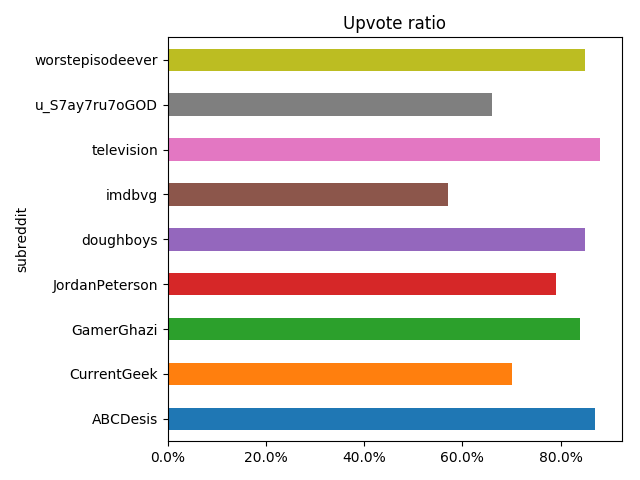
    The easiest metric for opinion is upvote ratio:

    posts_df[['subreddit','upvote_ratio']] \
        .groupby('subreddit') \
        .mean()['upvote_ratio'] \
        .reset_index() \
        .plot(kind='barh',x='subreddit',y='upvote_ratio',title='Upvote ratio',legend=False) \
        .xaxis \
        .set_major_formatter(FuncFormatter(lambdax,_:'{:.1f}%'.format(x*100)))

    But it doesn’t say us anything:

    Upvote ratio

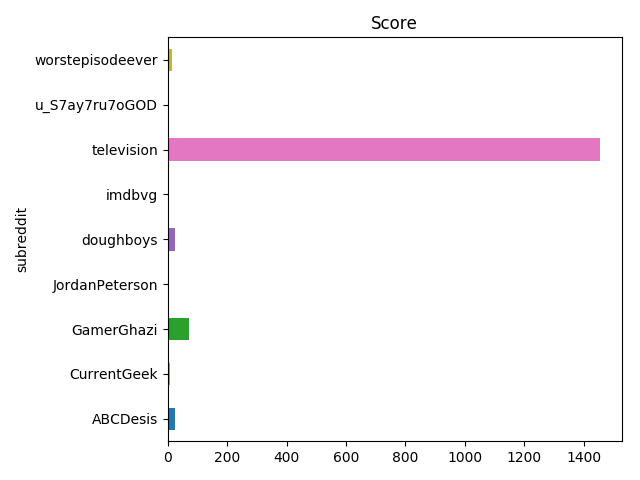
    The most straightforward metric to measure is score:

    posts_df[['subreddit','score']] \
        .groupby('subreddit') \
        .sum()['score'] \
        .reset_index() \
        .plot(kind='barh',x='subreddit',y='score',title='Score',legend=False)

    Score by subreddit

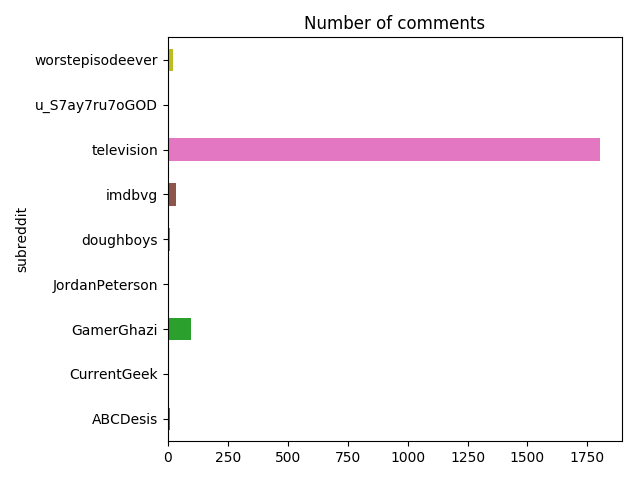
    A second obvious metric is a number of comments:

    posts_df[['subreddit','num_comments']] \
        .groupby('subreddit') \
        .sum()['num_comments'] \
        .reset_index() \
        .plot(kind='barh',x='subreddit',y='num_comments',title='Number of comments',legend=False)

    Number of comments

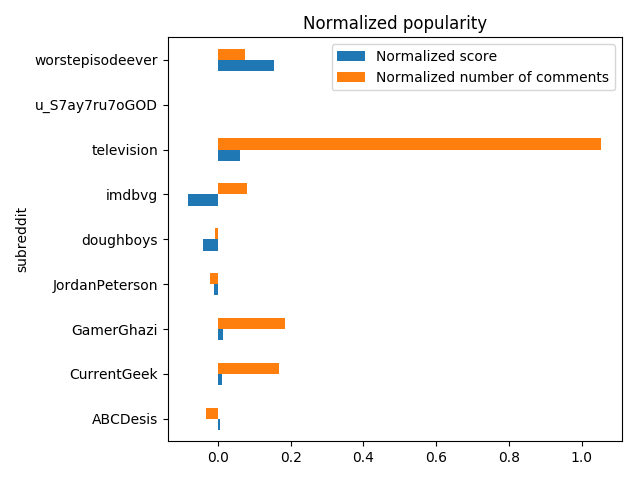
    As absolute numbers can’t say us anything about an opinion of a subbreddit, I’ve decided to calculate normalized score and number of comments with data from the last 1000 of posts from the subreddit:

    defnormalize(post):[*subreddit_posts]=reddit.subreddit(post.subreddit.display_name).new(limit=1000)subreddit_posts_df=pd.DataFrame([(post.id,post.score,post.num_comments)forpostinsubreddit_posts],columns=('id','score','num_comments'))norm_score=((post.score-subreddit_posts_df.score.mean())/(subreddit_posts_df.score.max()-subreddit_posts_df.score.min()))norm_num_comments=((post.num_comments-subreddit_posts_df.num_comments.mean())/(subreddit_posts_df.num_comments.max()-subreddit_posts_df.num_comments.min()))returnnorm_score,norm_num_commentsnormalized_vals=pd \
        .DataFrame([normalize(post)forpostinposts],columns=['norm_score','norm_num_comments']) \
        .fillna(0)posts_df[['norm_score','norm_num_comments']]=normalized_vals

    And look at the popularity of the link based on the numbers:

    posts_df[['subreddit','norm_score','norm_num_comments']] \
        .groupby('subreddit') \
        .sum()[['norm_score','norm_num_comments']] \
        .reset_index() \
        .rename(columns={'norm_score':'Normalized score','norm_num_comments':'Normalized number of comments'}) \
        .plot(kind='barh',x='subreddit',title='Normalized popularity')

    Normalized popularity

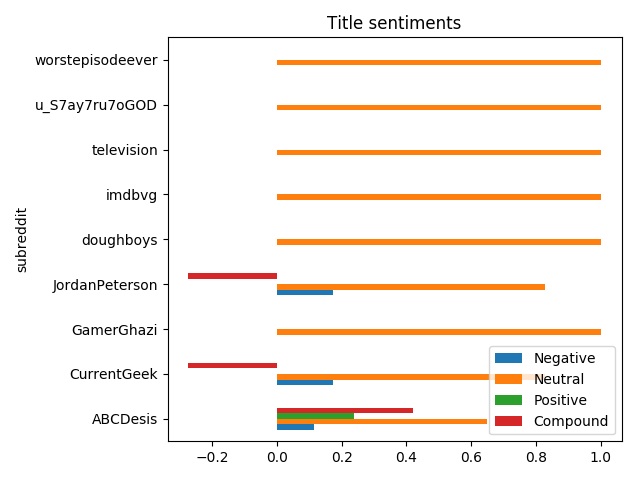
    As in different subreddits a link can be shared with a different title with totally different sentiments, it seemed interesting to do sentiment analysis on titles:

    sid=SentimentIntensityAnalyzer()posts_sentiments=posts_df.title.apply(sid.polarity_scores).apply(pd.Series)posts_df=posts_df.assign(title_neg=posts_sentiments.neg,title_neu=posts_sentiments.neu,title_pos=posts_sentiments.pos,title_compound=posts_sentiments['compound'])

    And notice that people are using the same title almost every time:

    posts_df[['subreddit','title_neg','title_neu','title_pos','title_compound']] \
        .groupby('subreddit') \
        .sum()[['title_neg','title_neu','title_pos','title_compound']] \
        .reset_index() \
        .rename(columns={'title_neg':'Title negativity','title_pos':'Title positivity','title_neu':'Title neutrality','title_compound':'Title sentiment'}) \
        .plot(kind='barh',x='subreddit',title='Title sentiments',legend=True)

    Title sentiments

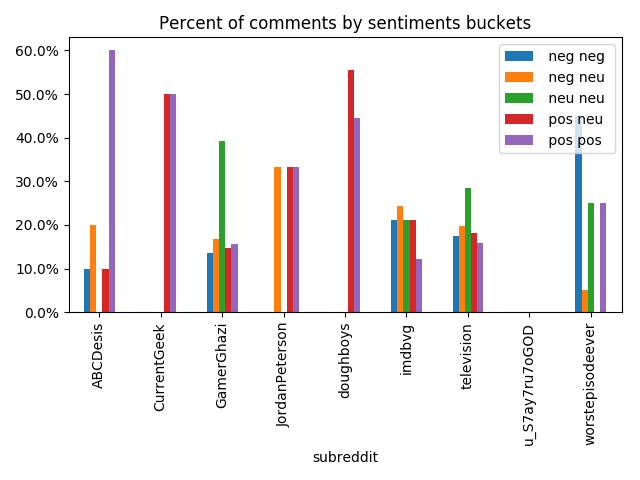
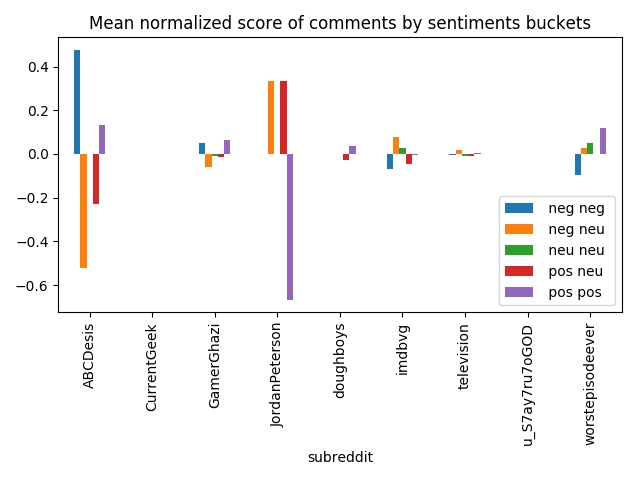
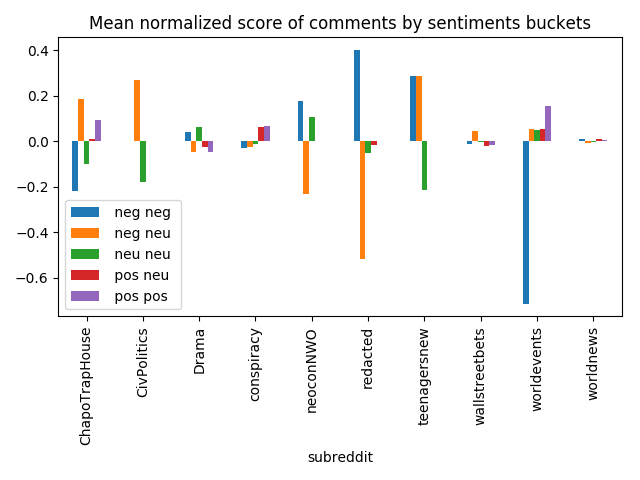
    Sentiments of a title isn’t that interesting, but it might be much more interesting for comments. I’ve decided to only handle root comments as replies to comments might be totally not related to post subject, and they’re making everything more complicated. For comments analysis I’ve bucketed them to five buckets by compound value, and calculated mean normalized score and percentage:

    posts_comments_df=pd \
        .concat([handle_post_comments(post)forpostinposts]) \  # handle_post_comments is huge and available in the gist.fillna(0)>>>posts_comments_df.head()keyroot_comments_keyroot_comments_neg_neg_amountroot_comments_neg_neg_norm_scoreroot_comments_neg_neg_percentroot_comments_neg_neu_amountroot_comments_neg_neu_norm_scoreroot_comments_neg_neu_percentroot_comments_neu_neu_amountroot_comments_neu_neu_norm_scoreroot_comments_neu_neu_percentroot_comments_pos_neu_amountroot_comments_pos_neu_norm_scoreroot_comments_pos_neu_percentroot_comments_pos_pos_amountroot_comments_pos_pos_norm_scoreroot_comments_pos_pos_percentroot_comments_post_id09rmz0o087.0-0.0051390.17575898.00.0192010.197980141.0-0.0071250.28484890.0-0.0100920.181818790.0060540.1595969rmz0o09rnu73012.00.0481720.13483115.0-0.0613310.16853935.0-0.0105380.39325813.0-0.0157620.146067140.0654020.1573039rnu7309roen109.0-0.0949210.4500001.00.0257140.0500005.00.0485710.2500000.00.0000000.00000050.1171430.2500009roen109rq7ov01.00.4764710.1000002.0-0.5235290.2000000.00.0000000.0000001.0-0.2294120.10000060.1333330.6000009rq7ov09rnd6y00.00.0000000.0000000.00.0000000.0000000.00.0000000.0000005.0-0.0277780.55555640.0347220.4444449rnd6y

    So now we can get a percent of comments by sentiments buckets:

    percent_columns=['root_comments_neg_neg_percent','root_comments_neg_neu_percent','root_comments_neu_neu_percent','root_comments_pos_neu_percent','root_comments_pos_pos_percent']posts_with_comments_df[['subreddit']+percent_columns] \
        .groupby('subreddit') \
        .mean()[percent_columns] \
        .reset_index() \
        .rename(columns={column:column[13:-7].replace('_',' ')forcolumninpercent_columns}) \
        .plot(kind='bar',x='subreddit',legend=True,title='Percent of comments by sentiments buckets') \
        .yaxis \
        .set_major_formatter(FuncFormatter(lambday,_:'{:.1f}%'.format(y*100)))

    It’s easy to spot that on less popular subreddits comments are more opinionated:

    Comments sentiments

    The same can be spotted with mean normalized scores:

    norm_score_columns=['root_comments_neg_neg_norm_score','root_comments_neg_neu_norm_score','root_comments_neu_neu_norm_score','root_comments_pos_neu_norm_score','root_comments_pos_pos_norm_score']posts_with_comments_df[['subreddit']+norm_score_columns] \
        .groupby('subreddit') \
        .mean()[norm_score_columns] \
        .reset_index() \
        .rename(columns={column:column[13:-10].replace('_',' ')forcolumninnorm_score_columns}) \
        .plot(kind='bar',x='subreddit',legend=True,title='Mean normalized score of comments by sentiments buckets')

    Comments normalized score

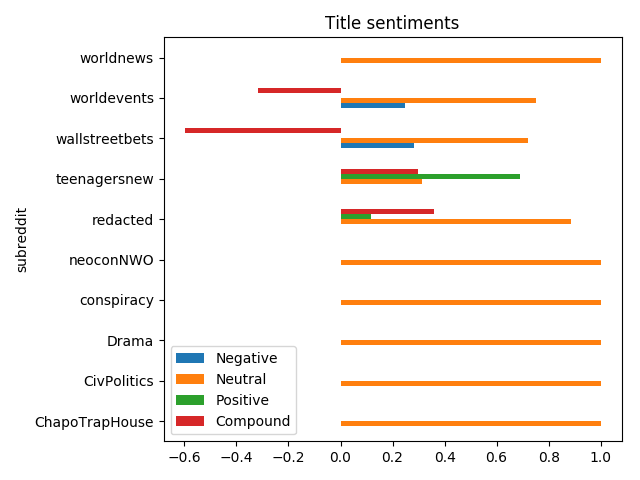
    Although those plots are fun even with that link, it’s more fun with something more controversial. I’ve picked one of the recent posts from r/worldnews, and it’s easy to notice that different subreddits present the news in a different way:

    Hot title sentiment

    And comments are rated differently, some subreddits are more neutral, some definitely not:

    Hot title sentiment

    Gist with full source code.

    Codementor: AutoHotkey, Python style

    $
    0
    0
    Implementing an AutoHotkey wrapper in Python.

    Matthew Rocklin: Support Python 2 with Cython

    $
    0
    0

    Summary

    Many popular Python packages are dropping support for Python 2 next month. This will be painful for several large institutions. Cython can provide a temporary fix by letting us compile a Python 3 codebase into something usable by Python 2 in many cases.

    It’s not clear if we should do this, but it’s an interesting and little known feature of Cython.

    Background: Dropping Python 2 Might be Harder than we Expect

    Many major numeric Python packages are dropping support for Python 2 at the end of this year. This includes packages like Numpy, Pandas, and Scikit-Learn. Jupyter already dropped Python 2 earlier this year.

    For most developers in the ecosystem this isn’t a problem. Most of our packages are Python-3 compatible and we’ve learned how to switch libraries. However, for larger companies or government organizations it’s often far harder to switch. The PyCon 2017 keynote by Lisa Guo and Hui Ding from Instagram gives a good look into why this can be challenging for large production codebases and also gives a good example of someone successfully navigating this transition.

    It will be interesting to see what happens when Numpy, Pandas, and Scikit-Learn start publishing Python-3 only releases. We may uncover a lot of pain within larger institutions. In that case, what should we do?

    (Although, to be fair, the data science stack tends to get used more often in isolated user environments, which tend to be more amenable to making the Python 2-3 switch than web-services production codebases).

    Cython

    The Cython compiler provides a possible solution that I don’t hear discussed very often, so I thought I’d cover it briefly.

    The Cython compiler can convert a Python 3 codebase into a C-Extension module that is usable by both Python 2 and 3. We could probably use Cython to prepare Python 2 packages for a large subset of the numeric Python ecosystem after that ecosystem drops Python 2.

    Lets see an example…

    Example

    Here we show a small Python project that uses Python 3 language features. (source code here)

    py32test$ tree .
    .
    ├── py32test
    │   ├── core.py
    │   └── __init__.py
    └── setup.py
    
    1 directory, 3 files
    
    # py32test/core.pydefinc(x:int)->int:# Uses typing annotationsreturnx+1defgreet(name:str)->str:returnf'Hello, {name}!'# Uses format strings
    # py32test/__init__.pyfrom.coreimportinc,greet

    We see that this code uses both typing annotations and format strings, two language features that are well-loved by Python-3 enthusiasts, and entirely inaccessible if you want to continue supporting Python-2 users.

    We also show the setup.py script, which includes a bit of Cython code if we’re running under Python 2.

    # setup.pyimportosfromsetuptoolsimportsetup,find_packagesimportsysifsys.version_info[0]==2:fromCython.Buildimportcythonizekwargs={'ext_modules':cythonize(os.path.join("py32test","*.py"),language_level='3')}else:kwargs={}setup(name='py32test',version='1.0.0',packages=find_packages(),**kwargs)

    This package works fine in Python 2

    >>>importsys>>>sys.version_infosys.version_info(major=2,minor=7,micro=14,releaselevel='final',serial=0)>>>importpy32test>>>py32test.inc(100)101>>>py32test.greet(u'user')u'Hello, user!'

    In general things seem to work fine. There are a couple of gotchas though

    Potential problems

    1. We can’t use any libraries that are Python 3 only, like asyncio.

    2. Semantics may differ slightly, for example I was surprised (though pleased) to see the following behavior.

      >>>py32test.greet('user')# <<--- note that I'm sending a str, not unicode objectTypeError:Argument'name'hasincorrecttype(expectedunicode,gotstr)

      I suspect that this is tunable with a keyword parameter somewhere in Cython. More generally this is a warning that we would need to be careful because semantics may differ slightly between Cython and CPython.

    3. Introspection becomes difficult. Tools like pdb, getting frames and stack traces, and so forth will probably not be as easy when going through Cython.

    4. Python 2 users would have to go through a compilation step to get development versions. More Python 2 users will probably just wait for proper releases or will install compilers locally.

    5. Moved imports like the from collections.abc import Mapping are not supported, though presumably changes like this could be baked into Cython in the future.

    So this would probably take a bit of work to make clean, but fortunately most of this work wouldn’t affect the project’s development day-to-day.

    Should we do this?

    Just because we can support Python 2 in this way doesn’t mean that we should. Long term, institutions do need to drop Python 2 and either move on to Python 3 or to some other language. Tricks like using Cython only extend the inevitable and, due to the complexities above, may end up adding as much headache for developers as Python 2.

    However, as someone who maintains a sizable Python-2 compatible project that is used by large institutions, and whose livelihood depends a bit on continued uptake, I’ll admit that I’m hesitant to jump onto the Python 3 Statement. For me personally, seeing Cython as an option to provide continued support makes me much more comfortable with dropping Python 2.

    I also think that maintaining a conda channel of Cython-compiled Python-2-compatible packages would be an excellent effort for a for-profit company like Anaconda Inc, Enthought, or Quansight (or someone new). Companies may be willing to pay for access to such a channel, and presumably the company providing these packages would then be incentivized to improve support for the Cython compiler.

    John Cook: Searching for Mersenne primes

    $
    0
    0

    The nth Mersenne number is

    Mn = 2n– 1.

    A Mersenne prime is a Mersenne number which is also prime. So far 50 have been found [1].

    A necessary condition for Mn to be prime is that n is prime, so searches for Mersenne numbers only test prime values of n. It’s not sufficient for n to be prime as you can see from the example

    M11 = 2047 = 23 × 89.

    Lucas-Lehmer test

    The largest known prime has been a Mersenne prime since 1952, with one exception in 1989. This is because there is an efficient algorithm, the Lucas-Lehmer test, for determining whether a Mersenne number is prime. This is the algorithm used by GIMPS (Great Internet Mersenne Prime Search).

    The Lucas-Lehmer test is very simple. The following Python code tests whether Mp is prime.

        def lucas_lehmer(p):
            M = 2**p - 1
            s = 4
            for _ in range(p-2):
                s = (s*s - 2) % M
            return s == 0
    

    Using this code I was able to verify the first 25 Mersenne primes in under 50 seconds. This includes all Mersenne primes that were known as of 40 years ago.

    History

    Mersenne primes are named after the French monk Marin Mersenne (1588–1648) who compiled a list of Mersenne primes.

    Édouard Lucas came up with his test for Mersenne primes in 1856 and in 1876 proved that M127 is prime. That is, he found a 39-digit prime number by hand. Derrick Lehmer refined the test in 1930.

    As of January 2018, the largest known prime is M77,232,917.

    Related posts

    [1] We’ve found 50 Mersenne primes, but we’re not sure whether we’ve found the first 50 Mersenne primes. We know we’ve found the 47 smallest Mersenne primes. It’s possible that there are other Mersenne primes between the 47th and the largest one currently known.

    Real Python: Python Community Interview With Emily Morehouse

    $
    0
    0

    I’m very pleased to be joined this week by Emily Morehouse.

    Emily is one of the newest additions to the CPython core developer team, and the founder and director of engineering of Cuttlesoft. Emily and I talk about the recent CPython core developer sprint and the fact that she completed three majors in college at the same time! We’ll also get into her passion for compilers and abstract syntax trees.

    Ricky:Let’s start with the obvious: how did you get into programming, and when did you start using Python?

    Emily Morehouse

    Emily: My path to programming started with falling in love with Enigma machines. Really, I stumbled into programming during college. I had recently switched one of my majors from Biochemistry to Criminology, and the department had just launched a Computer Criminology program.

    I was encouraged to try out the Intro To Programming course to see how I liked it. One of our final projects was building an Enigma machine simulator (in C++, mind you), and I was hooked. I decided to add a third major to take on a full Computer Science degree (more on that later!).

    Since the CS program was highly theoretical and focused on languages like C and C++, I started to find ways outside of coursework to learn different things. I picked up Python working on web scrapers on the weekends and was eventually hired as a researcher where we used Python to scrape and analyze public data from various sites.

    For me, programming spans this wide range of challenging logic and technical problems to more abstract concepts of how humans think and interact with machines and how technology can enhance our daily lives. It fills a gap between academics and art that I didn’t know I needed to, or could, fill.

    Ricky:As you’ve already alluded to, you attended Florida State University, where you completed your CS degree. And a degree in Criminology. And another one in Theater… Did you ever sleep? One degree is hard, but three at once? I’m really curious to know your secrets and any time management hacks for studying and learning to code when you have so much else going on.

    Emily: I definitely did not sleep much. On top of all of my schoolwork, I worked a nearly full-time job and even worked as an overnight manager at our local coffee shop while still participating in theater rehearsals and performances.

    I was able to get a research position in the CS department to eliminate some of that pressure. I was lucky to have started college with a lot of credits and tested out of a few courses, so I was technically already a year ahead, which gave me more freedom to try out courses like Programming.

    It’s all very much how I was raised. From a very young age, I knew that my day started around 7 a.m. I went straight from school to rehearsals and dance classes, then had to do homework until I fell asleep. I had to learn how to retain information and figure things out quickly—and I had to stay organized, so I made a lot of lists.

    I’ve asked my parents how I came to be this way, and they just shrug! I’ve always felt very in control of how I spend my time to ensure it’s what I want to be doing, and I think that’s important when staying so busy. You have to want to be doing everything, or else things will fall by the wayside.

    I definitely suggest finding a manner of keeping to-do lists and prioritizing your time. I use an app called Bear (like a simplified Evernote, but with programmer-friendly themes and markdown support) along with a lot of task prioritization.

    I also figured out that I learn things quickly by writing them down multiple times. I used this method to memorize lines for shows. I’d white-out my lines then go back and physically write them down from memory on a separate piece of paper, rinse, and repeat. I got to the point where if I wrote something down 1 to 2 times, it’d stick.

    Ricky:You are the co-founder and director of engineering at Cuttlesoft. It looks as if you started the company before finishing college. What was your motivation for starting your own business instead of applying for junior software developer jobs straight out of college?

    Emily:Cuttlesoft was a matter of circumstance. I never imagined I’d run my own company, especially not alongside my now-husband Frank. I was in a weird timing limbo where I’d finished my undergraduate degrees earlier than expected which meant that I missed all of the grad school deadlines.

    FSU agreed to let me jump in and start my Masters there, and my intention was to stay for a year then transfer elsewhere where I could continue working with parsers, compilers, and formal verification. I was also getting recruited by huge tech companies, and I was a bit enamored with the idea of living in San Francisco or Boston. (I’d only ever lived in Florida at the time.)

    But then Frank and I had found our way into this budding entrepreneurship ecosystem in Tallahassee. We met a few people who became great mentors, and before we could even get our Is dotted, we had our first couple of clients. I thought, “Why do I want to leave all of these people who are invested in my future and success to go be one of the thousands somewhere else?”

    I figured that I should take the chance on starting something of my own and continuing on this rapid growth path. I knew I’d learn a lot more in a shorter amount of time than I would almost anywhere else. So I dropped out of graduate school after my first semester and put all of my time into Cuttlesoft.

    Looking back, I can’t imagine a different path for me. Soon after I turned down those job offers, Susan Fowler’s story came to light. I couldn’t help but think, “That could have been me.” I truly believe that a company’s culture is top-down, and I’m grateful to get to contribute to a company where I can make a huge impact in a positive manner.

    Ricky:This year, you got to fulfill a dream and speak at PyCon, with your talk titled The AST and Me. I’ll admit, some of it went over my head, but I’m still learning. I got the impression that language internals fascinate you. What advice would you give to someone who is at the start of their coding journey and wants to know more about how the sausage is made? What resources would you recommend?

    Emily: Yes! I was the weird kid in university who loved the classes that most everyone else hated (Programming Languages, Compilers, Theory of Computation…). I would spend hours drawing out non-deterministic finite automata and state machines for my course notes.

    I’m a huge fan of Seven Languages in Seven Weeks: A Pragmatic Guide to Learning Programming Languages by Bruce A. Tate to get a feel for different programming language paradigms. The Dragon Book (Compilers: Principles, Techniques, and Tools) is a classic and is the backbone of so much we still use today. (Python’s compiler is based on this.) Philip Guo’s video series on CPython internals is also awesome and helped me in my journey diving into how Python works under the hood.

    Ricky:Huge congratulations are in order, as you have just been promoted to a CPython core developer! You must be so thrilled. How was the initiation at the recent CPython sprints? Anything exciting to share or any stories to tell? Don’t worry, we can keep a secret…

    Emily: Thank you! The CPython Sprint was a lot of fun. It’s rare that we get so many core developers in the same room working together. We’re all incredibly grateful for the PSF and this year’s sprint sponsor, Microsoft, for supporting CPython.

    I was able to attend sprints and Language Summits at PyCons past and had the chance to get to know a lot of the group previously, so this sprint felt surprisingly normal, but it was super cool to see and work with everyone in person.

    I spent most of the sprint implementing PEP 572, the (in)famous assignment expressions PEP, with Guido’s guidance. No matter which side of the fence you fell on with assignment expressions (or I as lovingly now call it, the walrus operator), it’s been incredibly cool to add new syntax to the language and deep dive into the internals to get variable scoping to work as intended. It will be in the alpha versions of 3.8 early next year, so keep an eye out!

    One of my favorite parts of the sprint was getting to know more about the history of CPython. Since the beginning of my path in core development, I’ve found that it’s really interesting to hear the stories of how others became core developers, so I pose that question to everyone I can.

    Understanding everyone’s journey and motivations for devoting so much of their time and energy to a project (especially those who have been involved since the very early days) is an important step to understanding how to continue growing the group and increasing diversity.

    Ricky:Now for my last question: what other hobbies and interests do you have, aside from Python? Any you’d like to share and/or plug?

    Emily: I try to take advantage of everything Colorado has to offer in my spare time—coming from Florida, I’m still totally enamored with the Rocky Mountains and love hiking. Denver is also a great foodie city.

    When I make the time for it, I also really enjoy yoga, reading, listening to podcasts, playing video games (though I’m still slowly working through the most recent God of War), and trying to keep my houseplants alive. I also enjoy spending time with my husband and our dog—they’re my world.


    Thank you, Emily, for joining me this week. You can follow Emily’s work on Twitter or Github. Find out more about her company, Cuttlesoft, here.

    If there’s someone you’d like me to interview in the future, reach out to me in the comments below, or send me a message on Twitter.


    [ Improve Your Python With 🐍 Python Tricks 💌 – Get a short & sweet Python Trick delivered to your inbox every couple of days. >> Click here to learn more and see examples ]

    Stack Abuse: Search Algorithms in Python

    $
    0
    0

    Introduction

    Searching for data stored in different data structures is a crucial part of pretty much every single application.

    There are many different algorithms available to utilize when searching, and each have different implementations and rely on different data structures to get the job done.

    Being able to choose a specific algorithm for a given task is a key skill for developers and can mean the difference between a fast, reliable and stable application and an application that crumbles from a simple request.

    Membership Operators

    Algorithms develop and become optimized over time as a result of constant evolution and the need to find the most efficient solutions for underlying problems in different domains.

    One of the most common problems in the domain of Computer Science is searching through a collection and determining whether a given object is present in the collection or not.

    Almost every programming language has its own implementation of a basic search algorithm, usually as a function which returns a Boolean value of True or False when an item is found in a given collection of items.

    In Python, the easiest way to search for an object is to use Membership Operators - named that way because they allow us to determine whether a given object is a member in a collection.

    These operators can be used with any iterable data structure in Python, including Strings, Lists, and Tuples.

    • in - Returns True if the given element is a part of the structure.
    • not in - Returns True if the given element is not a part of the structure.
    >>> 'apple' in ['orange', 'apple', 'grape']
    True  
    >>> 't' in 'stackabuse'
    True  
    >>> 'q' in 'stackabuse'
    False  
    >>> 'q' not in 'stackabuse'
    True  
    

    Membership operators suffice when all we need to do is find whether a substring exists within a given string, or determine whether two Strings, Lists, or Tuples intersect in terms of the objects they hold.

    In most cases we need the position of the item in the sequence, in addition to determining whether or not it exists; membership operators do not meet this requirement.

    There are many search algorithms that don't depend on built-in operators and can be used to search for values faster and/or more efficiently. In addition, they can yield more information, such as the position of the element in the collection, rather than just being able to determine its existence.

    Linear Search

    Linear search is one of the simplest searching algorithms, and the easiest to understand. We can think of it as a ramped-up version of our own implementation of Python's in operator.

    The algorithm consists of iterating over an array and returning the index of the first occurrence of an item once it is found:

    def LinearSearch(lys, element):  
        for i in range (len(lys)):
            if lys[i] == element:
                return i
        return -1
    

    So if we use the function to compute:

    >>> print(LinearSearch([1,2,3,4,5,2,1], 2))
    

    Upon executing the code, we're greeted with:

    1  
    

    This is the index of the first occurrence of the item we are searching for - keeping in mind that Python indexes are 0-based.

    The time complexity of linear search is O(n), meaning that the time taken to execute increases with the number of items in our input list lys.

    Linear search is not often used in practice, because the same efficiency can be achieved by using inbuilt methods or existing operators, and it is not as fast or efficient as other search algorithms.

    Linear search is a good fit for when we need to find the first occurrence of an item in an unsorted collection because unlike most other search algorithms, it does not require that a collection be sorted before searching begins.

    Binary Search

    Binary search follows a divide and conquer methodology. It is faster than linear search but requires that the array be sorted before the algorithm is executed.

    Assuming that we're searching for a value val in a sorted array, the algorithm compares val to the value of the middle element of the array, which we'll call mid.

    • If mid is the element we are looking for (best case), we return its index.
    • If not, we identify which side of midval is more likely to be on based on whether val is smaller or greater than mid, and discard the other side of the array.
    • We then recursively or iteratively follow the same steps, choosing a new value for mid, comparing it with val and discarding half of the possible matches in each iteration of the algorithm.

    The binary search algorithm can be written either recursively or iteratively. Recursion is generally slower in Python because it requires the allocation of new stack frames.

    Since a good search algorithm should be as fast and accurate as possible, let's consider the iterative implementation of binary search:

    def BinarySearch(lys, val):  
        first = 0
        last = len(lys)-1
        index = -1
        while (first <= last) and (index == -1):
            mid = (first+last)//2
            if lys[mid] == val:
                index = mid
            else:
                if val<lys[mid]:
                    last = mid -1
                else:
                    first = mid +1
        return index
    

    If we use the function to compute:

    >>> BinarySearch([10,20,30,40,50], 20)
    

    We get the result:

    1  
    

    Which is the index of the value that we are searching for.

    The action that the algorithm performs next in each iteration is one of several possibilities:

    • Returning the index of the current element
    • Searching through the left half of the array
    • Searching through the right half of the array

    We can only pick one possibility per iteration, and our pool of possible matches gets divided by two in each iteration. This makes the time complexity of binary search O(log n).

    One drawback of binary search is that if there are multiple occurrences of an element in the array, it does not return the index of the first element, but rather the index of the element closest to the middle:

    >>> print(BinarySearch([4,4,4,4,4], 4))
    

    Running this piece of code will result in the index of the middle element:

    1  
    

    For comparison performing a linear search on the same array would return:

    0  
    

    Which is the index of the first element. However, we cannot categorically say that binary search does not work if an array contains the same element twice - it can work just like linear search and return the first occurrence of the element in some cases.

    If we perform binary search on the array [1,2,3,4,4,5] for instance, and search for 4, we would get 3 as the result.

    Binary search is quite commonly used in practice because it is efficient and fast when compared to linear search. However, it does have some shortcomings, such as its reliance on the // operator. There are many other divide and conquer search algorithms that are derived from binary search, let's examine a few of those next.

    Jump Search

    Jump Search is similar to binary search in that it works on a sorted array, and uses a similar divide and conquer approach to search through it.

    It can be classified as an improvement of the linear search algorithm since it depends on linear search to perform the actual comparison when searching for a value.

    Given a sorted array, instead of searching through the array elements incrementally, we search in jumps. So in our input list lys, if we have a jump size of jump our algorithm will consider elements in the order lys[0], lys[0+jump], lys[0+2jump], lys[0+3jump] and so on.

    With each jump, we store the previous value we looked at and its index. When we find a set of values where lys[i]lys[i+jump], we perform a linear search with lys[i] as the left-most element and lys[i+jump] as the right-most element in our search set:

    import math
    
    def JumpSearch (lys, val):  
        length = len(lys)
        jump = int(math.sqrt(length))
        left, right = 0, 0
        while left < length and lys[left] <= val:
            right = min(length - 1, left + jump)
            if lys[left] <= val and lys[right] >= val:
                break
            left += jump;
        if left >= length or lys[left] > val:
            return -1
        right = min(length - 1, right)
        i = left
        while i <= right and lys[i] <= val:
            if lys[i] == val:
                return i
            i += 1
        return -1
    

    Since this is a complex algorithm, let's consider the step-by-step computation of jump search with this input:

    >>> print(JumpSearch([1,2,3,4,5,6,7,8,9], 5))
    
    • Jump search would first determine the jump size by computing math.sqrt(len(lys)). Since we have 9 elements, the jump size would be √9 = 3.
    • Next, we compute the value of the right variable, which is the minimum of the length of the array minus 1, or the value of left+jump, which in our case would be 0+3= 3. Since 3 is smaller than 8 we use 3 as the value of right.
    • Now we check whether our search element, 5, is between lys[0] and lys[3]. Since 5 is not between 1 and 4, we move on.
    • Next, we do the calculations again and check whether our search element is between lys[3] and lys[6], where 6 is 3+jump. Since 5 is between 4 and 7, we do a linear search on the elements between lys[3] and lys[6] and return the index of our element as:
    4  
    

    The time complexity of jump search is O(√n), where √n is the jump size, and n is the length of the list, placing jump search between the linear search and binary search algorithms in terms of efficiency.

    The single most important advantage of jump search when compared to binary search is that it does not rely on the division operator (/).

    In most CPUs, using the division operator is costly when compared to other basic arithmetic operations (addition, subtraction, and multiplication), because the implementation of the division algorithm is iterative.

    The cost by itself is very small, but when the number of elements to search through is very large, and the number of division operations that we need to perform increases, the cost can add up incrementally. Therefore jump search is better than binary search when there is a large number of elements in a system where even a small increase in speed matters.

    To make jump search faster, we could use binary search or another internal jump search to search through the blocks, instead of relying on the much slower linear search.

    Fibonacci Search

    Fibonacci search is another divide and conquer algorithm which bears similarities to both binary search and jump search. It gets its name because it uses Fibonacci numbers to calculate the block size or search range in each step.

    Fibonacci numbers start with zero and follow the pattern 0, 1, 1, 2, 3, 5, 8, 13, 21... where each element is the addition of the two numbers that immediately precede it.

    The algorithm works with three Fibonacci numbers at a time. Let's call the three numbers fibM, fibM_minus_1, and fibM_minus_2 where fibM_minus_1 and fibM_minus_2 are the two numbers immediately before fibM in the sequence:

    fibM = fibM_minus_1 + fibM_minus_2  
    

    We initialize the values to 0,1, and 1 or the first three numbers in the Fibonacci sequence to avoid getting an index error in the case where our search array lys contains a very small number of items.

    Then we choose the smallest number of the Fibonacci sequence that is greater than or equal to the number of elements in our search array lys, as the value of fibM, and the two Fibonacci numbers immediately before it as the values of fibM_minus_1 and fibM_minus_2. While the array has elements remaining and the value of fibM is greater than one, we:

    • Compare val with the value of the block in the range up to fibM_minus_2, and return the index of the element if it matches.
    • If the value is greater than the element we are currently looking at, we move the values of fibM, fibM_minus_1 and fibM_minus_2 two steps down in the Fibonacci sequence, and reset the index to the index of the element.
    • If the value is less than the element we are currently looking at, we move the values of fibM, fibM_minus_1 and fibM_minus_2 one step down in the Fibonacci sequence.

    Let's take a look at the Python implementation of this algorithm:

    def FibonacciSearch(lys, val):  
        fibM_minus_2 = 0
        fibM_minus_1 = 1
        fibM = fibM_minus_1 + fibM_minus_2
        while (fibM < len(lys)):
            fibM_minus_2 = fibM_minus_1
            fibM_minus_1 = fibM
            fibM = fibM_minus_1 + fibM_minus_2
        index = -1;
        while (fibM > 1):
            i = min(index + fibM_minus_2, (len(lys)-1))
            if (lys[i] < val):
                fibM = fibM_minus_1
                fibM_minus_1 = fibM_minus_2
                fibM_minus_2 = fibM - fibM_minus_1
                index = i
            elif (lys[i] > val):
                fibM = fibM_minus_2
                fibM_minus_1 = fibM_minus_1 - fibM_minus_2
                fibM_minus_2 = fibM - fibM_minus_1
            else :
                return i
        if(fibM_minus_1 and index < (len(lys)-1) and lys[index+1] == val):
            return index+1;
        return -1
    

    If we use the FibonacciSearch function to compute:

    >>> print(FibonacciSearch([1,2,3,4,5,6,7,8,9,10,11], 6))
    

    Let's take a look at the step-by-step process of this search:

    • Determining the smallest Fibonacci number greater than or equal to the length of the list as fibM; in this case, the smallest Fibonacci number meeting our requirements is 13.
    • The values would be assigned as:
      • fibM = 13
      • fibMminus1 = 8
      • fibMminus2 = 5
      • index = -1
    • Next, we check the element lys[4] where 4 is the minimum of -1+5 . Since the value of lys[4] is 5, which is smaller than the value we are searching for, we move the Fibonacci numbers one step down in the sequence, making the values:
      • fibM = 8
      • fibMminus1 = 5
      • fibMminus2 = 3
      • index = 4
    • Next, we check the element lys[7] where 7 is the minimum of 4+3. Since the value of lys[7] is 8, which is greater than the value we are searching for, we move the Fibonacci numbers two steps down in the sequence.
      • fibM = 3
      • fibMminus1 = 2
      • fibMminus2 = 1
      • index = 4
    • Now we check the element lys[5] where 5 is the minimum of 4+1 . The value of lys[5] is 6, which is the value we are searching for!

    The result, as expected is:

    5  
    

    The time complexity for Fibonacci search is O(log n); the same as binary search. This means the algorithm is faster than both linear search and jump search in most cases.

    Fibonacci search can be used when we have a very large number of elements to search through, and we want to reduce the inefficiency associated with using an algorithm which relies on the division operator.

    An additional advantage of using Fibonacci search is that it can accommodate input arrays that are too large to be held in CPU cache or RAM, because it searches through elements in increasing step sizes, and not in a fixed size.

    Exponential Search

    Exponential search is another search algorithm that can be implemented quite simply in Python, compared to jump search and Fibonacci search which are both a bit complex. It is also known by the names galloping search, doubling search and Struzik search.

    Exponential search depends on binary search to perform the final comparison of values. The algorithm works by:

    • Determining the range where the element we're looking for is likely to be
    • Using binary search for the range to find the exact index of the item

    The Python implementation of the exponential search algorithm is:

    def ExponentialSearch(lys, val):  
        if lys[0] == val:
            return 0
        index = 1
        while index < len(lys) and lys[index] <= val:
            index = index * 2
        return BinarySearch( arr[:min(index, len(lys))], val)
    

    If we use the function to find the value of:

    >>> print(ExponentialSearch([1,2,3,4,5,6,7,8],3))
    

    The algorithm works by:

    • Checking whether the first element in the list matches the value we are searching for - since lys[0] is 1 and we are searching for 3, we set the index to 1 and move on.
    • Going through all the elements in the list, and while the item at the index'th position is less than or equal to our value, exponentially increasing the value of index in multiples of two:
      • index = 1, lys[1] is 2, which is less than 3, so the index is multiplied by 2 and set to 2.
      • index = 2, lys[2]is 3, which is equal to 3, so the index is multiplied by 2 and set to 4.
      • index = 4, lys[4] is 5, which is greater than 3; the loop is broken at this point.
    • It then performs a binary search by slicing the list; arr[:4]. In Python, this means that the sub list will contain all elements up to the 4th element, so we're actually calling:
    >>> BinarySearch([1,2,3,4], 3)
    

    which would return:

    2  
    

    Which is the index of the element we are searching for in both the original list, and the sliced list that we pass on to the binary search algorithm.

    Exponential search runs in O(log i) time, where i is the index of the item we are searching for. In its worst case, the time complexity is O(log n), when the last item is the item we are searching for (n being the length of the array).

    Exponential search works better than binary search when the element we are searching for is closer to the beginning of the array. In practice, we use exponential search because it is one of the most efficient search algorithms for unbounded or infinite arrays.

    Interpolation Search

    Interpolation search is another divide and conquer algorithm, similar to binary search. Unlike binary search, it does not always begin searching at the middle. Interpolation search calculates the probable position of the element we are searching for using the formula:

    index = low + [(val-lys[low])*(high-low) / (lys[high]-lys[low])]  
    

    Where the variables are:

    • lys - our input array
    • val - the element we are searching for
    • index - the probable index of the search element. This is computed to be a higher value when val is closer in value to the element at the end of the array (lys[high]), and lower when val is closer in value to the element at the start of the array (lys[low])
    • low - the starting index of the array
    • high - the last index of the array

    The algorithm searches by calculating the value of index:

    • If a match is found (when lys[index] == val), the index is returned
    • If the value of val is less than lys[index], the value for the index is re-calculated using the formula for the left sub-array
    • If the value of val is greater than lys[index], the value for the index is re-calculated using the formula for the right sub-array

    Let's go ahead and implement the Interpolation search using Python:

    def InterpolationSearch(lys, val):  
        low = 0
        high = (len(lys) - 1)
        while low <= high and val >= lys[low] and val <= lys[high]:
            index = low + int(((float(high - low) / ( lys[high] - lys[low])) * ( val - lys[low])))
            if lys[index] == val:
                return index
            if lys[index] < val:
                low = index + 1;
            else:
                high = index - 1;
        return -1
    

    If we use the function to compute:

    >>> print(InterpolationSearch([1,2,3,4,5,6,7,8], 6))
    

    Our initial values would be:

    • val = 6,
    • low = 0,
    • high = 7,
    • lys[low] = 1,
    • lys[high] = 8,
    • index = 0 + [(6-1)*(7-0)/(8-1)] = 5

    Since lys[5] is 6, which is the value we are searching for, we stop executing and return the result:

    5  
    

    `

    If we have a large number of elements, and our index cannot be computed in one iteration, we keep on re-calculating values for index after adjusting the values of high and low in our formula.

    The time complexity of interpolation search is O(log log n) when values are uniformly distributed. If values are not uniformly distributed, the worst-case time complexity is O(n), the same as linear search.

    Interpolation search works best on uniformly distributed, sorted arrays. Whereas binary search starts in the middle and always divides into two, interpolation search calculates the likely position of the element and checks the index, making it more likely to find the element in a smaller number of iterations.

    Why Use Python For Searching?

    Python is highly readable and efficient when compared to older programming languages like Java, Fortran, C, C++ etc. One key advantage of using Python for implementing search algorithms is that you don't have to worry about casting or explicit typing.

    In Python, most of the search algorithms we discussed will work just as well if we're searching for a String. Keep in mind that we do have to make changes to the code for algorithms which use the search element for numeric calculations, like the interpolation search algorithm.

    Python is also a good place to start if you want to compare the performance of different search algorithms for your dataset; building a prototype in Python is easier and faster because you can do more with fewer lines of code.

    To compare the performance of our implemented search algorithms against a dataset, we can use the time library in Python:

    >>> print(BinarySearch([4,4,4,4,4], 4))
    

    Conclusion

    There are many possible ways to search for an element within a collection. In this article, we attempted to discuss a few search algorithms and their implementations in Python.

    Choosing which algorithm to use is based on the data you have to search through; your input array, which we've called lys in all our implementations.

    • If you want to search through an unsorted array or to find the first occurrence of a search variable, the best option is linear search.
    • If you want to search through a sorted array, there are many options of which the simplest and fastest method is binary search.
    • If you have a sorted array that you want to search through without using the division operator, you can use either jump search or Fibonacci search.
    • If you know that the element you're searching for is likely to be closer to the start of the array, you can use exponential search.
    • If your sorted array is also uniformly distributed, the fastest and most efficient search algorithm to use would be interpolation search.

    If you're not sure which algorithm to use with a sorted array, just try each of them out along with Python's time library and pick the one that performs best with your dataset.


    Stack Abuse: Saving Text, JSON, and CSV to a File in Python

    $
    0
    0

    Saving data to a file is one of the most common programming tasks you may come across in your developer life.

    Generally, programs take some input and produce some output. There are numerous cases in which we'd want to persist these results. We may find ourselves saving data to a file for later processing - from webpages we browse, simple dumps of tabular data we use for reports, machine learning and training or logging during the application runtime - we rely on applications writing to files rather than doing it manually.

    Python allows us to save files of various types without having to use third-party libraries. In this article, we'll dive into saving the most common file formats in Python.

    Opening and Closing a File

    Opening a File

    The contents of a file can be accessed when it's opened, and it's no longer available for reading and writing after it's been closed.

    Opening a file is simple in Python:

    my_data_file = open('data.txt', 'w')  
    

    When opening a file you'll need the filename - a string that could be a relative or absolute path. The second argument is the mode, this determines the actions you can do with the open file.

    Here are some of the commonly used ones:

    • r - (default mode) open the file for reading
    • w - open the file for writing, overwriting the content if the file already exists with data
    • x - creates a new file, failing if it exists
    • a - open the file for writing, appending new data at the end of the file's contents if it already exists
    • b - write binary data to files instead of the default text data
    • + - allow reading and writing to a mode

    Let's say you wanted to write to a file and then read it after, your mode should be 'w+'. If you wanted to write and then read from a file, without deleting the previous contents then you'll use 'a+'.

    Closing a File

    Closing a file is even easier in Python:

    my_data_file.close()  
    

    You simply need to call the close method on the file object. It's important to close the file after you are finished using it, and there are many good reasons to do so:

    • Open files take up space in RAM
    • Lowers chance of data corruption as it's no longer accessible
    • There's a limit of files your OS can have open

    For small scripts, these aren't pressing concerns, and some Python implementations will actually automatically close files for you, but for large programs don't leave closing your files to chance and make sure to free up the used resources.

    Using the "with" Keyword

    Closing a file can be easily forgotten, we're human after all. Lucky for us, Python has a mechanism to use a file and automatically close it when we're done.

    To do this, we simply need to use the with keyword:

    with open('data.txt', 'w') as my_data_file:  
        # TODO: write data to the file
    # After leaving the above block of code, the file is closed
    

    The file will be open for all the code that's indented after using the with keyword, marked as the # TODO comment. Once that block of code is complete, the file will be automatically closed.

    This is the recommended way to open and write to a file as you don't have to manually close it to free up resources and it offers a failsafe mechanism to keep your mind on the more important aspects of programming.

    Saving a Text File

    Now that we know the best way to access a file, let's get straight into writing data.

    Fortunately, Python makes this straightforward as well:

    with open('do_re_mi.txt', 'w') as f:  
        f.write('Doe, a deer, a female deer\n')
        f.write('Ray, a drop of golden sun\n')
    

    The write() function takes a string and puts that content into the file stream. Although we don't store it, the write() function returns the number of characters it just entered i.e. the length of the input string.

    Note: Notice the inclusion of the newline character, \n. It’s used to write to a next line in the file, otherwise, all the text would be added as a single line.

    Saving Multiple Lines at Once

    With the write() function we can take one string and put it into a file. What if we wanted to write multiple lines at once?

    We can use the writelines() function to put data in a sequence (like a list or tuple) and into a file:

    with open('browsers.txt', 'w') as f:  
        web_browsers = ['Firefox\n', 'Chrome\n', 'Edge\n']
        f.writelines(web_browsers)
    

    As before, if we want the data to appear in new lines we include the newline character at the end of each string.

    If you'd like to skip the step of manually entering the newline character after each item in the list, it's easy to automate it:

    with open('browsers.txt', 'w') as f:  
        web_browsers = ['Firefox\n', 'Chrome\n', 'Edge\n']
        f.writelines("%s\n" % line for line in web_browsers)
    

    Note: The input for writelines() must be a flat sequence of strings or bytes - no numbers, objects or nested sequences like a list within a list are allowed.

    If you're interested in reading more about lists and tuples, we already have an article dedicated to them - Lists vs Tuples in Python.

    Saving a CSV File

    CSV (Comma Separated Values) files are commonly used for storing tabular data. Because of its popularity, Python has some built-in methods to make writing files of that type easier:

    import csv
    
    weekdays = ['Monday', 'Tuesday', 'Wednesday', 'Thursday', 'Friday']  
    sales = ['10', '8', '19', '12', '25']
    
    with open('sales.csv', 'w') as csv_file:  
        csv_writer = csv.writer(csv_file, delimiter=',')
        csv_writer.writerow(weekdays)
        csv_writer.writerow(sales)
    

    We first need to import the csv library to get their helper functions. We open the file as we're accustomed to but instead of writing content on the csv_file object, we create a new object called csv_writer.

    This object provides us with the writerow() method which allows us to put all the row's data in the file in one go.

    If you'd like to learn more about using CSV files in Python in more detail, you can read more here: Reading and Writing CSV Files in Python.

    Saving a JSON File

    JSON is another popular format for storing data, and just like with CSVs, Python has made it dead simple to write your dictionary data into JSON files:

    import json
    
    my_details = {  
        'name': 'John Doe',
        'age': 29
    }
    
    with open('personal.json', 'w') as json_file:  
        json.dump(my_details, json_file)
    

    We do need to import the json library and open the file. To actually write the data to the file, we just call the dump() function, giving it our data dictionary and the file object.

    If you'd like to know more about using JSON files in Python, you can more from this article: Reading and Writing JSON to a File in Python.

    Conclusion

    Saving files can come in handy in many kinds of programs we write. To write a file in Python, we first need to open the file and make sure we close it later.

    It's best to use the with keyword so files are automatically closed when we're done writing to them.

    We can use the write() method to put the contents of a string into a file or use writelines() if we have a sequence of text to put into the file.

    For CSV and JSON data, we can use special functions that Python provides to write data to a file once the file is open.

    PyCharm: Let PyCharm Do Your Import Janitorial Work

    $
    0
    0

    What’s something you do all the time in Python? Import modules from packages. Not just that, you also fiddle with the formatting to make the style nannies happy. And remove unused imports. And bunches of other janitorial tasks.

    Let PyCharm be your janitor. PyCharm has tons of support to take over this mundane drudgery, from auto-import to re-organizing your import lines, with settings to customize its work.

    This support is both super-helpful and underappreciated. Let’s solve that with a deep dive on PyCharm’s import support, including new import styling features in PyCharm 2018.3.

    Zen Coding

    You’re coding away, in the zen flow, and then…you want to use the requests library. It’s installed in your virtualenv, you just need to import it. So away you go, up to the top of the file, looking for the right place to manually import it.

    Manual

    Instead, let PyCharm do it for you. Start typing part of requests and type Ctrl-Space-Space. PyCharm will offer a completion. When you accept it, PyCharm will complete the symbol and also generate the import.

    CtrlSpaceSpace

    Sometimes you cut-and-paste some code and already have requests typed out completely. Or, perhaps you can type faster than doing autocomplete. Put your cursor somewhere in requests and hit Alt-Enter to bring up the Code Inspection. PyCharm has a choice to Import this name. As with Ctrl-Space, PyCharm generates the import:

    AltEnter

    If you already have an import from that package, PyCharm merges into the existing import line:

    Merge Import

    PyCharm calls this the Import Assistant. You stay where you are, it manages the import.

    Generating the import is half the annoyance. Equally frustrating? Constant gardening of the long list of imports: re-sorting, pruning unused imports, joining or splitting. Janitorial work like that is what PyCharm lives for.

    First, let’s put our imports into a messy state: bad sorting and unused imports.

    Use the Optimize Imports action to let PyCharm clean this up. You can trigger this action with Ctrl-Alt-O but, if you haven’t memorized that, use Find Action. The result: nice import lines:

    Optimize Imports

    PyCharm can optimize imports in a single file. But you can also optimize imports across the entire project. Select the folder at your project root, then trigger Optimize Imports (from the menu, the shortcut, or Find Action.)

    Working with Packages

    That’s two drudgeries in the bag already — generating imports and gardening the import list. Here’s another: what if you don’t have the package installed yet?

    We saw with imports the zen mode: you start typing and tell PyCharm to do the work. Same here: type your import, hit Alt-Enter, and choose Install and import package:

    Maya

    This is explained further in the tip on the help page.

    Thus, in the middle of using the import, rather than interrupt your flow, tell PyCharm to go install the package into your project interpreter. As a bonus, if you have a setup.py or requirements.txt registered with your project, then PyCharm can record this package as an entry. That’s a nice flow.

    07 Requirements Poster

    Import Preferences

    PyCharm follows PEP 8’s guidance on import style. For example, PyCharm will warn you if you have an import mixed into your module code, instead of at the top. By default, Optimize Imports will do the joining and sorting from PEP 8. And finally, if you generate another import from an already-imported package, PyCharm will add the new symbol to the existing import line.

    What if you want some flexibility? PyCharm’s project preferences let you change sorting and the joining behavior:

    Preferences

    I have a colleague who wants easier-to-track diffs by putting each import on its own line. PyCharm lets you toggle this setting, switching from joining imports to splitting them.

    Split Imports

    JavaScript and CSS Too

    But wait, there’s more. If you do frontend development (JavaScript, HTML, CSS) in PyCharm Professional, then you get all of this and even a little more, on that side of the fence: imports in ES6, CSS, SASS, and more.

    Narrated Video

    We often say that a big part of PyCharm’s value is how it does the janitorial work for you. Managing imports is a perfect example of that.

    Continuum Analytics Blog: Understanding Conda and Pip

    $
    0
    0

    Conda and pip are often considered as being nearly identical. Although some of the functionality of these two tools overlap, they were designed and should be used for different purposes. Pip is the Python Packaging Authority’s recommended tool for installing packages from the Python Package Index, PyPI. Pip installs Python software packaged as wheels or …
    Read more →

    The post Understanding Conda and Pip appeared first on Anaconda.

    Django Weblog: Report from PyCon Zimbabwe 2018

    $
    0
    0

    The 3rd edition of Pycon Zimbabwe was held from the 19th to the 20th of October, 2018 under the theme: “For the community, by the community”. The conference was hosted at Cresta Oasis Hotel in Harare, Zimbabwe.

    Attendees

    PyCon Zimbabwe 2018 attracted 80 delegates from around Zimbabwe, the USA and South Africa. The delegates included university students, lecturers, professionals and hobbyists.

    Talks and Workshops

    The first day of the conference was dedicated to talks which covered a variety of subjects that included topics on machine learning, solving financial problems with Python and blockchain technologies among others. The talks included:

    • Python and the AI revolution– Dr Panashe of the University of Zimbabwe took delegates on the future of Machine Learning with Python
    • Bit Mari Smart Contracts with Python– Tongayi Choto shared how they are using block chain technology with python to help small scale farmers in Zimbabwe to access capital.
    • Graphql and Python– Wedzerayi Muyengwa from Steward Bank took the audience through the journey of creating apis with flask and graphl.
    • Geo-spatial Data in Python and PostgreSQL - Nick Doiron of McKinsey and Company conducted a workshop on how to make interactive maps with Python and PostgreSQL database management system.
    • Components and configuration in Reahl - by Iwan Vosloo

    The second day of the conference was dedicated to workshops and tutorials. Delegates were taken through practial tutorials on deep learning, data science with Tensorflow and creating interactive maps with Python and Postgresql.

    On the final day Bit Mari, a local startup sponsored prices for a hackathon which was held to come up with solutions for small scale traders based in the high density areas of Harare using Python.

    Sponsorship

    The third edition of PyCon Zimbabwe would not have happened had it not been for the generosity of the Django Software Foundation. With the prevailing, unfavorable economic situation in Zimbabwe, we almost cancelled the conference. We were unfortunate that a financial crisis of high magnitude manifested itself towards the days of the conference and threw our initial plans into disarray as local companies were not keen to support as they wanted the situation to improve first.

    Despite this however, with the support we got from the DSF we were able to convene the best conference to date since the inception of PyCon Zimbabwe in 2016. With the financial support we got from the DSF we were able to heavily subsidize the tickets whose value had been eroded overnight by the financial crisis. We also managed to secure a decent venue for the 2 day convention. We were also able to provide financial assistance to some of the delegates who included 15 women.

    Takeaways

    The Python Zimbabwe community is alive and growing. The 2018 conference was dominated by new comers. More than half of the attendees were people who had never attended the first two conferences in 2016 and 2017. At the conference we discovered other interest groups such as the Harare School of AI and BitMari Inc who are doing amazing things with Python.

    Present at the conference was a local fintech startup, Bitmari, who added diversity to the discussions with their activities on block-chain and bitcoin. They sponsored a hackathlon with the hope of working with some of the participants. For us, the organizers this is a success as it achieves one of our goals, which is to expose local python developers to the world and potential recruiters. We also had professionals from a local banking institution, whom we hope to work with next year in organizing the next conference.

    The conference also exposed another group of enthusiastic python developers: Geo-spatial data scientists, from the Forestry Commission and some from the University of Zimbabwe who attended Nick Doiron’s workshop.

    Finally we would like to thank DSF for partnering with us as we managed to host a very successful PyCon Zimbabwe 2018.

    RMOTR: Google Sheets with Python (live demo)

    $
    0
    0

    TL;DR: You can interact with Google Spreadsheets (read, write, etc) from Python in a super simple way by using https://github.com/burnash/gspread Python library. Want to jump right into code? Give it a try yourself! 👇

    (recommended usage of Jupyter Lab on Desktop browsers)

    At RMOTR School we have many students that want to automate boring Excel tasks using Python. If you host your Sheets on Google Drive, you will see how easy it is to interact with them. With just a few lines of code you will be able to read all the data from your Sheets, insert new rows, update cells, and more.

    Getting started 👊

    Live Demo linked above works with a copy of the Legislators 2017 public Spreadsheet, which contains a big variety of data types, columns and rows.

    To be able to fully interact with the Spreadsheet, you will need to get your own copy of the “Legislators 2017" Sheet and give it the proper access permissions to connect from Python.

    To see how to get the credentials JSON file, take a look at the very nice Twilio’s Blog Post, which explains it in details.

    Connecting the Spreadsheet 🔌

    To authenticate and access Google Sheets you will need to install these two Python libraries:

    (they are already installed in the live demo, so you don’t need to worry about them) 😉

    Once you are set up, connecting to the Sheet is as simple as specifying the credentials JSON file, plus the Spreadsheet name.

    https://medium.com/media/6b7c0976a81500e9e5066dc56fb9ab18/href

    Time to play! 🎉

    Now you are free to do anything you want in your Spreadsheet. Actions like reading cell content, inserting or deleting rows or columns, and even sharing the Sheet with other users are really simply to do with this library.

    See the whole list of actions you can perform on your Spreadsheets in the gspread documentation:

    https://gspread.readthedocs.io/en/latest/

    Happy coding! 🍰


    Google Sheets with Python 👏 (live demo) was originally published in rmotr.com on Medium, where people are continuing the conversation by highlighting and responding to this story.

    Viewing all 24356 articles
    Browse latest View live


    <script src="https://jsc.adskeeper.com/r/s/rssing.com.1596347.js" async> </script>