Quantcast
Channel: Planet Python
Viewing all 24375 articles
Browse latest View live

PyCharm: PyCharm Edu 4 is Out, Enhanced for Both Learners and Educators

$
0
0

PyCharm Edu 4 is out now! This update brings a better user experience to both learners and educators, making the product’s use as simple as possible, whether it is used for learning, or for teaching.

PyCharm 4 is out

First of all, we’ve changed the welcoming UI. Now you begin by choosing your role, Learner or Educator. Depending on your choice, you get access to the courses you can join as a learner and can practice with the help of simple and effective “fill in the missing code” exercises. Or, you can create your own code practice tasks and integrated tests as an educator.

learner@2xLearner

With PyCharm Edu 4, learners can now easily choose the course to join and start learning thanks to the new Welcoming UI.

Learn more about PyCharm Edu for learners.

educator@2xEducator

Educators can now easily manage and share their learning materials thanks to better integration with Stepik.

Learn more about PyCharm Edu for educators.


Please let us know what you think about PyCharm Edu! Share your feedback here in the comments, on twitter or report your findings on YouTrack.


Your PyCharm Edu Team


Sandipan Dey: Some Machine Learning with Astronomy data (in Python)

$
0
0
The following problems appeared as assignments in the coursera course Data-Driven Astronomy. The description of the problems are taken mostly from the course assignments and from https://groklearning.com/learn/data-driven-astro/. 1. Building a Regression Model to predict Redshift The Sloan data (sdss_galaxy_colors) is going to be used for this purpose, the first few rows are shown below. The columns ‘u’–‘z’ are the flux … Continue reading Some Machine Learning with Astronomy data (in Python)

Daniel Bader: Python Iterators: A Step-By-Step Introduction

$
0
0

Python Iterators: A Step-By-Step Introduction

Understanding iterators is a milestone for any serious Pythonista. With this step-by-step tutorial you’ll understanding class-based iterators in Python, completely from scratch.

Python Iterators Tutorial

I love how beautiful and clear Python’s syntax is compared to many other programming languages.

Let’s take the humble for-in loop, for example. It speaks for Python’s beauty that you can read a Pythonic loop like this as if it was an English sentence:

numbers=[1,2,3]forninnumbers:print(n)

But how do Python’s elegant loop constructs work behind the scenes? How does the loop fetch individual elements from the object it is looping over? And how can you support the same programming style in your own Python objects?

You’ll find the answer to these questions in Python’s iterator protocol:

Objects that support the __iter__ and __next__ dunder methods automatically work with for-in loops.

But let’s take things step by step. Just like decorators, iterators and their related techniques can appear quite arcane and complicated on first glance. So we’ll ease into it.

In this tutorial you’ll see how to write several Python classes that support the iterator protocol. They’ll serve as “non-magical” examples and test implementations you can build upon and deepen your understanding with.

We’ll focus on the core mechanics of iterators in Python 3 first and leave out any unnecessary complications, so you can see clearly how iterators behave at the fundamental level.

I’ll tie each example back to the for-in loop question we started out with. And at the end of this tutorial we’ll go over some differences that exist between Python 2 and 3 when it comes to iterators.

Ready? Let’s jump right in!

Python Iterators That Iterate Forever

We’ll begin by writing a class that demonstrates the bare-bones iterator protocol in Python. The example I’m using here might look different from the examples you’ve seen in other iterator tutorials, but bear with me. I think doing it this way gives you a more applicable understanding of how iterators work in Python.

Over the next few paragraphs we’re going to implement a class called Repeater that can be iterated over with a for-in loop, like so:

repeater=Repeater('Hello')foriteminrepeater:print(item)

Like its name suggests, instances of this Repeater class will repeatedly return a single value when iterated over. So the above example code would print the string Hello to the console forever.

To start with the implementation we’ll define and flesh out the Repeater class first:

classRepeater:def__init__(self,value):self.value=valuedef__iter__(self):returnRepeaterIterator(self)

On first inspection, Repeater looks like a bog-standard Python class. But notice how it also includes the __iter__ dunder method.

What’s the RepeaterIterator object we’re creating and returning from __iter__? It’s a helper class we also need to define for our for-in iteration example to work:

classRepeaterIterator:def__init__(self,source):self.source=sourcedef__next__(self):returnself.source.value

Again, RepeaterIterator looks like a straightforward Python class, but you might want to take note of the following two things:

  1. In the __init__ method we link each RepeaterIterator instance to the Repeater object that created it. That way we can hold on to the “source” object that’s being iterated over.

  2. In RepeaterIterator.__next__, we reach back into the “source” Repeater instance and return the value associated with it.

In this code example, Repeater and RepeaterIterator are working together to support Python’s iterator protocol. The two dunder methods we defined, __iter__ and __next__, are the key to making a Python object iterable.

We’ll take a closer look at these two methods and how they work together after some hands-on experimentation with the code we’ve got so far.

Let’s confirm that this two-class setup really made Repeater objects compatible with for-in loop iteration. To do that we’ll first create an instance of Repeater that would return the string 'Hello' indefinitely:

>>>repeater=Repeater('Hello')

And now we’re going to try iterating over this repeater object with a for-in loop. What’s going to happen when you run the following code snippet?

>>>foriteminrepeater:...print(item)

Right on! You’ll see 'Hello' printed to the screen…a lot. Repeater keeps on returning the same string value, and so, this loop will never complete. Our little program is doomed to print 'Hello' to the console forever:

Hello
Hello
Hello
Hello
Hello
...

But congratulations—you just wrote a working iterator in Python and used it with a for-in loop. The loop may not terminate yet…but so far, so good!

Next up we’ll tease this example apart to understand how the __iter__ and __next__ methods work together to make a Python object iterable.

Pro tip: If you ran the last example inside a Python REPL session or from the terminal and you want to stop it, hit Ctrl + C a few times to break out of the infinite loop.

How do for-in loops work in Python?

At this point we’ve got our Repeater class that apparently supports the iterator protocol, and we just ran a for-in loop to prove it:

repeater=Repeater('Hello')foriteminrepeater:print(item)

Now, what does this for-in loop really do behind the scenes? How does it communicate with the repeater object to fetch new elements from it?

To dispel some of that “magic” we can expand this loop into a slightly longer code snippet that gives the same result:

repeater=Repeater('Hello')iterator=repeater.__iter__()whileTrue:item=iterator.__next__()print(item)

As you can see, the for-in was just syntactic sugar for a simple while loop:

  • It first prepared the repeater object for iteration by calling its __iter__ method. This returned the actual iterator object.
  • After that, the loop repeatedly calls the iterator object’s __next__ method to retrieve values from it.

If you’ve ever worked with database cursors, this mental model will seem familiar: We first initialize the cursor and prepare it for reading, and then we can fetch data into local variables as needed from it, one element at a time.

Because there’s never more than one element “in flight”, this approach is highly memory-efficient. Our Repeater class provides an infinite sequence of elements and we can iterate over it just fine. Emulating the same with a Python list would be impossible—there’s no way we could create a list with an infinite number of elements in the first place. This makes iterators a very powerful concept.

On more abstract terms, iterators provide a common interface that allows you to process every element of a container while being completely isolated from the container’s internal structure.

Whether you’re dealing with a list of elements, a dictionary, an infinite sequence like the one provided by our Repeater class, or another sequence type—all of that is just an implementation detail. Every single one of these objects can be traversed in the same way by the power of iterators.

And as you’ve seen, there’s nothing special about for-in loops in Python. If you peek behind the curtain, it all comes down to calling the right dunder methods at the right time.

In fact, you can manually “emulate” how the loop used the iterator protocol in a Python interpreter session:

>>>repeater=Repeater('Hello')>>>iterator=iter(repeater)>>>next(iterator)'Hello'>>>next(iterator)'Hello'>>>next(iterator)'Hello'...

This gives the same result: An infinite stream of hellos. Every time you call next() the iterator hands out the same greeting again.

By the way, I took the opportunity here to replace the calls to __iter__ and __next__ with calls to Python’s built-in functions iter() and next().

Internally these built-ins invoke the same dunder methods, but they make this code a little prettier and easier to read by providing a clean “facade” to the iterator protocol.

Python offers these facades for other functionality as well. For example, len(x) is a shortcut for calling x.__len__. Similarly, calling iter(x) invokes x.__iter__ and calling next(x) invokes x.__next__.

Generally it’s a good idea to use the built-in facade functions rather than directly accessing the dunder methods implementing a protocol. It just makes the code a little easier to read.

A Simpler Iterator Class

Up until now our iterator example consisted of two separate classes, Repeater and RepeaterIterator. They corresponded directly to the two phases used by Python’s iterator protocol:

First setting up and retrieving the iterator object with an iter() call, and then repeatedly fetching values from it via next().

Many times both of these responsibilities can be shouldered by a single class. Doing this allows you to reduce the amount of code necessary to write a class-based iterator.

I chose not to do this with the first example in this tutorial, because it mixes up the cleanliness of the mental model behind the iterator protocol. But now that you’ve seen how to write a class-based iterator the longer and more complicated way, let’s take a minute to simplify what we’ve got so far.

Remember why we needed the RepeaterIterator class again? We needed it to host the __next__ method for fetching new values from the iterator. But it doesn’t really matter where__next__ is defined. In the iterator protocol, all that matters is that __iter__ returns any object with a __next__ method on it.

So here’s an idea: RepeaterIterator returns the same value over and over, and it doesn’t have to keep track of any internal state. What if we added the __next__ method directly to the Repeater class instead?

That way we could get rid of RepeaterIterator altogether and implement an iterable object with a single Python class. Let’s try it out! Our new and simplified iterator example looks as follows:

classRepeater:def__init__(self,value):self.value=valuedef__iter__(self):returnselfdef__next__(self):returnself.value

We just went from two separate classes and 10 lines of code to to just one class and 7 lines of code. Our simplified implementation still supports the iterator protocol just fine:

>>>repeater=Repeater('Hello')>>>foriteminrepeater:...print(item)HelloHelloHello...

Streamlining a class-based iterator like that often makes sense. In fact, most Python iterator tutorials start out that way. But I always felt that explaining iterators with a single class from the get-go hides the underlying principles of the iterator protocol—and thus makes it more difficult to understand.

Who Wants to Iterate Forever

At this point you’ll have a pretty good understanding of how iterators work in Python. But so far we’ve only implemented iterators that kept on iterating forever.

Clearly, infinite repetition isn’t the main use case for iterators in Python. In fact, when you look back all the way to the beginning of this tutorial, I used the following snippet as a motivating example:

numbers=[1,2,3]forninnumbers:print(n)

You’ll rightfully expect this code to print the numbers 1, 2, and 3 and then stop. And you probably don’t expect it to go on spamming your terminal window by printing threes forever until you mash Ctrl+C a few times in a wild panic…

And so, it’s time to find out how to write an iterator that eventually stops generating new values instead of iterating forever. Because that’s what Python objects typically do when we use them in a for-in loop.

We’ll now write another iterator class that we’ll call BoundedRepeater. It’ll be similar to our previous Repeater example, but this time we’ll want it to stop after a predefined number of repetitions.

Let’s think about this for a bit. How do we do this? How does an iterator signal that it’s exhausted and out of elements to iterate over? Maybe you’re thinking, “Hmm, we could just return None from the __next__ method.”

And that’s not a bad idea—but the trouble is, what are we going to do if we want some iterators to be able to return None as an acceptable value?

Let’s see what other Python iterators do to solve this problem. I’m going to construct a simple container, a list with a few elements, and then I’ll iterate over it until it runs out of elements to see what happens:

>>>my_list=[1,2,3]>>>iterator=iter(my_list)>>>next(iterator)1>>>next(iterator)2>>>next(iterator)3

Careful now! We’ve consumed all of the three available elements in the list. Watch what happens if I call next on the iterator again:

>>>next(iterator)StopIteration

Aha! It raises a StopIteration exception to signal we’ve exhausted all of the available values in the iterator.

That’s right: Iterators use exceptions to structure control flow. To signal the end of iteration, a Python iterator simply raises the built-in StopIteration exception.

If I keep requesting more values from the iterator it’ll keep raising StopIteration exceptions to signal that there are no more values available to iterate over:

>>>next(iterator)StopIteration>>>next(iterator)StopIteration...

Python iterators normally can’t be “reset”—once they’re exhausted they’re supposed to raise StopIteration every time next() is called on them. To iterate anew you’ll need to request a fresh iterator object with the iter() function.

Now we know everything we need to write our BoundedRepeater class that stops iterating after a set number of repetitions:

classBoundedRepeater:def__init__(self,value,max_repeats):self.value=valueself.max_repeats=max_repeatsself.count=0def__iter__(self):returnselfdef__next__(self):ifself.count>=self.max_repeats:raiseStopIterationself.count+=1returnself.value

This gives us the desired result. Iteration stops after the number of repetitions defined in the max_repeats parameter:

>>>repeater=BoundedRepeater('Hello',3)>>>foriteminrepeater:print(item)HelloHelloHello

If we rewrite this last for-in loop example to take away some of the syntactic sugar, we end up with the following expanded code snippet:

repeater=BoundedRepeater('Hello',3)iterator=iter(repeater)whileTrue:try:item=next(iterator)exceptStopIteration:breakprint(item)

Every time next() is called in this loop we check for a StopIteration exception and break the while loop if necessary.

Being able to write a three-line for-in loop instead of an eight lines long while loop is quite a nice improvement. It makes the code easier to read and more maintainable. And this is another reason why iterators in Python are such a powerful tool.

Python 2.x Compatible Iterators

All the code examples I showed here were written in Python 3. There’s a small but important difference between Python 2 and 3 when it comes to implementing class-based iterators:

  • In Python 3, the method that retrieves the next value from an iterator is called __next__.
  • In Python 2, the same method is called next (no underscores).

This naming difference can lead to some trouble if you’re trying to write class-based iterators that should work on both versions of Python. Luckily there’s a simple approach you can take to work around this difference.

Here’s an updated version of the InfiniteRepeater class that will work on both Python 2 and Python 3:

classInfiniteRepeater(object):def__init__(self,value):self.value=valuedef__iter__(self):returnselfdef__next__(self):returnself.value# Python 2 compatibility:defnext(self):returnself.__next__()

To make this iterator class compatible with Python 2 I’ve made two small changes to it:

First, I added a next method that simply calls the original __next__ and forwards its return value. This essentially creates an alias for the existing __next__ implementation so that Python 2 finds it. That way we can support both versions of Python while still keeping all of the actual implementation details in one place.

And second, I modified the class definition to inherit from object in order to ensure we’re creating a new-style class on Python 2. This has nothing to do with iterators specifically, but it’s a good practice nonetheless.

Python Iterators – A Quick Summary

  • Iterators provide a sequence interface to Python objects that’s memory efficient and considered Pythonic. Behold the beauty of the for-in loop!
  • To support iteration an object needs to implement the iterator protocol by providing the __iter__ and __next__ dunder methods.
  • Class-based iterators are only one way to write iterable objects in Python. Also consider generators and generator expressions.

Codementor: Building An Image Crawler Using Python And Scrapy

$
0
0
Learn how to create an image crawler using Python and scrapy

Django Weblog: Django bugfix release: 1.11.4

$
0
0

Today we've issued the 1.11.4 bugfix release.

The release package and checksums are available from our downloads page, as well as from the Python Package Index. The PGP key ID used for this release is Tim Graham: 1E8ABDC773EDE252.

Simple is Better Than Complex: How to Setup Amazon S3 in a Django Project

$
0
0

In this tutorial you will learn how to use the Amazon S3 service to handle static assets and the user uploaded files, that is, the media assets.

First, I will cover the basic concepts, installation and configuration. Then you will find three sections covering:


Dependencies

You will need to install two Python libraries:

  • boto3
  • django-storages

The boto3 library is a public API client to access the Amazon Web Services (AWS) resources, such as the Amazon S3. It’s an official distribution maintained by Amazon.

The django-storages is an open-source library to manage storage backends like Dropbox, OneDrive and Amazon S3. It’s very convenient, as it plugs in the built-in Django storage backend API. In other words, it will make you life easier, as it won’t drastically change how you interact with the static/media assets. We will only need to add a few configuration parameters and it will do all the hard work for us.


Amazon S3 Setup

Before we get to the Django part, let’s set up the S3 part. We will need to create a user that have access to manage our S3 resources.

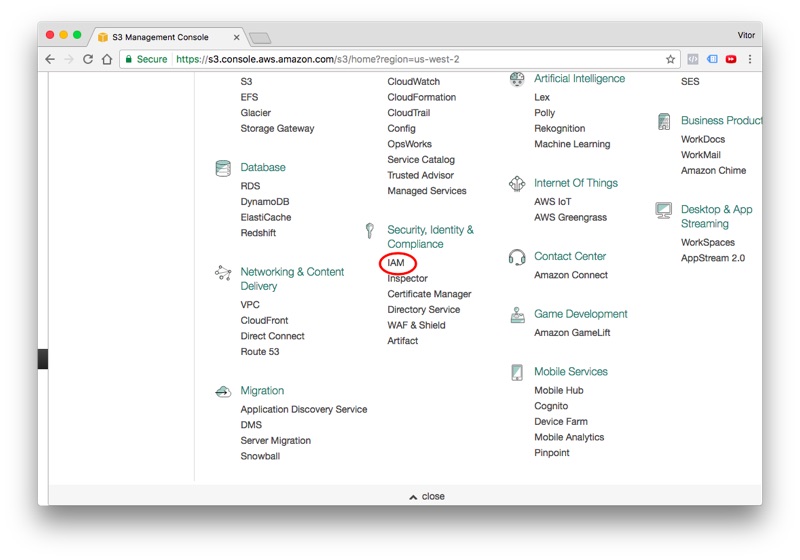
Logged in the AWS web page, find the IAM in the list of services, it’s listed under Security, Identity & Compliance:

IAM Service

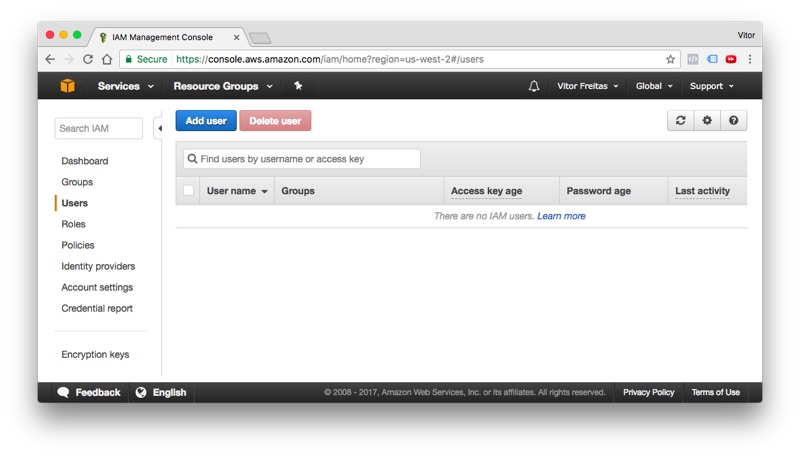
Go to the Users tab and click in the Add user button:

IAM Users Tab

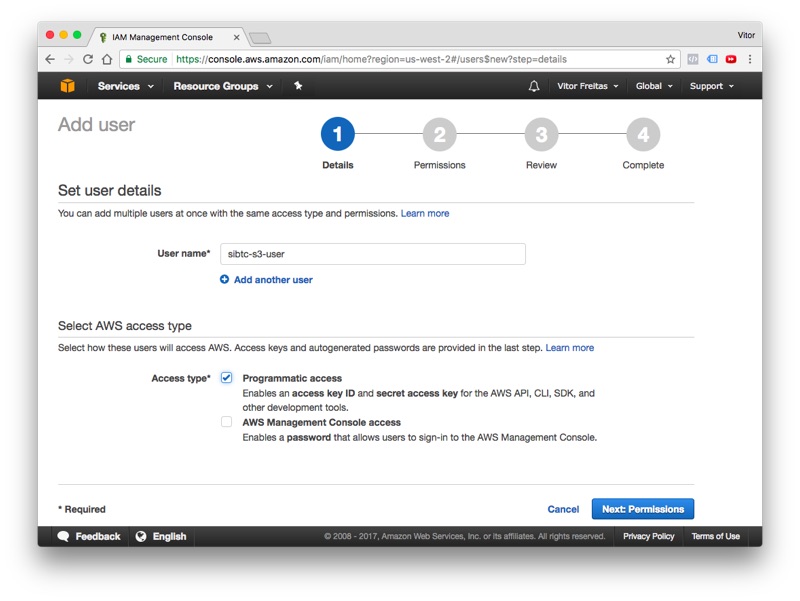
Give a user name and select the programmatic access option:

New AWS User

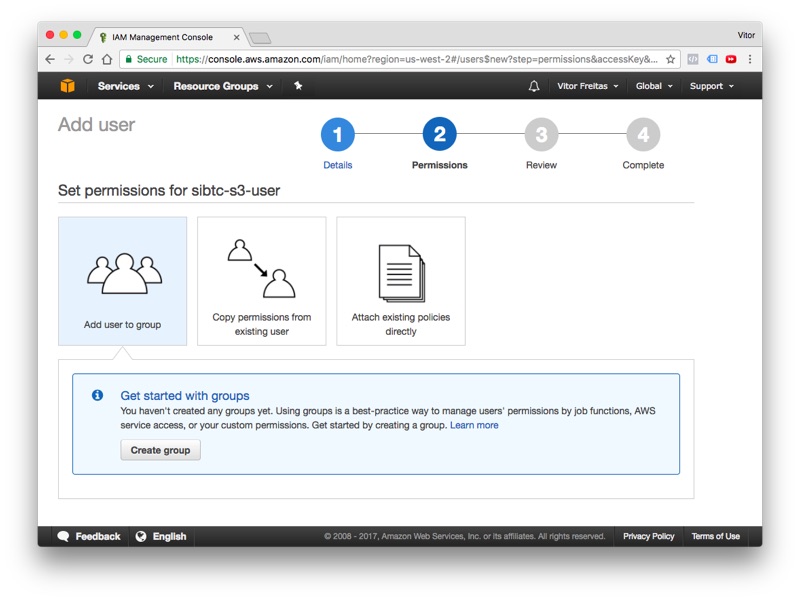
Click next to proceed to permissions. At this point we will need to create a new group with the right S3 permissions, and add our new user to it. Follow the wizard and click in the Create group button:

Add User to Group

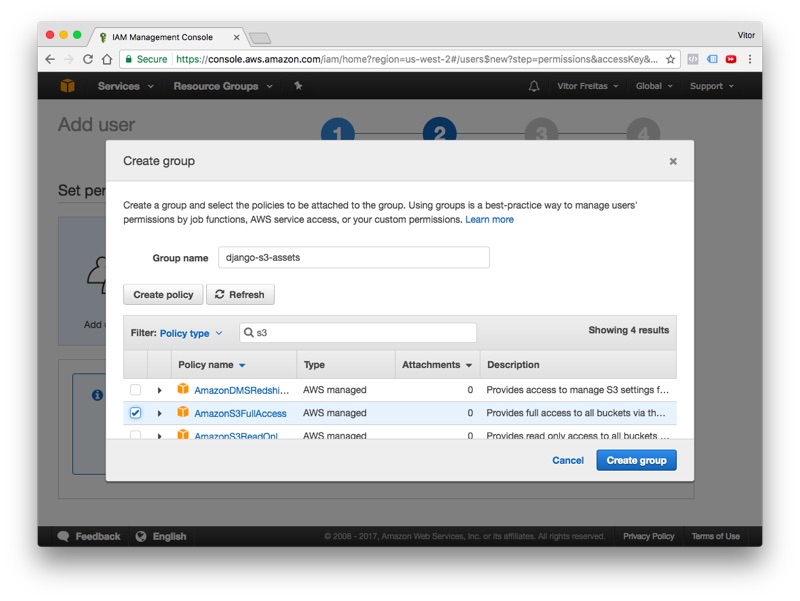
Define a name for the group and search for the built-in policy AmazonS3FullAccess:

New AWS Group

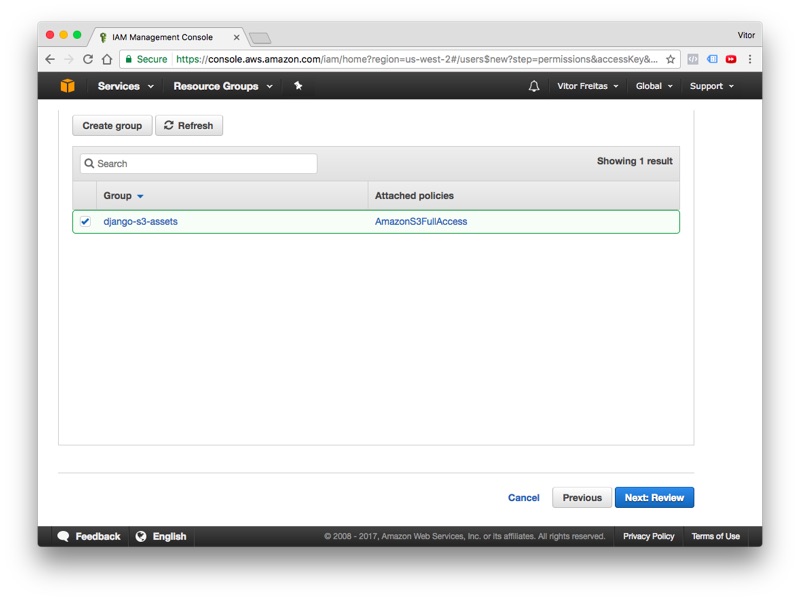
Click in the Create group to finalize the group creation process, in the next screen, the recently created group will show up selected, keep it that way and finally click in the button Next: Review:

Select AWS Group

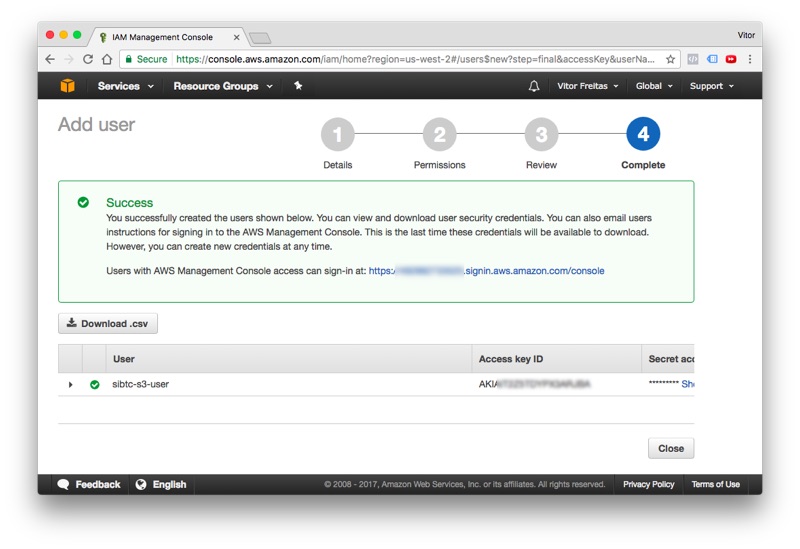
Review the information, if everything is correct proceed to create the new user. Next, you should see this information:

New User Created

Take note of all the information: User, Access key ID and the Secret access key. Save them for later.

Click in the Close button and let’s proceed. Now, it’s time to create our very first bucket.

Bucket is what we call a storage container in S3. We can work with several buckets within the same Django project. But, for the most part you will only need one bucket per website.

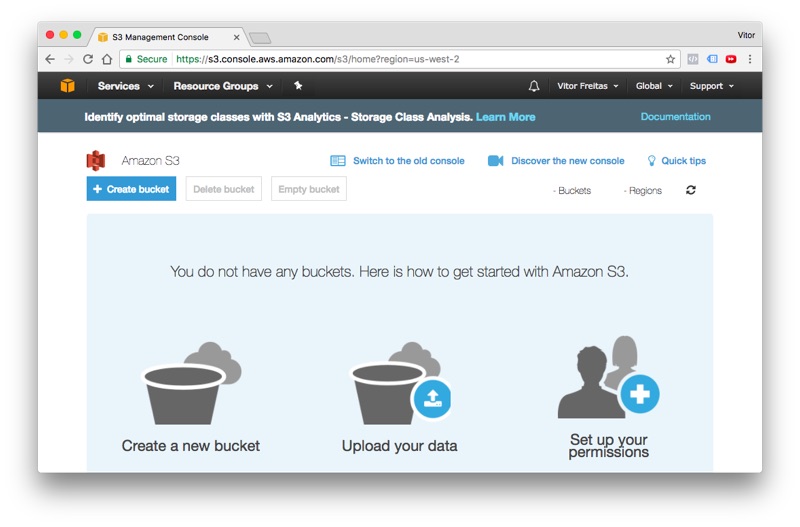
Click in the Services menu and search for S3. It’s located under Storage. If you see the screen below, you are in the right place.

Amazon S3

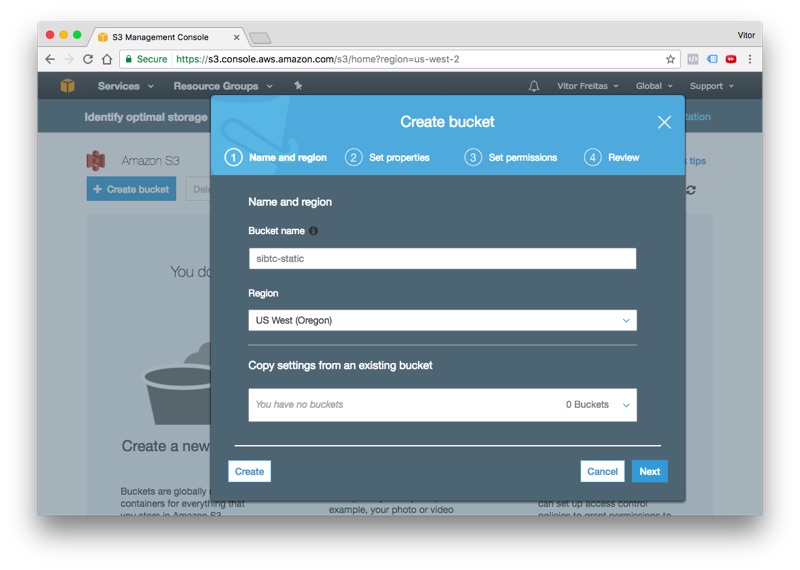
Click in the + Create bucket to start the flow. Set a DNS-compliant name for your bucket. It will be used to identify your assets. In my case, I choose sibtc-static. So the path to my assets will be something like this: https://sibtc-static.s3.amazonaws.com/static/.

Create bucket

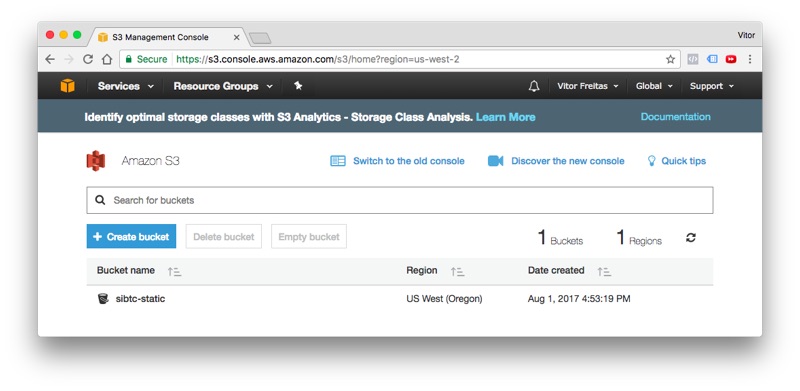
Leave the remaining of the settings as it is, proceed to the next steps just using the defaults and finally hit the Create bucket button. Next you should see the screen below:

Bucket list

Let’s leave it like this and let’s start working on the Django side.


Installation

The easiest way is to install the libraries using pip:

pip install boto3
pip install django-storages

Now add the storages to your INSTALLED_APPS inside the settings.py module:

settings.py

INSTALLED_APPS=['django.contrib.auth','django.contrib.contenttypes','django.contrib.sessions','django.contrib.messages','django.contrib.staticfiles','storages',]

Working with static assets only

This is the simplest use case. It works out-of-the-box with minimal configuration. All the configuration below goes inside the settings.py module:

settings.py

AWS_ACCESS_KEY_ID='AKIAIT2Z5TDYPX3ARJBA'AWS_SECRET_ACCESS_KEY='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'AWS_STORAGE_BUCKET_NAME='sibtc-static'AWS_S3_CUSTOM_DOMAIN='%s.s3.amazonaws.com'%AWS_STORAGE_BUCKET_NAMEAWS_S3_OBJECT_PARAMETERS={'CacheControl':'max-age=86400',}AWS_LOCATION='static'STATICFILES_DIRS=[os.path.join(BASE_DIR,'mysite/static'),]STATIC_URL='https://%s/%s/'%(AWS_S3_CUSTOM_DOMAIN,AWS_LOCATION)STATICFILES_STORAGE='storages.backends.s3boto3.S3Boto3Storage'

Note that we have some sensitive informations here, such as the AWS_ACCESS_KEY_ID and AWS_SECRET_ACCESS_KEY. You should not put it directly to your settings.py file or commit it to a public repository. Instead use environment variables or use the Python library Python Decouple. I have also written a tutorial on how to use Python Decouple.

To illustrate this use case, I created a minimal Django project:

mysite/
 |-- mysite/
 |    |-- static/
 |    |    |-- css/
 |    |    |    +-- app.css
 |    |    +-- img/
 |    |         +-- thumbs-up.png
 |    |-- templates/
 |    |    +-- home.html
 |    |-- __init__.py
 |    |-- settings.py
 |    |-- urls.py
 |    +-- wsgi.py
 +-- manage.py

As you can see, the handling of the static files should go seamlessly:

home.html

{%loadstatic%}<!DOCTYPE html><html><head><metacharset="utf-8"><title>S3 Example Static Only</title><linkrel="stylesheet"type="text/css"href="{%static'css/app.css'%}"></head><body><header><h1>S3 Example Static Only</h1></header><main><imgsrc="{%static'img/thumbs-up.png'%}"><h2>It's working!</h2></main><footer><ahref="https://simpleisbetterthancomplex.com">www.SimpleIsBetterThanComplex.com</a></footer></body></html>

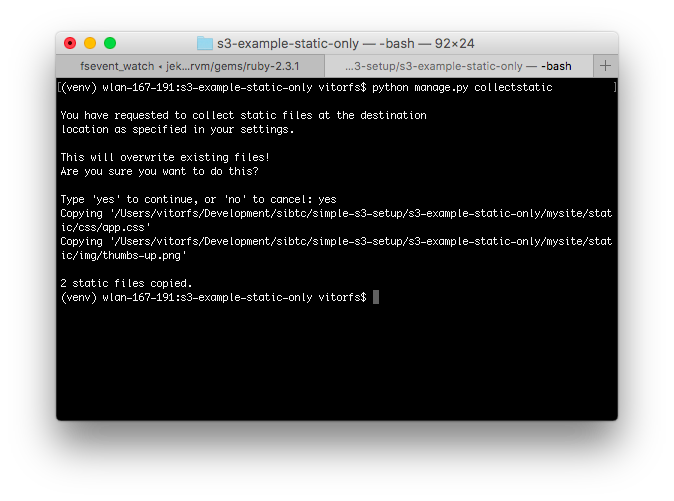
Even though we are using our local machine, we will need to run the collectstatic command, since our code will refer to a remote location:

python manage.py collectstatic

Django collectstatic

You will notice that the copying process will take longer than usual. It’s expected. I removed the Django Admin from the INSTALLED_APPS so the example is cleaner. But if you are trying it locally, you will see lot’s of files being copied to your S3 bucket.

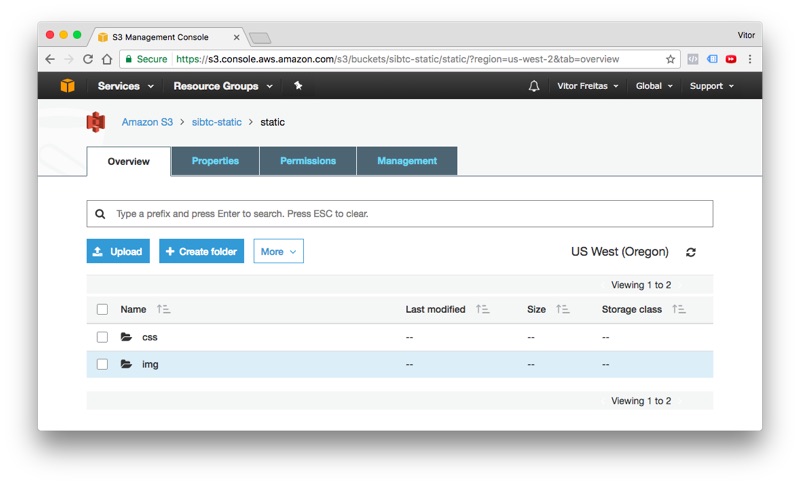
If we check on the AWS website, we will see our static assets there:

Django collectstatic

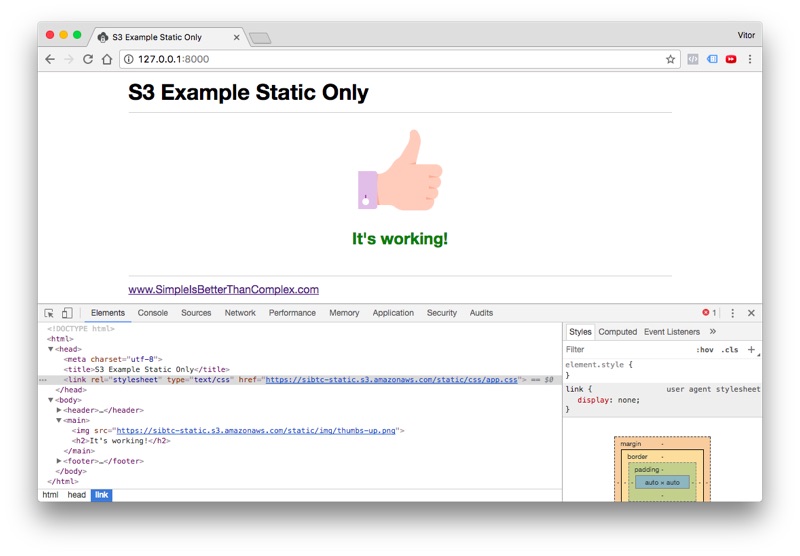
And finally, the result:

Example site success

As you can see, the storage backend take care to translate the template tag {%static'img/thumbs-up.png'%} into https://sibtc-static.s3.amazonaws.com/static/img/thumbs-up.png and serve it from the S3 bucket.

In the next example you will learn how to work with both static and media assets.


Working with static and media assets

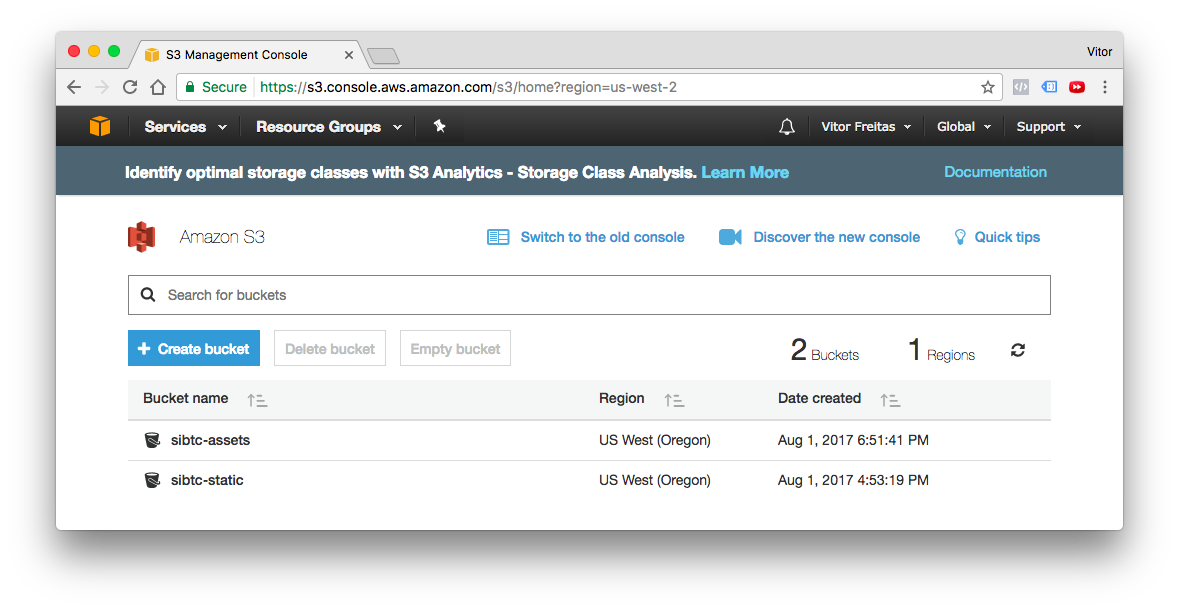
For this example I created a new bucket named sibtc-assets.

Amazon S3 bucket list

The settings.py configuration will be very similar. Except we will extend the storages.backends.s3boto3.S3Boto3Storage to add a few custom parameters, in order to be able to store the user uploaded files, that is, the media assets in a different location and also to tell S3 to not override files with the same name.

What I usually like to do is create storage_backends.py file in the same directory as my settings.py, and you can define a new Storage Backend like this:

storage_backends.py

fromstorages.backends.s3boto3importS3Boto3StorageclassMediaStorage(S3Boto3Storage):location='media'file_overwrite=False

Now on the settings.py, we need to this new backend to the DEFAULT_FILE_STORAGE option:

settings.py

STATICFILES_DIRS=[os.path.join(BASE_DIR,'mysite/static'),]AWS_ACCESS_KEY_ID='AKIAIT2Z5TDYPX3ARJBA'AWS_SECRET_ACCESS_KEY='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'AWS_STORAGE_BUCKET_NAME='sibtc-assets'AWS_S3_CUSTOM_DOMAIN='%s.s3.amazonaws.com'%AWS_STORAGE_BUCKET_NAMEAWS_S3_OBJECT_PARAMETERS={'CacheControl':'max-age=86400',}AWS_LOCATION='static'STATICFILES_STORAGE='storages.backends.s3boto3.S3Boto3Storage'STATIC_URL="https://%s/%s/"%(AWS_S3_CUSTOM_DOMAIN,AWS_LOCATION)DEFAULT_FILE_STORAGE='mysite.storage_backends.MediaStorage'# <-- here is where we reference it

To illustrate a file upload, I created an app named core and defined the following model:

models.py

fromdjango.dbimportmodelsclassDocument(models.Model):uploaded_at=models.DateTimeField(auto_now_add=True)upload=models.FileField()

Then this is what my view looks like:

views.py

fromdjango.contrib.auth.decoratorsimportlogin_requiredfromdjango.views.generic.editimportCreateViewfromdjango.urlsimportreverse_lazyfrom.modelsimportDocumentclassDocumentCreateView(CreateView):model=Documentfields=['upload',]success_url=reverse_lazy('home')defget_context_data(self,**kwargs):context=super().get_context_data(**kwargs)documents=Document.objects.all()context['documents']=documentsreturncontext

The document_form.html template:

<formmethod="post"enctype="multipart/form-data">{%csrf_token%}{{form.as_p}}<buttontype="submit">Submit</button></form><table><thead><tr><th>Name</th><th>Uploaded at</th><th>Size</th></tr></thead><tbody>{%fordocumentindocuments%}<tr><td><ahref="{{document.upload.url}}"target="_blank">{{document.upload.name}}</a></td><td>{{document.uploaded_at}}</td><td>{{document.upload.size|filesizeformat}}</td></tr>{%empty%}<tr><tdcolspan="3">No data.</td></tr>{%endfor%}</tbody></table>

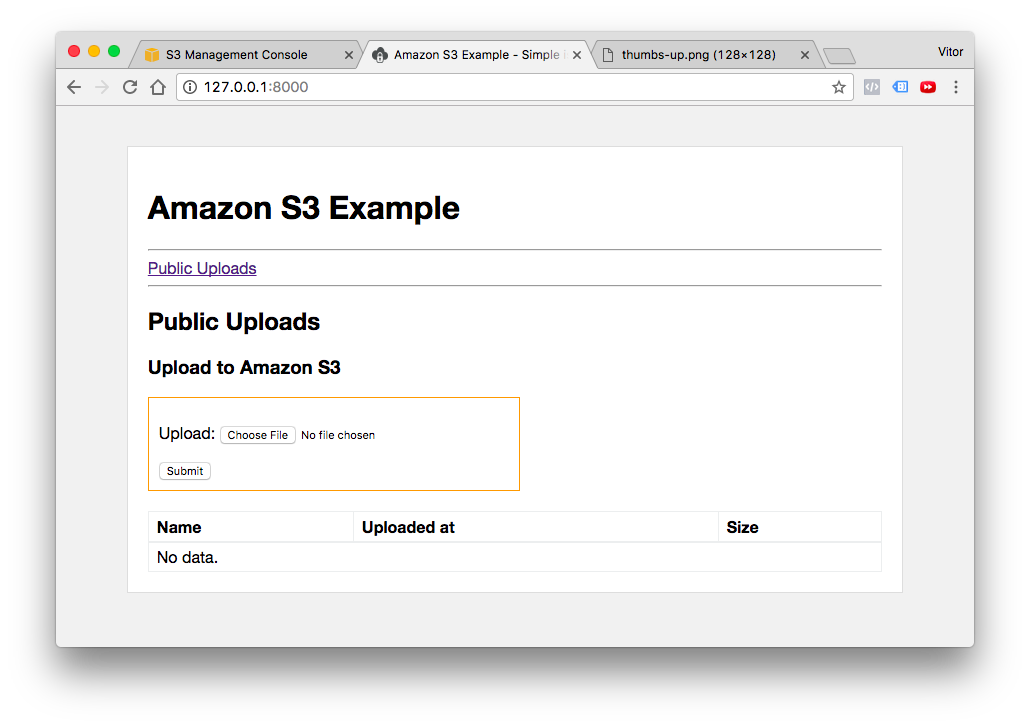
As you can see I’m only using Django’s built-in resources in the template. Here is what this template looks like:

Document form template

I’m not gonna dig into the details about file upload, you can read a comprehensive guide here in the blog (see the Related Posts in the end of this post for more information).

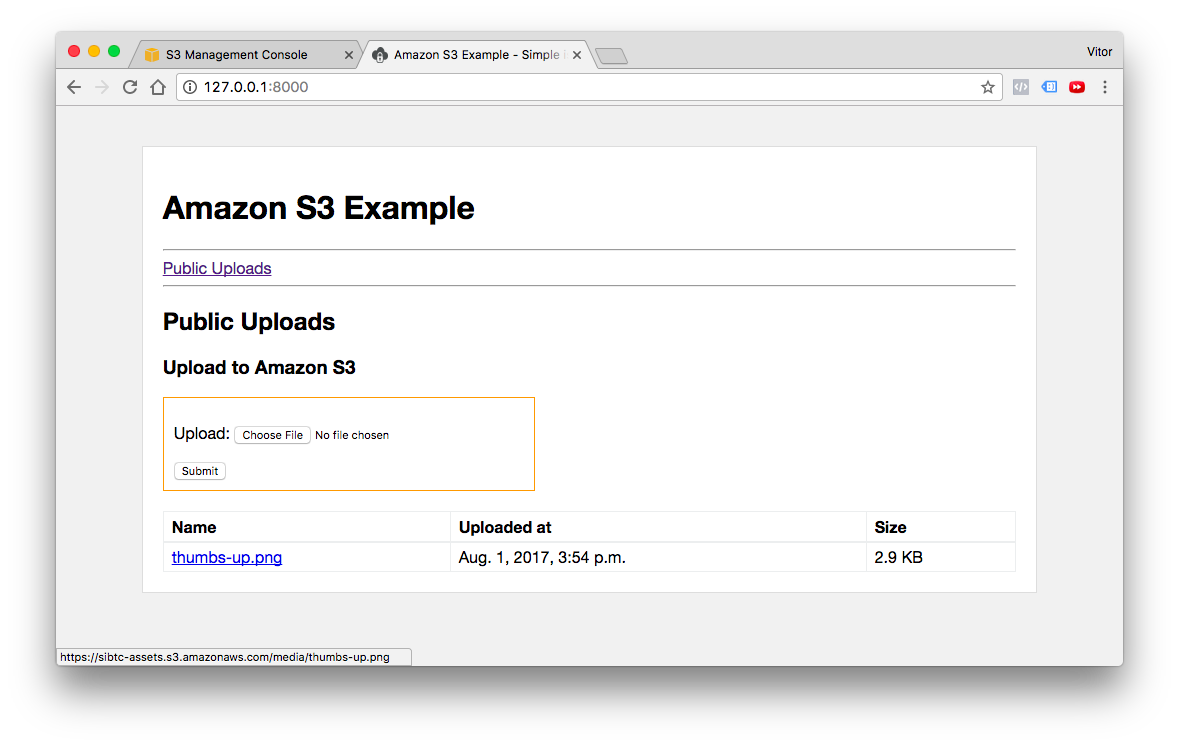
Now, testing the user uploaded files:

Successful upload

I created my template to list the uploaded files, so after a user upload some image or document it will be listed like in the picture above.

Then if we click in the link, which is the usual {{document.upload.url}}, managed by Django, it will render the image from the S3 bucket:

Media S3 bucket

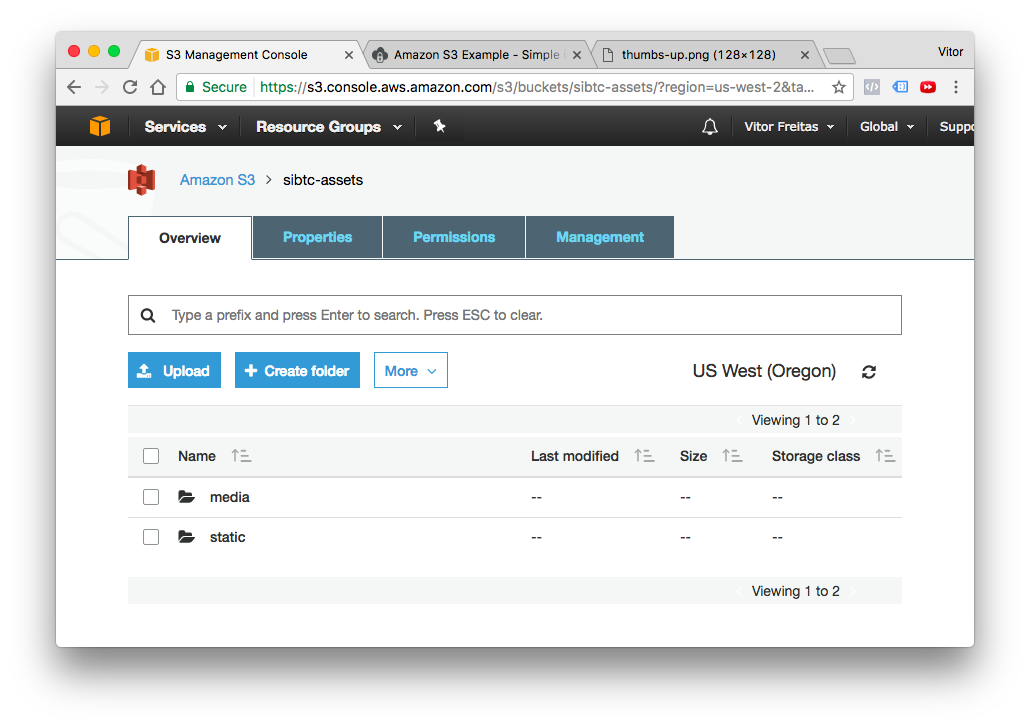
Now if we check our bucket, we can see that there’s a static and a media directory:

S3 bucket media and static dirs


Mixing public assets and private assets

Using pretty much the same concepts you define some resources to be privately stored in the S3 bucket. See the configuration below:

storage_backends.py

fromdjango.confimportsettingsfromstorages.backends.s3boto3importS3Boto3StorageclassStaticStorage(S3Boto3Storage):location=settings.AWS_STATIC_LOCATIONclassPublicMediaStorage(S3Boto3Storage):location=settings.AWS_PUBLIC_MEDIA_LOCATIONfile_overwrite=FalseclassPrivateMediaStorage(S3Boto3Storage):location=settings.AWS_PRIVATE_MEDIA_LOCATIONdefault_acl='private'file_overwrite=Falsecustom_domain=False

settings.py

AWS_ACCESS_KEY_ID='AKIAIT2Z5TDYPX3ARJBA'AWS_SECRET_ACCESS_KEY='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'AWS_STORAGE_BUCKET_NAME='sibtc-assets'AWS_S3_CUSTOM_DOMAIN='%s.s3.amazonaws.com'%AWS_STORAGE_BUCKET_NAMEAWS_S3_OBJECT_PARAMETERS={'CacheControl':'max-age=86400',}AWS_STATIC_LOCATION='static'STATICFILES_STORAGE='mysite.storage_backends.StaticStorage'STATIC_URL="https://%s/%s/"%(AWS_S3_CUSTOM_DOMAIN,AWS_STATIC_LOCATION)AWS_PUBLIC_MEDIA_LOCATION='media/public'DEFAULT_FILE_STORAGE='mysite.storage_backends.PublicMediaStorage'AWS_PRIVATE_MEDIA_LOCATION='media/private'PRIVATE_FILE_STORAGE='mysite.storage_backends.PrivateMediaStorage'

Then we can define this new PrivateMediaStorage directly in the model definition:

models.py

fromdjango.dbimportmodelsfromdjango.confimportsettingsfromdjango.contrib.auth.modelsimportUserfrommysite.storage_backendsimportPrivateMediaStorageclassDocument(models.Model):uploaded_at=models.DateTimeField(auto_now_add=True)upload=models.FileField()classPrivateDocument(models.Model):uploaded_at=models.DateTimeField(auto_now_add=True)upload=models.FileField(storage=PrivateMediaStorage())user=models.ForeignKey(User,related_name='documents')

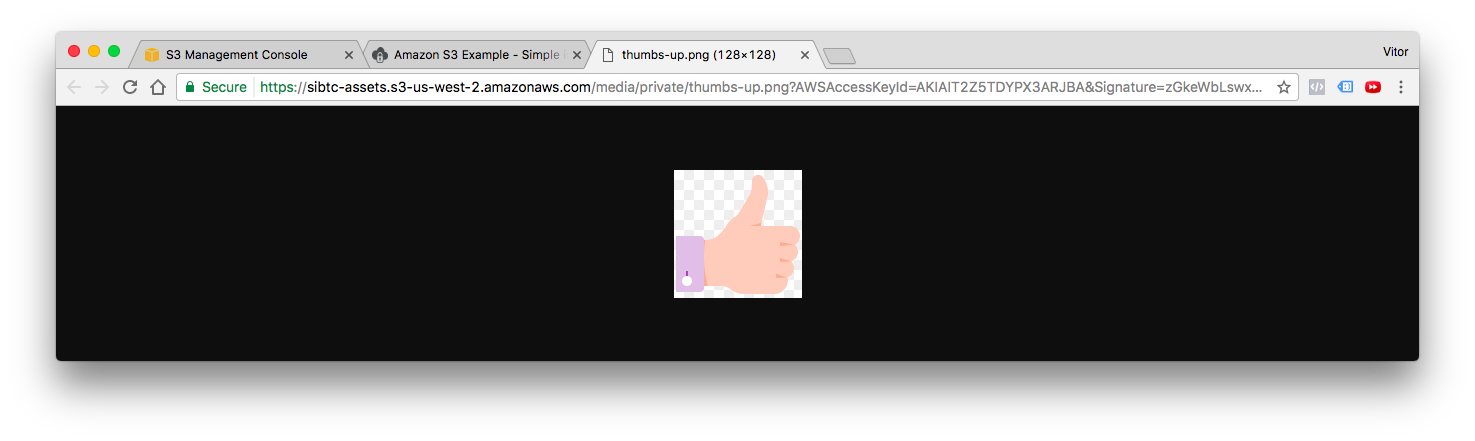
After uploading a private file, if you try to retrieve the URL of the content, the API will generate a long URL that expires after a few minutes:

S3 private file

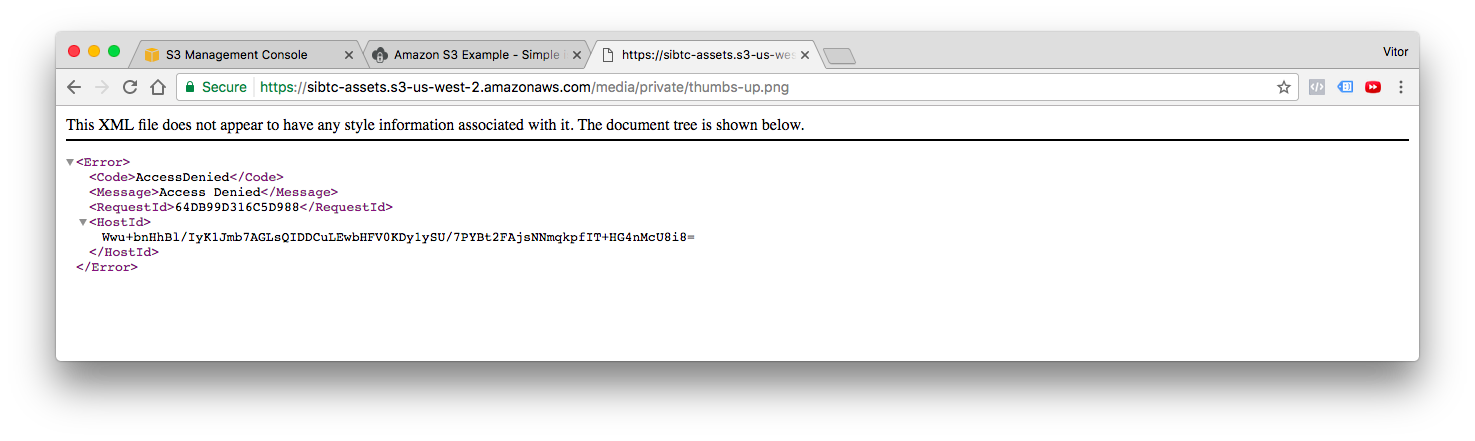
If you try to access it directly, without the parameters, you will get an error message from AWS:

S3 private file error


Conclusions

I hope this tutorial helped to clarify a few concepts of the Amazon S3 and helped you at least get started. Don’t be afraid to dig in the official documentation from both boto3 and the django-storages library.

I have also prepared three fully functional examples (the ones that I used in this tutorial), so you can explore and find out more on how I implemented it.

github.com/sibtc/simple-s3-setup

In this repository you will find three Django projects, one for each use case:

  • s3-example-public-and-private
  • s3-example-static-and-media
  • s3-example-static-only

Don’t forget to add your own credentials to make it work! I Left them empty on purpose.

Janusworx: On My First Project

$
0
0

noun_1067223_small


Being laid up sick in bed is never fun.
Yet, serendipitously, it was the being laid up, that gave me time to focus and complete my first Python program.

We were to make a project, that combined what we’d learnt so far at DGPLUG.

So to me that was:

  • Markdown (or RST; I chose Markdown)
  • Git (my bugbear. I still can’t quite wrap my head around it)
  • and Python.

So I created a spanking new repo for my crazy, one off projects at Github.
Created a license, because, well because Anwesha says you ought to, and even shows you how to. (and it’s generally a good thing any way :)

That, out of the way, I used my ninja Markdown skills (honed by writing here :P) to whip up a little README

And then started the slog.

While I have been learning the basics of Python, like a child learning shapes; moulding what I have learnt into some semblance of a logical thing is darned hard.

I’d read somewhere about the Golden Mean and it’s relation to the Fibonacci sequence, so I thought I’d write a mini text adventurish romp as my first project.

It took me the whole day!
I typed and it did not run.
I fixed typos.
I fixed colons.
I fixed quotes.
I tore my hair out.
And I typed some more.
And I fixed some more.
Oh, and all the while, I was trying to push it up to Github as well. (with varying degrees of success)

But in a lot of ways, it reminded me of the time, I spent learning photography and basic editing.
I was moving sliders and figuring curves and creating needlessly large TIFFs all over Lightroom

And gm.py reminds me of the first time a photo came out right.
I don’t quite know how I did it then and I don’t quite know how I did it now.
The recipe’s ugly.
But the photo looked good.
And the program does run.

Which brings me to how I look at a photo today.
I can instinctively tell, what needs cropping, if I need to make white balance adjustments, whether the exposure needs tweaking, if I can pull detail out of the shadows.
And my newbie-ness wasn’t that long ago.

I wish myself the same level of competence when it comes to programming.
Onward!

You can find the repo and my first program here.


NumFOCUS: Leveling up with Open Astronomy: Astropy affiliated packages

$
0
0
Matt Craig, Professor of Physics and Astronomy at Minnesota State University Moorhead, has created this list of Astropy affiliated packages to help improve your experience exploring astronomy using Python. This post was inspired by Ole Moeller-Nilsson’s recent blog post on how to get started doing astronomy with open data and Python. — One of the […]

Simeon Franklin: PyBay 2017

$
0
0

PyBay, the Bay Area regional Python Conference is happening again August 10th-13th. See pybay.com for tickets and keep reading to find out why you shouldn't miss it.

Codementor: A Dive Into Python Closures and Decorators - Part 2

$
0
0
In previoust post (https://www.codementor.io/moyosore/a-dive-into-python-closures-and-decorators-part-1-9mpr98pgr), we talked about local functions, closures and quickly looked into basic...

Yasoob Khalid: PyCon Pakistan & The First Meetup in Lahore

$
0
0

Hi there guys! I will be starting my bachelors at Colgate University in Hamilton, US from this month. I have been pretty busy lately with making all of the required arrangements. However, during this time I got a chance to attend the first ever Python meetup in Lahore, Pakistan. It was hosted on July 22nd. I am a bit late with this write-up so without any further ado let’s get right into it.

I arrived at precisely 2 pm at the venue (Arbisoft’s office near Thokkar). The meetup started a bit later than planned because this was the first time and a couple of people arrived late. The meetup was attended by around 25 people. Some of them were seasoned devs, some were juniors and some were there with no idea about what Python actually is.

The event kicked off with an intro about Arbisoft and how they use Python. Soon after that everyone introduced himself/herself. Moving on, the discussion steered towards what the first PyCon should be about. A lot of ideas were bounced around and were taken very positively by everyone. Here is the crux of the discussion which ensued (this list has been taken from the official writeup about the event):

  • More people need to be aware of how diverse and massive Python is. They aren’t aware that Python powers mega-projects such as Youtube, edX, and Quora. This has to change.
  • Python needs to be made accessible for both developers and non-technical managers alike. We’re interested in putting together tutorials and talks about using Python–that means we’re looking for knowledgeable speakers that break down complex topics into easy-to-understand takeaways.
  • We’re Pythonistas at heart and we have our favorites! We want to know which framework you prefer and why.
  • Python works well for machine learning but most people aren’t aware. We need to raise attention around this.
  • Universities in Pakistan are still focused on curricula that no longer adequately prepare students for industry demands. Instead of being first exposed to Python when they start a job (or try to qualify for one) we have to bridge the gap during student life–that’s why we should reach out to students directly and invite them to PyCon.
  • We need to bring together all kinds of programmers, including those working on GPU-based programming, data automation, and deep neural networks. Imagine the possibilities of this: smart people working on cutting-edge technology, all speaking the same language, all in the same room.

The event can be filed as a success. The attendance was low but that was expected because this was the first meetup and not very well advertised.

I have two suggestions for the next meetup:

  • Invite more females to the event and make it more inclusive with female speakers. In Pakistan there is this notion that most events are only male friendly, we need to change that.
  • Plan out the whole event in such a way that people who come alone do not sit around talking to themselves. Help everyone get to know each other. Not everyone is good at initiating social discussions.
  • Advertise the event on Python mailing lists and local universities. Students are very eager to attend meetups in Pakistan but are usually unaware when one is happening nearby.

Here is a short video of me endorsing these efforts as well. There is a small bit in Urdu language but it is mostly in English.


I won’t be in Pakistan for the next meetup but I have my fingers crossed and hope that these efforts towards a successful PyCon in Pakistan will bear fruit. You can signup for the next meetup over here which will take place on 19th August at X2 cafe in Lahore.

Please note that you can submit proposals for the first PyCon till the 25th of August 2017. Speakers are eligible for discounted conference registration that may be waived on request. Speakers will receive souvenirs/certificates, lunch/meals, and external speakers are also eligible for travel allowance and accommodation. Here is the link to the official website.


Python Bytes: #37 Rule over the shells with Sultan

$
0
0
<p><strong>Brian #1:</strong> <a href="https://devguide.python.org/"><strong>New URL for Python Developer’s Guide</strong></a></p> <ul> <li>How to contribute to CPython</li> </ul> <p>Some really useful links that I hadn’t noticed before. Also great ideas to include in a contributing guide for any large open source project:</p> <ul> <li>Core developers and contributors alike will find the following guides useful: <ul> <li><a href="https://opensource.guide/how-to-contribute/">How to Contribute to Open Source</a> (from https://opensource.guide)</li> <li><a href="https://opensource.guide/building-community/">Building Welcoming Communities</a> (from https://opensource.guide)</li> </ul></li> <li>Guide for contributing to Python: <ul> <li><a href="https://devguide.python.org/setup/">Getting Started</a></li> <li><a href="https://devguide.python.org/help/">Where to Get Help</a></li> <li><a href="https://devguide.python.org/pullrequest/">Lifecycle of a Pull Request</a></li> <li><a href="https://devguide.python.org/runtests/">Running &amp; Writing Tests</a></li> <li>Beginner tasks to become familiar with the development process</li> <li><a href="https://devguide.python.org/docquality/">Helping with Documentation</a></li> <li><a href="https://devguide.python.org/coverage/">Increase Test Coverage</a></li> <li>Advanced tasks for once you are comfortable</li> <li><a href="https://devguide.python.org/silencewarnings/">Silence Warnings From the Test Suite</a></li> <li>Fixing issues found by the <a href="https://devguide.python.org/buildbots/">buildbots</a></li> <li><a href="https://devguide.python.org/fixingissues/">Fixing “easy” Issues (and Beyond)</a></li> <li><a href="https://devguide.python.org/tracker/#tracker">Using the Issue Tracker</a> and <a href="https://devguide.python.org/tracker/#helptriage">Helping Triage Issues</a></li> <li><a href="https://devguide.python.org/triaging/">Triaging an Issue</a></li> <li><a href="https://devguide.python.org/experts/">Experts Index</a></li> <li><a href="https://devguide.python.org/communication/">Following Python’s Development</a></li> <li><a href="https://devguide.python.org/coredev/">How to Become a Core Developer</a></li> <li><a href="https://devguide.python.org/committing/">Committing and Pushing Changes</a></li> <li><a href="https://devguide.python.org/devcycle/">Development Cycle</a></li> <li><a href="https://devguide.python.org/buildbots/">Continuous Integration</a></li> <li><a href="https://devguide.python.org/gitbootcamp/">Git Bootcamp and Cheat Sheet</a></li> </ul></li> </ul> <p><strong>Michael #2:</strong> <a href="https://sultan.readthedocs.io/en/latest/"><strong>Sultan: Command and Rule Over Your Shell</strong></a></p> <ul> <li>Python package for interfacing with command-line utilities, like yum, apt-get, or ls, in a Pythonic manner</li> </ul> <p>Simple example</p> <pre><code>from sultan.api import Sultan s = Sultan() s.sudo("yum install -y tree").run() </code></pre> <p>Better in a context manager:</p> <pre><code>from sultan.api import Sultan with Sultan.load(sudo=True) as s: s.yum("install -y tree").run() </code></pre> <p>Even works remotely:</p> <pre><code>from sultan.api import Sultan with Sultan.load(sudo=True, hostname="myserver.com") as sultan: sultan.yum("install -y tree").run() </code></pre> <p><strong>Brian #3:</strong> <a href="https://github.com/dreadatour/Flake8Lint"><strong>Flake8Lint</strong></a></p> <ul> <li>Sublime Text plugin for lint Python files.</li> <li>Includes these linters and style checkers: <ul> <li><a href="http://pypi.python.org/pypi/flake8"><strong>Flake8</strong></a> (used in "Python Flake8 Lint") is a wrapper around these tools:</li> <li><a href="http://pypi.python.org/pypi/pep8"><strong>pep8</strong></a> is a tool to check your Python code against some of the style conventions in <a href="http://www.python.org/dev/peps/pep-0008/">PEP8</a>.</li> <li><a href="https://launchpad.net/pyflakes"><strong>PyFlakes</strong></a> checks only for logical errors in programs; it does not perform any check on style.</li> <li><a href="http://nedbatchelder.com/blog/200803/python_code_complexity_microtool.html"><strong>mccabe</strong></a> is a code complexity checker. It is quite useful to detect over-complex code. According to McCabe, anything that goes beyond 10 is too complex. See <a href="https://en.wikipedia.org/wiki/Cyclomatic_complexity">Cyclomatic_complexity</a>.</li> <li>There are additional tools used to lint Python files:</li> <li><a href="https://github.com/PyCQA/pydocstyle"><strong>pydocstyle</strong></a> is a static analysis tool for checking compliance with Python <a href="http://www.python.org/dev/peps/pep-0257/">PEP257</a>.</li> <li><a href="https://github.com/flintwork/pep8-naming"><strong>pep8-naming</strong></a> is a naming convention checker for Python.</li> <li><a href="https://github.com/JBKahn/flake8-debugger"><strong>flake8-debugger</strong></a> is a flake8 debug statement checker.</li> <li><a href="https://github.com/public/flake8-import-order"><strong>flake8-import-order</strong></a> is a flake8 plugin that checks import order in the fashion of the Google Python Style Guide (turned off by default).</li> </ul></li> </ul> <p><strong>Michael #4:</strong> <a href="https://github.com/warner/magic-wormhole"><strong>Magic Wormhole</strong></a></p> <ul> <li>Get things from one computer to another, safely.</li> <li>A library and a command-line tool named <code>wormhole</code>, which makes it possible to get arbitrary-sized files and directories (or short pieces of text) from one computer to another.</li> <li>The two endpoints are identified by using identical "wormhole codes”</li> <li>Video from PyCon 2016: <a href="https://www.youtube.com/watch?v=oFrTqQw0_3c">https://www.youtube.com/watch?v=oFrTqQw0_3c</a></li> <li>The codes are short and human-pronounceable, using a phonetically-distinct wordlist.</li> <li>As a library too: The wormhole module makes it possible for other applications to use these code-protected channels. </li> </ul> <p><strong>Brian #5:</strong> <a href="https://realpython.com/blog/python/python-virtual-environments-a-primer/"><strong>Python Virtual Environments Primer</strong></a></p> <ul> <li>why do we need virtual environments</li> <li>what are they</li> <li>how to use them / how do they work</li> <li>also <ul> <li>virtualenvwrapper</li> <li>using different versions of python</li> <li>pyvenv</li> </ul></li> </ul> <p><strong>Michael #6:</strong> <a href="http://www.infoworld.com/article/3208391/python/how-rust-can-replace-c-with-pythons-help.html"><strong>How Rust can replace C, with Python's help</strong></a></p> <ul> <li>Why Rust? Rust has <ul> <li>a type system feature that helps eliminate memory leaks,</li> <li>proper interfaces, called 'traits',</li> <li>better type inference,</li> <li>better support for concurrency,</li> <li>(almost) first-class functions that can be passed as arguments.</li> </ul></li> <li>It isn’t difficult to expose Rust code to Python. A Rust library can expose a C ABI (application binary interface) to Python without too much work. </li> <li>Some Rust crates (as Rust packages are called) already expose Python bindings to make them useful in Python.</li> <li>A new spate of projects are making it easier to develop Rust libraries with convenient bindings to Python – and to deploy Python packages that have Rust binaries</li> <li><a href="https://github.com/dgrunwald/rust-cpython"><strong>Rust-CPython</strong></a><strong>:</strong> <ul> <li><strong>What it is:</strong> A set of bindings in Rust for the CPython runtime. This allows a Rust program to connect to CPython, use its ABI, run Python programs through it, and work with representations of Python objects in Rust itself.</li> <li><strong>Who it’s for:</strong> Rust programmers who want to hook into CPython and control it from the inside out.</li> </ul></li> <li><a href="https://github.com/PyO3/PyO3"><strong>PyO3</strong></a> <ul> <li><strong>What it is:</strong> For Rust developers, the PyO3 project provides a basic way to write Rust software with bindings to Python in both directions. A Rust program can interface with Python objects and the Python interpreter, and can expose Rust methods to a Python program in the same way a C module does.</li> <li><strong>Who it’s for:</strong> Those writing modules that work closely with the Python runtime, and need to interact directly with it.</li> </ul></li> <li><a href="https://github.com/mitsuhiko/snaek/"><strong>Snaek</strong></a> <ul> <li><strong>What it is:</strong> Another project in the early stages, Snaek lets developers create Rust libraries that are loaded dynamically into Python as needed, but don’t rely on being linked statically against Python’s runtime.</li> <li>Doesn’t use CTypes but CFFI</li> <li><strong>Who it’s for:</strong> Those who want to expose methods written in Rust to a Python script, or for Rust developers who don’t want or need to become familiar with Python.</li> </ul></li> <li>And there is a cookiecutter project / template too <ul> <li><a href="https://github.com/mckaymatt/cookiecutter-pypackage-rust-cross-platform-publish">https://github.com/mckaymatt/cookiecutter-pypackage-rust-cross-platform-publish</a></li> <li>“A very important goal of the project,” writes its maintainers, “is that it be able to produce a binary distribution (Wheel) which will not require the end user to actually compile the Rust code themselves.”</li> </ul></li> </ul>

Tryton News: Tryton Unconference 2017 - Announcement

$
0
0

The 10th December 2017 we will celebrate the 10th anniversary of the first commit in the Tryton source code repository.

That is an important milestone for the project and to celebrate it, the Tryton Foundation is pleased to announce that this year's Tryton Unconference will be held in Liège, Belgium. The city were Tryton was born 10 years ago.

LiègeCC BY ND 2.0 KenC1983

Although the exact dates of the unconference are yet to be defined, organizers will make them match the anniversary. So it's time you make room in your schedule to ensure you don't miss this exceptional event.

As always, expect experts from all over the world to share their knowledge and on the field experience on the development and usage of Tryton.

See you there!

Carl Chenet: Feed2toot 0.6, the RSS to Mastodon bot, released

$
0
0

I just released the version 0.6 of Feed2toot, a self hosted bot to automatically post RSS feeds to Mastodon, a free (as in free software) and decentralized social network.

Thanks a lot to all involved contributors (read the changelog for details), this version is mostly their work.

fiesta

What’s the purpose of Feed2toot?

If you have a blog and that you want to automatically post your new blog post on Mastodon, you can use Feed2toot. You also may want to create a Mastodon bot to broadcast news to Mastodon from a RSS feed.

Feed2toot is Python self-hosted app, the source code is easy to read and you can enjoy the official documentation online with lots of examples.

What’s new in 0.6?

  • starting from 0.6 you can define a name for a feed, accessible with the {feedname} variable in the toot format of your configuration file. If you have a lot of RSS feeds, you can identify with a quick look what news comes from what feed. This new feature was contributed by Alexis Metaireau (fr).
  • the toot visibility is now managed by Feed2toot. You can switch to a more restricted visibility if you need it. This feature was contributed by The Dod.

… and finally

You can help me developing tools for Mastodon by donating anything through Liberaypay (also possible with cryptocurrencies). Any contribution will be appreciated. That’s a big factor motivation 😉

You also may follow my account @carlchenet on Mastodon 😉

Carl Chenet On Mastodon


Brad Lucas: Cleaning Global Installs With Pip

$
0
0

I moved to Python3 and looked back and realized I had a ton of things installed globally for Python2. With this realization I wanted to clean everything out.

Here is one method

$ pip freeze > requirements.txt
$ pip uninstall -y -r requirements.txt

Simple is Better Than Complex: Ask Vitor #4: WordPress or Self-Made Blog?

$
0
0

Aviral Tiwari asks:

Is this blog made through Django or some blog engine like WordPress?


Answer

First of all, thanks Aviral for the great question!

The short answer is Jekyll + Django. Now, if you are interested in a little bit of the history of this blog and the technology stack behind it, keep reading!

This blog is powered by Jekyll, a static site generator written in Ruby. All the pages, all the HTML you see is managed by Jekyll. But at some point this year I had to create a small API using Django to provide a few services and enhance the user experience. So, it’s a little bit of a Frankenstein code.

The reason why I initially picked Jekyll was that I had no intention to write on a regular basis and honestly I did not expect the blog to grow as much as it did. Right now, the blog receives roughly 130,000 visits every month, and it has been such a great experience – writing articles, interacting with the readers, reading comments, starting discussions.

Anyway, Jekyll was a very convenient option, because you can host it using GitHub pages. So, all I needed was a domain name, and I didn’t have to bother about hosting.

It’s still holding up pretty well. The pages load fast enough. After all, it’s almost like having a fully cached website. The requests don’t touch the database, no code being executed, just serving plain HTML pages. The publishing process works pretty well. But as the blog grows, adding more articles and pages, functionalities like “Related posts” and “Read time,” it constantly keeps increasing the build time. Nowadays it’s taking 15~ seconds to build the source code into the website you see right now.

I wish I had started the blog using WordPress. I mean, it’s a good framework. Lot’s of websites are using it, it’s simple to get started, tons of helping material and tutorials on the Internet. It’s a great publishing tool. And after all, it’s not about using Python and Django for everything. It’s about using the right tools for the right problem.

Many of the things I had to do by hand regarding SEO, the organization of the blog content, templates, plugins you would get out-of-the-box using WordPress.

I started the blog using Jekyll, hosting on Github. Then at some point, I moved it to DigitalOcean so to have more control over the blog. This way I could serve it using https only and add some other features to it.

I like the DigitalOcean service; I’ve been using it for more than three years now. It’s very simple to setup, and I find it very inexpensive. I’ve been running the blog on its tiniest VPS (which costs U$ 5,00 per month) with no problem at all, and as you can see, the blog runs very smoothly. I’ve written a blog post about it, if you are interested in knowing more about Django deployment using DigitalOcean, you can read it here, or if you want to get a U$ 10,00 free credit on DigitalOcean, you can sign up using my referral link.


Technology Stack of the Blog

Jekyll

Responsible for generating the static website, converting the posts which are written using Markdown (actually it’s kramdown) into HTML pages using the templates I created.

Along with Jekyll, I use the following Ruby gems:

Django

As I mentioned at the beginning of this post, at some point, I had to create a small API using Django to help me handle some of the features of the blog to make it more dynamic and also to help me automate a few tasks, such as its deployment.

Bubbles from Dragon Ball Z

This was when Bubbles was born – my Django powered helper. I named it after the monkey that helps King Kai’s on the Dragon Ball Z anime.

Among other duties, Bubbles is responsible for:

  • Deploying the website when I push new code to a specific branch of my Github repository;
    • It involves waiting for a webhook call from Github;
    • Pulling the new code on my DigitalOcean server;
    • Building the Jekyll website;
    • Testing if the build was successful;
    • Updating the public directory where NGINX serves the website;
  • Consuming the Google Analytics API to grab the page views data I display in the posts;
  • Consuming the Disqus API to generate a list of last comments displayed on the homepage;
  • Processing the questions forms submitted in the Ask a Question page and sending the emails to the person who sent me the question and notifying myself.
  • Validating the Google Invisible Recaptcha in some pages.

He lives under the /api/ URL. I instructed NGINX to serve all the requests except those URLs under /api/. Those requests are delegated to my Gunicorn workers that pass the tasks to Bubbles so he can do his thing.

Below is what part of my NGINX server block looks like:

server{#...
location/api/{proxy_set_headerX-Forwarded-For$proxy_add_x_forwarded_for;proxy_set_headerX-Forwarded-Protohttps;proxy_set_headerHost$http_host;proxy_set_headerX-Real-IP$remote_addr;proxy_redirectoff;proxy_passhttp://bubbles_web_server;}location/{try_files$uri$uri/$uri.html=404;}}
Front-End

Back in the days, I used to be good with CSS. But nowadays with all the Bootstrap stuff around I got lazy and rusty. I wanted to play around with the CSS a little bit, so I decided to use Skeleton boilerplate and build my CSS on top of it. The result is what see right now.

Basically what I use in the client-side:

Other Resources

I also use PostgreSQL and Memcached in the web server because some of the APIs I consume have rate limit per hour and also to make the access to the data faster.

Other than that I have a Travis CI setup that builds the blog upon every push; it checks the Jekyll build, search for broken links and check the HTML structure (if there are any broken tag, an img tag without the “alt” property and so on).

For writing, I use my favorite text editor which is Sublime Text 2. I have a few macros and snippets for creating the code snippet tags I frequently use in the posts, and I also have an English spell checker.


Conclusion

I hope you enjoyed reading this post and finding out more about the underlying technologies that run this blog.

I intend to move away from the Jekyll at some point. It’s great, but as the blog grows, it starts to get a little bit challenging to keep developing and writing with it. I thought about moving to WordPress, but I wanted to take the opportunity to create a Django project from scratch, and as I develop it, create a series of posts explaining the whole process.

Chris Warrick: Gynvael’s Mission 11 (en): Python bytecode reverse-engineering

$
0
0

Gynvael Coldwind is a security researcher at Google, who hosts weekly livestreams about security and programming in Polish and English). As part of the streams, he gives out missions — basically, CTF-style reverse engineering tasks. Yesterday’s mission was about Elvish — I mean Paint — I mean Python programming and bytecode.

MISSION 011               goo.gl/13Bia9             DIFFICULTY: ██████░░░░ [6╱10]
┅┅┅┅┅┅┅┅┅┅┅┅┅┅┅┅┅┅┅┅┅┅┅┅┅┅┅┅┅┅┅┅┅┅┅┅┅┅┅┅┅┅┅┅┅┅┅┅┅┅┅┅┅┅┅┅┅┅┅┅┅┅┅┅┅┅┅┅┅┅┅┅┅┅┅┅┅┅┅┅┅
Finally some real work!
One of our field agents managed to infiltrate suspects hideout and steal a
pendrive possibly containing important information. However, the pendrive
actually requires one to authenticate themselves before accessing the stored
files.
We gave the pendrive to our laboratory and they managed to dump the firmware. We
looked at the deadlisting they sent and for our best knowledge it's some form of
Elvish. We can't read it.
Here is the firmware: goo.gl/axsAHt
And off you go. Bring us back the password.
Good luck!
---------------------------------------------------------------------------------
If you decode the answer, put it in the comments under this video! If you write
a blogpost / post your solution online, please add a link in the comments too!
P.S. I'll show/explain the solution on the stream in ~two weeks.
P.S.2. Bonus points for recreating the original high-level code.

Here’s the firmware:

co_argcount 1
co_consts (None, '4e5d4e92865a4e495a86494b5a5d49525261865f5758534d4a89', 'hex', 89, 255, 115, 50)
co_flags 67
co_name check_password
co_names ('decode', 'len', 'False', 'all', 'zip', 'ord')
co_nlocals 4
co_stacksize 6
co_varnames ('s', 'good', 'cs', 'cg')
              0 LOAD_CONST               1
              3 LOAD_ATTR                0
              6 LOAD_CONST               2
              9 CALL_FUNCTION            1
             12 STORE_FAST               1
             15 LOAD_GLOBAL              1
             18 LOAD_FAST                0
             21 CALL_FUNCTION            1
             24 LOAD_GLOBAL              1
             27 LOAD_FAST                1
             30 CALL_FUNCTION            1
             33 COMPARE_OP               3 (!=)
             36 POP_JUMP_IF_FALSE       43
             39 LOAD_GLOBAL              2
             42 RETURN_VALUE
>>   43 LOAD_GLOBAL              3
             46 BUILD_LIST               0
             49 LOAD_GLOBAL              4
             52 LOAD_FAST                0
             55 LOAD_FAST                1
             58 CALL_FUNCTION            2
             61 GET_ITER
>>   62 FOR_ITER                52 (to 117)
             65 UNPACK_SEQUENCE          2
             68 STORE_FAST               2
             71 STORE_FAST               3
             74 LOAD_GLOBAL              5
             77 LOAD_FAST                2
             80 CALL_FUNCTION            1
             83 LOAD_CONST               3
             86 BINARY_SUBTRACT
             87 LOAD_CONST               4
             90 BINARY_AND
             91 LOAD_CONST               5
             94 BINARY_XOR
             95 LOAD_CONST               6
             98 BINARY_XOR
             99 LOAD_GLOBAL              5
            102 LOAD_FAST                3
            105 CALL_FUNCTION            1
            108 COMPARE_OP               2 (==)
            111 LIST_APPEND              2
            114 JUMP_ABSOLUTE           62
>>  117 CALL_FUNCTION            1
            120 RETURN_VALUE

To the uninitiated, this might look like Elvish. In reality, this is Python bytecode — the instruction set understood by Python’s (CPython 2.7) virtual machine. Python, like many other languages, uses a compiler to translate human-readable source code into something more appropriate for computers. Python code compiles to bytecode, which is then executed by CPython’s virtual machine. CPython bytecode can be ported between different hardware, while machine code cannot. However, machine code can often be faster than languages based on virtual machines and bytecode. (Java and C# work the same way as Python, C compiles directly to machine code)

This is the internal representation of a Python function. The first few lines are the member variables of the f.__code__ object of our function. We know that:

  • it takes 1 argument
  • it has 7 constants: None, a long string of hex digits, the string 'hex', and numbers: 89, 255, 115, 50.
  • its flags are set to 67 (CO_NOFREE, CO_NEWLOCALS, CO_OPTIMIZED). This is the “standard” value that most uncomplicated functions take.
  • its name is check_password
  • it uses the following globals or attribute names: decode, len, False, all, zip, ord
  • it has 4 local variables
  • it uses a stack of size 6
  • its variables are named s, good, cs, cg

There are two ways to solve this task: you can re-assemble the dis output with the help of the opcode module, or try to re-create the function by hand, using the bytecode. I chose the latter method.

Reverse-engineering Python bytecode: re-creating the function by hand

I started by recreating the original firmware file. I created an empty function and wrote some code to print out __code__ contents and dis.dis output. I also added color-coding to help me read it:

#!/usr/bin/env python2importdisimportsys# Write code heredefcheck_password(s):pass# Reverse engineering the codecnames=('co_argcount','co_consts','co_flags','co_name','co_names','co_nlocals','co_stacksize','co_varnames')cvalues=(1,(None,'4e5d4e92865a4e495a86494b5a5d49525261865f5758534d4a89','hex',89,255,115,50),67,'check_password',('decode','len','False','all','zip','ord'),4,6,('s','good','cs','cg'))forn,ovinzip(cnames,cvalues):v=getattr(check_password.__code__,n)ifv==ov:sys.stderr.write('\033[1;32m')else:sys.stderr.write('\033[1;31m')sys.stderr.flush()sys.stdout.write(str(n)+""+str(v)+"\n")sys.stdout.flush()sys.stderr.write('\033[0m')sys.stderr.flush()dis.dis(check_password)

If we run this solver, we get the following output (text in brackets added by me):

co_argcount 1            [OK]
co_consts (None,)        [1/7 match]
co_flags 67              [OK]
co_name check_password   [OK]
co_names ()              [0/6 match]
co_nlocals 1             [should be 4]
co_stacksize 1           [should be 6]
co_varnames ('s',)       [1/4 match]
  7           0 LOAD_CONST               0 (None)
              3 RETURN_VALUE

We can see (with the help of colors, not reproduced here), that we’ve got co_argcount, co_flags, co_name correctly. We also have one constant (None, in every function) and one variable name (s, the argument name). We can also see dis.dis() output. While it looks similar to the assignment, there are a few noticeable differences: there is no 7 (line number) at the start, and LOAD_CONST instructions in the original code did not have anything in parentheses (only comparisions and loops did). This makes reading bytecode harder, but still possible. (I originally thought about using diff for help, but it’s not hard to do it by hand. I did use diff for the final checking after a manual “conversion”)

Let’s stop to look at the constants and names for a second. The long string is followed by hex, and one of the constants is decode. This means that we need to use str.decode('hex') to create a (byte)string of some information. Puzzle answers tend to be human-readable, and this string isn’t — so we need to do some more work.

So, let’s try reproducing the start of the original mission code using what we’ve just discussed. Python’s VM is based on a stack. In the bytecode above, you can see that instructions take 0 or 1 arguments. Some of them put things on the stack, others do actions and remove them. Most instruction names are self-explanatory, but the full list can be found in the dis module documentation.

Instructions like LOAD and STORE refer to indices in the constants/names/varnames tuples. To make it easier, here’s a “table” of them:

constants
 0     1                                                       2      3   4    5    6
(None, '4e5d4e92865a4e495a86494b5a5d49525261865f5758534d4a89', 'hex', 89, 255, 115, 50)
names (globals, attributes)
 0         1      2        3      4      5
('decode', 'len', 'False', 'all', 'zip', 'ord')
varnames (locals, _fast)
 0    1       2     3
('s', 'good', 'cs', 'cg')

In order to improve readability, I will use “new” dis output with names in parentheses below:

 0 LOAD_CONST               1 ('4e5d4e92865a4e495a86494b5a5d49525261865f5758534d4a89')
 3 LOAD_ATTR                0 (decode)
 6 LOAD_CONST               2 ('hex')
 9 CALL_FUNCTION            1 # function takes 1 argument from stack
12 STORE_FAST               1 (good)

As I guessed before, the first line of our function is as follows:

defcheck_password(s):good='4e5d4e92865a4e495a86494b5a5d49525261865f5758534d4a89'.decode('hex')# new

If we run the solver again, we’ll see that the first 12 bytes of our bytecode match the mission text. We can also see that varnames is filled in half, we’ve added two constants, and one name. The next few lines are as follows:

15 LOAD_GLOBAL              1
18 LOAD_FAST                0
21 CALL_FUNCTION            1
24 LOAD_GLOBAL              1
27 LOAD_FAST                1
30 CALL_FUNCTION            1
33 COMPARE_OP               3 (!=)
36 POP_JUMP_IF_FALSE       43
39 LOAD_GLOBAL              2
42 RETURN_VALUE

We can see that we’re putting a global object on stack and calling it with one argument. In both cases, the global has the index 1, that’s len. The two arguments are s and good. We put both lengths on stack, then compare them. If the comparison fails (they’re equal), we jump to the instruction starting at byte 43, otherwise we continue execution to load the second global (False) and return it. This wall of text translates to the following simple code:

defcheck_password(s):good='4e5d4e92865a4e495a86494b5a5d49525261865f5758534d4a89'.decode('hex')iflen(s)!=len(good):# newreturnFalse# new

Let’s take another look at our names. We can see we’re missing all, zip, ord. You can already see a common pattern here: we will iterate over both strings at once (using zip), do some math based on the character’s codes (ord), and then check if all results (of a comparison, usually) are truthy.

Here’s the bytecode with value annotations and comments, which explain what happens where:

>>   43 LOAD_GLOBAL              3 (all)
     46 BUILD_LIST               0
     49 LOAD_GLOBAL              4 (zip)
     52 LOAD_FAST                0 (s)
     55 LOAD_FAST                1 (good)
     58 CALL_FUNCTION            2           # zip(s, good)
     61 GET_ITER                             # Start iterating: iter()
>>   62 FOR_ITER                52 (to 117)  # for loop iteration start (if iterator exhausted, jump +52 bytes to position 117)
     65 UNPACK_SEQUENCE          2           # unpack a sequence (a, b = sequence)
     68 STORE_FAST               2 (cs)      # cs = item from s
     71 STORE_FAST               3 (cg)      # cg = item from good
     74 LOAD_GLOBAL              5 (ord)
     77 LOAD_FAST                2 (cs)
     80 CALL_FUNCTION            1           # put ord(cs) on stack
     83 LOAD_CONST               3 (89)
     86 BINARY_SUBTRACT                      # - 89   [subtract 89 from topmost value]
     87 LOAD_CONST               4 (255)
     90 BINARY_AND                           # & 255  [bitwise AND with topmost value]
     91 LOAD_CONST               5 (115)
     94 BINARY_XOR                           # ^ 115  [bitwise XOR with topmost value]
     95 LOAD_CONST               6 (50)
     98 BINARY_XOR                           # ^ 50   [bitwise XOR with topmost value]
     99 LOAD_GLOBAL              5 (ord)
    102 LOAD_FAST                3 (cg)
    105 CALL_FUNCTION            1           # put ord(cs) on stack
    108 COMPARE_OP               2 (==)      # compare the two values on stack
    111 LIST_APPEND              2           # append topmost value to the list in topmost-1; pop topmost (append to list created in comprehension)
    114 JUMP_ABSOLUTE           62           # jump back to start of loop
>>  117 CALL_FUNCTION            1           # after loop: call all([list comprehension result])
    120 RETURN_VALUE                         # return value returned by all()

We can now write the full answer.

listings/gynvaels-mission-11-en/mission11.py(Source)

defcheck_password(s):good='4e5d4e92865a4e495a86494b5a5d49525261865f5758534d4a89'.decode('hex')iflen(s)!=len(good):returnFalsereturnall([ord(cs)-89&255^115^50==ord(cg)forcs,cginzip(s,good)])

In the end, our dis.dis() output matches the mission text (except the removed values, but their IDs do match), our co_* variables are all green, and we can get to work on solving the puzzle itself!

Side note: this task uses a list comprehension. You might want to optimize it, remove the brackets, and end up with a generator expression. This would make the task harder, since would require working with the internal generator code object as well:

co_consts (None, '4e5d4e92865a4e495a86494b5a5d49525261865f5758534d4a89', 'hex', <code object <genexpr> at 0x104a86c30, file "mission11-genexpr.py", line 11>)
46 LOAD_CONST               3 (<code object <genexpr> at 0x104a86c30, file "mission11-genexpr.py", line 11>)

BINARY_* and ord disappeared from the new listing. You can see the modified code (which differs by two bytes) and solver output.

Solving the real puzzle

I solved the extra credit part of the puzzle. The real aim of the puzzle was to recover the password — the text for which check_password() will return True.

This part is pretty boring. I built a dictionary, where I mapped every byte (0…255) to the result of the calculation done in the check_password() function’s loop. Then I used that to recover the original text.

pass_values={}foriinrange(256):result=i-89&255^115^50pass_values[result]=igood='4e5d4e92865a4e495a86494b5a5d49525261865f5758534d4a89'.decode('hex')password=''forcingood:password+=chr(pass_values[ord(c)])print(password)print(check_password(password))

The password is:huh, that actually worked!.

What was that Paint thing about?

Yesterday’s mission was about Elvish — I mean Paint— I mean Python programming.yours truly in this post’s teaser

Most of my readers were probably puzzled by the mention of Paint. Long-time viewers of Gynvael’s streams in Polish remember the Python 101 video he posted on April Fools last year. See original video, explanation, code (video and explanation are both Polish; you can get the gist of the video without hearing the audio commentary though.) Spoilers ahead.

In that prank, Gynvael taught Python basics. The first part concerned itself with writing bytecode by hand. The second part (starts around 12:00) was about drawing custom Python modules. In Paint. Yes, Paint, the simple graphics program included with Microsoft Windows. He drew a custom Python module in Paint, and saved it using the BMP format. It looked like this (zoomed PNG below; download gynmod.bmp):

/images/gynvaels-mission-11-en/gynmod-zoom.png

How was this done? There are three things that come into play:

  • Python can import modules from a ZIP file (if it’s appended to sys.path). Some tools that produce .exe files of Python code use this technique; the old .egg file format also used ZIPs this way.
  • BMP files have their header at the start of a file.
  • ZIP files have their header at the end of a file.
  • Thus, one file can be a valid BMP and ZIP at the same time.

I took the code of check_password and put it in mission11.py (which I already cited above). Then I compiled to .pyc and created a .zip out of it.

listings/gynvaels-mission-11-en/mission11.py(Source)

defcheck_password(s):good='4e5d4e92865a4e495a86494b5a5d49525261865f5758534d4a89'.decode('hex')iflen(s)!=len(good):returnFalsereturnall([ord(cs)-89&255^115^50==ord(cg)forcs,cginzip(s,good)])

Since I’m not an expert in any of the formats, I booted my Windows virtual machine and blindly copied the parameters used by Gynvael to open the ZIP file (renamed .raw) in IrfanView and saved as .bmp. I changed the size to 83×2, because my ZIP file was 498 bytes long (3 BPP * 83 px * 2 px = 498 bytes) — by doing that, and through sheer luck with the size, I could avoid adding comments and editing the ZIP archive. I ended up with this (PNG again; download mission11.bmp):

/images/gynvaels-mission-11-en/mission11-zoom.png

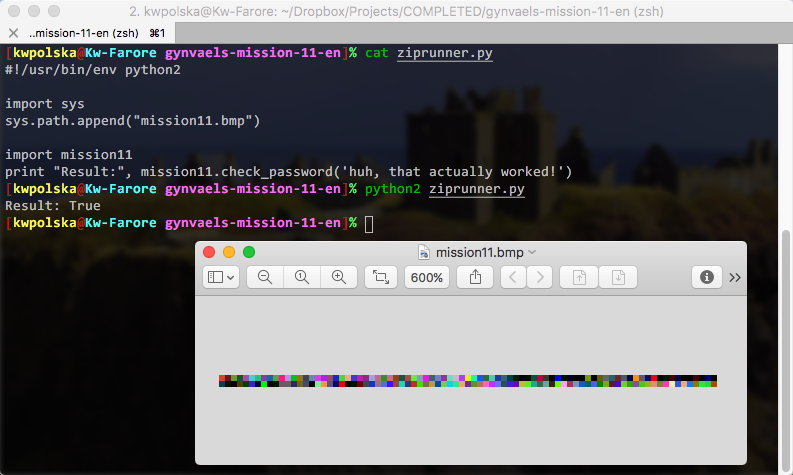
The .bmp file is runnable! We can use this code:

listings/gynvaels-mission-11-en/ziprunner.py(Source)

#!/usr/bin/env python2importsyssys.path.append("mission11.bmp")importmission11print"Result:",mission11.check_password('huh, that actually worked!')

And we get this:

/images/gynvaels-mission-11-en/running-bmp.png

Resources

Thanks for the mission (and BMP idea), Gynvael!

Codementor: Working with pelican

$
0
0
This post will help the beginner to get started with Pelican.

PyCharm: Using Docker Compose on Windows in PyCharm

$
0
0

By popular demand, PyCharm 2017.2 Professional Edition expands its Docker Compose support to those of you who run Windows. Let’s take a look and see how this works!

In our last Docker Compose post, we created a guest book in Flask. This time we’ll take a simple todo app in Django, and dockerize it. The starting point today will be a Django todo app which works locally, see the code on GitHub.

Setting Up Docker on Windows

If you don’t have Docker installed yet, you’ll need to make a decision about which version to install:

  • Are you using anything other than Windows 10 Pro or Enterprise, or do you have Virtualbox, VMware, or anything other than Hyper-V installed: get Docker Toolbox and Virtualbox.
  • If you’re on Windows 10 Pro or Enterprise, and you have either Hyper-V or no virtualization software installed: get Docker for Windows.

The reason for this is that Docker for Windows is based on Microsoft’s Hyper-V virtualization technology. Hyper-V is a seriously cool bit of tech that wraps your Windows in a hypervisor, rather than installing a hypervisor within Windows. What this means is that effectively you’ll be using a VM when you’re using your computer. Hypervisors are unable to run on a VM, so when you enable Hyper-V on Windows, you can’t run any other VM software anymore.

Setting Up Docker Toolbox

If you installed Docker for Windows, you can skip this section.

Docker Toolbox works by redirecting all your Docker commands to a Docker instance running either on a local VM, or on a cloud service. Today, let’s set up a Virtualbox VM on our local computer. Run with a cmd window:

docker-machine create --driver virtualbox default

Let’s verify that it works by connecting our command-line Docker. To do so, we need to run this cryptic looking command in cmd:

@FOR /f "tokens=*" %i IN ('docker-machine env default --shell=cmd') DO @%i

To see what it does, run docker-machine env default --shell=cmd, it will output several commands to set environment variables that configure Docker and Docker Compose. The long command above simply runs these all.

At this point, if you run docker run hello-world you should see a cheerful message that confirms that everything works:

Hello World Container Windows

Running Django in Docker

For our Django app we’ll need to create two containers: a database container, and a container which holds our actual application. We’ll use Docker Compose to link the containers together.

Let’s get started with writing our Dockerfile:

FROM python:3.6

WORKDIR /app

# By copying over requirements first, we make sure that Docker will cache
# our installed requirements rather than reinstall them on every build
COPY requirements.txt /app/requirements.txt
RUN pip install -r requirements.txt

# Now copy in our code, and run it
COPY . /app
EXPOSE 8000
CMD ["python", "manage.py", "runserver", "0.0.0.0:8000"]

This is enough configuration to start Django, however, before we can proceed we should also make sure that we configure our database. For this we should write a compose file where we add both our Django service, and our postgres service:

version: '2'
services:
 web:
   build: .
   ports:
    - "8000:8000"
   volumes:
    - .:/app
   links:
    - db

 db:
   image: "postgres:9.6"
   ports:
     - "5432:5432"
   environment:
     POSTGRES_PASSWORD: hunter2

The postgres image is easily configured with environment variables, for details read the image’s page on Docker hub. In this case we’re only setting the password, leaving the defaults for username and database. If you want to persist data when the container is destroyed, you’d need to create a named volume for the /var/lib/postgresql/data folder.

After adding these files, let’s just head over to our Django settings.py to configure our new database credentials:

DATABASES = {
   'default': {
       'ENGINE': 'django.db.backends.postgresql',
       'NAME': 'postgres',
       'USER': 'postgres',
       'PASSWORD': 'hunter2',
       'HOST': 'db'
   }
}

In a Docker Compose project, you can connect to linked containers by their service name unless you’ve specified an alias in the link section of the compose file. In this case we wrote:

links:
 - db

Therefore we should tell Django to look for the db host. Although I’m hardcoding it here for simplicity, ideally you’d get this configuration from environment variables.

This is all the configuration we need to do, and we can get started with building our images now.

Let’s first let PyCharm know where to find Docker. Go to Settings | Build, Execution, Deployment | Docker, and make sure that your Docker is configured. If you’re using Docker for Windows, and there’s no Docker listed, just click the green ‘+’ icon, and the defaults should be correct. If you’re using Docker machine, select the ‘Docker Machine’ radio button, and select the correct machine in the dropdown:

Docker-Machine Settings in PyCharm

After that’s set up, we can go and add our Docker run configuration, go to the ‘Edit Run Configurations’ screen, and add a Docker Deployment run configuration.

Add Docker Deployment Run Config

Let’s name it Rebuild Images, and in the Deployment field, select the compose file:

Docker Compose Run Configuration in PyCharm

Now when we run this configuration, we should see that all the layers are pulled from Docker hub, and both the database and Django are started.

Setting up the Python Remote Docker Interpreter

Now to make sure that we can debug our Django project, let’s configure PyCharm to use the Python interpreter within our Docker container. To do so go to Settings | Project Interpreter, and use the gear icon to select Add Remote:

Interpreter Settings

Choose the Docker Compose interpreter type, and make sure the docker-compose.yml file is selected. The service you choose under ‘service’ is the service you want to debug with this run configuration, when you start it, all services will still be started either way. As the only Python service is ‘web’, let’s select that here:

Add Compose Interpreter

Afterwards you should see that PyCharm detected the packages we configured in requirements.txt, and the path mappings:

configured-interpreter

Now we can add a normal Django server run configuration, just make sure to set host to ‘0.0.0.0’ to make sure that we listen to requests coming from outside the Docker container.

Now first run the migrations, by going to Tools | Run manage.py task, and then writing migrate. After this command has completed, we can use the regular run and debug icons in PyCharm to run and debug our Django project. So let’s run it!

To see our Django application in the browser, go to http://localhost:8000 if you’re using Docker for Windows. If you’re using Docker Machine, we’ll first need to check on which IP our Docker Machine is running, run docker-machine ip default on the command line. In my case this is 192.168.99.100, so I’ll go to http://192.168.99.100:8000 in the browser.

Now if you see a message “DisallowedHost at /”, go to Django’s settings.py, and find ALLOWED_HOSTS. During development we can change this to: ALLOWED_HOSTS = [‘*’] to disable this check. Please make sure you appropriately configure it when running in production however.

When everything works, we can add a breakpoint, and debug as usual:

Debug Django

Mike Driscoll: ANN: Python 101 Website

$
0
0

After making my first book, Python 101, freely available, I have been investigating the best way to make its contents available online as well. Since I write all my books in RestructuredText, I had a few options. I ended up going with Sphinx for now, but I may end up switching to something else in the future.

Sphinx is the documentation tool used by the Python language for their documentation and it is also the backbone of Read the Docs, which is a website of documentation for 3rd party Python packages. I tried the default Sphinx theme of Alabaster, but it didn’t have the two features I most wanted:

  • Mobile friendly
  • Next / Previous buttons to make chapter navigation easy

Or at least it didn’t appear to be easy to modify to make these features available. So I ended up switching to the Read the Docs theme as it had both of those features. You can check out the book at the following URL:
http://python101.pythonlibrary.org

Viewing all 24375 articles
Browse latest View live


<script src="https://jsc.adskeeper.com/r/s/rssing.com.1596347.js" async> </script>