Quantcast
Channel: Planet Python
Viewing all 24375 articles
Browse latest View live

PyCharm: Webinar Recording: Teaching Python 3.6 with Games

$
0
0

Yesterday Paul Craven, computer science professor and creator of the Arcade library for Python 2d games, gave a webinar about teaching Python to university students using game writing. The recording is now available:

During the webinar, Paul discussed his techniques for teaching introductory programming, an approach which he has refined over the years based on seeing what works and what doesn’t work. He covered:

  • The iterative process of producing teaching materials
  • Having a good toolchain (PyCharm for writing Sphinx docs, GitHub, ReadTheDocs, etc.)
  • How PyCharm’s IDE features impacted the quality of what students did (PEP 8, function completion, spell checking, etc.)
  • The effect Python 3.5/3.6 type hinting had on the learning/teaching experience
  • How games as a topic made learning fun, and how he adjusted the game library to make it more teachable
  • Teaching self-sufficiency by learning to browse APIs
  • The importance of already-working game examples

Paul then covered a bit of Arcade and the kinds of games it makes easy to write.

The webinar lasted a bit over an hour and had one of our highest number of questions posed during the session. We’ll try to get Paul back again in the future and go more in depth on game writing.

If you have any questions or comments about the webinar, feel free to leave them in the comments below, or you can reach us on Twitter. Paul Craven is on Twitter as well, his Twitter handle is @professorcraven.

-PyCharm Team
The Drive to Develop


Sandipan Dey: Deep Learning with TensorFlow in Python: Convolution Neural Nets

PyCharm: PyCharm 2017.2.1 RC out now

$
0
0

After the 2017.2 release, we haven’t been sitting still, and have fixed a lot of bugs:

  • Docker: Python console volume issue fix, and various other fixes
  • Debugging: concurrency visualization for Python 3.6, and console fixes
  • Inspections: variable type comparison bugs
  • Namespace package resolution bug on remote interpreters
  • JavaScript: Go to Declaration bug fix, and more
  • See details for all fixes in the release notes

You can try the release candidate of PyCharm 2017.2.1 now: get it from Confluence.

To keep up with the latest news on PyCharm, please subscribe to our blog posts (leave your email address in the box on the right), or follow us on Twitter.

-PyCharm Team
The Drive to Develop

Michy Alice: Taylor series with Python and Sympy: Revised

$
0
0

More than 2 years ago I wrote a short post on Taylor series. The post featured a simple script that took a single variable function (a sine in the example), printed out the Taylor expansion up to the nth term and plotted the approximation along with the original function. As you can see on the right on the “Popular posts” bar, that post is one of the most popular and I’m told it appears among the first results on Google.

Figure_1-1

The script I wrote originally was a bit clunky, and there surely was room for improvement. Last week I received an email from a reader, Josh, who sent me an improved version of the original post.

What has changed compared to the original post? Here is a short summary of the changes:

- Lambdify (from the sympy package) is used to speed up the computation.

- The plot function can now handle generic single variable functions and accepts arguments for more customized plotting behaviour.

I also made some improvements to the formatting, which was a bit horrible to say the least : )

Here is an approximation of the function log(x + 1) from the 1st up to the 9th order by steps of 2.

Figure_1

Note that the approximation is evaluated also for x <= 1 which does not make sense and should not be considered. Anyway, as expected, the farther you go from x0, the worse the approximation becomes. If you look closely in the output you’ll also see a warning since the evaluation of log(x + 1) in the region x <= 1 can not be done, but this doesn’t prevent the plot to be drawn.

You can find the improved version of the script here below. Thanks to Josh for taking the time to making it and sending it to me! You can find more about him at his GitHub profile.

Thanks for reading this post!

Peter Bengtsson: Fastest *local* cache backend possible for Django

$
0
0

I did another couple of benchmarks of different cache backends in Django. This is an extension/update on Fastest cache backend possible for Django published a couple of months ago. This benchmarking isn't as elaborate as the last one. Fewer tests and fewer variables.

I have another app where I use a lot of caching. This web application will run its cache server on the same virtual machine. So no separation of cache server and web head(s). Just one Django server talking to localhost:11211 (memcached's default port) and localhost:6379 (Redis's default port).

Also in this benchmark, the keys were slightly smaller. To simulate my applications "realistic needs" I made the benchmark fall on roughly 80% cache hits and 20% cache misses. The cache keys were 1 to 3 characters long and the cache values lists of strings always 30 items long (e.g. len(['abc', 'def', 'cba', ... , 'cab']) == 30).

Also, in this benchmark I was too lazy to test all different parsers, serializers and compressors that django-redis supports. I only test python-memcached==1.58 versus django-redis==4.8.0 versus django-redis==4.8.0 && msgpack-python==0.4.8.

The results are quite "boring". There's basically not enough difference to matter.

ConfigAverageMedianCompared to fastest
memcache4.51s3.90s100%
redis5.41s4.61s84.7%
redis_msgpack5.16s4.40s88.8%

NumFOCUS: Meet our GSoC Students Part 4: Astropy, SunPy & Shogun

Weekly Python StackOverflow Report: (lxxxv) stackoverflow python report

$
0
0

Brad Lucas: Installing The Solidity Plugin Into Webstorm And PyCharm

$
0
0

The following instructions work for other JetBrains environments. Here I only added the Solidity plugin to WebStorm and PyCharm.

The latest version of the Solidity plugin is available here: https://plugins.jetbrains.com/plugin/9475-intellij-solidity

Procedure

- Download plugin
  - Zip file
  - Do not uncompress
  - Copy to it's own directory

- WebStorm/PyCharm -> Properties
  - Plugins
  - Install Plugin from Disk

- Restart WebStorm/PyCharm

Ned Batchelder: Coverage.py podcast

$
0
0

I was a guest on the Podcast.__init__ podcast this week: Coverage.py with Ned Batchelder. We talk about coverage.py, how I got started on it, why it's good, why it's not good, how it works, and so on:

I've only listened to a small part of it. Getting ideas out verbally is different than in writing: there's no chance to go back and edit. To me, I sound a bit halting, because I was trying to get the words and sentences right in my head before I said them. I hope it sounds OK to others. Also, I think I said "dudes" and "guy" when I could have chosen more neutral words, sorry about that.

Tobias has been doing a great job with this podcast. It's not easy to consistently put out good content (I hate that word) on a regular schedule. He's been finding interesting people and giving them a good place to talk about their Python world, whatever that means to them.

BTW, this is my second time on Podcast.__init__, and it seems I never mentioned the first time in this blog, so here it is, from two years ago: Episode 5: Ned Batchelder. The focus then was the user group I organize, Boston Python, so a completely different topic:

And in the unlikely case that you want yet more of my dulcet tones, I was also on the Python Test podcast, mentioned in this blog post: The Value of Unit Tests.

Calvin Spealman: Why I Switched From Git to Microsoft OneDrive

$
0
0
I made the unexpected move with a string of recent projects to drop Git to sync between my different computers in favor of OneDrive, the file sync offering from Microsoft. Its like Dropbox, but "enterprise."

Feeling a little ashamed at what I previously would have scoffed at should I hear of it from another developer, I felt a little write up of the why and the experience could be a good idea. Now, I should emphasize that I'm not dropping Git for all my projects, just specific kinds of projects. I've been making this change in habit for projects that are just for me, not shared with anyone else. It has been especially helpful in projects I work on sporadically. More on why a little later.

So, what drove me away from Git, exactly?

On the smallest projects, like game jam hacks, I just wanted to code. I didn't want to think about revisions and commit messages. I didn't need branching or merges. I didn't even need to rollback to another version, ever. I just needed to write code. The only reason I needed anything at all is that I have my desktop machine, my work laptop, and my Windows tablet. It is especially because these projects are ones I tinker on in the little time between other things that its best to have them available any time and any where.

I had bad luck with Git in the past on those kinds of projects. If you only have a few moments to tinker, you likely don't have time to wrap up whatever change you were in the middle of. You don't have time to craft and push a commit, either.

I was already using OneDrive for the art assets of games. This worked well because I liked to draw on my tablet and it was a very fast and handle way to share assets between that and my main machine by just throwing it in a project folder on my OneDrive account, which auto-syncs between the machines. Once I already had a habit of creating those folders to manage art resources, when I was starting the next small game project it just became natural to start writing code in there too.

And, it has worked out surprisingly well. There's been a lot of benefits over Git. I don't have to explicitly commit and push, or pull on the other end, so changes I'm only halfway into are available on the other machine when I sit down and I can finish stuff back and forth. Its a really natural process. It is also kind of handy that I have everything available on my phone, if I want to pull up some game art to post somewhere during some downtime.

Of course, there are trade offs. The synchronizing being a background process can mean some delay and lack of predictability in when it runs, so there are times when I move directly from my tablet to computer, or the other way around, and have to wait a moment to get the files. But, that's the case when I have to do it manually, anyway, I suppose. It is just more obvious when you just wait, and can't actively do something about it.

Though I haven't used it yet, OneDrive did just add Version support in July. This is file-level, so I can't rollback a whole folder or project at once, but if I need an old version of a module or some sprites, I can trust I can get that now. This makes up for what was previously a major downside that I had only avoiding because I was doing this for small, throw-away projects.

So, maybe in the future, I'll ditch real version control for even larger projects.

Simple is Better Than Complex: A Minimal Django Application

$
0
0

In this article I want to explore some of the basic concepts of Django, setting up a minimal web application to get a deeper understanding of how Django works under the hoods.

An important disclaimer before we start, that’s not a tutorial about how to start a Django application, it’s more of an exploratory experiment for learning purpose.


Introduction

If you are reading this article, the chances are that you already know that Django is a Web framework written in Python. But that’s an abstract definition. In practice, Django is a Python package that lives inside the site-packages directory of your current Python installation. That means it lives alongside with other Python packages, such as Requests, Pillow and NumPy.

A simple way to verify a Django installation is importing it in a Python shell:

>>> import django
>>> print(django.get_version())
1.11.4

But the way we interact with Django is a little bit different than the way we interact with other Python packages. Usually we don’t import it directly into our Python programs to make use of its resources.

When we first start learning Django, we are taught that we should start a new project using the django-admin command-line utility by executing the startproject command.

The startproject command creates a basic Django project directory structure with the following files:

  • manage.py
  • settings.py
  • urls.py
  • wsgi.py

The contents of the files above are essentially a boilerplate code that’s generated using the templates inside the django.conf.project_template folder. It’s like a pre-configuration of commonly used resources.

For example, if you are going to develop a Web application, the chances are that you will need a database, handle user authentication, work with sessions, and so on. The boilerplate code from the startproject command makes our life easier. But that’s not the only way to start a new project. We could start everything from scratch. And that’s sort of what we are going to do in this article.

Also, the names are purely convention, which is a good thing because whenever you browse an existing Django project it’s easier to know where to find certain things.

In the next sections we are going to explore the role of each of those files in a Django project.


Running a Project Locally

To run the the development server, we usually execute the following command:

python manage.py runserver

The manage.py script is automatically generated when we start a new Django project by running the command:

django-admin startproject myproject

Basically the django-admin and manage.py does the same things. The main difference is that manage.py adds your project’s package in the sys.path and sets the environment variable DJANGO_SETTINGS_MODULE to point to your settings.py file.

That means we could run the development server of my project using the django-admin command-line utility. The difference is that we would need to provide manually the information of the path to my project’s package and the settings.py.

So, considering my project is in the following path: /home/projects/myproject, we can start the development server like this:

django-admin runserver --pythonpath='/home/projects/myproject' --settings=myproject.settings

Or if you are currently in the project root in the file system, you could perhaps do this to save typing:

django-admin runserver --pythonpath=. --settings=myproject.settings

As you can see, the settings.py module is the starting point of every Django project. It’s the file responsible for putting the pieces together and instructing Django on how to run our project; which apps are installed, what database the project uses (if any), the credentials to connect, where to find the project’s templates, the urls, the wsgi module and many other important configurations.

The name settings.py is just a convention. We could use any other name. As far as we tell Django where to find the required information.


The Settings Module

Now that we know the settings module is the central part to run our project, what’s the bare minimum configuration we need to feed Django, so to start the development server?

Before we answer that question, know that Django comes pre-configured. Before loading your project’s settings module, Django will load the global settings that can be found in the django.conf.global_settings.py file.

The link above takes you to the file directly in the Django’s GitHub repository. Take a moment and check it out.

What happen when Django finally loads your project’s settings module, is that it will override the default values from the global_settings.py.

The global_settings.py doesn’t have all the necessary information. We will need to provide at least a SECRET_KEY.

If you check the Django’s global_settings.py file, you will see right at the top of the file that the DEBUG configuration defaults to False. If you don’t override it to True, you will also need to configure the ALLOWED_HOSTS variable.

So, the bare minimum configuration just to successfully start the development server could be either defining the SECRET_KEY and DEBUG=True, or SECRET_KEY and ALLOWED_HOSTS.


Starting a Project From Scratch

To try things out, I created a file named tinyapp.py and added the following parameters to it:

DEBUG=TrueSECRET_KEY='4l0ngs3cr3tstr1ngw3lln0ts0l0ngw41tn0w1tsl0ng3n0ugh'

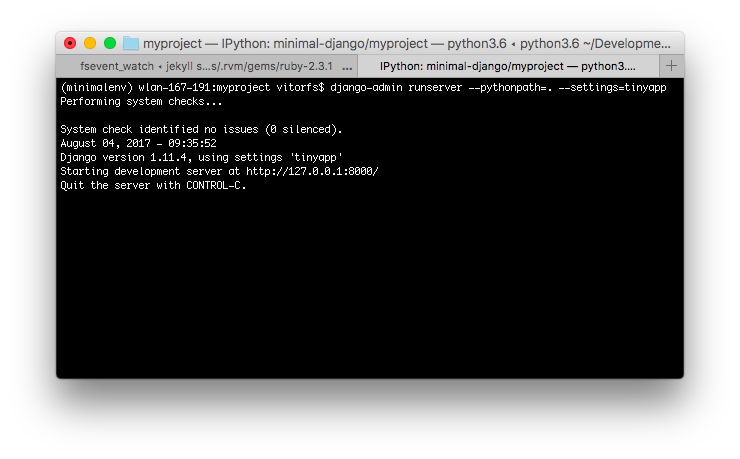
Let’s run it:

django-admin runserver --pythonpath=. --settings=tinyapp

django-admin runserver

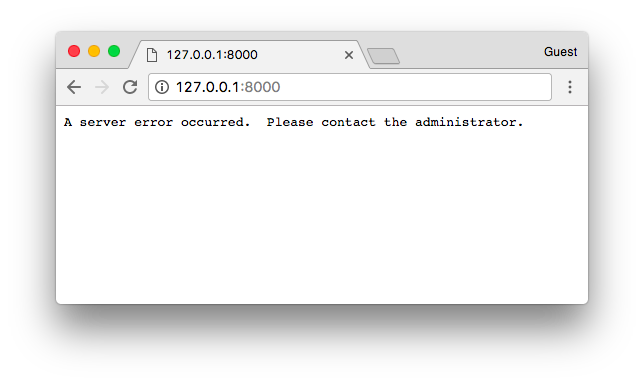
It’s running. Let’s see what happens when we open it in a web browser:

A server error occurred. Please contact the administrator.

At least something showed up. Let’s check the terminal for some further information about the error we got. Checking the terminal that I’m using to run the project, it says:

AttributeError: 'Settings' object has no attribute 'ROOT_URLCONF'

At the moment we happen to have no URL or view. Actually right now Django doesn’t even know where to look for URL patterns to see if it have something to process or show.

The ROOT_URLCONF expects the path to a special file that contains a list of URLs so it can match the requested path with the views within our project. This file needs to define a list named urlpatterns. That’s correct! We are talking about our well known urls.py module here.

But, so far we don’t need a urls.py file. We can tell Django to import the urlpatterns from our tinyapp.py file, so it can also be our ROOT_URLCONF.

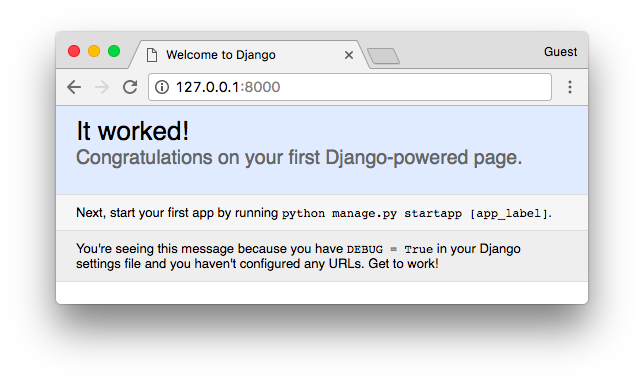
DEBUG=TrueSECRET_KEY='4l0ngs3cr3tstr1ngw3lln0ts0l0ngw41tn0w1tsl0ng3n0ugh'ROOT_URLCONF=__name__urlpatterns=[]

It worked!

There we go! Our first Django-powered page!


Working With Views

So far so good. But our tiny Django app isn’t doing much. Let’s add our very first view.

A Django view is just a Python function that receives an HttpRequest object and returns an HttpResponse.

Truth is, our view functions can be defined anywhere in our project. Django won’t look for a file named views.py. Again, it’s just a convention. Unless you have a good reason for doing it in a different way, stick with the convention.

We will get there later. For now, let’s keep writing code inside the tinyapp.py file.

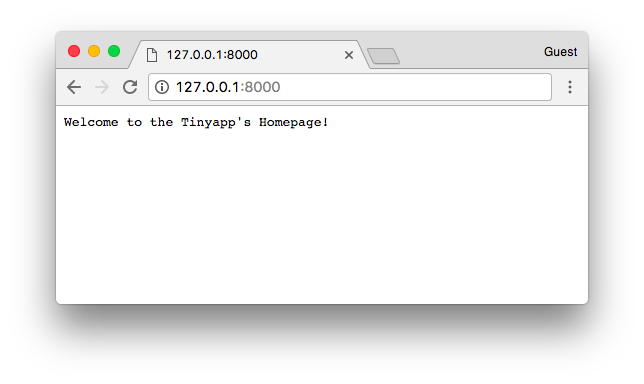
Below, our first Django view named home. It simply returns a text saying “Welcome to the Tinyapp’s Homepage!”.

fromdjango.httpimportHttpResponseDEBUG=TrueSECRET_KEY='4l0ngs3cr3tstr1ngw3lln0ts0l0ngw41tn0w1tsl0ng3n0ugh'ROOT_URLCONF=__name__defhome(request):returnHttpResponse('Welcome to the Tinyapp\'s Homepage!')urlpatterns=[]

The next step is instructing Django when to return this view to the visitor. We can do that by adding an entry to the urlpatterns list.

The urlpatterns list expects instances of url() which can be imported from django.conf.urls.

To define a url() you need to at least inform a regex compatible with Python’s re module and a view function or the result of as_view() for class-based views.

A basic url routing to the homepage looks like this:

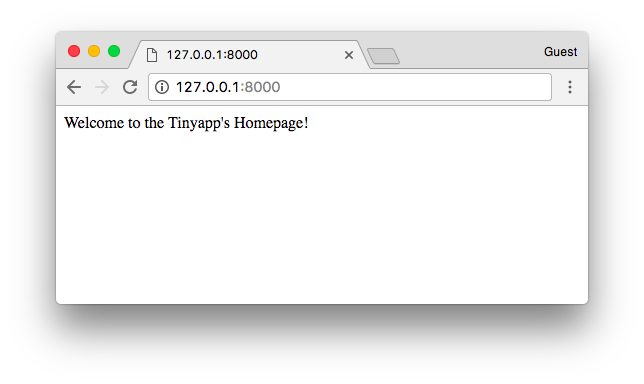
fromdjango.conf.urlsimporturlfromdjango.httpimportHttpResponseDEBUG=TrueSECRET_KEY='4l0ngs3cr3tstr1ngw3lln0ts0l0ngw41tn0w1tsl0ng3n0ugh'ROOT_URLCONF=__name__defhome(request):returnHttpResponse('Welcome to the Tinyapp\'s Homepage!')urlpatterns=[url(r'^$',home),]

The result is:

Welcome to the Tinyapp's Homepage!


HTML Templates

Even though we are just returning a string in our first view, the browser tries to render it as if it was an HTML page.

If you want to return text only, you can pass this information along in the HttpResponse so the browser will know it’s working with plain text only and won’t try to do anything smart with the response body:

fromdjango.conf.urlsimporturlfromdjango.httpimportHttpResponseDEBUG=TrueSECRET_KEY='4l0ngs3cr3tstr1ngw3lln0ts0l0ngw41tn0w1tsl0ng3n0ugh'ROOT_URLCONF=__name__defhome(request):returnHttpResponse('Welcome to the Tinyapp\'s Homepage!',content_type='text/plain')urlpatterns=[url(r'^$',home),]

You can see that the browser renders it a little bit different, as it won’t try to parse the content as HTML:

Welcome to the Tinyapp's Homepage!

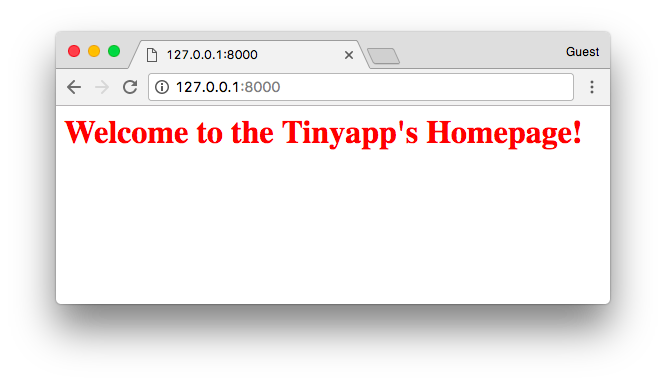
But we know that’s not the case in most of the cases while developing Web applications. Let’s remove the content_type and add some HTML to our pages.

fromdjango.conf.urlsimporturlfromdjango.httpimportHttpResponseDEBUG=TrueSECRET_KEY='4l0ngs3cr3tstr1ngw3lln0ts0l0ngw41tn0w1tsl0ng3n0ugh'ROOT_URLCONF=__name__defhome(request):returnHttpResponse('<h1 style="color:red">Welcome to the Tinyapp\'s Homepage!</h1>')urlpatterns=[url(r'^$',home),]

Welcome to the Tinyapp's Homepage!

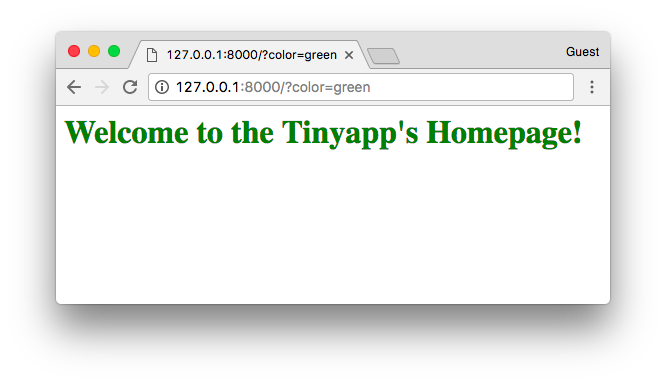
We can keep it on and make it a little bit more dynamic:

Warning! Don't use user's input directly like that in real projects! You should always sanitize the user input to avoid security issues like XSS.
fromdjango.conf.urlsimporturlfromdjango.httpimportHttpResponseDEBUG=TrueSECRET_KEY='4l0ngs3cr3tstr1ngw3lln0ts0l0ngw41tn0w1tsl0ng3n0ugh'ROOT_URLCONF=__name__defhome(request):color=request.GET.get('color','')returnHttpResponse('<h1 style="color:'+color+'">Welcome to the Tinyapp\'s Homepage!</h1>')# don't use user input like that in real projects!urlpatterns=[url(r'^$',home),]

Welcome to the Tinyapp's Homepage!

We could keep playing with strings and generating HTML on-the-fly:

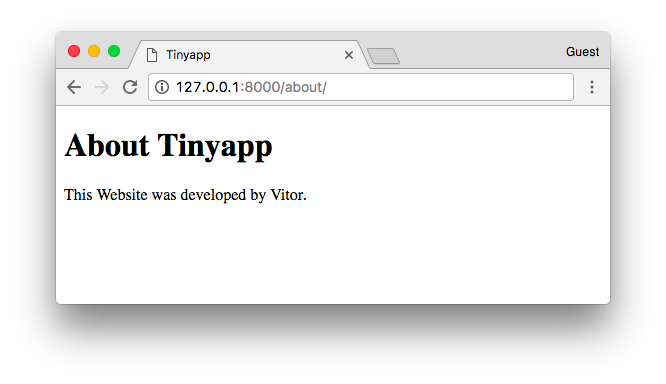
fromdjango.conf.urlsimporturlfromdjango.httpimportHttpResponseDEBUG=TrueSECRET_KEY='4l0ngs3cr3tstr1ngw3lln0ts0l0ngw41tn0w1tsl0ng3n0ugh'ROOT_URLCONF=__name__defhome(request):color=request.GET.get('color','')returnHttpResponse('<h1 style="color:'+color+'">Welcome to the Tinyapp\'s Homepage!</h1>')defabout(request):title='Tinyapp'author='Vitor Freitas'html='''<!DOCTYPE html>
    <html>
    <head>
      <title>'''+title+'''</title>
    </head>
    <body>
        <h1>About '''+title+'''</h1>
        <p>This Website was developed by '''+author+'''.</p>
    </body>
    </html>'''returnHttpResponse(html)urlpatterns=[url(r'^$',home),url(r'^about/$',about),]

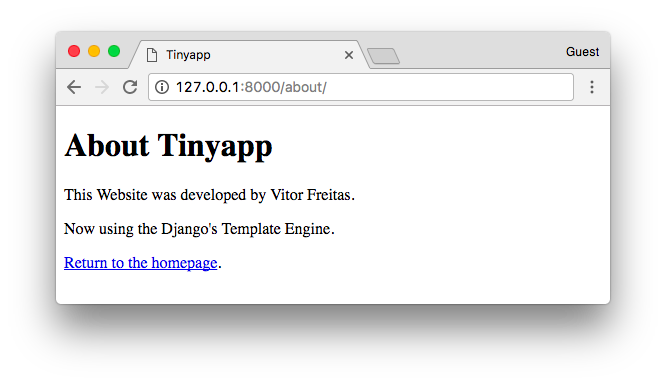
About Tinyapp

But hey, there should be a better way to do it. And sure thing there is. That’s what the Django’s Template Engine is all about.

Before we can use it, we need to tell Django our project makes use of the template engine:

fromdjango.conf.urlsimporturlfromdjango.httpimportHttpResponseDEBUG=TrueSECRET_KEY='4l0ngs3cr3tstr1ngw3lln0ts0l0ngw41tn0w1tsl0ng3n0ugh'ROOT_URLCONF=__name__TEMPLATES=[{'BACKEND':'django.template.backends.django.DjangoTemplates'},]defhome(request):# body of the function...defabout(request):# body of the function...urlpatterns=[url(r'^$',home),url(r'^about/$',about),]

The Django Template Engine have its own syntax rules. Basically it will read a file (a template), usually a .html file, parse it, process all the special tags like {{var}} or {%foruserinusers%} and the final result will be an output string, which normally is a valid HTML document which is returned to the user.

See the example below:

fromdjango.conf.urlsimporturlfromdjango.httpimportHttpResponseDEBUG=TrueSECRET_KEY='4l0ngs3cr3tstr1ngw3lln0ts0l0ngw41tn0w1tsl0ng3n0ugh'ROOT_URLCONF=__name__TEMPLATES=[{'BACKEND':'django.template.backends.django.DjangoTemplates'},]defhome(request):color=request.GET.get('color','')returnHttpResponse('<h1 style="color:'+color+'">Welcome to the Tinyapp\'s Homepage!</h1>')fromdjango.templateimportenginesfromdjango.template.loaderimportrender_to_stringdefabout(request):title='Tinyapp'author='Vitor Freitas'about_template='''<!DOCTYPE html>
    <html>
    <head>
      <title>{{ title }}</title>
    </head>
    <body>
      <h1>About {{ title }}</h1>
      <p>This Website was developed by {{ author }}.</p>
      <p>Now using the Django's Template Engine.</p>
      <p><a href="{% url 'homepage' %}">Return to the homepage</a>.</p>
    </body>
    </html>
    '''django_engine=engines['django']template=django_engine.from_string(about_template)html=template.render({'title':title,'author':author})returnHttpResponse(html)urlpatterns=[url(r'^$',home,name='homepage'),url(r'^about/$',about,name='aboutpage'),]

Template Engine

Here we are using the Django’s Template Engine programmatically. But what we normally do is storing the HTML templates outside the Python code and telling Django where to look for the templates.

Let’s do it step-by-step.

First, create a folder named “templates” alongside our tinyapp.py file.

Now, save the content of the about_template variable inside an HTML file named about.html, inside our recently created templates folder.

templates/about.html

<!DOCTYPE html><html><head><title>{{title}}</title></head><body><h1>About {{title}}</h1><p>This Website was developed by {{author}}.</p><p>Now using the Django's Template Engine.</p><p><ahref="{%url'homepage'%}">Return to the homepage</a>.</p></body></html>

That’s what our project looks like now:

myproject/
 |-- templates/
 |    +-- about.html
 +-- tinyapp.py

So, now instead of loading the template from a Python string, we can load it from the filesystem.

First and most importantly, we tell Django where to find the templates:

TEMPLATES=[{'BACKEND':'django.template.backends.django.DjangoTemplates','DIRS':['/home/projects/myproject/templates/'],},]

Now we can refactor our about view:

fromdjango.conf.urlsimporturlfromdjango.httpimportHttpResponsefromdjango.template.loaderimportrender_to_stringDEBUG=TrueSECRET_KEY='4l0ngs3cr3tstr1ngw3lln0ts0l0ngw41tn0w1tsl0ng3n0ugh'ROOT_URLCONF=__name__TEMPLATES=[{'BACKEND':'django.template.backends.django.DjangoTemplates','DIRS':['/home/projects/myproject/templates/'],},]defhome(request):color=request.GET.get('color','')returnHttpResponse('<h1 style="color:'+color+'">Welcome to the Tinyapp\'s Homepage!</h1>')defabout(request):title='Tinyapp'author='Vitor Freitas'html=render_to_string('about.html',{'title':title,'author':author})returnHttpResponse(html)urlpatterns=[url(r'^$',home,name='homepage'),url(r'^about/$',about,name='aboutpage'),]

You know the render function from django.shortcuts? That’s exactly what it does: use the render_to_string function and returns an HttpResponse instance.


Conclusions

I hope you enjoyed reading this article and that you learned something new today! As I said in the beginning, this was just some sort of experiment. I strongly advise you to get your hands dirty and try things out. It makes you feel more comfortable with Django development, as you get a deeper understanding of its mechanics.

Talk Python to Me: #124 Python for AI research

$
0
0
We all know that Python is a major player in the application of Machine Learning and AI. That often involves grabbing Keras or TensorFlow and applying it to a problem. But what about AI research? When you're actually trying to create something that has yet to be created? How do researchers use Python here? <br/> <br/> Today you'll meet Alex Lavin, a Python developer and research scientist at Vicarious where they are trying to develop artificial general intelligence for robots.<br/> <br/> Links from the show:<br/> <br/> <div style="font-size: .85em;"><b>Alex on the web</b>: <a href="https://www.lavin.io/" target="_blank">lavin.io</a><br/> <b>Alex on Twitter</b>: <a href="https://twitter.com/theAlexLavin" target="_blank">@theAlexLavin</a><br/> <b>Vicarious</b>: <a href="http://www.vicarious.com/" target="_blank">vicarious.com</a><br/> <b>NOVA's Great Robot Race Documentary</b>: <a href="https://www.youtube.com/watch?v=vCRrXQRvC_I" target="_blank">youtube.com</a><br/></div>

Reuven Lerner: foo(y=y), and similar code that confuses Python newbies

$
0
0

Let’s define a simple Python function:

In [1]: def foo(x):
 ...: return x * x
 ...:

In [2]: foo(5)
Out[2]: 25

In [3]: foo(10)
Out[3]: 100

As we can see, this function has a single parameter, “x”.  In Python, parameters are local variables whose values are set by whoever is calling the function. So we know that x is a local variable in the function “foo” — which means that “x” doesn’t exist outside of the function “foo”.

I can define a more complex function, which has two parameters:

In [4]: def mul(x, y):
 ...: return x * y
 ...:

In [5]: mul(5, 3)
Out[5]: 15

In [6]: mul(6, 8)
Out[6]: 48

In this example, the “mul” function must take two arguments. “x” and “y” are both local variables within “mul”, meaning that they only exist within the “mul” function.

What happens if I define a “y” variable outside of our “mul” function?  That would be a global variable, which shouldn’t be confused with a local one. Local variables exist only within a function, whereas global variables exist outside of functions. For example:

In [7]: y = 100

In [8]: mul(5,3)
Out[8]: 15

I have thus defined the global variable “y”, which has the value 100. Inside of the function, Python ignores our global “y” variable, because according to Python’s scoping (LEGB) scoping rules, local variables get priority.

So far, so good. But now let’s make things a bit more complex: Let’s change our “mul” function such that the “y” parameter takes a default value. In other words, I’ll be able to call “mul” with two arguments (as before) or with one argument (and thus use the default value for “y”):

In [9]: def mul(x, y=10):
 ...: return x * y
 ...:

In [10]: mul(5)
Out[10]: 50

In [11]: mul(7)
Out[11]: 70

In [12]: mul(5,7)
Out[12]: 35

Notice that once again, our global “y” value has no effect whatsoever on our local “y” parameter: Inside of the function, when Python looks for the value of “y”, it finds the local variable by that name, and uses the value accordingly.

We can even go so far as to give both “x” and “y” default values. Here’s how that would look:

In [13]: def mul(x=3, y=10):
 ...: return x * y
 ...:

In [14]: mul()
Out[14]: 30

In [15]: mul(5)
Out[15]: 50

In [16]: mul(7,3)
Out[16]: 21

Let’s say I want to use the default value of x, but pass a value to y.  How can I do that?  By calling the function, but explicitly naming the “y” parameter, along with a value:

In [17]: mul(y=3)
Out[17]: 9

In [18]: mul(y=5)
Out[18]: 15

What happens if I do this:

In [19]: mul(y=y)

In this case, I’m calling the function, and I’m saying that I want to set the “y” local variable to a value.  But what value am I giving it?  Well, I’m not in the function when I call the function.  And thus the only “y” value available to me is the global“y” variable that I had set earlier.

In other words: I want to call the “mul” function, setting the “y” parameter to the current value of the “y” global variable.

Why would we do such a thing? Relative newcomers to Python find this hard to read, and wonder why (or “y”) we use the same variable name on both the left and right sides.  And the answer is… it’s often easier and more convenient.  The example I’ve provided here is contrived, but there are cases in which you might want to define a function called “key” that sorts your list in a particular way.  With that function defined, you can then say

mylist.sort(key=key)

I personally prefer to define my sorting functions using a different convention, starting with the word “by”, so I can say something like

mylist.sort(key=by_last_name)

At the end of the day, this “y=y” code makes sense if you understand Python’s scoping rules, as well as how function defaults are defined and assigned. Want to know more? I’m giving a live, online course about Python functions (including exactly these topics) on Sunday, August 13th. More details are here, and early-bird tickets are still available!

The post foo(y=y), and similar code that confuses Python newbies appeared first on Lerner Consulting Blog.

Will McGugan: Amazon S3 Filesystem for Python

$
0
0

I'd like to announce an new Python module to make working with Amazon S3 files a whole lot easier.

The S3FS class in fs-s3fs wraps an Amazon S3 bucket in a PyFilesystem interface. There was an S3FS class built in to the first version of PyFilesystem, but it had suffered from using an older version of 'boto' (Amazon's S3 interface) and was in need of maintenance. The new version is up-to-date with PyFilesystem2 and boto3, and works with Python2.7 and Python3.X.

If you aren't familiar with PyFilesystem, it is a common interface to anything that resembles a filesystem. Amazon S3 isn't quite a full filesystem, but close enough that it can be made to work in the same way as the files and directories on your local drive (or any other supported filesystem for that matter).

For instance here's how you might uploads files from your local drive to an S3 bucket:

from fs.copy import copy_dir
copy_dir('~/projects', 's3://backups')

This backs up a 'projects' folder in your home directory to a bucket called 'backups' with a simple file copy. The two strings are FS URLs and could refer to any of the supported filesystems. You could use the same function to download files from S3 straight in to a zip file with copy_dir('s3://backups', 'zip://bucket.zip') -- literally any combination of source and destination will work.

This magic is supplied by a relatively new feature to PyFilesystem, which is the automatic discovery of new protocols. The beauty of this system is that applications using PyFilesystem can now work with S3 without any changes. For example Moya gains the ability to serve index pages for S3 buckets.

If you have S3 configured on your system, here's how you can serve index pages for a bucket:

$ pip install moya fs-s3fs -U
$ moya serve s3://mybucket --show-debug
© 2017 Will McGugan

Serving an S3 bucket with Moya and PyFilesystem.

I've been guilty of using this blog for announcements rather than discussing techie things, but I kind of feel that the magic here is worthy of a more detailed blog post. Let me know in the comments if there is anything that could use further explanation.

If you have any issues with S3FS (it's a relatively young project), let me know on S3FS GitHub issues.

Import Python: Import Python 136

$
0
0
Worthy Read

I faced an interesting challenge at work the other day. I felt like sharing because it might save a few hours for others, or reveal some insights about the Python internals.
python object

In this video series, we will be tackling Python Regular Expressions. The first few videos we will go over the basics, and then tackle some intermediate problems using Python Regular Expressions.
regular expression

eSignature API Integration. HelloSign eSign API. Test the API for free.
sponsor

process pool

In this tutorial, I’ll be taking you through the basics of developing a vehicle license plate recognition system using the concepts of machine learning with Python.
machine learning

core-python
,
code snippets

logging beyond 101
logging

We will see in this article how to detect if an image contains celebrities with Sightengine.
machine learning

Curator's Note - I am a big Game of Thrones fan so had to share this. As a fan of Game of Thrones, I couldn’t wait for it to return for a 7th season. Watching the season premier, I greatly enjoyed that iconic scene of Sam doing his chores at the Citadel. I enjoyed it so much that I wanted to see more of it… much more of it. In this post we’ll take the short video compilation of Sam cleaning the Citadel, we will split it to multiple sub clips and create a video of Sam cleaning the Citadel using a random mix of those sub clips.
video processing

The aim of this short notebook is to show how to use NumPy and SciPy to play with spectral audio signal analysis (and synthesis).
numpy
,
scipy

Every once in a while it is useful to take a step back and look at pandas’ functions and see if there is a new or better way to do things. I was recently working on a problem and noticed that pandas had a Grouper function that I had never used before. I looked into how it can be used and it turns out it is useful for the type of summary analysis I tend to do on a frequent basis.
pandas

For any program that is used by more than one person you need a way to control identity and permissions. There are myriad solutions to that problem, but most of them are tied to a specific framework. Yosai is a flexible, general purpose framework for managing role-based access to your applications that has been decoupled from the underlying platform. This week the author of Yosai, Darin Gordon, joins us to talk about why he started it, his experience porting it from Java, and where he hopes to take it in the future.
podcast

Recently, I worked on a Python project that required the whole codebase to be protected using Cython. Although protecting Python sources from reverse engineering seems like a futile task at first, cythonizing all the code leads to a reasonable amount of security (the binary is very difficult to disassemble, but it's still possible to e.g. monkey patch parts of the program). This security comes with a price though - the primary use case for Cython is writing compiled extensions that can easily interface with Python code. Therefore, the support for non-trivial module/package structures is rather limited and we have to do some extra work to achieve the desired results.
cpython

The complication arises when invoking awaitable functions. Doing so requires an async defined code block or coroutine. A non-issue except that if your caller has to be async, then you can’t call it either unless its caller is async. Which then forces its caller into an async block as well, and so on. This is “async creep”.
asyncio

Maybe you’ve heard about it in preparing for coding interviews. Maybe you’ve struggled through it in an algorithms course. Maybe you’re trying to learn how to code on your own, and were told somewhere along the way that it’s important to understand dynamic programming. Using dynamic programming (DP) to write algorithms is as essential as it is feared.
algorithms

pandas

mrjob
,
mapreduce

Today, let’s use TensorFlow to build an artificial neural network that detects fake banknotes.
tensorflow

What would you do if you wanted to know which files are the most similar to a particular text-based file? For example to find a particular configuration file which has changed its filename and its contents.
project


Jobs

London, United Kingdom
Forward Partners is the UK's largest dedicated seed stage VC with £80m AUM. We focus on next-generation eCommerce companies and applied AI startups.


Projects

pytorch-nice - 53 Stars, 1 Fork
Support powerful visual logging in PyTorch.

CryptoTracker - 52 Stars, 2 Fork
A complete open source system for tracking and visualizing cryptocurrency price movements on leading exchanges.

Imports-in-Python - 41 Stars, 4 Fork
A guide on how importing works in Python.

Tensorflow solve minesweeper.

Baidu-Dogs - 19 Stars, 0 Fork
Baidu competition for classifying dogs.

EffectiveTensorflow - 4 Stars, 1 Fork
Guides and best practices for effective use of Tensorflow.

minimal_flight_search - 3 Stars, 0 Fork
A minimalist flight search engine written in Python.

django_rest_example - 3 Stars, 0 Fork
Django/DRF rest application example.

ytsearch - 0 Stars, 0 Fork
A program to search and view YouTube videos.


Codementor: Design Simple Dialog Using PyQt5 Designer Tool

$
0
0
This articles talks about designing simple dialog using PyQt5 designer tool and the convert and integrate it in python.

Weekly Python Chat: DjangoCon US Chat 1

$
0
0

I'll be holding a live chat with the friendly folks I meet at DjangoCon US.

This will be the first of two chats at DjangoCon US (at different times on different days).

Semaphore Community: Testing Python Applications with Pytest

$
0
0

This article is brought with ❤ to you by Semaphore.

Introduction

Testing applications has become a standard skill set required for any competent developer today. The Python community embraces testing, and even the Python standard library has good inbuilt tools to support testing. In the larger Python ecosystem, there are a lot of testing tools. Pytest stands out among them due to its ease of use and its ability to handle increasingly complex testing needs.

This tutorial will demonstrate how to write tests for Python code with pytest, and how to utilize it to cater for a wide range of testing scenarios.

Prerequisites

This tutorial uses Python 3, and we will be working inside a virtualenv.
Fortunately for us, Python 3 has inbuilt support for creating virtual environments.
To create and activate a virtual environment for this project, let's run the following commands:

mkdir pytest_project
cd pytest_project
python3 -m venv pytest-env

This creates a virtual environment called pytest-env in our working directory.

To begin using the virtualenv, we need to activate it as follows:

source pytest-env/bin/activate

As long as the virtualenv is active, any packages we install will be installed in our virtual environment, rather than in the global Python installation.

To get started, let's install pytest in our virtualenv.

pip install pytest

Basic Pytest Usage

We will start with a simple test. Pytest expects our tests to be located in files whose names begin with test_ or end with _test.py. Let's create a file called test_capitalize.py, and inside it we will write a function called capital_case which should take a string as its argument, and should return a capitalized version of the string. We will also write a test, test_capital_case to ensure that the function does what it says. We prefix our test function names with test_, since this is what pytest expects our test functions to be named.

# test_capitalize.pydefcapital_case(x):returnx.capitalize()deftest_capital_case():assertcapital_case('semaphore')=='Semaphore'

The immediately noticeable thing is that pytest uses a plain assert statement, which is much easier to remember and use compared to the numerous assertSomething functions found in unittest.

To run the test, execute the pytest command:

pytest

We should see that our first test passes.

A keen reader will notice that our function could lead to a bug. It does not check the type of the argument to ensure that it is a string. Therefore, if we passed in a number as the argument to the function, it would raise an exception.

We would like to handle this case in our function by raising a custom exception with a friendly error message to the user.

Let's try to capture this in our test:

# test_capitalize.pyimportpytestdeftest_capital_case():assertcapital_case('semaphore')=='Semaphore'deftest_raises_exception_on_non_string_arguments():withpytest.raises(TypeError):capital_case(9)

The major addition here is the pytest.raises helper, which asserts that our function should raise a TypeError in case the argument passed is not a string.

Running the tests at this point should fail with the following error:

def capital_case(x):
>       return x.capitalize()
E       AttributeError: 'int' object has no attribute 'capitalize'

Since we've verified that we have not handled such a case, we can go ahead and fix it.

In our capital_case function, we should check that the argument passed is a string or a string subclass before calling the capitalize function. If it is not, we should raise a TypeError with a custom error message.

# test_capitalize.pydefcapital_case(x):ifnotisinstance(x,str):raiseTypeError('Please provide a string argument')returnx.capitalize()

When we rerun our tests, they should be passing once again.

Using Pytest Fixtures

In the following sections, we will explore some more advanced pytest features. To do this, we will need a small project to work with.

We will be writing a wallet application that enables its users to add or spend money in the wallet. It will be modeled as a class with two instance methods: spend_cash and add_cash.

We'll get started by writing our tests first. Create a file called test_wallet.py in the working directory, and add the following contents:

# test_wallet.pyimportpytestfromwalletimportWallet,InsufficientAmountdeftest_default_initial_amount():wallet=Wallet()assertwallet.balance==0deftest_setting_initial_amount():wallet=Wallet(100)assertwallet.balance==100deftest_wallet_add_cash():wallet=Wallet(10)wallet.add_cash(90)assertwallet.balance==100deftest_wallet_spend_cash():wallet=Wallet(20)wallet.spend_cash(10)assertwallet.balance==10deftest_wallet_spend_cash_raises_exception_on_insufficient_amount():wallet=Wallet()withpytest.raises(InsufficientAmount):wallet.spend_cash(100)

First things first, we import the Wallet class and the InsufficientAmount exception that we expect to raise when the user tries to spend more cash than they have in their wallet.

When we initialize the Wallet class, we expect it to have a default balance of 0. However, when we initialize the class with a value, that value should be set as the wallet's initial balance.

Moving on to the methods we plan to implement, we test that the add_cash method correctly increments the balance with the added amount. On the other hand, we are also ensuring that the spend_cash method reduces the balance by the spent amount, and that we can't spend more cash than we have in the wallet. If we try to do so, an InsufficientAmount exception should be raised.

Running the tests at this point should fail, since we have not created our Wallet class yet. We'll proceed with creating it. Create a file called wallet.py, and we will add our Wallet implementation in it. The file should look as follows:

# wallet.pyclassInsufficientAmount(Exception):passclassWallet(object):def__init__(self,initial_amount=0):self.balance=initial_amountdefspend_cash(self,amount):ifself.balance<amount:raiseInsufficientAmount('Not enough available to spend {}'.format(amount))self.balance-=amountdefadd_cash(self,amount):self.balance+=amount

First of all, we define our custom exception, InsufficientAmount, which will be raised when we try to spend more money than we have in the wallet. The Wallet class then follows. The constructor accepts an initial amount, which defaults to 0 if not provided. The initial amount is then set as the balance.

In the spend_cash method, we first check that we have a sufficient balance. If the balance is lower than the amount we intend to spend, we raise the InsufficientAmount exception with a friendly error message.

The implementation of add_cash then follows, which simply adds the provided amount to the current wallet balance.

Once we have this in place, we can rerun our tests, and they should be passing.

pytest -q test_wallet.py

.....
5 passed in 0.01 seconds

Refactoring our Tests with Fixtures

You may have noticed some repetition in the way we initialized the class in each test. This is where pytest fixtures come in. They help us set up some helper code that should run before any tests are executed, and are perfect for setting up resources that are needed by the tests.

Fixture functions are created by marking them with the @pytest.fixture decorator. Test functions that require fixtures should accept them as arguments. For example, for a test to receive a fixture called wallet, it should have an argument with the fixture name, i.e. wallet.

Let's see how this works in practice. We will refactor our previous tests to use test fixtures where appropriate.

# test_wallet.pyimportpytestfromwalletimportWallet,InsufficientAmount@pytest.fixturedefempty_wallet():'''Returns a Wallet instance with a zero balance'''returnWallet()@pytest.fixturedefwallet():'''Returns a Wallet instance with a balance of 20'''returnWallet(20)deftest_default_initial_amount(empty_wallet):assertempty_wallet.balance==0deftest_setting_initial_amount(wallet):assertwallet.balance==20deftest_wallet_add_cash(wallet):wallet.add_cash(80)assertwallet.balance==100deftest_wallet_spend_cash(wallet):wallet.spend_cash(10)assertwallet.balance==10deftest_wallet_spend_cash_raises_exception_on_insufficient_amount(empty_wallet):withpytest.raises(InsufficientAmount):empty_wallet.spend_cash(100)

In our refactored tests, we can see that we have reduced the amount of boilerplate code by making use of fixtures.

We define two fixture functions,wallet and empty_wallet, which will be responsible for initializing the Wallet class in tests where it is needed, with different values.

For the first test function, we make use of the empty_wallet fixture, which provided a wallet instance with a balance of 0 to the test.
The next three tests receive a wallet instance initialized with a balance of 20. Finally, the last test receives the empty_wallet fixture. The tests can then make use of the fixture as if it was created inside the test function, as in the tests we had before.

Rerun the tests to confirm that everything works.

Utilizing fixtures helps us de-duplicate our code. If you notice a case where a piece of code is used repeatedly in a number of tests, that might be a good candidate to use as a fixture.

Some Pointers on Test Fixtures

Here are some pointers on using test fixtures:

  • Each test is provided with a newly-initialized Wallet instance, and not one that has been used in another test.

  • It is a good practice to add docstrings for your fixtures. To see all the available fixtures, run the following command:

pytest --fixtures

This lists out some inbuilt pytest fixtures, as well as our custom fixtures. The docstrings will appear as the descriptions of the fixtures.

wallet
    Returns a Wallet instance with a balance of 20
empty_wallet
    Returns a Wallet instance with a zero balance

Parametrized Test Functions

Having tested the individual methods in the Wallet class, the next step we should take is to test various combinations of these methods. This is to answer questions such as "If I have an initial balance of 30, and spend 20, then add 100, and later on spend 50, how much should the balance be?"

As you can imagine, writing out those steps in the tests would be tedious, and pytest provides quite a delightful solution: Parametrized test functions

To capture a scenario like the one above, we can write a test:

# test_wallet.py@pytest.mark.parametrize("earned,spent,expected",[(30,10,20),(20,2,18),])deftest_transactions(earned,spent,expected):my_wallet=Wallet()my_wallet.add_cash(earned)my_wallet.spend_cash(spent)assertmy_wallet.balance==expected

This enables us to test different scenarios, all in one function. We make use of the @pytest.mark.parametrize decorator, where we can specify the names of the arguments that will be passed to the test function, and a list of arguments corresponding to the names.

The test function marked with the decorator will then be run once for each set of parameters.

For example, the test will be run the first time with the earned parameter set to 30, spent set to 10, and expected set to 20. The second time the test is run, the parameters will take the second set of arguments. We can then use these parameters in our test function.

This elegantly helps us capture the scenario:

  • My wallet initially has 0,
  • I add 30 units of cash to the wallet,
  • I spend 10 units of cash, and
  • I should have 20 units of cash remaining after the two transactions.

This is quite a succinct way to test different combinations of values without writing a lot of repeated code.

Combining Test Fixtures and Parametrized Test Functions

To make our tests less repetitive, we can go further and combine test fixtures and parametrize test functions. To demonstrate this, let's replace the wallet initialization code with a test fixture as we did before. The end result will be:

# test_wallet.py@pytest.fixturedefmy_wallet():'''Returns a Wallet instance with a zero balance'''returnWallet()@pytest.mark.parametrize("earned,spent,expected",[(30,10,20),(20,2,18),])deftest_transactions(my_wallet,earned,spent,expected):my_wallet.add_cash(earned)my_wallet.spend_cash(spent)assertmy_wallet.balance==expected

We will create a new fixture called my_wallet that is exactly the same as the empty_wallet fixture we used before. It returns a wallet instance with a balance of 0. To use both the fixture and the parametrized functions in the test, we include the fixture as the first argument, and the parameters as the rest of the arguments.

The transactions will then be performed on the wallet instance provided by the fixture.

You can try out this pattern further, e.g. with the wallet instance with a non-empty balance and with other different combinations of the earned and spent amounts.

Continuous Testing on Semaphore CI

Next, let's add continuous testing to our application using SemaphoreCI to ensure that we don't break our code when we make new changes.

Make sure you've committed everything on Git, and push your repository to GitHub or Bitbucket, which will enable Semaphore to fetch your code. Next, sign up for a free Semaphore account, if you don't have one already. Once you've confirmed your email, it's time to create a new project.

Follow these steps to add the project to Semaphore:

  1. Once you're logged into Semaphore, navigate to your list of projects and click the "Add New Project" button:

    Add New Project Screen

  2. Next, select the account where you wish to add the new project.

    Select Account Screen

  3. Select the repository that holds the code you'd like to build:

    Select Repository Screen

  4. Select the branch you would like to build. The master branch is the default.

    Select branch

  5. Configure your project as shown below:
    Project Configuration

  6. Once your build has run, you should see a successful build that should look something like this: Successful Build

In a few simple steps, we've set up continuous testing.

Summary

We hope that this article has given you a solid introduction to pytest, which is one of the most popular testing tools in the Python ecosystem. It's extremely easy to get started with using it, and it can handle most of what you need from a testing tool.

You can check out the complete code on GitHub.

Please reach out with any questions or feedback you may have in the comments section below.

This article is brought with ❤ to you by Semaphore.

Mike Driscoll: PyDev of the Week: Dave Forgac

$
0
0

This week we welcome Dave Forgac as our PyDev of the Week! Dave is an organizer of PyOhio, ClePy, and the Cleveland API Meetup. He also gave a presentation about sharing your code at PyCon 2017 that you can watch below:

Dave also has a website that lists his other talks. You might also find his Github profile interesting. Let’s take a few moments to get to know Dave better!

Can you tell us a little about yourself (hobbies, education, etc):

I work as a Sr. Software Engineer at American Greetings in the greater Cleveland, OH area. There I focus mainly on API design and development, application deployment, and internal developer experience.

I grew up in Cleveland and took a few semesters of college classes before losing a scholarship and taking some time off. I moved to Wilmington, DE in ‘03 and eventually went back to school and finished a degree in Information Systems eight years later than planned (it’s never too late!) I moved back to the Cleveland area with my wife in 2011. We now have a 3.5 year old and a newborn keeping us busy.

I enjoy playing with my kids, walking around town with my family, cooking, brewing, hiking, and tabletop gaming. I’ve really been enjoying 5th edition D&D lately. I also have a bunch of “toy” programming projects that I work on when I find time.

Lately I’ve spent a lot more of my own time doing community organizing than I have coding. I help organize a couple local meetups and and PyOhio. I’m the PyOhio 2017 Program Chair and just finalized the schedule. You should check out PyOhio some time!

Why did you start using Python?

My first paid programming work was using Perl and at some point someone (I wish I could remember who!) suggested that I check out Python. I got myself a copy of Learning Python for Christmas in 1999 and liked what I saw. I then did some work in PHP and Ruby but dabbled in Python along the way. I finally started using it more regularly around to automate administration tasks when I started work at a web hosting company in ‘08. Since then Python has been my primary language.

What other programming languages do you know and which is your favorite?

I’ve worked with a lot of languages over the years, starting with BASIC on a TRS-80 that I rescued from a neighbor’s trash when I was a kid. I’ve done non-trivial work in Perl, PHP, Java, Ruby, JavaScript / Node, and Go. Python is by far my favorite for both the language itself and for the community around it. I can see myself doing a little more work in Go depending on the task though.

What projects are you working on now?

I spent the last few months preparing for talks and tutorials at OSCON and PyCon and as soon as those were done PyOhio organizing got into full swing. With a new kid arriving in August I probably won’t have too much time for extra projects any time soon. Once I do find some free time though I’m working on finishing-up a DIY weather station and adding some features to an Alexa skill for use with D&D. I also have some updates planned for a couple real-world-connected Twitter bots: @iotjackolantern and @iotxmastree

Which Python libraries are your favorite (core or 3rd party)?

Three come to mind because they’ve changed the way I write and manage Python code on a daily basis:

  • Cookiecutter allows you to generate projects based on a template and answers to some questions. It takes care of all the boilerplate for you so you can quickly get to work on what your package does rather than packaging and setup. I’ve found it makes me much more likely to package and publish code. I like that you can include test stubs and documentation layouts in the generated project because when you publish a project, people are a lot more likely to contribute improvements to existing tests / docs than they are to create them wholesale for you. I suggest finding one of the package templates that’s close to what you need, forking it, and using that as the basis of your Python projects.
  • Pipsi installs Python packages in their own isolated virtualenvs and makes them available from your default shell. I use this to make a lot of Python command line tools available to me without having to worry about activating a virtualenv. For example, I have Cookiecutter installed via Pipsi.
  • Jupyter gives you a web-based interface for running Python (and other code) interactively. You mostly hear about it in the context of data analysis and scientific computing but I’ve found it’s a great way to experiment with new code or to keep examples of how things work for when I forget them.

Is there anything else you’d like to say?

I’m super-excited that PyCon 2018-2019 will be in Cleveland! I’m looking forward to showing-off my under-appreciated city and think folks are going to have a great time. Find me on Twitter @tylerdave if you want to talk about visiting Cleveland for PyCon or anything else.

Thanks for doing the interview!

Doug Hellmann: socket — Network Communication — PyMOTW 3

$
0
0
The socket module exposes the low-level C API for communicating over a network using the BSD socket interface. It includes the socket class, for handling the actual data channel, and also includes functions for network-related tasks such as converting a server’s name to an address and formatting data to be sent across the network. Read … Continue reading socket — Network Communication — PyMOTW 3
Viewing all 24375 articles
Browse latest View live


<script src="https://jsc.adskeeper.com/r/s/rssing.com.1596347.js" async> </script>