Quantcast
Channel: Planet Python
Viewing all 24369 articles
Browse latest View live

Trey Hunner: Craft Your Python Like Poetry

$
0
0

Line length is a big deal… programmers argue about it quite a bit. PEP 8, the Python style guide, recommends a 79 character maximum line length but concedes that a line length up to 100 characters is acceptable for teams that agree to use a specific longer line length.

So 79 characters is recommended… but isn’t line length completely obsolete? After all, programmers are no longer restricted by punch cards, teletypes, and 80 column terminals. The laptop screen I’m typing this on can fit about 200 characters per line.

Line length is not obsolete

Line length is not a technical limitation: it’s a human-imposed limitation. Many programmers prefer short lines because long lines are hard to read. This is true in typography and it’s true in programming as well.

Short lines are easier to read.

In the typography world, a line length of 55 characters per line is recommended for electronic text (see line length on Wikipedia). That doesn’t mean we should use a 55 character limit though; typography and programming are different.

Python isn’t prose

Python code isn’t structured like prose. English prose is structured in flowing sentences: each line wraps into the next line. In Python, statements are somewhat like sentences, meaning each sentence begins at the start of each line.

Python code is more like poetry than prose. Poets and Python programmers don’t wrap lines once they hit an arbitrary length; they wrap lines when they make sense for readability and beauty.

I stand amid the roar Of a surf-tormented shore, And I hold within my hand
Grains of the golden sand— How few! yet how they creep Through my fingers to
the deep, While I weep—while I weep! O God! can I not grasp Them with a
tighter clasp? O God! can I not save One from the pitiless wave? Is all that we
see or seem But a dream within a dream?

Don’t wrap lines arbitrarily. Craft each line with care to help readers experience your code exactly the way you intended.

I stand amid the roar
Of a surf-tormented shore,
And I hold within my hand
Grains of the golden sand—
How few! yet how they creep
Through my fingers to the deep,
While I weep—while I weep!
O God! can I not grasp
Them with a tighter clasp?
O God! can I not save
One from the pitiless wave?
Is all that we see or seem
But a dream within a dream?

Examples

It’s not possible to make a single rule for when and how to wrap lines of code. PEP8 discusses line wrapping briefly, but it only discusses one case of line wrapping and three different acceptable styles are provided, leaving the reader to choose which is best.

Line wrapping is best discussed through examples. Let’s look at a few examples of long lines and few variations for line wrapping for each.

Example: Wrapping a Comprehension

This line of code is over 79 characters long:

1
employee_hours=[schedule.earliest_hourforemployeeinself.public_employeesforscheduleinemployee.schedules]

Here we’ve wrapped that line of code so that it’s two shorter lines of code:

12
employee_hours=[schedule.earliest_hourforemployeeinself.public_employeesforscheduleinemployee.schedules]

We’re able to insert that line break in this line because we have an unclosed square bracket. This is called an implicit line continuation. Python knows we’re continuing a line of code whenever there’s a line break inside unclosed square brackets, curly braces, or parentheses.

This code still isn’t very easy to read because the line break was inserted arbitrarily. We simply wrapped this line just before a specific line length. We were thinking about line length here, but we completely neglected to think about readability.

This code is the same as above, but we’ve inserted line breaks in very particular places:

123
employee_hours=[schedule.earliest_hourforemployeeinself.public_employeesforscheduleinemployee.schedules]

We have two lines breaks here and we’ve purposely inserted them before our for clauses in this list comprehension.

Statements have logical components that make up a whole, the same way sentences have clauses that make up the whole. We’ve chosen to break up this list comprehension by inserting line breaks between these logical components.

Here’s another way to break up this statement:

12345
employee_hours=[schedule.earliest_hourforemployeeinself.public_employeesforscheduleinemployee.schedules]

Which of these methods you prefer is up to you. It’s important to make sure you break up the logical components though. And whichever method you choose, be consistent!

Example: Function Calls

This is a Django model field with a whole bunch of arguments being passed to it:

123
default_appointment=models.ForeignKey(othermodel='AppointmentType',null=True,on_delete=models.SET_NULL,related_name='+')

We’re already using an implicit line continuation to wrap these lines of code, but again we’re wrapping this code at an arbitrary line length.

Here’s the same Django model field with one argument specific per line:

1234
default_appointment=models.ForeignKey(othermodel='AppointmentType',null=True,on_delete=models.SET_NULL,related_name='+')

We’re breaking up the component parts (the arguments) of this statement onto separate lines.

We could also wrap this line by indenting each argument instead of aligning them:

123456
default_appointment=models.ForeignKey(othermodel='AppointmentType',null=True,on_delete=models.SET_NULL,related_name='+')

Notice we’re also leaving that closing parenthesis on its own line. We could additionally add a trailing comma if we wanted:

123456
default_appointment=models.ForeignKey(othermodel='AppointmentType',null=True,on_delete=models.SET_NULL,related_name='+',)

Which of these is the best way to wrap this line?

Personally for this line I prefer that last approach: each argument on its own line, the closing parenthesis on its own line, and a comma after each argument.

It’s important to decide what you prefer, reflect on why you prefer it, and always maintain consistency within each project/file you create. And keep in mind that consistence of your personal style is less important than consistency within a single project.

Example: Chained Function Calls

Here’s a long line of chained Django queryset methods:

1
books=Book.objects.filter(author__in=favorite_authors).select_related('author','publisher').order_by('title')

Notice that there aren’t parenthesis around this whole statement, so the only place we can currently wrap our lines is inside those parenthesis. We could do something like this:

12345
books=Book.objects.filter(author__in=favorite_authors).select_related('author','publisher').order_by('title')

But that looks kind of weird and it doesn’t really improve readability.

We could add backslashes at the end of each line to allow us to wrap at arbitrary places:

1234
books=Book.objects\
.filter(author__in=favorite_authors)\
.select_related('author','publisher')\
.order_by('title')

This works, but PEP8 recommends against this.

We could wrap the whole statement in parenthesis, allowing us to use implicit line continuation wherever we’d like:

1234
books=(Book.objects.filter(author__in=favorite_authors).select_related('author','publisher').order_by('title'))

It’s not uncommon to see extra parenthesis added in Python code to allow implicit line continuations.

That indentation style is a little odd though. We could align our code with the parenthesis instead:

1234
books=(Book.objects.filter(author__in=favorite_authors).select_related('author','publisher').order_by('title'))

Although I’d probably prefer to align the dots in this case:

1234
books=(Book.objects.filter(author__in=favorite_authors).select_related('author','publisher').order_by('title'))

A fully indentation-based style works too (we’ve also moved objects to its own line here):

1234567
books=(Book.objects.filter(author__in=favorite_authors).select_related('author','publisher').order_by('title'))

There are yet more ways to resolve this problem. For example we could try to use intermediary variables to avoid line wrapping entirely.

Chained methods pose a different problem for line wrapping than single method calls and require a different solution. Focus on readability when picking a preferred solution and be consistent with the solution you pick. Consistency lies at the heart of readability.

Example: Dictionary Literals

I often define long dictionaries and lists defined in Python code.

Here’s a dictionary definition that has been over multiple lines, with line breaks inserted as a maximum line length is approached:

123
MONTHS={'January':1,'February':2,'March':3,'April':4,'May':5,'June':6,'July':7,'August':8,'September':9,'October':10,'November':11,'December':12}

Here’s the same dictionary with each key-value pair on its own line, aligned with the first key-value pair:

123456789101112
MONTHS={'January':1,'February':2,'March':3,'April':4,'May':5,'June':6,'July':7,'August':8,'September':9,'October':10,'November':11,'December':12}

And the same dictionary again, with each key-value pair indented instead of aligned (with a trailing comma on the last line as well):

1234567891011121314
MONTHS={'January':1,'February':2,'March':3,'April':4,'May':5,'June':6,'July':7,'August':8,'September':9,'October':10,'November':11,'December':12,}

This is the strategy I prefer for wrapping long dictionaries and lists. I very often wrap short dictionaries and lists this way as well, for the sake of readability.

Python is Poetry

The moment of peak readability is the moment just after you write a line of code. Your code will be far less readable to you one day, one week, and one month after you’ve written it.

When crafting Python code, use spaces and line breaks to split up the logical components of each statement. Don’t write a statement on a single line unless it’s already very clear. If you break each line over multiple lines for clarity, lines length shouldn’t be a major concern because your lines of code will mostly be far shorter than 79 characters already.

Make sure to craft your code carefully as you write it because your future self will have a much more difficult time cleaning it up than you will right now. So take that line of code you just wrote and carefully add line breaks to it.


NumFOCUS: Meet our GSoC Students Part 3: Matplotlib, PyMC3, FEniCS, MDAnalysis, Data Retriever, & Gensim

Mike Driscoll: Python is #1 in 2017 According to IEEE Spectrum

$
0
0

It’s always fun to see what languages are considered to be in the top ten. This year, IEEE Spectrum named Python as the #1 language in the Web and Enterprise categories. Some of the Python community over at Reddit think that the scoring of the languages are flawed because Javascript is below R in web programming. That gives me pause as well. Frankly I don’t really see how anything is above Javascript when it comes to web programming.

Regardless, it’s still interesting to read through the article.

Related Articles

Kevin Dahlhausen: Using Beets from 3rd Party Python Applications

$
0
0

I am thinking of using Beets as music library to update a project. The only example of using it this way is in the source code of the Beets command-line interface. That code is well-written but does much more than I need so I decided to create a simple example of using Beets in a 3rd party application.

The hardest part turned out to be determining how to create a proper configuration pro grammatically. The final code is short:

        config["import"]["autotag"] = False
        config["import"]["copy"] = False
        config["import"]["move"] = False
        config["import"]["write"] = False
        config["library"] = music_library_file_name
        config["threaded"] = True 

This will create a configuration that keeps the music files in place and does not attempt to autotag them.

Importating files requires one to subclass importer.ImportSession. A simple importer that serves to import files and not change them is:

    class AutoImportSession(importer.ImportSession):
        "a minimal session class for importing that does not change files"

        def should_resume(self, path):
            return True

        def choose_match(self, task):
            return importer.action.ASIS

        def resolve_duplicate(self, task, found_duplicates):
            pass

        def choose_item(self, task):
            return importer.action.ASIS 

That’s the trickiest part of it. The full demo is:


# Copyright 2017, Kevin Dahlhausen
#
# Permission is hereby granted, free of charge, to any person obtaining
# a copy of this software and associated documentation files (the
# "Software"), to deal in the Software without restriction, including
# without limitation the rights to use, copy, modify, merge, publish,
# distribute, sublicense, and/or sell copies of the Software, and to
# permit persons to whom the Software is furnished to do so, subject to
# the following conditions:
#
# The above copyright notice and this permission notice shall be
# included in all copies or substantial portions of the Software.

from beets import config
from beets import importer
from beets.ui import _open_library

class Beets(object):
    """a minimal wrapper for using beets in a 3rd party application
       as a music library."""

    class AutoImportSession(importer.ImportSession):
        "a minimal session class for importing that does not change files"

        def should_resume(self, path):
            return True

        def choose_match(self, task):
            return importer.action.ASIS

        def resolve_duplicate(self, task, found_duplicates):
            pass

        def choose_item(self, task):
            return importer.action.ASIS

    def __init__(self, music_library_file_name):
        """ music_library_file_name = full path and name of
            music database to use """
        "configure to keep music in place and do not auto-tag"
        config["import"]["autotag"] = False
        config["import"]["copy"] = False
        config["import"]["move"] = False
        config["import"]["write"] = False
        config["library"] = music_library_file_name
        config["threaded"] = True

        # create/open the the beets library
        self.lib = _open_library(config)

    def import_files(self, list_of_paths):
        """import/reimport music from the list of paths.
            Note: This may need some kind of mutex as I
                  do not know the ramifications of calling
                  it a second time if there are background
                  import threads still running.
        """
        query = None
        loghandler = None  # or log.handlers[0]
        self.session = Beets.AutoImportSession(self.lib, loghandler,
                                               list_of_paths, query)
        self.session.run()

    def query(self, query=None):
        """return list of items from the music DB that match the given query"""
        return self.lib.items(query)

if __name__ == "__main__":

    import os

    # this demo places music.db in same lib as this file and
    # imports music from <this dir>/Music
    path_of_this_file = os.path.dirname(__file__)
    MUSIC_DIR = os.path.join(path_of_this_file, "Music")
    LIBRARY_FILE_NAME = os.path.join(path_of_this_file, "music.db")

    def print_items(items, description):
        print("Results when querying for "+description)
        for item in items:
            print("   Title: {} by '{}' ".format(item.title, item.artist))
            print("      genre: {}".format(item.genre))
            print("      length: {}".format(item.length))
            print("      path: {}".format(item.path))
        print("")

    demo = Beets(LIBRARY_FILE_NAME)

    # import music - this demo does not move, copy or tag the files
    demo.import_files([MUSIC_DIR, ])

    # sample queries:
    items = demo.query()
    print_items(items, "all items")

    items = demo.query(["artist:heart,", "title:Hold", ])
    print_items(items, 'artist="heart" or title contains "Hold"')

    items = demo.query(["genre:Hard Rock"])
    print_items(items, 'genre = Hard Rock') 

I hope this helps. Turns out it is easy to use beets in other apps.

Catalin George Festila: Fix Gimp with python script.

$
0
0
Today I will show you how python language can help GIMP users.
From my point of view, Gimp does not properly import frames from GIF files.
This program imports GIF files in this way:

Using the python module, you can get the correct frames from the GIF file.
Here's my script that uses the python PIL module.
import sys
from PIL import Image, ImageSequence
try:
img = Image.open(sys.argv[1])
except IOError:
print "Cant load", infile
sys.exit(1)

pal = img.getpalette()
prev = img.convert('RGBA')
prev_dispose = True
for i, frame in enumerate(ImageSequence.Iterator(img)):
dispose = frame.dispose

if frame.tile:
x0, y0, x1, y1 = frame.tile[0][1]
if not frame.palette.dirty:
frame.putpalette(pal)
frame = frame.crop((x0, y0, x1, y1))
bbox = (x0, y0, x1, y1)
else:
bbox = None

if dispose is None:
prev.paste(frame, bbox, frame.convert('RGBA'))
prev.save('result_%03d.png' % i)
prev_dispose = False
else:
if prev_dispose:
prev = Image.new('RGBA', img.size, (0, 0, 0, 0))
out = prev.copy()
out.paste(frame, bbox, frame.convert('RGBA'))
out.save('result_%03d.png' % i)
Name the python script with convert_gif.py and then you can use it on the GIF file as follows:
C:\Python27>python.exe convert_gif.py 0001.gif
The final result has a smaller number of images than in Gimp, but this was to be expected.

A. Jesse Jiryu Davis: Vote For Your Favorite PyGotham Talks

$
0
0

Black and white photograph of voters in 1930s-era British dress, standing lined up on one side of a wooden table, consulting with poll workers seated on the other side of the table and checking voter rolls.

We received 195 proposals for talks at PyGotham this year. Now we have to find the best 50 or so. For the first time, we’re asking the community to vote on their favorite talks. Voting will close August 7th; then I and my comrades on the Program Committee will make a final selection.

Your Mission, If You Choose To Accept It

We need your help judging which proposals are the highest quality and the best fit for our community’s interests. For each talk we’ll ask you one question: “Would you like to see this talk at PyGotham?” Remember, PyGotham isn’t just about Python: it’s an eclectic conference about open source technology, policy, and culture.

You can give each talk one of:

  • +1“I would definitely like to see this talk”
  •  0“I have no preference on this talk”
  • -1“I do not think this talk should be in PyGotham”

You can sign up for an account and begin voting at vote.pygotham.org. The site presents you with talks in random order, omitting the ones you have already voted on. For each talk, you will see this form:

image of +1/0/-1 voting form

Click “Save Vote” to make sure your vote is recorded. Once you do, a button appears to jump to the next proposal.

Our thanks to Ned Jackson Lovely, who made this possible by sharing the talk voting app “progcom” that was developed for the PyCon US committee.

So far, about 50 people have cast votes. We need to hear from you, too. Please help us shape this October’s PyGotham. Vote today!


Image: Voting in Brisbane, 1937

Python Software Foundation: 2017 Bylaw Changes

$
0
0
The PSF has changed its bylaws, following a discussion and vote among the voting members. I'd like to publicly explain those changes.

For each of the changes, I will describe  1.) what the bylaws used to say prior to June 2017 2.) what the new bylaws say and 3.) why the changes were implemented.

Certification of Voting Members
  • What the bylaws used to say
Every member had to acknowledge that they wanted to vote/or not vote every year.
  • What the bylaws now say
The bylaws now say that the list of voters is based on criteria decided upon by the board.
  • Why was this change made?
The previous bylaws pertaining to this topic created too much work for our staff to handle and sometimes it was not done because we did not have the time resources to do it. We can now change the certification to something more manageable for our staff and our members.

Voting in New PSF Fellow Members
  • What the bylaws used to say
We did not have a procedure in place for this in the previous bylaws.
  • What the bylaws now say
Now the bylaws allow any member to nominate a Fellow. Additionally, it gives the chance for the PSF Board to create a work group for evaluating the nominations.
  • Why was this change made?
We lacked a procedure. We had several inquiries and nominations in the past, but did not have a policy to respond with. Now that we voted in this bylaw, the PSF Board voted in the creation of the Work Group. We can now begin accepting new Fellow Members after several years.
Staggered Board Terms
  • What the bylaws used to say
We did not have staggered board terms prior to June 2017. Every director would be voted on every term.
  • What the bylaws now say
The bylaws now say that in the June election, the top 4 voted directors would hold 3 year terms, the next 4 voted-in directors hold 2 year terms and the next 3 voted-in directors hold 1 year terms. That resulted in:
  1. Naomi Ceder (3 yr)
  2. Eric Holscher (3 yr)
  3. Jackie Kazil (3 yr)
  4. Paul Hildebrandt (3 yr)
  5. Lorena Mesa (2 yr)
  6. Thomas Wouters (2 yr)
  7. Kushal Das (2 yr)
  8. Marlene Mhangami (2 yr)
  9. Kenneth Reitz (1 yr)
  10. Trey Hunner (1 yr)
  11. Paola Katherine Pacheco (1 yr)
  • Why was this change made?
The main push behind this change is continuity. As the PSF continues to grow, we are hoping to make it more stable and sustainable. Having some directors in place for more than one year will help us better complete short-term and long-term projects. It will also help us pass on context from previous discussions and meetings.
Direct Officers
  • What the bylaws used to say
We did not have Direct Officers prior to June 2017.
  • What the bylaws now say
The bylaws state that the current General Counsel and Director of Operations will be the Direct Officers of the PSF. Additionally, they state that the Direct Officers become the 12th and 13th members of the board giving them rights to vote on board business. Direct Officers can be removed by a.) fail of an approval vote, held on at least the same schedule as 3-year-term directors; b) leave the office associated with the officer director position; or c) fail a no-confidence vote.
  • Why was this change made?
In an effort to become a more stable and mature board, we are appointing two important positions to be directors of the board. Having the General Counsel and Director of Operations on the board helps us have more strength with legal situations and how the PSF operates. The two new Direct Officers are:
  1. Van Lindberg
  2. Ewa Jodlowska
Delegating Ability to Set Compensation
  • What the bylaws used to say
The bylaws used to state that the President of the Foundation would direct how compensation of the Foundation’s employees was decided.
  • What the bylaws now say
The bylaws have changed so that the Board of Directors decide how employee compensation is decided.
  • Why was this change made?
This change was made because even though we keep the president informed of major changes, Guido does not participate in day to day operations nor employee management. We wanted the bylaws to clarify the most effective and fair way we set compensation for our staff.

We hope this breakdown sheds light on the changes and why they were important to implement. Please feel free to contact me with any questions or concerns.

Talk Python to Me: #122 Home Assistant: Pythonic Home Automation

$
0
0
The past few years have seen an explosion of IoT devices. Many of these are for the so-called smart home. Their true potential lies in the ability to coordinate and automate them as a group. <br/> <br/> How can you garage, wifi, chromecast, and window shades work together automatically? Chances are these are all from different manufacturers with different protocols and apps. That's why you need something like Home Assistant. This Python based app brings over 740 devices together and allows you to automate them as a whole. <br/> <br/> Today you'll meet Paulus Schoutsen who created Home Assistant.<br/> <br/> Links from the show:<br/> <br/> <div style="font-size: .85em;"><b>Home Assistant</b>: <a href="https://home-assistant.io" target="_blank">home-assistant.io</a><br/> <b>Home Assistant Podcast</b>: <a href="https://hasspodcast.io/" target="_blank">hasspodcast.io</a><br/> <b>Paulus on Twitter</b>: <a href="https://twitter.com/balloob" target="_blank">@balloob</a><br/> <b>Home Assistant on Twitter</b>: <a href="https://twitter.com/home_assistant" target="_blank">@home_assistant</a><br/> <b>Hass.io OS announcment</b>: <a href="https://home-assistant.io/blog/2017/07/25/introducing-hassio/" target="_blank">home-assistant.io/blog/2017/07/25/introducing-hassio</a><br/> <b>The perfect home automation vision</b>: <a href="https://home-assistant.io/blog/2016/01/19/perfect-home-automation/" target="_blank">home-assistant.io/blog/2016/01/19/perfect-home-automation</a><br/> <br/> <b>Michael on migrating to MongoDB</b>: <a href="https://www.podcastinit.com/moving-to-mongodb-with-michael-kennedy-episode-119/" target="_blank">podcastinit.com/moving-to-mongodb-with-michael-kennedy-episode-119</a><br/></div>

PyCharm: PyCharm 2017.2 Out Now: Docker Compose on Windows, SSH Agent and more

$
0
0

PyCharm 2017.2 is out now! Get it today for Docker Compose support on Windows, SSH Agent, Azure Databases, and Amazon Redshift support.


Get it from our website

  • We’ve added some small improvements for editing Python files: a quick fix to change the signature of a function you’re calling, an inspection to make sure your Python strings formatted with str.format() work correctly, and auto-completion for type hints
  • Docker Compose is additionally supported on Windows (this feature is available only in PyCharm Professional Edition)
  • PyCharm 2017.2 supports using SSH Agent to handle your SSH private keys. Compatible tools like Pageant on Windows are also supported. (only in Professional Edition)
  • Database tools fully support connecting to Amazon Redshift and Azure Databases (only in Professional Edition)
  • Run inline SQL on multiple data source (only in Professional Edition)
  • Improvements for Version Control, JavaScript, and HiDPI support (JavaScript support is available only in Professional Edition)
  • And more, see our what’s new page for details

Get PyCharm 2017.2 now from our website!

Please let us know what you think about PyCharm! You can reach us on Twitter, Facebook, and by leaving a comment on the blog.

PyCharm Team
-The Drive to Develop

Catalin George Festila: The gtts python module.

$
0
0
This python module named gtts will create an mp3 file from spoken text via the Google TTS (Text-to-Speech) API.
The installation of the gtts python module under Windows 10.
C:\Python27\Scripts>pip install gtts
Collecting gtts
Downloading gTTS-1.2.0.tar.gz
Requirement already satisfied: six in c:\python27\lib\site-packages (from gtts)
Requirement already satisfied: requests in c:\python27\lib\site-packages (from gtts)
Collecting gtts_token (from gtts)
Downloading gTTS-token-1.1.1.zip
Requirement already satisfied: chardet3 .1.0="">=3.0.2 in c:\python27\lib\site-packages (from requests->gtts)
Requirement already satisfied: certifi>=2017.4.17 in c:\python27\lib\site-packages (from requests->gtts)
Requirement already satisfied: idna2 .6="">=2.5 in c:\python27\lib\site-packages (from requests->gtts)
Collecting urllib31 .22="">=1.21.1 (from requests->gtts)
Using cached urllib3-1.21.1-py2.py3-none-any.whl
Installing collected packages: gtts-token, gtts, urllib3
Running setup.py install for gtts-token ... done
Running setup.py install for gtts ... done
Found existing installation: urllib3 1.22
Uninstalling urllib3-1.22:
Successfully uninstalled urllib3-1.22
Successfully installed gtts-1.2.0 gtts-token-1.1.1 urllib3-1.21.1
Let's see a basic example:
from gtts import gTTS
import os
import pygame.mixer
from time import sleep

user_text=input("Type your text: ")

translate=gTTS(text=user_text ,lang='en')
translate.save('output.wav')

pygame.mixer.init()
path_name=os.path.realpath('output.wav')
real_path=path_name.replace('\\','\\\\')
pygame.mixer.music.load(open(real_path,"rb"))
pygame.mixer.music.play()
while pygame.mixer.music.get_busy():
sleep(1)
The text will be take by input into user_text variable.
You need to type the text into quotes also you will got a error.
The result will be one audio file named output.wav and play it by pygame python module.
This use the default voices for all languages. I don't find a way to change this voices with python.

The Three of Wands: attrs I: The Basics

$
0
0

This is the first article in my series on the inner workings of attrs.

Attrs is a Python library for defining classes a different (much better) way. The docs can be found at attrs.readthedocs.org and are pretty good; they explain how and why you should use attrs. And as a Python developer in 2017 you should be using attrs.

This attrs series is about how attrs works under the hood, so go read the docs and use it somewhere first. It'll make following along much easier. The source code is available on GitHub; at this time it's not a particularly large codebase at around 900 lines of non-test code. (Django, as an example, currently has around 76000 lines of Python.)

Here's the simplest useful class the attrs way:

@attr.s
class C:  
    a = attr.ib()

(I'm omitting boilerplate like imports and using Python 3.6+.)

This will get you a class with a single attribute and the most common boilerplate (__init__, __repr__, ...) generated and ready to be used. But what's actually happening here?

Let's take a look at this class without the attr.s decorator applied. (Leaving it out is an error and won't get you a working class, we're doing it now to take a look under the hood.)

class C:  
    a = attr.ib()

So this is just a class with a single class (i.e. not instance) attribute, assigned the value of whatever the attr.ib() function returns. attr.ib is just a reference to the attr._make.attr function, which is a fairly thin wrapper around the attr._make._CountingAttr class.

This is a private class (as the leading underscore suggests) that holds the intermediate attribute state until the attr.s class decorator comes along and does something with it.

>>> C.a
_CountingAttr(counter=8, _default=NOTHING, repr=True, cmp=True, hash=None, init=True, metadata={})  

The counter is a global variable that gets incremented and assigned to _CountingAttr instances when they're created. It's there so you can count on the consistent ordering of attributes:

@attr.s
class D:  
    a = attr.ib()
    b = attr.ib()
    c = attr.ib()
    d = attr.ib()

>>> [a.name for a in attr.fields(D)]
['a', 'b', 'c', 'd']  # Note the ordering.

Attrs has relatively recently added a new way of defining attribute defaults:

@attr.s
class E:  
    a = attr.ib()

    @a.default
    def a_default(self):
        return 1

As you might guess by now, default is just a _CountingAttr method that updates its internal state. (It's also the reason the field on CountingAttr instances is called _default and not default.)

attr.s is a class decorator that gathers up these _CountingAttrs and converts them into attr.Attributes, which are public and immutable, before generating all the other methods. The Attributes get put into a tuple at C.__attrs_attrs__, and this tuple is what you get when you call attr.fields(C). If you want to inspect an attribute, fetch it using attr.fields(C).a and notC.a. C.a is deprecated and scheduled to be removed soon, and doesn't work on slot classes anyway.

Now, armed with this knowledge, you can customize your attributes before they get transformed and the other boilerplate methods get generated.

You'll also need some courage, since _CountingAttrs are a private implementation detail and might work differently in the next release of attrs. Attributes are safe to use and follow the usual deprecation period; ideally you should apply your customizations after the application of attr.s. I've chosen an example that's much easier to implement before attr.s.

As an exercise, let's code up a class decorator that will set all your attribute defaults to None if no other default was set (no default set is indicated by the _default field having the sentinel value attr.NOTHING). We just need to iterate over all _CountingAttrs and change their _default fields.

from attr import NOTHING  
from attr._make import _CountingAttr

def add_defaults(cl):  
    for obj in cl.__dict__.values():
        if not isinstance(obj, _CountingAttr) or obj._default is not NOTHING:
            continue
        obj._default = None
    return cl

Example usage:

@attr.s
@add_defaults
class C:  
    a = attr.ib(default=5)
    b = attr.ib()

>>> C()
C(a=5, b=None)  

DataCamp: New Python Course: Data Types for Data Science

$
0
0

Hello Python users! New course launching today: Data Types for Data Science by Jason Myers!

Have you got your basic Python programming chops down for Data Science but are yearning for more? Then this is the course for you. Herein, you'll consolidate and practice your knowledge of lists, dictionaries, tuples, sets, and date times. You'll see their relevance in working with lots of real data and how to leverage several of them in concert to solve multistep problems, including an extended case study using Chicago metropolitan area transit data. You'll also learn how to use many of the objects in the Python Collections module, which will allow you to store and manipulate your data for a variety of Data Scientific purposes. After taking this course, you'll be ready to tackle many Data Science challenges Pythonically.

Take me to chapter 1!

Data Types for Data Science features interactive exercises that combine high-quality video, in-browser coding, and gamification for an engaging learning experience that will make you a master in data science with Python!

What you'll learn: 

Chapter 1: Fundamental data types

This chapter will introduce you to the fundamental Python data types - lists, sets, and tuples. These data containers are critical as they provide the basis for storing and looping over ordered data. To make things interesting, you'll apply what you learn about these types to answer questions about the New York Baby Names dataset!

Chapter 2: Dictionaries - the root of Python

At the root of all things Python is a dictionary. Herein, you'll learn how to use them to safely handle data that can be viewed in a variety of ways to answer even more questions about the New York Baby Names dataset. You'll explore how to loop through data in a dictionary, access nested data, add new data, and come to appreciate all of the wonderful capabilities of Python dictionaries.

Chapter 3: Meet the collections module

The collections module is part of Python's standard library and holds some more advanced data containers. You'll learn how to use the Counter, defaultdict, OrderedDict and namedtuple in the context of answering questions about the Chicago transit dataset.

Chapter 4: Handling Dates and Times

Handling times can seem daunting at times, but here, you'll dig in and learn how to create datetime objects, print them, look to the past and to the future. Additionally, you'll learn about some third party modules that can make all of this easier. You'll continue to use the Chicago Transit dataset to answer questions about transit times.

Chapter 5: Answering Data Science Questions

Finally, time for a case study to reinforce all of your learning so far! You'll use all the containers and data types you've learned about to answer several real world questions about a dataset containing information about crime in Chicago.

Learn all there is to know about Data Types for Data Science today!

Tarek Ziade: Python Microservices Development

$
0
0

My new book, Python Microservices Development is out!

The last time I wrote a book, I was pretty sure I would not write a new one -- or at least not about Python. Writing a book is a lot of work.

The hard part is mostly about not quitting. After a day of work and taking care of the kids, sitting down again at my desk for a couple of hours was just hard, in particular since I do other stuff like running. I stole time from my wife.

The topic, "microservices" was also not easy to come around. When I was first approached by Packt to write it, I said no because I could not see any value of writing yet another book on that trendy (if not buzzwordy) topic.

But the project grew on me. I realized that in the past seven years, I have been working on services at Mozilla, we did move from a monolithic model to a microservices model. It happened because we moved most of our services to a cloud vendor, and when you do this, your application consumes a lot of services, and you end up splitting your applications into smaller pieces.

While picking Python 3 was a given, I hesitated a lot about writing the book using an asynchronous framework. I ended up sticking with a synchronous framework (Flask). Synchronous programming still seems to be mainstream in Python land. If we do a 2nd edition in a couple of years, I would probably use aiohttp :)

The other challenge is English. It is not my native language, and while I used Grammarly and I was helped a lot by Packt (they improved their editing process a lot since my first book there) it's probably something you will notice if you read it.

Technically speaking, I think I have done a good job at explaining how I think microservices should be developed. It should be useful for people that are wondering how to build their applications. Although I wished I had more time to finish polishing some of the code that goes with the book, thankfully that's on GitHub, so I still have a bit of time to finish that.

Kudos to Wil Khane-Green, my technical reviewer, who did a fantastic work. The book content is much better, thanks to him.

If you buy the book, let me know what you think, and do not hesitate to interact with me on Github or by email.

PyPy Development: Binary wheels for PyPy

$
0
0
Hi,

this is a short blog post, just to announce the existence of this Github repository, which contains binary PyPy wheels for some selected packages. The availability of binary wheels means that you can install the packages much more quickly, without having to wait for compilation.

At the moment of writing, these packages are available:

  • numpy
  • scipy
  • pandas
  • psutil
  • netifaces

For now, we provide only wheels built on Ubuntu, compiled for PyPy 5.8.
In particular, it is worth noting that they are not manylinux1 wheels, which means they could not work on other Linux distributions. For more information, see the explanation in the README of the above repo.

Moreover, the existence of the wheels does not guarantee that they work correctly 100% of the time. they still depend on cpyext, our C-API emulation layer, which is still work-in-progress, although it has become better and better during the last months. Again, the wheels are there only to save compilation time.

To install a package from the wheel repository, you can invoke pip like this:

$ pip install --extra-index https://antocuni.github.io/pypy-wheels/ubuntu numpy

Happy installing!

Continuum Analytics News: Open Sourcing Anaconda Accelerate

$
0
0
Thursday, July 27, 2017
Stan Seibert
Director, Community Innovation

We’re very excited to announce the open sourcing and splitting of the proprietary Anaconda Accelerate library into several new projects. This change has been a long time coming, and we are looking forward to moving this functionality out into the open for the community.

A Brief History of Accelerate/NumbaPro

Continuum Analytics has always been a products, services and training company focused on open data science, especially Python. Prior to the introduction of Anaconda Enterprise, our flagship enterprise product, we created two smaller proprietary libraries: IOPro and NumbaPro. You may recall that IOPro was open sourced last year.

NumbaPro was one of the early tools that could compile Python for execution on NVIDIA GPUs. Our goal with NumbaPro was to make cutting-edge GPUs more accessible to Python users, and to improve the performance of numerical code in Python. NumbaPro proved this was possible, and we offered free licenses to academic users to help jump start early adoption.

In March 2014, we decided that the core GPU compiler in NumbaPro really needed to become open source to help advance GPU usage in Python, and it was merged into the open source Numba project. Later, in January 2016, we moved the compiler features for multithreaded CPU and GPU ufuncs (and generalized ufuncs) into the Numba project and renamed NumbaPro to Accelerate.

Our philosophy with open source is that we should open source a technology when we (1) think it should become core infrastructure in the PyData community and (2) we want to build a user/developer community around the technology. If you look at our other open source projects, we hope that spirit comes through, and it has guided us as we have transferred features from Accelerate/NumbaPro to Numba.

What is Changing?

Accelerate currently is composed of three different feature sets:

  • Python wrappers around NVIDIA GPU libraries for linear algebra, FFT, sparse matrix operations, sorting and searching.
  • Python wrappers around some of Intel’s MKL Vector Math Library functions
  • A “data profiler” tool based on cProfile and SnakeViz.

NVIDIA CUDA Libraries

Today, we are releasing a two new Numba sub-projects called pyculib and pyculib_sorting, which contain the NVIDIA GPU library Python wrappers and sorting functions from Accelerate. These wrappers work with NumPy arrays and Numba GPU device arrays to provide access to accelerated functions from:

  • cuBLAS: Linear algebra
  • cuFFT: Fast Fourier Transform
  • cuSparse: Sparse matrix operations
  • cuRand: Random number generation (host functions only)
  • Sorting: Fast sorting algorithms ported from CUB and ModernGPU

Going forward, the Numba project will take stewardship of pyculib and pyculib_sorting, releasing updates as needed when new Numba releases come out. These projects are BSD-licensed, just like Numba.

MKL Accelerated NumPy Ufuncs

The second Accelerate feature was a set of wrappers around Intel’s Vector Math Libraries to compute special math functions on NumPy arrays in parallel on the CPU. Shortly after we implemented this feature, Intel released their own Python distribution based on Anaconda. The Intel Distribution for Python includes a patched version of NumPy that delegates many array math operations to either Intel’s SVML library (for small arrays) or their MKL Vector Math Library (for large arrays). We think this is a much better alternative to Accelerate for users who want accelerated NumPy functions on the CPU. Existing Anaconda users can create new conda environments with Intel’s full Python distribution, or install Intel’s version of NumPy using these instructions.

Note that the free Anaconda distribution of NumPy and SciPy has used MKL to accelerate linear algebra and FFT operations for several years now, and will continue to do so.

Data Profiler

The final feature in Accelerate is what we have decided to call a “data profiler." This tool arose out of our experiences doing optimization projects for customers. Every optimization task should start by profiling the application to see what functions are consuming the most compute time. However, in a lot of scientific Python applications that use NumPy, it is important to also consider the shape and data type of the arrays being passed around, as that determines what optimization strategies are viable. Operations on a very large array could be accelerated with a multi-threaded CPU or GPU implementation, whereas many operations on small arrays might require some refactoring to batch processing for higher efficiency.  

The traditional Python profiler, cProfile, doesn’t capture information about data types or array sizes, so we extended it to record this extra information along with the function signature. Any tool that works with cProfile stats files should be able to display this information. We also modified the SnakeViz tool to more easily embed its interactive graphics into a Jupyter Notebook.

Today, we are open sourcing this tool in the data_profiler project on GitHub, also under the Numba organization. Again, like Numba, data_profiler is BSD-licensed.

Next Steps

  • If you were using the accelerate.cuda package, you can install the pyculib package today:
    • conda install -c numba pyculib
    • The documentation for pyculib shows how to map old Accelerate package names to the new version. The pyculib packages will appear in the default conda channel in a few weeks.
  • If you are interested in accelerated NumPy functions on the CPU, take a look at the Intel Python conda packages: Using Intel Distribution for Python with Anaconda.
  • If you want to try out the data_profiler, you can take a look at the documentation here.

We will continue to support current Anaconda Accelerate licensees until August 1, 2018, but we encourage you to switch over to the new projects as soon as possible.  If you have any questions, please contact support@continuum.io for more information.


Data School: Web scraping the President's lies in 16 lines of Python

$
0
0

Note: This tutorial is also available as a Jupyter notebook, which can be downloaded from GitHub.

Summary

This an introductory tutorial on web scraping in Python. All that is required to follow along is a basic understanding of the Python programming language.

By the end of this tutorial, you will be able to scrape data from a static web page using the requests and Beautiful Soup libraries, and export that data into a structured text file using the pandas library.

Outline

What is web scraping?

On July 21, 2017, the New York Times updated an opinion article called Trump's Lies, detailing every public lie the President has told since taking office. Because this is a newspaper, the information was (of course) published as a block of text. This is a great format for human consumption, but it can't easily be understood by a computer. In this tutorial, we'll extract the President's lies from the New York Times article and store them in a structured dataset.

This is a common scenario: You find a web page that contains data you want to analyze, but it's not presented in a format that you can easily download and read into your favorite data analysis tool. You might imagine manually copying and pasting the data into a spreadsheet, but in most cases, that is way too time consuming. A technique called web scraping is a useful way to automate this process.

What is web scraping? It's the process of extracting information from a web page by taking advantage of patterns in the web page's underlying code. Let's start looking for these patterns!

Examining the New York Times article

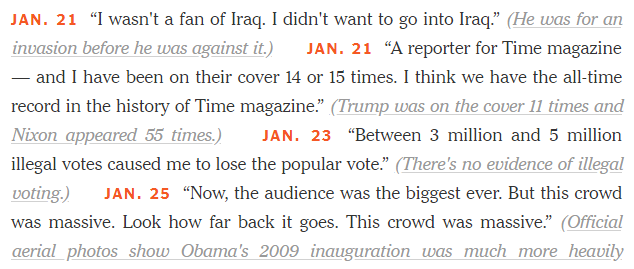
Here's the way the article presented the information:

Screenshot of the article

When converting this into a dataset, you can think of each lie as a "record" with four fields:

  1. The date of the lie.
  2. The lie itself (as a quotation).
  3. The writer's brief explanation of why it was a lie.
  4. The URL of an article that substantiates the claim that it was a lie.

Importantly, those fields have different formatting, which is consistent throughout the article: the date is bold red text, the lie is "regular" text, the explanation is gray italics text, and the URL is linked from the gray italics text.

Why does the formatting matter? Because it's very likely that the code underlying the web page "tags" those fields differently, and we can take advantage of that pattern when scraping the page. Let's take a look at the source code, known as HTML:

Examining the HTML

To view the HTML code that generates a web page, you right click on it and select "View Page Source" in Chrome or Firefox, "View Source" in Internet Explorer, or "Show Page Source" in Safari. (If that option doesn't appear in Safari, just open Safari Preferences, select the Advanced tab, and check "Show Develop menu in menu bar".)

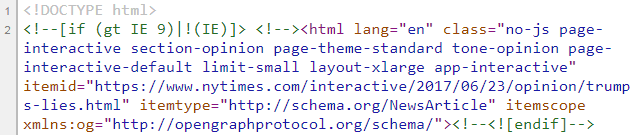
Here are the first few lines you will see if you view the source of the New York Times article:

Screenshot of the source

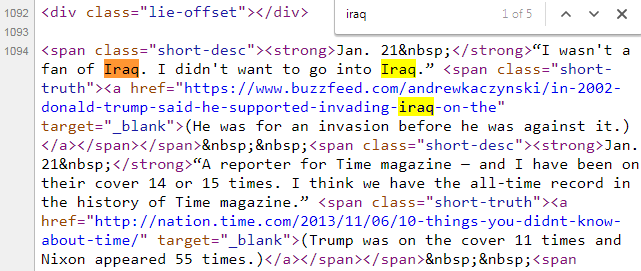
Let's locate the first lie by searching the HTML for the text "iraq":

Screenshot of the source

Thankfully, you only have to understand three basic facts about HTML in order to get started with web scraping!

Fact 1: HTML consists of tags

You can see that the HTML contains the article text, along with "tags" (specified using angle brackets) that "mark up" the text. ("HTML" stands for Hyper Text Markup Language.)

For example, one tag is <strong>, which means "use bold formatting". There is a <strong> tag before "Jan. 21" and a </strong> tag after it. The first is an "opening tag" and the second is a "closing tag" (denoted by the /), which indicates to the web browser where to start and stop applying the formatting. In other words, this tag tells the web browser to make the text "Jan. 21" bold. (Don't worry about the &nbsp; - we'll deal with that later.)

Fact 2: Tags can have attributes

HTML tags can have "attributes", which are specified in the opening tag. For example, <span class="short-desc"> indicates that this particular <span> tag has a class attribute with a value of short-desc.

For the purpose of web scraping, you don't actually need to understand the meaning of <span>, class, or short-desc. Instead, you just need to recognize that tags can have attributes, and that they are specified in this particular way.

Fact 3: Tags can be nested

Let's pretend my HTML code said:

Hello <strong><em>Data School</em> students</strong>

The text Data School students would be bold, because all of that text is between the opening <strong> tag and the closing </strong> tag. The text Data School would also be in italics, because the <em> tag means "use italics". The text "Hello" would not be bold or italics, because it's not within either the <strong> or <em> tags. Thus, it would appear as follows:

Hello Data School students

The central point to take away from this example is that tags "mark up" text from wherever they open to wherever they close, regardless of whether they are nested within other tags.

Got it? You now know enough about HTML in order to start web scraping!

Reading the web page into Python

The first thing we need to do is to read the HTML for this article into Python, which we'll do using the requests library. (If you don't have it, you can pip install requests from the command line.)

import requests  
r = requests.get('https://www.nytimes.com/interactive/2017/06/23/opinion/trumps-lies.html')  

The code above fetches our web page from the URL, and stores the result in a "response" object called r. That response object has a text attribute, which contains the same HTML code we saw when viewing the source from our web browser:

# print the first 500 characters of the HTML
print(r.text[0:500])  
<!DOCTYPE html>  
<!--[if (gt IE 9)|!(IE)]> <!--><html lang="en" class="no-js page-interactive section-opinion page-theme-standard tone-opinion page-interactive-default limit-small layout-xlarge app-interactive" itemid="https://www.nytimes.com/interactive/2017/06/23/opinion/trumps-lies.html" itemtype="http://schema.org/NewsArticle" itemscope xmlns:og="http://opengraphprotocol.org/schema/"><!--<![endif]-->  
<!--[if IE 9]> <html lang="en" class="no-js ie9 lt-ie10 page-interactive section-opinion page  

Parsing the HTML using Beautiful Soup

We're going to parse the HTML using the Beautiful Soup 4 library, which is a popular Python library for web scraping. (If you don't have it, you can pip install beautifulsoup4 from the command line.)

from bs4 import BeautifulSoup  
soup = BeautifulSoup(r.text, 'html.parser')  

The code above parses the HTML (stored in r.text) into a special object called soup that the Beautiful Soup library understands. In other words, Beautiful Soup is reading the HTML and making sense of its structure.

(Note that html.parser is the parser included with the Python standard library, though other parsers can be used by Beautiful Soup. See differences between parsers to learn more.)

Collecting all of the records

The Python code above is the standard code I use with every web scraping project. Now, we're going to start taking advantage of the patterns we noticed in the article formatting to build our dataset!

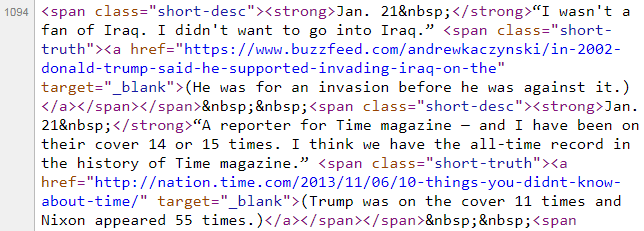
Let's take another look at the article, and compare it with the HTML:

Screenshot of the article
Screenshot of the source

You might have noticed that each record has the following format:

<span class="short-desc"><strong> DATE </strong> LIE <span class="short-truth"><a href="URL"> EXPLANATION </a></span></span>

There's an outer <span> tag, and then nested within it is a <strong> tag plus another <span> tag, which itself contains an <a> tag. All of these tags affect the formatting of the text. And because the New York Times wants each record to appear in a consistent way in your web browser, we know that each record will be tagged in a consistent way in the HTML. This is the pattern that allows us to build our dataset!

Let's ask Beautiful Soup to find all of the records:

results = soup.find_all('span', attrs={'class':'short-desc'})  

This code searches the soup object for all <span> tags with the attribute class="short-desc". It returns a special Beautiful Soup object (called a "ResultSet") containing the search results.

results acts like a Python list, so we can check its length:

len(results)  
116  

There are 116 results, which seems reasonable given the length of the article. (If this number did not seem reasonable, we would examine the HTML further to determine if our assumptions about the patterns in the HTML were incorrect.)

We can also slice the object like a list, in order to examine the first three results:

results[0:3]  
[<span class="short-desc"><strong>Jan. 21 </strong>“I wasn't a fan of Iraq. I didn't want to go into Iraq.” <span class="short-truth"><a href="https://www.buzzfeed.com/andrewkaczynski/in-2002-donald-trump-said-he-supported-invading-iraq-on-the" target="_blank">(He was for an invasion before he was against it.)</a></span></span>,
 <span class="short-desc"><strong>Jan. 21 </strong>“A reporter for Time magazine — and I have been on their cover 14 or 15 times. I think we have the all-time record in the history of Time magazine.” <span class="short-truth"><a href="http://nation.time.com/2013/11/06/10-things-you-didnt-know-about-time/" target="_blank">(Trump was on the cover 11 times and Nixon appeared 55 times.)</a></span></span>,
 <span class="short-desc"><strong>Jan. 23 </strong>“Between 3 million and 5 million illegal votes caused me to lose the popular vote.” <span class="short-truth"><a href="https://www.nytimes.com/2017/01/23/us/politics/donald-trump-congress-democrats.html" target="_blank">(There's no evidence of illegal voting.)</a></span></span>]

We'll also check that the last result in this object matches the last record in the article:

Screenshot of the article
results[-1]  
<span class="short-desc"><strong>July 19 </strong>“But the F.B.I. person really reports directly to the president of the United States, which is interesting.” <span class="short-truth"><a href="https://www.usatoday.com/story/news/politics/onpolitics/2017/07/20/fbi-director-reports-justice-department-not-president/495094001/" target="_blank">(He reports directly to the attorney general.)</a></span></span>  

Looks good!

We have now collected all 116 of the records, but we still need to separate each record into its four components (date, lie, explanation, and URL) in order to give the dataset some structure.

Extracting the date

Web scraping is often an iterative process, in which you experiment with your code until it works exactly as you desire. To simplify the experimentation, we'll start by only working with the first record in the results object, and then later on we'll modify our code to use a loop:

first_result = results[0]  
first_result  
<span class="short-desc"><strong>Jan. 21 </strong>“I wasn't a fan of Iraq. I didn't want to go into Iraq.” <span class="short-truth"><a href="https://www.buzzfeed.com/andrewkaczynski/in-2002-donald-trump-said-he-supported-invading-iraq-on-the" target="_blank">(He was for an invasion before he was against it.)</a></span></span>  

Although first_result may look like a Python string, you'll notice that there are no quote marks around it. Instead, it's another special Beautiful Soup object (called a "Tag") that has specific methods and attributes.

In order to locate the date, we can use its find() method to find a single tag that matches a specific pattern, in contrast to the find_all() method we used above to find all tags that match a pattern:

first_result.find('strong')  
<strong>Jan. 21 </strong>  

This code searches first_result for the first instance of a <strong> tag, and again returns a Beautiful Soup "Tag" object (not a string).

Since we want to extract the text between the opening and closing tags, we can access its text attribute, which does in fact return a regular Python string:

first_result.find('strong').text  
'Jan. 21\xa0'  

What is \xa0? You don't actually need to know this, but it's called an "escape sequence" that represents the &nbsp; character we saw earlier in the HTML source.

However, you do need to know that an escape sequence represents a single character within a string. Let's slice it off from the end of the string:

first_result.find('strong').text[0:-1]  
'Jan. 21'  

Finally, we're going to add the year, since we don't want our dataset to include ambiguous dates:

first_result.find('strong').text[0:-1] + ', 2017'  
'Jan. 21, 2017'  

Extracting the lie

Let's take another look at first_result:

first_result  
<span class="short-desc"><strong>Jan. 21 </strong>“I wasn't a fan of Iraq. I didn't want to go into Iraq.” <span class="short-truth"><a href="https://www.buzzfeed.com/andrewkaczynski/in-2002-donald-trump-said-he-supported-invading-iraq-on-the" target="_blank">(He was for an invasion before he was against it.)</a></span></span>  

Our goal is to extract the two sentences about Iraq. Unfortunately, there isn't a pair of opening and closing tags that starts immediately before the lie and ends immediately after the lie. Therefore, we're going to have to use a different technique:

first_result.contents  
[<strong>Jan. 21 </strong>,
 "“I wasn't a fan of Iraq. I didn't want to go into Iraq.” ",
 <span class="short-truth"><a href="https://www.buzzfeed.com/andrewkaczynski/in-2002-donald-trump-said-he-supported-invading-iraq-on-the" target="_blank">(He was for an invasion before he was against it.)</a></span>]

The first_result"Tag" has a contents attribute, which returns a Python list containing its "children". What are children? They are the Tags and strings that are nested within a Tag.

We can slice this list to extract the second element:

first_result.contents[1]  
"“I wasn't a fan of Iraq. I didn't want to go into Iraq.” "

Finally, we'll slice off the curly quotation marks as well as the extra space at the end:

first_result.contents[1][1:-2]  
"I wasn't a fan of Iraq. I didn't want to go into Iraq."

Extracting the explanation

Based upon what you've seen already, you might have figured out that we have at least two options for how we extract the third component of the record, which is the writer's explanation of why the President's statement was a lie.

The first option is to slice the contents attribute, like we did when extracting the lie:

first_result.contents[2]  
<span class="short-truth"><a href="https://www.buzzfeed.com/andrewkaczynski/in-2002-donald-trump-said-he-supported-invading-iraq-on-the" target="_blank">(He was for an invasion before he was against it.)</a></span>  

The second option is to search for the surrounding tag, like we did when extracting the date:

first_result.find('a')  
<a href="https://www.buzzfeed.com/andrewkaczynski/in-2002-donald-trump-said-he-supported-invading-iraq-on-the" target="_blank">(He was for an invasion before he was against it.)</a>  

Either way, we can access the text attribute and then slice off the opening and closing parentheses:

first_result.find('a').text[1:-1]  
'He was for an invasion before he was against it.'  

Extracting the URL

Finally, we want to extract the URL of the article that substantiates the writer's claim that the President was lying.

Let's examine the <a> tag within first_result:

first_result.find('a')  
<a href="https://www.buzzfeed.com/andrewkaczynski/in-2002-donald-trump-said-he-supported-invading-iraq-on-the" target="_blank">(He was for an invasion before he was against it.)</a>  

So far in this tutorial, we have been extracting text that is between tags. In this case, the text we want to extract is located within the tag itself. Specifically, we want to access the value of the href attribute within the <a> tag.

Beautiful Soup treats tag attributes and their values like key-value pairs in a dictionary: you put the attribute name in brackets (like a dictionary key), and you get back the attribute's value:

first_result.find('a')['href']  
'https://www.buzzfeed.com/andrewkaczynski/in-2002-donald-trump-said-he-supported-invading-iraq-on-the'  

Recap: Beautiful Soup methods and attributes

Before we finish building the dataset, I want to summarize a few ways you can interact with Beautiful Soup objects.

You can apply these two methods to either the initial soup object or a Tag object (such as first_result):

  • find(): searches for the first matching tag, and returns a Tag object
  • find_all(): searches for all matching tags, and returns a ResultSet object (which you can treat like a list of Tags)

You can extract information from a Tag object (such as first_result) using these two attributes:

  • text: extracts the text of a Tag, and returns a string
  • contents: extracts the children of a Tag, and returns a list of Tags and strings

It's important to keep track of whether you are interacting with a Tag, ResultSet, list, or string, because that affects which methods and attributes you can access.

And of course, there are many more methods and attributes available to you, which are described in the Beautiful Soup documentation.

Building the dataset

Now that we've figured out how to extract the four components of first_result, we can create a loop to repeat this process on all 116 results. We'll store the output in a list of tuples called records:

records = []  
for result in results:  
    date = result.find('strong').text[0:-1] + ', 2017'
    lie = result.contents[1][1:-2]
    explanation = result.find('a').text[1:-1]
    url = result.find('a')['href']
    records.append((date, lie, explanation, url))

Since there were 116 results, we should have 116 records:

len(records)  
116  

Let's do a quick spot check of the first three records:

records[0:3]  
[('Jan. 21, 2017',
  "I wasn't a fan of Iraq. I didn't want to go into Iraq.",
  'He was for an invasion before he was against it.',
  'https://www.buzzfeed.com/andrewkaczynski/in-2002-donald-trump-said-he-supported-invading-iraq-on-the'),
 ('Jan. 21, 2017',
  'A reporter for Time magazine — and I have been on their cover 14 or 15 times. I think we have the all-time record in the history of Time magazine.',
  'Trump was on the cover 11 times and Nixon appeared 55 times.',
  'http://nation.time.com/2013/11/06/10-things-you-didnt-know-about-time/'),
 ('Jan. 23, 2017',
  'Between 3 million and 5 million illegal votes caused me to lose the popular vote.',
  "There's no evidence of illegal voting.",
  'https://www.nytimes.com/2017/01/23/us/politics/donald-trump-congress-democrats.html')]

Looks good!

Applying a tabular data structure

The last major step in this process is to apply a tabular data structure to our existing structure (which is a list of tuples). We're going to do this using the pandas library, an incredibly popular Python library for data analysis and manipulation. (If you don't have it, here are the installation instructions.)

The primary data structure in pandas is the "DataFrame", which is suitable for tabular data with columns of different types, similar to an Excel spreadsheet or SQL table. We can convert our list of tuples into a DataFrame by passing it to the DataFrame constructor and specifying the desired column names:

import pandas as pd  
df = pd.DataFrame(records, columns=['date', 'lie', 'explanation', 'url'])  

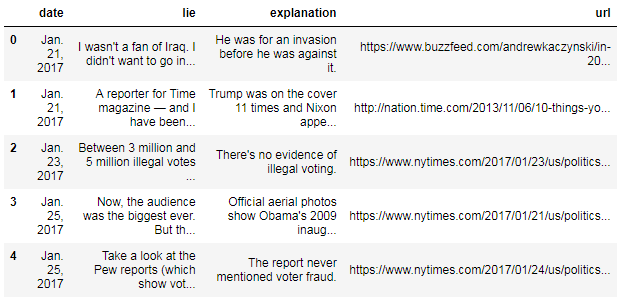
The DataFrame includes a head() method, which allows you to examine the top of the DataFrame:

df.head()  
Screenshot of the DataFrame

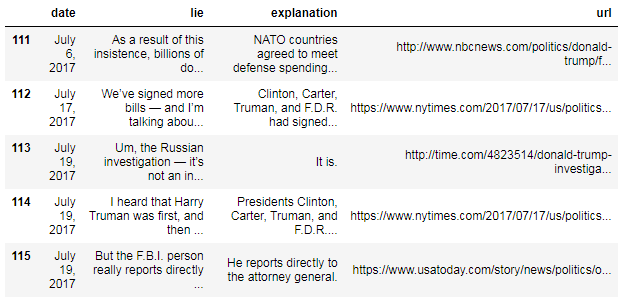
The numbers on the left side of the DataFrame are known as the "index", which act as identifiers for the rows. Because we didn't specify an index, it was automatically assigned as the integers 0 to 115.

We can examine the bottom of the DataFrame using the tail() method:

df.tail()  
Screenshot of the DataFrame

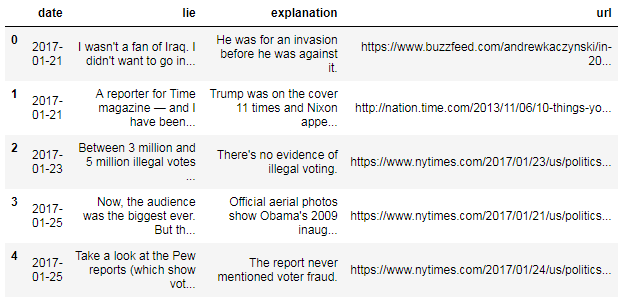
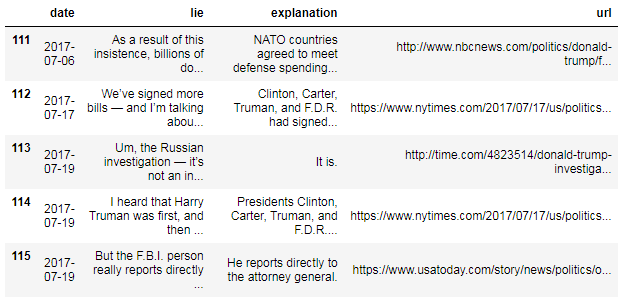
Did you notice that "January" is abbreviated, while "July" is not? It's best to format your data consistently, and so we're going to convert the date column to pandas' special "datetime" format:

df['date'] = pd.to_datetime(df['date'])  

The code above converts the "date" column to datetime format, and then overwrites the existing "date" column. (Notice that we did not have to tell pandas that the column was originally in "MONTH DAY, YEAR" format - pandas just figured it out!)

Let's take a look at the results:

df.head()  
Screenshot of the DataFrame
df.tail()  
Screenshot of the DataFrame

Not only is the date column now consistently formatted, but pandas also provides a wealth of date-related functionality because it's in datetime format.

Exporting the dataset to a CSV file

Finally, we'll use pandas to export the DataFrame to a CSV (comma-separated value) file, which is the simplest and most common way to store tabular data in a text file:

df.to_csv('trump_lies.csv', index=False, encoding='utf-8')  

We set the index parameter to False to tell pandas that we don't need it to include the index (the integers 0 to 115) in the CSV file. You should be able to find this file in your working directory, and open it in any text editor or spreadsheet program!

In the future, you can rebuild this DataFrame by reading the CSV file back into pandas:

df = pd.read_csv('trump_lies.csv', parse_dates=['date'], encoding='utf-8')  

If you want to learn a lot more about the pandas library, you can watch my video series, Easier data analysis in Python with pandas, or check out my top 8 resources for learning pandas.

Summary: 16 lines of Python code

Here are the 16 lines of code that we used to scrape the web page, extract the relevant data, convert it into a tabular dataset, and export it to a CSV file:

import requests  
r = requests.get('https://www.nytimes.com/interactive/2017/06/23/opinion/trumps-lies.html')

from bs4 import BeautifulSoup  
soup = BeautifulSoup(r.text, 'html.parser')  
results = soup.find_all('span', attrs={'class':'short-desc'})

records = []  
for result in results:  
    date = result.find('strong').text[0:-1] + ', 2017'
    lie = result.contents[1][1:-2]
    explanation = result.find('a').text[1:-1]
    url = result.find('a')['href']
    records.append((date, lie, explanation, url))

import pandas as pd  
df = pd.DataFrame(records, columns=['date', 'lie', 'explanation', 'url'])  
df['date'] = pd.to_datetime(df['date'])  
df.to_csv('trump_lies.csv', index=False, encoding='utf-8')  

Appendix A: Web scraping advice

  • Web scraping works best with static, well-structured web pages. Dynamic or interactive content on a web page is often not accessible through the HTML source, which makes scraping it much harder!
  • Web scraping is a "fragile" approach for building a dataset. The HTML on a page you are scraping can change at any time, which may cause your scraper to stop working.
  • If you can download the data you need from a website, or if the website provides an API with data access, those approaches are preferable to scraping since they are easier to implement and less likely to break.
  • If you are scraping a lot of pages from the same website (in rapid succession), it's best to insert delays in your code so that you don't overwhelm the website with requests. If the website decides you are causing a problem, they can block your IP address (which may affect everyone in your building!)
  • Before scraping a website, you should review its robots.txt file (also known as the Robots exclusion standard) to check whether you are "allowed" to scrape their website. (Here is the robots.txt file for nytimes.com.)

Appendix B: Web scraping resources

Appendix C: Alternative syntax for Beautiful Soup

It's worth noting that Beautiful Soup actually offers multiple ways to express the same command. I tend to use the most verbose option, since I think it makes the code readable, but it's useful to be able to recognize the alternative syntax since you might see it used elsewhere.

For example, you can search for a tag by accessing it like an attribute:

# search for a tag by name
first_result.find('strong')

# shorter alternative: access it like an attribute
first_result.strong  
<strong>Jan. 21 </strong>  

You can also search for multiple tags a few different ways:

# search for multiple tags by name and attribute
results = soup.find_all('span', attrs={'class':'short-desc'})

# shorter alternative: if you don't specify a method, it's assumed to be find_all()
results = soup('span', attrs={'class':'short-desc'})

# even shorter alternative: you can specify the attribute as if it's a parameter
results = soup('span', class_='short-desc')  

For more details, check out the Beautiful Soup documentation.

P.S. Want to be the first to know when I release new Python tutorials?Subscribe to the Data School newsletter.

Calvin Spealman: Game Development is Hard, Okay? 5 Things That Suck About Making Games

$
0
0

Game development is hard. I mean, really hard and everyone knows it. You probably won’t finish your game. You probably didn’t finish several games before it. You’ll probably start some more games you’ll never finish. The thing is, not finishing the games isn’t the only reason game development is hard. Let’s learn from some of my failures so far.

Taking Time From Your Family is Hard


Putting it like this sounds kind of distasteful. Yeah, if you’re working on your game in the time you aren’t at your day job, there’s a good chance you’re taking time away from precious family time. You’re missing evenings with your wife. You’re skipping days with your kids growing up. If you don’t have a family in your life, you’re opting out of time with friends, watching movies and reading books, or even just playing games, the same medium you obviously care a lot about.

Making games takes a lot of time. You think you know that, but it takes more time than you already fear. Double that number in your head. Triple it. You can’t make all that time out of thin air, so if you want to make games you have to make sacrifices in your life.

Sacrifices are a part of life, and your friends and family want you to pursue your passions. Make a point to find a balance. Take a break from time to time. Share what you do with your family, and let them know how much you appreciating making time for your obsession.

Making Bad Decisions is Going to Fill You With Regret


There are an enormous array of great tools to help you make your game. You can find full engines and editing suites, vast communities of resources and plugins and starter kits, and a sea of tutorials and inspiration. You need to pick a platform, a language, a graphics stack, architectures, and more.

And you’re going to choose something wrong. You’re going to second guess the language you write your code in. You’re going to fret over the art directions you committed to months ago. Every decision you make is going to be a potential source of dread and self doubt in the future. Of course, you won’t regret every decision. You might even be happy with most of them! If you’re lucky. But you will regret something.

Mistakes are a sign that you’ve learned more than you knew when you made the choice you regret.Now, that doesn’t mean every time you look back at those decisions you should rip everything apart and start over “the right way,” because down that road leads to disaster and never finishing anything. But, you can stand to correct some of those bad decisions, and you can learn a lot from the rest of them. Why do you regret that? What can you learn from it to do better on your next game, without jeopardizing the success of this one?

You Will Disappoint Yourself


Great! You finished a game! Oh wow, it sort of sucks, doesn’t it? Finishing a game might be the impossible milestone many fail to grasp, but feeling satisfied with the end product, even when you do get that game out the door, can be just as elusive. It is painful to pour your sweat into a project and see something come out of that effort that doesn’t look like the plan you had in your head.

Maybe your art fell short or your never found just the right sound effects to pull it together. Maybe you underestimated the amount of writing practice you needed and your dialogue is stiff and uninteresting. Perhaps you banked on features and mechanics that your fledgling coding skills just couldn’t deliver.

Show your game to those friends and family who love to see you enjoy your passion and to the game development community that will recognize your achievements with experienced understanding. These people will give you a sense of perspective to appreciate your accomplishments and put you in the positive state of mind you need to tackle the next big game idea on your list.

The List of Game Ideas Will Grow Faster Than You Can Make Them


I was washing dishes after dinner today and I got a great new idea for a game, but my first thought at this flash of inspiration was “Damn it! Not another one!” because new ideas are like bee stings. They’ll hit you fast when you didn’t see them coming and that nagging feeling will stick with you for days distracting your concentration incessantly.

They say it’s the execution that counts, not the raw idea. You’re going to amass those ideas just the same and you’re going to feel attached to them. As you get further and further along on your journey as a game developer, you’ll watch the end of that list grow and the number of ideas crossed off as you complete prototypes and complete projects progress much, much slower.

Focus on everything that grows around the idea: from the implementation, the art, the community of players, to the promotion. Ideas are great, but learn to put little stock in them. If you pile them up, take comfort in accepting that all of them are worthless, because you can build a great game and a terrible game out of every single one of them. That means the idea isn’t just waiting to be a hit: you have to make it happen with what you buildon that idea, so focus on what comes between writing it down and crossing it off.

You Could Have Made That Game Better Now Than You Could Then


There are game ideas that I am so attached to and so excited about that I can’t possibly force myself to begin working on them. I’m not ready to tackle them. They have too much potential for greatness to waste on this raw version of my game development skillset. Instead, I squander my time on ideas I don’t care about, have little attachment of interest in, and quickly get bored with simply because I’ve convinced myself I need “more practice” before tackling those big ideas.

The result is that I have no passion to put into my games and it shows, when I finish them at all. More often than not, it means I walk away from the game before it ever gets far beyond a prototype because I just can’t be bothered to keep myself engaged with a project I care so little about.

It is better to make your best ideas badly than to make your worst ideas well. Build things you care about. Build the types of games you want to make more of and can learn the most from. Use up all your best ideas and experience the joy of making games you really, truly care about.

There Are Enough Blogs and Videos To Engage You 24/7


You’re reading this instead of working on your game. You’ve spent time watching YouTube videos instead of working on your game. Learning from and engaging with the community is absolutely crucial, but can also be a massive attention sink.

Go make your game right now.

Python Bytes: #36 Craft Your Python Like Poetry and Other Musings

$
0
0
<p>Brought to you by <strong>Rollbar</strong>! Create an account and get special credits at <a href="https://pythonbytes.fm/rollbar">pythonbytes.fm/rollbar</a></p> <p><strong>Brian #1:</strong> <a href="http://treyhunner.com/2017/07/craft-your-python-like-poetry/"><strong>Craft Your Python Like Poetry</strong></a></p> <ul> <li>Line length is important. Shorter is often more readable.</li> <li>line break placement makes a huge difference in readability and applies to <ul> <li>comprehensions</li> <li>function call parameters</li> <li>chained function calls. (Dot alignment is pleasing and nothing I have considered previously)</li> <li>dictionary literals</li> </ul></li> </ul> <p><a href="https://trello.com/c/ME7ijnKw/88-https-devguidepythonorg"></a> <strong>Michael #2:</strong> <a href="https://labs.fedoraproject.org/en/python-classroom/"><strong>The Fedora Python Classroom Lab</strong></a></p> <ul> <li>Makes it easy for teachers and instructors to use Fedora in their classrooms or workshops.</li> <li>Ready to use operating system with important stuff pre-installed</li> <li>With GNOME or as a headless environment for Docker or Vagrant</li> <li>Lots of prebuilt goodies, especially around data science: <ul> <li>IPython, Jupyter Notebook, multiple Pythons, virtualenvs, tox, git and more</li> </ul></li> </ul> <p><strong>Brian #3:</strong> <a href="https://theoutline.com/post/1953/how-a-vc-funded-company-is-undermining-the-open-source-community"><strong>How a VC-funded company is undermining the open-source community</strong></a></p> <ul> <li>A San Francisco startup called Kite is being accused of underhanded tactics.</li> <li>An Atom plugin called Minimap, downloaded more than 3.5 M times, open source, and developed primarily by one person. @abe33</li> <li>abe33 hired by Kite, then adds a “Kite Promotion” “feature” to Minimap that examines user code and inserts links to related parts of Kite website. (Presumably in the minimap?)</li> <li>Users rightfully ticked.</li> <li>Next. autocomplete-Python, also an Atom addon, seems to be taken over by Kite engineers and changes the autocomplete from local Jedi engine to cloud Kite engine (also therefore sending users code to Kite). </li> <li>Seems like that ought to have been a separate plugin, not a take over of an existing one.</li> <li>Again, users not exactly supportive of the changes.</li> </ul> <p><strong>Michael #4:</strong> <a href="https://github.com/codelucas/newspaper/"><strong>Newspaper Python Package</strong></a></p> <ul> <li>News, full-text, and article metadata extraction in Python 3</li> <li>Behold the example code:</li> </ul> <pre><code> from newspaper import Article url = 'http://fox13now.com/2013/12/30/new-year-new-laws-obamacare-pot-guns-and-drones/' article = Article(url) article.download() article.parse() article.authors # ['Leigh Ann Caldwell', 'John Honway'] article.publish_date # datetime.datetime(2013, 12, 30, 0, 0) article.nlp() article.keywords # ['New Years', 'resolution', ...] article.summary # 'The study shows that 93% of people ...' </code></pre> <p><strong>Brian #5:</strong> <a href="http://spectrum.ieee.org/static/interactive-the-top-programming-languages-2017"><strong>IEEE Spectrum:</strong></a> <a href="http://spectrum.ieee.org/static/interactive-the-top-programming-languages-2017"><strong>The Top Programming Languages 2017</strong></a></p> <ul> <li>We’re #1. We’re #1.</li> <li>Python on top of the list</li> <li>IEEE very open about <a href="http://spectrum.ieee.org/ns/IEEE_TPL_2017/methods.html">their methodology.</a> <ul> <li>Combo of Google, Google Trends, GitHub, Twitter, Reddit, StackOverflow, HackerNews, CareerBuilder, Dice, and IEEE Xplore Digital Library</li> </ul></li> <li>Python #1 in lots of categories. Java still has more job openings, supposedly. Although I think it’s because Java people are quitting to go work on Python projects. </li> </ul> <p><strong>Michael #6:</strong> <a href="https://www.youtube.com/playlist?list=PLYx7XA2nY5GfdAFycPLBdUDOUtdQIVoMf"><strong>SciPy 2017 videos are out</strong></a></p> <ul> <li>Bunch of tutorials</li> <li>Keynote - Coding for Science and Innovation, Gaël Varoquaux</li> <li>Dash - A New Framework for Building User Interfaces for Technical Computing, </li> <li>Dask - Advanced Techniques, Matthew Rocklin</li> <li>Scientific Analysis at Scale - a Comparison of Five Systems, Jake V.</li> <li>Keynote - Academic Open Source, Kathryn Huff</li> <li>Plus lots more</li> </ul>

Brad Lucas: Ethereum Get Eth Balance Script

$
0
0

The site Etherscan allows you retrieve information on accounts and transactions. There is an interface to the Reposten testnet as well. While doing some work on a project I was monitoring the page to view an account balance and ended up creating a script to do the monitoring programmatically.

The repo listed at the bottom of the page contains the python script which simply parses the page and returns the balance.

The main routine after figuring out which chain the user wants to look at and which account is the get_balance routine. It parses the page and finds the balance in the first table's first row, second cell.

def get_balance(url):
    html = requests.get(url, headers={'User-agent': 'Mozilla/5.0'}).text
    soup = BeautifulSoup(html, "html.parser")
    table = soup.find("table", {"class" : "table"})
    value = table.findAll('td')[1].text.split(' ')[0].strip()
    return value

Amjith Ramanujam: FuzzyFinder - in 10 lines of Python

$
0
0

Introduction:

FuzzyFinder is a popular feature available in decent editors to open files. The idea is to start typing partial strings from the full path and the list of suggestions will be narrowed down to match the desired file. 

Examples: 

Vim (Ctrl-P)

Sublime Text (Cmd-P)

This is an extremely useful feature and it's quite easy to implement.

Problem Statement:

We have a collection of strings (filenames). We're trying to filter down that collection based on user input. The user input can be partial strings from the filename. Let's walk this through with an example. Here is a collection of filenames:

When the user types 'djm' we are supposed to match 'django_migrations.py' and 'django_admin_log.py'. The simplest route to achieve this is to use regular expressions. 

Solutions:

Naive Regex Matching:

Convert 'djm' into 'd.*j.*m' and try to match this regex against every item in the list. Items that match are the possible candidates.

This got us the desired results for input 'djm'. But the suggestions are not ranked in any particular order.

In fact, for the second example with user input 'mig' the best possible suggestion 'migrations.py' was listed as the last item in the result.

Ranking based on match position:

We can rank the results based on the position of the first occurrence of the matching character. For user input 'mig' the position of the matching characters are as follows:

Here's the code:

We made the list of suggestions to be tuples where the first item is the position of the match and second item is the matching filename. When this list is sorted, python will sort them based on the first item in tuple and use the second item as a tie breaker. On line 14 we use a list comprehension to iterate over the sorted list of tuples and extract just the second item which is the file name we're interested in.

This got us close to the end result, but as shown in the example, it's not perfect. We see 'main_generator.py' as the first suggestion, but the user wanted 'migration.py'.

Ranking based on compact match:

When a user starts typing a partial string they will continue to type consecutive letters in a effort to find the exact match. When someone types 'mig' they are looking for 'migrations.py' or 'django_migrations.py' not 'main_generator.py'. The key here is to find the most compact match for the user input.

Once again this is trivial to do in python. When we match a string against a regular expression, the matched string is stored in the match.group(). 

For example, if the input is 'mig', the matching group from the 'collection' defined earlier is as follows:

We can use the length of the captured group as our primary rank and use the starting position as our secondary rank. To do that we add the len(match.group()) as the first item in the tuple, match.start() as the second item in the tuple and the filename itself as the third item in the tuple. Python will sort this list based on first item in the tuple (primary rank), second item as tie-breaker (secondary rank) and the third item as the fall back tie-breaker. 

This produces the desired behavior for our input. We're not quite done yet.

Non-Greedy Matching

There is one more subtle corner case that was caught by Daniel Rocco. Consider these two items in the collection ['api_user', 'user_group']. When you enter the word 'user' the ideal suggestion should be ['user_group', 'api_user']. But the actual result is:

Looking at this output, you'll notice that api_user appears before user_group. Digging in a little, it turns out the search user expands to u.*s.*e.*r; notice that user_group has two rs, so the pattern matches user_gr instead of the expected user. The longer match length forces the ranking of this match down, which again seems counterintuitive. This is easy to change by using the non-greedy version of the regex (.*? instead of .*) on line 4. 

Now that works for all the cases we've outlines. We've just implemented a fuzzy finder in 10 lines of code.

Conclusion:

That was the design process for implementing fuzzy matching for my side project pgcli, which is a repl for Postgresql that can do auto-completion. 

I've extracted fuzzyfinder into a stand-alone python package. You can install it via 'pip install fuzzyfinder' and use it in your projects.

Thanks to Micah Zoltu and Daniel Rocco for reviewing the algorithm and fixing the corner cases.

If you found this interesting, you should follow me on twitter

Epilogue:

When I first started looking into fuzzy matching in python, I encountered this excellent library called fuzzywuzzy. But the fuzzy matching done by that library is a different kind. It uses levenshtein distance to find the closest matching string from a collection. Which is a great technique for auto-correction against spelling errors but it doesn't produce the desired results for matching long names from partial sub-strings.

Viewing all 24369 articles
Browse latest View live


<script src="https://jsc.adskeeper.com/r/s/rssing.com.1596347.js" async> </script>