Quantcast
Channel: Planet Python
Viewing all 23953 articles
Browse latest View live

Sebastian Pölsterl: scikit-survival 0.18.0 released

$
0
0

I’m pleased to announce the release of scikit-survival 0.18.0, which adds support for scikit-learn 1.1.

In addition, this release adds the return_array argument to all models providing predict_survival_function and predict_cumulative_hazard_function. That means you can now choose, whether you want to have the survival (cumulative hazard function) automatically evaluated at the unique event times. This is particular useful for plotting. Previously, you would have to evaluate each survival function before plotting:

estimator = CoxPHSurvivalAnalysis()
estimator.fit(X_train, y_train)
pred_surv = estimator.predict_survival_function(
X_test
)
times = pred_surv[0].x
for surv_func in pred_surv:
plt.step(times, surv_func(times), where="post")

Now, you can pass return_array=True and directly get probabilities of the survival function:

estimator = CoxPHSurvivalAnalysis()
estimator.fit(X_train, y_train)
pred_surv_probs = estimator.predict_survival_function(
X_test, return_array=True
)
times = estimator.event_times_
for probs in pred_surv_probs:
plt.step(times, probs, where="post")

Finally, support for Python 3.7 has been dropped and the minimal required version of the following dependencies are raised:

  • numpy 1.17.3
  • pandas 1.0.5
  • scikit-learn 1.1.0
  • scipy 1.3.2

For a full list of changes in scikit-survival 0.18.0, please see the release notes.

Install

Pre-built conda packages are available for Linux, macOS (Intel), and Windows, either

via pip:

pip install scikit-survival

or via conda

 conda install -c sebp scikit-survival

PyCon: Holding PyCon US 2023 in Salt Lake City, UT

$
0
0
In light of recent anti-abortion legislation, we have received feedback and concern about hosting PyCon US 2023 in Salt Lake City, Utah. We hear this concern and recognize the risk and impact these laws impose on people who can become pregnant. PyCon US plans to take extra efforts to create a safe and inclusive environment throughout the duration of the conference, including extending our “no questions asked” refund or conversion to a virtual ticket for any reason, right up to the start of the event.

PyCon US is a community conference centered around creating a valuable and inclusive experience for each member of our community to network and collaborate within the open source space. Diversity, equity and inclusion are an important focus of PyCon US and the Python Software Foundation’s mission, and they are valued and implemented through both the PyCon US and PSF Code of Conduct and Diversity Statement. PyCon US values each member of our community, and welcomes all individuals to participate regardless of age, gender identity and expression, sexual orientation, disability, physical appearance, body size, ethnicity, nationality, race, or religion (or lack thereof), education, or socio-economic status.

Organizing a large event like PyCon US takes many years of planning and preparation, with host city selection starting three to four years before the event. The potential location starts with a thorough evaluation of the city, combined with our best estimates for conference size and needs. It is through our team’s advanced planning strategy that we are able to provide the unique and valuable experience that our community deserves. Due to the prohibitive financial loss the PSF would incur to cancel or change the current contract with the Salt Palace Convention Center and local hotels, not to mention finding an alternative venue, PyCon US 2023 will go on as planned in Salt Lake City. We understand that some community members may feel hesitant about joining us in Salt Lake City this year and hope that anyone not comfortable with attending in person will consider joining us at PyCon US 2023 virtually.

The PyCon US team will be researching local Salt Lake City organizations who support and provide resources to women, girls, and people from marginalized genders to team up with in order to promote inclusion and make the most of our community’s presence while in Salt Lake City. Feel free to make suggestions by emailing pycon-reg@python.org! PyCon US aims to empower all members of our community and foster a positive experience for all who participate.

We welcome and request input from the community on ways PyCon US can make an impact and create a safe environment for our attendees at PyCon US 2023. If you have any ideas or suggestions, or any questions about PyCon US, contact us by emailing pycon-reg@python.org.

Moving Forward

As mentioned before, PyCon US selects host cities beginning three to four years before the event with PyCon US 2024 and PyCon US 2025 contracted to take place in Pittsburgh, Pennsylvania. 

The PyCon US team will begin host city selection for 2026-2027 this year and will be selecting a host city based upon these criteria. In addition, the PyCon US team will take local health care restrictions into consideration as well as any prevailing attitudes that could negatively affect the experience of our attendees. Our team will evaluate whether the state and city policies are non-discriminatory, safe, and inclusive for all, including people who can become pregnant, trans people and other members of the LGBTQIA+ community, and everyone else in our Python community. As learned through the planning of PyCon US 2023, we will move forward keeping in mind the challenge that policies and legislation can change from when the city is selected to the actual conference dates given the constantly changing political climate.

The PyCon US team would love to hear where our community would like to see PyCon US 2026 and PyCon US 2027 take place. Email pycon-reg@python.org to share your suggestions as well as any additional feedback for what we can do to ensure an inclusive, safe, and welcoming environment for all.

Written in collaboration with the PyCon US team and PyCon US Board Committee

IslandT: Create a music playing interface for windows 10

$
0
0

In this article, I am going to create a music-playing interface for windows 10’s users with python with the help of pygame framework! Pygame has a mixer module that can play music and it is basically good enough for us to create a functional music player in windows 10, the only problem is there is some music format which it will not play, for example, the wav audio file, but it is alright since most of the music files at this moment is actually OGG and MP3.

My plan here is simple, create the interface with the Tkinter and then used pygame mixer as the music playing engine…

Here is the entire code…

# This is a music player project created with Pygame Framework

import tkinter as tk
from tkinter import ttk
from tkinter import filedialog
import pygame

# create the windows for this music player
win = tk.Tk()
win.title("Easy Play")
win.resizable(0,0)

# the music file link is initially empty
music_file = ""

# open music file and initialize the mixer
def openFile():
    global music_file
    fullfilenames = filedialog.askopenfilenames(initialdir="/", title="Select music file", filetypes=[("OGG format", ".ogg"),
                    ("MP3 format", ".mp3"),])  # select a music file

    if (fullfilenames != ''):

        music_file = fullfilenames[0]
        pygame.mixer.init()

file_opener= ttk.Button(win, text="Open File", command=openFile)
file_opener.grid(column=0,row=0)

# play the music file

def playMusic():
    if(music_file!=''):
        pygame.mixer.music.load(music_file)
        pygame.mixer.music.play()

play_button = ttk.Button(win, text="Play", command=playMusic)
play_button.grid(column=1,row=0)

# pause the music file
pause = False
def pauseMusic():
    global pause
    if(pause == False):
        pygame.mixer.music.pause()
        pause = True
    else:
        pygame.mixer.music.unpause()
        pause = False

pause_button = ttk.Button(win, text="Pause", command=pauseMusic)
pause_button.grid(column=2,row=0)

# unload the music resource from the memory
def unloadMusic():

   pygame.mixer.music.unload()

unload_button = ttk.Button(win, text="Unload", command=unloadMusic)
unload_button.grid(column=3,row=0)


def stopMusic():
    pygame.mixer.music.stop()

stop_button = ttk.Button(win, text="Stop", command=unloadMusic)
stop_button.grid(column=4, row=0)

win.mainloop()

As the comments on the above program have already self-explained every function above I will just roughly explain to you what this program does.

1) When the user clicks on the open file button the file dialog box will appear where the user can then picks a music file he or she wants to hear about.
2) The file is basically ready but not played yet until the user clicks the play button.
3) The user can also click on the stop button to stop the music altogether or clicks on the pause button to pause the song and then clicks again on the pause button to continue playing the music. There is another unload button that is used to release the music on the computer memory.

If you select nothing and press the play button the music will not play! Below is the interface and I am actually planning to put more stuff to the below simple interface to make it a completely functional music player!

Python Music Player

Kay Hayen: Nuitka Release 1.0

$
0
0

This is to inform you about the new stable release of Nuitka. It is the extremely compatible Python compiler, “download now”.

This release contains a large amount of new features, while consolidating what we have with many bug fixes. Scalability should be dramatically better, as well as new optimization that will accelerate some code quite a bit. See the summary, how this release is paving the way forward.

Bug Fixes

  • Python3: Fix, bytes.decode with only errors argument given was not working. Fixed in 0.9.1 already.

  • MSYS2: Fix, the accelerate mode .cmd file was not working correctly. Fixed in 0.9.1 already.

  • Onefile: Fix, the bootstrap when waiting for the child, didn’t protect against signals that interrupt this call. This only affected users of the non-public --onefile-tempdir option on Linux, but with that becoming the default in 1.0, this was discovered. Fixed in 0.9.1 already.

  • Fix, pkg_resources compile time generated Distribution values could cause issues with code that put it into calls, or in tried blocks. Fixed in 0.9.1 already.

  • Standalone: Added implicit dependencies of Xlib package. Fixed in 0.9.1 already.

  • macOS: Fix, the package configuration for wx had become invalid when restructuring the Yaml with code and schema disagreeing on allowed values. Fixed in 0.9.1 already.

  • Fix: The str.format with a single positional argument didn’t generate proper code and failed to compile on the C level. Fixed in 0.9.1 already.

  • Fix, the type shape of str.count result was wrong. Fixed in 0.9.1 already.

  • UI: Fix, the warning about collision of just compiled package and original package in the same folder hiding the compiled package should not apply to packages without an __init__.py file, as those do not take precedence. Fixed in 0.9.2 already.

  • Debugging: Fix, the fallback to lldb from gdb when using the option --debugger was broken on anything but Windows. Fixed in 0.9.2 already.

  • Python3.8: The module importlib.metadata was not recognized before 3.9, but actually 3.8 already has it, causing the compile time resolution of package versions to not work there. Fixed in 0.9.3 already.

  • Standalone: Fix, at least on macOS we should also scan from parent folders of DLLs, since they may contain sub-directories in their names. This is mostly the case, when using frameworks. Fixed in 0.9.2 already.

  • Standalone: Added package configuration for PyQt5 to require onefile bundle mode on macOS, and recommend to disable console for PyQt6. This is same as we already do for PySide2 and PySide6. Fixed in 0.9.2 already.

  • Standalone: Removed stray macOS onefile bundle package configuration for pickle module which must have been added in error. Fixed in 0.9.2 already.

  • UI: Catch user error of attempting to compile the __init__.py rather than the package directory. Fixed in 0.9.2 already.

  • Fix, hard name import nodes failed to clone, causing issues in optimization phase. Fixed in 0.9.2 already.

  • Fix, avoid warnings given with gcc 11. Fixed in 0.9.2 already.

  • Fix, dictionary nodes where the operation itself has no effect, e.g. dict.copy were not properly annotating that their dictionary argument could still cause a raise and have side effects, triggering an assertion violation in Nuitka. Fixed in 0.9.2 already.

  • Standalone: Added pynput implicit dependencies on Linux. Fixed in 0.9.2 already.

  • Fix, boolean condition checks on variables converted immutable constant value assignments to boolean values, leading to incorrect code execution. Fixed in 0.9.2 already.

  • Python3.9: Fix, could crash on generic aliases with non-hashable values. Fixed in 0.9.3 already.

    dict[str:any]
  • Python3: Fix, an iteration over sys.version_info was falsely optimized into a tuple, which is not always compatible. Fixed in 0.9.3 already.

  • Standalone: Added support for xgboost package. Fixed in 0.9.3 already.

  • Standalone: Added data file for text_unidecode package. Fixed in 0.9.4 already.

  • Standalone: Added data files for swagger_ui_bundle package. Fixed in 0.9.4 already.

  • Standalone: Added data files for connexion package. Fixed in 0.9.4 already.

  • Standalone: Added implicit dependencies for sklearn.utils and rapidfuzz. Fixed in 0.9.4 already.

  • Python3.10: Fix, the reformulation of match statements could create nodes that are used twice, causing code generation to assert. Fixed in 0.9.4 already.

  • Fix, module objects removed from sys.modules but still used could lack a reference to themselves, and therefore crash due to working on a released module variables dictionary. Fixed in 0.9.5 already.

  • Fix, the MSVC compiles code generated for SciPy 1.8 wrongly. Added a workaround for that code to avoid triggering it. Fixed in 0.9.6 already.

  • Fix, calls to str.format where the result is not used, could crash the compiler during code generation. Fixed in 0.9.6 already.

  • Standalone: For DLLs on macOS and Anaconda, also consider the lib directory of the root environment, as some DLLs are otherwise not found.

  • Fix, allow nonlocal and global for __class__ to be used on the class level.

  • Fix, xrange with large values didn’t work on all platforms. This affected at least Python2 on macOS, but potentially others as well.

  • Windows: When scanning for installed Pythons to e.g. run Scons or onefile compression, it was attempting to use installations that got deleted manually and could crash.

  • macOS: Fix, DLL conflicts are now resolved by checking the version information too, also all cases that previously errored out after a conflict was reported, will now work.

  • Fix, conditional expressions whose statically decided condition picking a branch will raise an exception could crash the compilation.

    # Would previously crash Nuitka during optimization.return1/0ifos.name=="nt"else1/0
  • Windows: Make sure we set C level standard file handles too

    At least newer subprocess was affected by this, being unable to provide working handles to child processes that pass their current handles through, and also this should help DLL code to use it as level.

  • Standalone: Added support for pyqtgraph data files.

  • Standalone: Added support for dipy by anti-bloat removal of its testing framework that wants to do unsupported stuff.

  • UI: Could still give warnings about modules not being followed, where that was not true.

  • Fix, --include-module was not working for non-automatic standard library paths.

New Features

  • Onefile: Recognize a non-changing path from --onefile-tempdir-spec and then use cached mode. By default a temporary folder is used in the spec value, make it delete the files afterwards.

    The cached mode is not necessarily faster, but it is not going to change files already there, leaving the binaries there intact. In the future it may also become faster to execute, but right now checking the validity of the file takes about as long as re-creating it, therefore no gain yet. The main point, is to not change where it runs from.

  • Standalone: Added option to exclude DLLs. You can npw use --noinclude-dlls to exclude DLLs by filename patterns.

    The may e.g. come from Qt plugins, where you know, or experimented, that it is not going to be used in your specific application. Use with care, removing DLLs will lead to very hard to recognize errors.

  • Anaconda: Use CondaCC from environment variables for Linux and macOS, in case it is installed. This can be done with e.g. condainstallgcc-linux-64 on Linux or condainstallclang_osx-64 on macOS.

  • Added new option --nowarn-mnemonic to disable warnings that use mnemonics, there is currently not that many yet, but it’s going to expand. You can use this to acknowledge the ones you accept, and not get that warning with the information pointer anymore.

  • Added method for resolving DLL conflicts on macOS too. This is using version information and picks the newer one where possible.

  • Added option --user-package-configuration-file for user provided Yaml files, which can be used to provide package configuration to Nuitka, to e.g. add DLLs, data files, do some anti-bloat work, or add missing dependencies locally. The documentation for this does not yet exist though, but Nuitka contains a Yaml schema in the misc/nuitka-package-config-schema.json file.

  • Added nuitka-project-else to avoid repeating conditions in Nuitka project configuration, this can e.g. be used like this:

    # nuitka-project-if: os.getenv("TEST_VARIANT", "pyside2") == "pyside2":#   nuitka-project: --enable-plugin=no-qt# nuitka-project-else:#   nuitka-project: --enable-plugin=no-qt#   nuitka-project: --noinclude-data-file=*.svg

    Previously, the inverted condition had to be used in another nuitka-project-if which is no big deal, but less readable.

  • Added support for deep copying uncompiled functions. There is now a section in the User Manual that explains how to clone compiled functions. This allows a workaround like this:

    defbinder(func,name):try:result=func.clone()exceptAttributeError:result=types.FunctionType(func.__code__,func.__globals__,name=func.__name__,argdefs=func.__defaults__,closure=func.__closure__)result=functools.update_wrapper(result,func)result.__kwdefaults__=func.__kwdefaults__result.__name__=namereturnresult
  • Plugins: Added explicit deprecation status of a plugin. We now have a few that do nothing, and are just there for compatibility with existing users, and this now informs the user properly rather than just saying it is not relevant.

  • Fix, some Python installations crash when attempting to import modules, such as os with a ModuleName object, because we limit string operations done, and e.g. refuse to do .startswith which of course, other loaders that your installation has added, might still use.

  • Windows: In case of not found DLLs, we can still examine the run time of the currently compiling Python process of Nuitka, and locate them that way, which helps for some Python configurations to support standalone, esp. to find CPython DLL in unusual spots.

  • Debian: Workaround for lib2to3 data files. These are from stdlib and therefore the patched code from Debian needs to be undone, to make these portable again.

Optimization

  • Scalability: Avoid merge traces of initial variable versions, which came into play when merging a variable used in only one branch. These are useless and only made other optimization slower or impossible.

  • Scalability: Also avoid merge traces of merge traces, instead flatten merge traces and avoid the duplication doing so. There were pathological cases, where this reduced optimization time for functions from infinite to instant.

  • For comparison helpers, switch comparison where possible, such that there are only 3 variants, rather than 6. Instead the boolean result is inverted, e.g. changing >= into not< effectively. Of course this can only be done for types, where we know that nothing special, i.e. no method overloads of __gte__ is going on.

  • For binary operations that are commutative with the selected types, in mixed type cases, swap the arguments during code generation, such that e.g. long_a+float_b is actually computed as float_b+long_a. This again avoids many helpers. It also can be done for * with integers and container types.

  • In cases, where a comparison (or one of the few binary operation where we consider it useful), is used in a boolean context, but we know it is impossible to raise an exception, a C boolean result type is used rather than a nuitka_bool which is now only used when necessary, because it can indicate the exception result.

  • Anti-Bloat: More anti-bloat work was done for popular packages, covering also uses of setuptools_scm, nose and nose2 package removals and warnings. There was also a focus on making mmvc, tensorflow and tifffile compile well, removing e.g. the uses of the tensorflow testing framework.

  • Faster comparison of int values with constant values, this uses helpers that work with C long values that represent a single “digit” of a value, or ones that use the full value space of C long.

  • Faster comparison of float values with constant values, this uses helpers that work with C float values, avoiding the useless Python level constant objects.

  • Python2: Comparison of int and long now has specialized helpers that avoids converting the int to a long through coercion. This takes advantage of code to compare C long values (which are at the core of Python2 int objects, with long objects.

  • For binary operation on mixed types, e.g. int*bytes the slot of the first function was still considered, and called to give a Py_NotImplemented return value for no good reason. This also applies to mixed operations of int, long, and float types, and for str and unicode values on Python2.

  • Added missing helper for ** operation with floats, this had been overlooked so far.

  • Added dedicated nodes for ctypes.CDLL which aims to allow us to detect used DLLs at compile time in the future, and to move closer to support its bindings more efficiently.

  • Added specialized nodes for dict.popitem as well. With this, now all of the dictionary methods are specialized.

  • Added specialized nodes for str.expandtabs, str.translate, str.ljust, str.rjust, str.center, str.zfill, and str.splitlines. While these are barely performance relevant, this completes all str methods, except removeprefix and removesuffix that are Python3.9 or higher.

  • Added type shape for result of str.index operation as well, this was missing so far.

  • Optimize str, bytes and dict method calls through variables.

  • Optimize calls through variables containing e.g. mutable constant values, these will be rare, because they all become exceptions.

  • Optimize calls through variables containing built-in values, unlocking optimization of such calls, where it is assigned to a local variable.

  • For generated attribute nodes, avoid local doing import statements on the function level. While these were easier to generate, they can only be slow at runtime.

  • For the str built-in annotate its value as derived from str, which unfortunately does not allow much optimization, since that can still change many things, but it was still a missing attribute.

  • For variable value release nodes, specialize them by value type as well, enhancing the scalability, because e.g. parameter variable specific tests, need not be considered for all other variable types as well.

Organisational

  • Plugins: Major changes to the Yaml file content, cleaning up some of the DLL configuration to more easy to use.

    The DLL configuration has two flavors, one from code and one from filename matching, and these got separated into distinct items in the Yaml configuration. Also how source and dest paths get provided got simplified, with a relative path now being used consistently and with sane defaults, deriving the destination path from where the module lives. Also what we called patterns, are actually prefixes, as there is still the platform specific DLL file naming appended.

  • Plugins: Move mode checks to dedicated plugin called options-nanny that is always enabled, giving also much cleaner Yaml configuration with a new section added specifically for these. It controls advice on the optional or required use of --disable-console and the like. Some packages, e.g. wx are known to crash on macOS when the console is enabled, so this advice is now done with saner configuration.

  • Plugins: Also for all Yaml configuration sub-items where is now a consistent when field, that allows checking Python version, OS, Nuitka modes such as standalone, and only apply configuration when matching this criterion, with that the anti-bloat options to allow certain bloat, should now have proper effect as well.

  • The use of AppImage on Linux is no more. The performance for startup was always slower, while having lost the main benefit of avoiding IO at startup, due to new cached mode, so now we always use the same bootstrap binary as on macOS and Windows.

  • UI: Do not display implicit reports reported by plugins by default anymore. These have become far too many, esp. with the recent stdlib work, and often do not add any value. The compilation report will become where to turn to find out why a module in included.

  • UI: Ask the user to install the ordered set package that will actually work for the specific Python version, rather than making him try one of two, where sometimes only one can work, esp. with Python 3.10 allowing only one.

  • GitHub: More clear wording in the issue template that python-mnuitka--version output is really required for support to given.

  • Attempt to use Anaconda ccache binary if installed on non-Windows. This is esp. handy on macOS, where it is harder to get it.

  • Windows: Avoid byte-compiling the inline copy of Scons that uses Python3 when installing for Python2.

  • Added experimental switches to disable certain optimization in order to try out their impact, e.g. on corruption bugs.

  • Reports: Added included DLLs for standalone mode to compilation report.

  • Reports: Added control tags influencing plugin decisions to the compilation report.

  • Plugins: Make the implicit-imports dependency section in the Yaml package configuration a list, for consistency with other blocks.

  • Plugins: Added checking of tags such from the package configuration, so that for things dependent on python version (e.g. python39_or_higher, before_python39), the usage of Anaconda (anaconda) or certain OS (e.g. macos), or modes (e.g. standalone), expressions in when can limit a configuration item.

  • Quality: Re-enabled string normalization from black, the issues with changes that are breaking to Python2 have been worked around.

  • User Manual: Describe using a minimal virtualenv as a possible help low memory situations as well.

  • Quality: The yaml auto-format now properly preserves comments, being based on ruamel.yaml.

  • Nuitka-Python: Added support for the Linux build with Nuitka-Python for our own CPython fork as well, previously only Windows was working, amd macOS will follow later.

  • The commit hook when installed from git bash was working, but doing so from cmd.exe didn’t find a proper path for shell from the git location.

  • Debugging: A lot of experimental toggles were added, that allow control over the use of certain optimization, e.g. use of dict, list, iterators, subscripts, etc. internals, to aid in debugging in situations where it’s not clear, if these are causing the issue or not.

  • Added support for Fedora 36, which requires some specific linker options, also recognize Fedora based distributions as such.

  • Removed long deprecated option --noinclude-matplotlib from numpy plugin, as it hasn’t had an effect for a long time now.

  • Visual Code: Added extension for editing Jinja2 templates. This one even detects that we are editing C or Python and properly highlights accordingly.

Cleanups

  • Standalone: Major cleanup of the dependency analysis for standalone. There is no longer a distinction between entry points (main binary, extension modules) and DLLs that they depend on. The OS specific parts got broken out into dedicated modules as well and decisions are now taken immediately.

  • Plugins: Split the Yaml package configuration files into 3 files. One contains now Python2 only stdlib configuration, and another one general stdlib.

  • Plugins: Also cleanup the zmq plugin, which was one the last holdouts of now removed plugin method, moving parts to the Yaml configuration. We therefore no longer have considerExtraDlls which used to work on the standalone folder, but instead only plugin code that provides included DLL or binary objects from getExtraDlls which gives Nuitka much needed control over DLL copying. This was a long lasting battle finally won, and will allow many new features to come.

  • UI: Avoid changing whitespace in warnings, where we have intended line breaks, e.g. in case of duplicate DLLs. Went over all warnings and made sure to either avoid new-lines or have them, depending on wanted output.

  • Iterator end check code now uses the same code as rich comparison expressions and can benefit from optimization being done there as well.

  • Solved TODO item about code generation time C types to specify if they have error checking or not, rather than hard coding it.

  • Production of binary helper function set was cleaned up massively, but still needs more work, comparison helper function set was also redesigned.

  • Changing the spelling of our container package to become more clear.

  • Used namedtuple objects for storing used DLL information for more clear code.

  • Added spellchecker ignores for all attribute and argument names of generated fixed attribute nodes.

  • In auto-format make sure the imports float to the top. That very much cleans up generated attribute nodes code, allowing also to combine the many ones it makes, but also cleans up some of our existing code.

  • The package configuration Yaml files are now sorted according to module names. This will help to avoid merge conflicts during hotfixes merge back to develop and automatically group related entries in a sane way.

  • Moved large amounts of code producing implicit imports to Yaml configuration files.

  • Changed the tensorflow plugin to Yaml based configuration, making it a deprecated do nothing plugin, that only remains there for a few releases, to not crash existing build scripts.

  • Lots of spelling cleanups, e.g. renaming nuitka.codegen to nuitka.code_generation for clarity.

Tests

  • Added generated test to cover bytes method. This would have found the issue with decode potentially.

  • Enhanced standalone test for ctypes on Linux to actually have something to test.

Summary

This release improves on many things at once. A lot of work has been put into polishing the Yaml configuration that now only lacks documentation and examples, such that the community as a whole should become capable of adding missing dependencies, data files, DLLs, and even anti-bloat patches.

Then a lot of new optimization has been done, to close the missing gaps with dict and str methods, but before completing list which is already a work in progress pull request, and bytes, we want to start and generate the node classes that form the link or basis of dedicated nodes. This will be an area to work on more.

The many improvements to existing code helpers, and them being able to pick target types for the arguments of comparisons and binary operations, is a pre-cursor to universal optimization of this kind. What is currently only done for constant values, will in the future be interesting for picking specific C types for use. That will then be a huge difference from what we are doing now, where most things still have to use PyObject* based types.

Scalability has again seen very real improvements, memory usage of Nuitka itself, as well as compile time inside Nuitka are down by a lot for some cases, very noticeable. There is never enough of this, but it appears, in many cases now, large compilations run much faster.

For macOS specifically, the new DLL dependency analysis, is much more capable or resolving conflicts all by itself. Many of the more complex packages with some variants of Python, specifically Anaconda will now be working a lot better.

And then, of course there is the big improvement for Onefile, that allows to use cached paths. This will make it more usable in the general case, e.g. where the firewall of Windows hate binaries that change their path each time they run.

Future directions will aim to make the compilation report more concise, and given reasons and dependencies as they are known on the inside more clearly, such that is can be a major tool for testing, bug reporting and analysis of the compilation result.

Real Python: Caching in Python With lru_cache

$
0
0

There are many ways to achieve fast and responsive applications. Caching is one approach that, when used correctly, makes things much faster while decreasing the load on computing resources.

Python’s functools module comes with the @lru_cache decorator, which gives you the ability to cache the result of your functions using the Least Recently Used (LRU) strategy. This is a simple yet powerful technique that you can use to leverage the power of caching in your code.

In this video course, you’ll learn:

  • What caching strategies are available and how to implement them using Python decorators
  • What the LRU strategy is and how it works
  • How to improve performance by caching with the @lru_cache decorator
  • How to expand the functionality of the @lru_cache decorator and make it expire after a specific time

By the end of this video course, you’ll have a deeper understanding of how caching works and how to take advantage of it in Python.


[ Improve Your Python With 🐍 Python Tricks 💌 – Get a short & sweet Python Trick delivered to your inbox every couple of days. >> Click here to learn more and see examples ]

Python Bytes: #297 I AM the documentation

$
0
0
<p><strong>Watch the live stream:</strong></p> <a href='https://www.youtube.com/watch?v=RNrwpaG_bMk' style='font-weight: bold;'>Watch on YouTube</a><br> <br> <p><strong>About the show</strong></p> <p>Sponsored by the <a href="https://pythonbytes.fm/irl"><strong>IRL Podcast from Mozilla</strong></a></p> <p><strong>Michael #1:</strong> <a href="https://github.com/agronholm/sqlacodegen"><strong>SQLCodeGen</strong></a></p> <ul> <li>via Josh Thurston</li> <li>This is a tool that reads the structure of an existing database and generates the appropriate SQLAlchemy model code, using the declarative style if possible.</li> <li>This tool was written as a replacement for <a href="http://code.google.com/p/sqlautocode/">sqlautocode</a>, which was suffering from several issues (including, but not limited to, incompatibility with Python 3 and the latest SQLAlchemy version).</li> <li>Features: <ul> <li>Supports SQLAlchemy 1.4.x</li> <li>Produces declarative code that almost looks like it was hand written</li> <li>Produces <a href="http://www.python.org/dev/peps/pep-0008/">PEP 8</a> compliant code</li> <li>Accurately determines relationships, including many-to-many, one-to-one</li> <li>Automatically detects joined table inheritance</li> <li>Excellent test coverage</li> </ul></li> </ul> <p><strong>Brian #2:</strong> <strong>The death of setup.py*, long live pyproject.toml</strong> </p> <ul> <li>for Python-only projects</li> <li><a href="https://twitter.com/juanluisback/status/1557734536586625025?s=20&amp;t=OxIrS2c-blRHouZygbCjCQ">Juan Luis Cano Rodriguez tweet</a></li> <li><code>pip install</code> <code>--``editable .</code> <a href="https://setuptools.pypa.io/en/latest/userguide/development_mode.html">now works with setuptools, as of version 64.0.0</a></li> <li>To be clear, <code>setup.cfg</code> also not required.</li> <li>So everything can be in <code>pyproject.toml</code></li> <li>The * part: projects with non-Python bits may still need <code>setup.py</code></li> <li>See also the newly updated tutorial by the <a href="https://packaging.python.org/en/latest/tutorials/packaging-projects/">PyPA: Packaging Python Projects</a> <ul> <li>Now with absolutely no mention of <code>setup.py</code> or <code>setup.cfg</code></li> <li>It’s all <code>pyproject.toml</code></li> </ul></li> <li>Commentary: <ul> <li>For Python only projects, is setuptools a decent flit contender???</li> <li>stay tuned</li> </ul></li> </ul> <p><strong>Michael #3:</strong> <a href="https://pypi.org/project/aiocache/"><strong>aiocache</strong></a></p> <ul> <li>via <a href="https://twitter.com/owenrlamont">Owen Lamont</a></li> <li>In the same vein as async-cache you might also be interested in <a href="https://t.co/V1uGBlDzYS">aiocache</a>. </li> <li>It has some cool functionality like an optional Redis backend for multi process caching.</li> <li>his library aims for simplicity over specialization. All caches contain the same minimum interface which consists on the following functions: <ul> <li>add: Only adds key/value if key does not exist.</li> <li>get: Retrieve value identified by key.</li> <li>set: Sets key/value.</li> <li>multi_get: Retrieves multiple key/values.</li> <li>multi_set: Sets multiple key/values.</li> <li>exists: Returns True if key exists False otherwise.</li> <li>increment: Increment the value stored in the given key.</li> <li>delete: Deletes key and returns number of deleted items.</li> <li>clear: Clears the items stored.</li> <li>raw: Executes the specified command using the underlying client.</li> </ul></li> </ul> <p><strong>Brian #4:</strong> <a href="https://hatch.pypa.io/latest/"><strong>Hatch : a modern, extensible Python project manager</strong></a></p> <ul> <li>Another flit contender?</li> <li>While reading <a href="https://packaging.python.org/en/latest/tutorials/packaging-projects/">Packaging Python Projects</a> tutorial update, I noticed some examples for <code>hatchling</code>, as an alternative to <code>setuptools</code>, <code>flit-core</code>, and <code>pdm</code>.</li> <li>Played with it some, but still have some exploring to do.</li> <li>features <ul> <li>Standardized <a href="https://hatch.pypa.io/latest/build/#packaging-ecosystem">build system</a> with reproducible builds by default</li> <li>Robust <a href="https://hatch.pypa.io/latest/environment/">environment management</a> with support for custom scripts</li> <li>Easy <a href="https://hatch.pypa.io/latest/publish/">publishing</a> to PyPI <strong>or other sources</strong> <ul> <li>includes <code>--repo</code> flag to be able to publish to alternative indices. </li> <li>Awesome for internal systems.</li> </ul></li> <li><a href="https://hatch.pypa.io/latest/version/">Version management</a></li> <li>Configurable <a href="https://hatch.pypa.io/latest/config/project-templates/">project generation</a> with sane defaults</li> <li>Responsive <a href="https://hatch.pypa.io/latest/cli/about/">CLI</a>, ~2-3x faster than equivalent tools <ul> <li>This sounds great. I haven’t verified this</li> </ul></li> </ul></li> <li>Commentary: <ul> <li>Good to see more packaging tools and user workflow explorations around packaging.</li> </ul></li> </ul> <p><strong>Extras</strong> </p> <p>Michael:</p> <ul> <li><a href="https://www.pypy.org/posts/2022/07/m1-support-for-pypy.html"><strong>M1 Support for PyPy Announced</strong></a> (via PyCoders)</li> </ul> <p><strong>Joke:</strong> <a href="https://twitter.com/PR0GRAMMERHUM0R/status/1557109490775883778"><strong>I am the docs</strong></a></p>

James Bennett: Understanding async Python for the web

$
0
0

Recently Django 4.1 was released, and the thing most people seem interested in is the expanded async support. Meanwhile, for the last couple years the Python web ecosystem as a whole has been seeing new frameworks pop up which are fully async, or support going fully async, from the start.

But this raises a lot of questions, like: just what is “async” Python? Why do people care about it so much? And is it really …

Read full entry

John Cook: Dump a pickle file to a readable text file

$
0
0

I got a data file from a client recently in “pickle” format. I happen to know that pickle is a binary format for serializing Python objects, but trying to open a pickle file could be a puzzle if you didn’t know this.

There are a couple problems with using pickle files for data transfer. First of all, it’s a security risk because an attacker could create a malformed pickle file that would cause your system to run arbitrary code. In the Python Cookbook, the authors David Beazley and Brian K. Jones warn

It’s essential that pickle only be used internally with interpreters that have some ability to authenticate one another.

The second problem is that the format could change. Again quoting the Cookbook,

Because of its Python-specific nature and attachment to source code, you probably shouldn’t use pickle as a format for long-term storage. For example, if the source code changes, all of your stored data might break and become unreadable.

Suppose someone gives you a pickle file and you’re willing to take your chances and open it. It’s from a trusted source, and it was created recently enough that the format probably hasn’t changed. How do you open it?

The following code will open the file data.pickle and read it into an object obj.

    import pickle
    obj = pickle.load(open("data.pickle", "rb"))

If the object in the pickle file is very  small, you could simply print obj. But if the object is at all large, you probably want to save it to a file rather than dumping it at the command line, and you also want to “pretty” print it than simply printing it.

The following code will dump a nicely-formatted version of our pickled object to a text file out.txt.

    import pickle
    import pprint

    obj = pickle.load(open("sample_data.pickle", "rb"))

    with open("out.txt", "a") as f:
         pprint.pprint(obj, stream=f)

In my case, the client’s file contained a dictionary of lists of dictionaries. It printed as one incomprehensible line, but it pretty printed as 40,000 readable lines.

Related posts

The post Dump a pickle file to a readable text file first appeared on John D. Cook.

PyCoder’s Weekly: Issue #538 (Aug. 16, 2022)

$
0
0

#538 – AUGUST 16, 2022
View in Browser »

The PyCoder’s Weekly Logo


NLP Forward With Transformer Models and Attention

What’s the big breakthrough for Natural Language Processing (NLP) that has dramatically advanced machine learning into deep learning? What makes these transformer models unique, and what defines “attention?” This week on the show, Jodie Burchell, developer advocate for data science at JetBrains, continues our talk about how machine learning (ML) models understand and generate text.
REAL PYTHONpodcast

“Unstoppable” Python Remains More Popular Than C and Java

“Python seems to be unstoppable,” argues the commentary on August’s edition of the TIOBE index, which attempts to calculate programming-language popularity based on search results for courses, vendors, and “skilled engineers”.
SLASHDOT.ORG

Scout APM: Built For Developers, By Developers

alt

Scout APM is a python monitoring tool designed to help developers find and fix performance issues quickly. With an intuitive user interface, Scout will tie bottlenecks to source code so you can quickly pinpoint and resolve performance abnormalities. Start your 14-day free trial today →
SCOUT APMsponsor

Adding Auditing to Pip

In light of recent supply-chain attacks on PyPi, people are talking about how to help secure their environments. Discussions on adding a security audit feature to pip have begun, but opinions differ widely. This article summarizes the conversation so far.
JAKE EDGE

Finding Performance Problems: Profiling or Logging?

Statistical profiling takes a sample of your code at run time and in intervals inspects the performance. Learn how to use this to help determine your performance bottlenecks even in production code.
ITAMAR TURNER-TRAURING

Discussions

Python Jobs

Software Engineer Backend/Python (Anywhere)

Close

Software Engineer (Los Angeles or Dallas, USA)

Causeway Capital Management LLC

Backend Software Engineer (Anywhere)

Catalpa

Backend Engineering Manager (Anywhere)

Close

Python/JavaScript Full-Stack Engineers (Anywhere)

United States Senate Sergeant at Arms

More Python Jobs >>>

Articles & Tutorials

Sorting a Python Dictionary: Values, Keys, and More

In this tutorial, you’ll get the lowdown on sorting Python dictionaries. By the end, you’ll be able to sort by key, value, or even nested attributes. But you won’t stop there—you’ll go on to measure the performance of variations when sorting and compare different key-value data structures.
REAL PYTHON

PEP 682 – Format Specifier for Signed Zero

Somewhat surprising to math people, both floats and the Decimal package support negative zero. As this can cause strange results, Python Enhancement Proposal 682 suggests a change to the string format specification to automatically normalize negative zero to positive zero.
PYTHON.ORG

Ray Summit 2022: The Industry Conference for Scalable AI and Python Applications

Join us August 22-24 in San Francisco to learn what’s next in AI and how Ray is transforming scalable AI and ML.
ANYSCALEsponsor

The Many Flavors of Hashing

As Python has the dict type built-in and hashing is a common part of objects, it is easy to forget that there is more than one way to hash an object. This high-level article describes many ways hashes are used in programming and the associated algorithms.
CIPRIAN DORIN CRACIUN

Text Extraction Using PyMuPDF

PyMuPDF is an open source Python programming library which provides convenient access to the C library MuPDF. This blog post explores text extraction using PyMUPDF and what differentiates it from other approaches.
HARALD LIEDER• Shared by Harald Lieder

How to Add a Text Editor to Django With Summernote

“No one wants to read unformatted text.” This article teaches you how to use the Summernote WYSIWYG editor plug-in to add formatting and images to your posts.
ALICE RIDGWAY

10 Malicious Python Packages Found

Ten more malicious packages have been found in a series of supply-chain attacks on PyPi. Increasingly, hosting sites are discussing how to handle the situation, with GitHub creating an RFC on package signing.
KEVIN PURDY

Exploring Special Function Parameters

In this Code Conversation video course, you’ll explore special function parameters that allow for positional-only arguments, keyword-only arguments, or a combination of the two.
REAL PYTHONcourse

The Magic of Matplotlib Stylesheets

With a single line of code, you can integrate a stylesheet with your Matplotlib visualization. This tutorial shows you how to make your very own custom reusable stylesheet.
KEVIN WHITE• Shared by Kevin White

Building a Slack-Bot With Python and Supabase

Learn how to use Python and Supabase to build a Slack-bot that consolidates messages from several channels.
RAMIRO NUÑEZ DOSIO• Shared by Ramiro Nuñez Dosio

Projects & Code

Events

PyStaDa

August 17, 2022
PYSTADA.GITHUB.IO


Happy Pythoning!
This was PyCoder’s Weekly Issue #538.
View in Browser »

alt

[ Subscribe to 🐍 PyCoder’s Weekly 💌 – Get the best Python news, articles, and tutorials delivered to your inbox once a week >> Click here to learn more ]

PyBites: Annotate all the things! Why you should care about Python type hints …

$
0
0

Listen now:

This week we have Will Frey on the podcast: ML engineer, Python “knowledge dictionary” and type hints fan & geek.

We talk about his background, how he learns / keeps up with Python’s fast moving ecosystem and of course we look at Python’s type hints in-depth: why care and some of his favorite tricks. 

We hope you enjoy this episode.

Links:
– typing docs
– mypy docs
– PEP 484 – Type Hints
– PEP 483 – Theory of Type Hints
– PEP 526 – Syntax for Variable Annotations
– PEP 544 – Protocols: Structural subtyping (static duck typing)
– PEP 561 – Distributing and Packaging Type Information
– typing notes (unmentioned, but useful)
– grep.app

(We told you, he lives and breathes this stuff haha)

John Ludhi/nbshare.io: Numpy Array vs Vector

$
0
0

Numpy Array vs Vector

This notebook explains the difference between Numpy Array and Vector.
If you are new to Numpy, please checkout numpy basics tutorial first.

Let us create a numpy array.

In [1]:
importnumpyasnp
In [2]:
arr0=np.random.randn(4)arr0
Out[2]:
array([ 0.87942377, -0.69131025,  0.33220169,  1.76007805])
In [3]:
arr0.shape
Out[3]:
(4,)

The above is rank 1 or 1 dimensional array but this is neither a row or column.

let us create another array.

In [4]:
arr1=np.random.randn(4).Tarr1
Out[4]:
array([-0.45719195,  0.78906387, -0.15142986, -0.3826037 ])
In [5]:
arr1.shape
Out[5]:
(4,)

For arr1, even though we applied the transpose, it is still a simple array without any row or column property.

Now let us calulate dot product.

In [6]:
res=np.dot(arr0,arr1)res
Out[6]:
-1.6712710262811714

Note dot product didn't generate a matrix but a number only.

Let us repeat the above steps for Numpy Vector now.

In [7]:
arr0=np.random.randn(4,1)arr0
Out[7]:
array([[ 1.12964633],
       [ 1.29681385],
       [-0.53971566],
       [-0.17936079]])

Even though it is still array but note the difference, two square brackets vs one in numpy array earlier. Let us print the shape.

In [8]:
arr0.shape
Out[8]:
(4, 1)

As we can see shape is 4,1 that is 4 rows and one column

In [9]:
arr1=np.random.randn(1,4)arr1
Out[9]:
array([[-0.06850754, -0.01908695, -1.0186154 , -1.15776782]])
In [10]:
arr1.shape
Out[10]:
(1, 4)
In [11]:
res=np.dot(arr0,arr1)res
Out[11]:
array([[-0.07738929, -0.02156151, -1.15067516, -1.30786817],
       [-0.08884152, -0.02475222, -1.32095457, -1.50140934],
       [ 0.03697459,  0.01030153,  0.54976269,  0.62486542],
       [ 0.01228757,  0.00342345,  0.18269966,  0.20765815]])

res is a numpy matrix.

Kushal Das: johnnycanencrypt 0.7.0 released

$
0
0

Today I released Johnnycanencrypt 0.7.0. It has breaking change of some function names.

  • create_newkey renamed to create_key
  • import_cert renamed to import_key

But, the major work done are in few different places:

  • Handling errors better, no more normal Rust panics, instead providing better Python exceptions as CryptoError.
  • We can now sign bytes/files in both detached & in normal compressed binary form.
  • Signature can be done via smartcards, and verification works as usual.

In the Github release page you can find an OpenPGP signature, which you can use to verify the release. You can also verify via sigstore.

SIGSTORE_LOGLEVEL=debug python -m sigstore verify --cert-email mail@kushaldas.in --cert-oidc-issuer https://github.com/login/oauth johnnycanencrypt-0.7.0.tar.gz
DEBUG:sigstore._cli:parsed arguments Namespace(subcommand='verify', certificate=None, signature=None, cert_email='mail@kushaldas.in', cert_oidc_issuer='https://github.com/login/oauth', rekor_url='https://rekor.sigstore.dev', staging=False, files=[PosixPath('johnnycanencrypt-0.7.0.tar.gz')])
DEBUG:sigstore._cli:Using certificate from: johnnycanencrypt-0.7.0.tar.gz.crt
DEBUG:sigstore._cli:Using signature from: johnnycanencrypt-0.7.0.tar.gz.sig
DEBUG:sigstore._cli:Verifying contents from: johnnycanencrypt-0.7.0.tar.gz
DEBUG:sigstore._verify:Successfully verified signing certificate validity...
DEBUG:sigstore._verify:Successfully verified signature...
DEBUG:urllib3.connectionpool:Starting new HTTPS connection (1): rekor.sigstore.dev:443
DEBUG:urllib3.connectionpool:https://rekor.sigstore.dev:443 "POST /api/v1/index/retrieve/ HTTP/1.1" 200 85
DEBUG:urllib3.connectionpool:https://rekor.sigstore.dev:443 "GET /api/v1/log/entries/362f8ecba72f4326972bc321d658ba3c9197b29bb8015967e755a97e1fa4758c13222bc07f26d27c HTTP/1.1" 200 None
DEBUG:sigstore._verify:Successfully verified Rekor entry...
OK: johnnycanencrypt-0.7.0.tar.gz

I took 8 months for this release, now time to write some tools to use it in more places :)

Python for Beginners: Check For Disjoint Sets in Python

$
0
0

In python, sets are container objects that are used to store unique immutable objects. In this article, we will discuss disjoint sets in python. We will also discuss different approaches to check for disjoint sets in python.

What are Disjoint Sets?

Two sets are said to be disjoint if they don’t have any common element. If there exists any common element between two given sets, they will not be disjoint sets.

Suppose that we have set A, set B, and set C as shown below. 

A = {1, 2, 3, 4, 5, 6, 7, 8}
B = {2, 4, 6, 8, 10, 12}
C = {10, 20, 30, 40, 50}

Here, you can observe that set A and set B have some common elements i.e. 2,4, 6, and 8. Hence, they are not disjoint sets. On the other hand, set A and set C have no common elements. Hence, set A and set C will be called disjoint sets.

How to Check For Disjoint Sets in Python?

To check for disjoint sets, we just have to check if there exists any common element in the given sets. If there are common elements among the two sets, the sets will not be disjoint sets. Otherwise, they will be considered disjoint sets.

To implement this logic, we will declare a variable isDisjoint and initialize it to True assuming that both the sets are disjoint sets. After that, we will traverse one of the input sets using a for loop. While traversing, we will check for each element in the set if it exists in another set or not. If we find any element in the first set that belongs to the second set, we will assign the value False to the isDisjoint variable denoting that the sets are not disjoint sets. 

If there are no common elements between the input sets, the isDisjoint variable will remain True after execution of the for loop. Hence, denoting that the sets are disjoint sets.

def checkDisjoint(set1, set2):
    isDisjoint = True
    for element in set1:
        if element in set2:
            isDisjoint = False
            break
    return isDisjoint


A = {1, 2, 3, 4, 5, 6, 7, 8}
B = {2, 4, 6, 8, 10, 12}
C = {10, 20, 30, 40, 50}
print("Set {} is: {}".format("A", A))
print("Set {} is: {}".format("B", B))
print("Set {} is: {}".format("C", C))
print("Set A and B are disjoint:", checkDisjoint(A, B))
print("Set A and C are disjoint:", checkDisjoint(A, C))
print("Set B and C are disjoint:", checkDisjoint(B, C))

Output:

Set A is: {1, 2, 3, 4, 5, 6, 7, 8}
Set B is: {2, 4, 6, 8, 10, 12}
Set C is: {40, 10, 50, 20, 30}
Set A and B are disjoint: False
Set A and C are disjoint: True
Set B and C are disjoint: False

Suggested Reading: Chat Application in Python

Check For Disjoint Sets Using The isdisjoint() Method

Instead of the approach discussed above, we can use the isdisjoint() method to check for disjoint sets in python. The isdisjoint() method, when invoked on a set, takes another set as an input argument. After execution,it returns True if the sets are disjoint sets. Otherwise, it returns False. You can observe this in the following example.

A = {1, 2, 3, 4, 5, 6, 7, 8}
B = {2, 4, 6, 8, 10, 12}
C = {10, 20, 30, 40, 50}
print("Set {} is: {}".format("A", A))
print("Set {} is: {}".format("B", B))
print("Set {} is: {}".format("C", C))
print("Set A and B are disjoint:", A.isdisjoint(B))
print("Set A and C are disjoint:", A.isdisjoint(C))
print("Set B and C are disjoint:", B.isdisjoint(C))

Output:

Set A is: {1, 2, 3, 4, 5, 6, 7, 8}
Set B is: {2, 4, 6, 8, 10, 12}
Set C is: {40, 10, 50, 20, 30}
Set A and B are disjoint: False
Set A and C are disjoint: True
Set B and C are disjoint: False

Conclusion

In this article, we have discussed two ways to check for disjoint sets in python. To learn more about sets, you can read this article on set comprehension in python. You might also like this article on list comprehension in python.

The post Check For Disjoint Sets in Python appeared first on PythonForBeginners.com.

Real Python: How to Find an Absolute Value in Python

$
0
0

Absolute values are commonly used in mathematics, physics, and engineering. Although the school definition of an absolute value might seem straightforward, you can actually look at the concept from many different angles. If you intend to work with absolute values in Python, then you’ve come to the right place.

In this tutorial, you’ll learn how to:

  • Implement the absolute value function from scratch
  • Use the built-in abs() function in Python
  • Calculate the absolute values of numbers
  • Call abs() on NumPy arrays and pandas series
  • Customize the behavior of abs() on objects

Don’t worry if your mathematical knowledge of the absolute value function is a little rusty. You’ll begin by refreshing your memory before diving deeper into Python code. That said, feel free to skip the next section and jump right into the nitty-gritty details that follow.

Sample Code:Click here to download the sample code that you’ll use to find absolute values in Python.

Defining the Absolute Value

The absolute value lets you determine the size or magnitude of an object, such as a number or a vector, regardless of its direction. Real numbers can have one of two directions when you ignore zero: they can be either positive or negative. On the other hand, complex numbers and vectors can have many more directions.

Note: When you take the absolute value of a number, you lose information about its sign or, more generally, its direction.

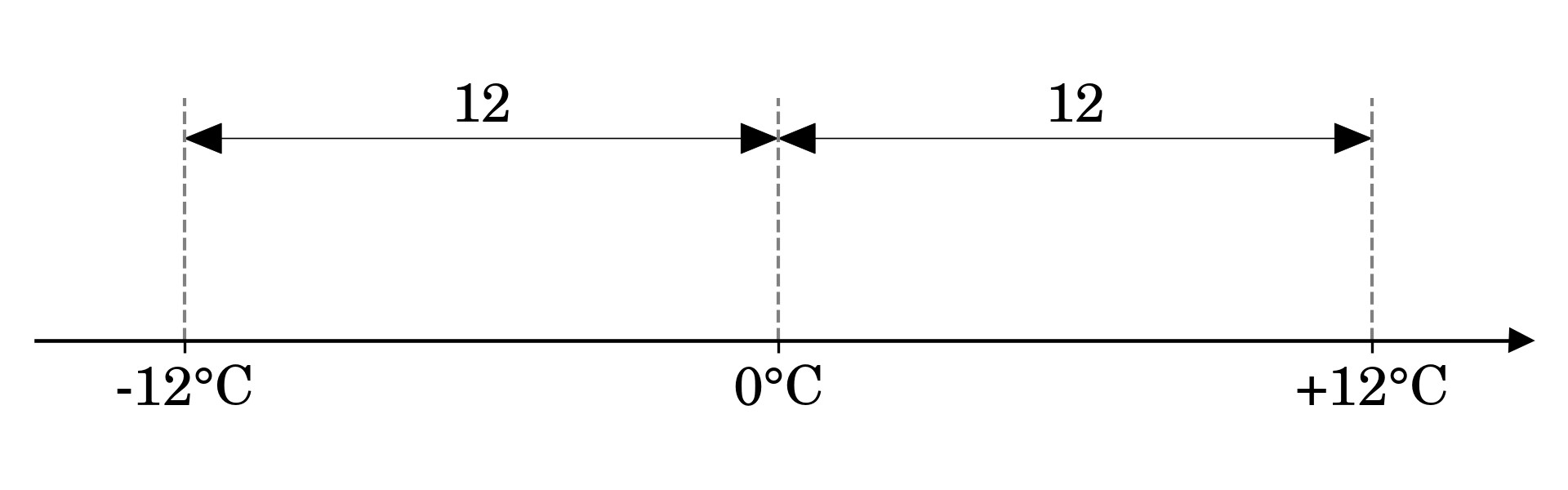
Consider a temperature measurement as an example. If the thermometer reads -12°C, then you can say it’s twelve degrees Celsius below freezing. Notice how you decomposed the temperature in the last sentence into a magnitude, twelve, and a sign. The phrase below freezing means the same as below zero degrees Celsius. The temperature’s size or absolute value is identical to the absolute value of the much warmer +12°C.

Using mathematical notation, you can define the absolute value of 𝑥 as a piecewise function, which behaves differently depending on the range of input values. A common symbol for absolute value consists of two vertical lines:

Absolute Value Defined as a Piecewise FunctionAbsolute Value Defined as a Piecewise Function

This function returns values greater than or equal to zero without alteration. On the other hand, values smaller than zero have their sign flipped from a minus to a plus. Algebraically, this is equivalent to taking the square root of a number squared:

Absolute Value Defined AlgebraicallyAbsolute Value Defined Algebraically

When you square a real number, you always get a positive result, even if the number that you started with was negative. For example, the square of -12 and the square of 12 have the same value, equal to 144. Later, when you compute the square root of 144, you’ll only get 12 without the minus sign.

Geometrically, you can think of an absolute value as the distance from the origin, which is zero on a number line in the case of the temperature reading from before:

Absolute Value on a Number LineAbsolute Value on a Number Line

To calculate this distance, you can subtract the origin from the temperature reading (-12°C - 0°C = -12°C) or the other way around (0°C - (-12°C) = +12°C), and then drop the sign of the result. Subtracting zero doesn’t make much difference here, but the reference point may sometimes be shifted. That’s the case for vectors bound to a fixed point in space, which becomes their origin.

Vectors, just like numbers, convey information about the direction and the magnitude of a physical quantity, but in more than one dimension. For example, you can express the velocity of a falling snowflake as a three-dimensional vector:

This vector indicates the snowflake’s current position relative to the origin of the coordinate system. It also shows the snowflake’s direction and pace of motion through the space. The longer the vector, the greater the magnitude of the snowflake’s speed. As long as the coordinates of the vector’s initial and terminal points are expressed in meters, calculating its length will get you the snowflake’s speed measured in meters per unit of time.

Note: There are two ways to look at a vector. A bound vector is an ordered pair of fixed points in space, whereas a free vector only tells you about the displacement of the coordinates from point A to point B without revealing their absolute locations. Consider the following code snippet as an example:

>>>
>>> A=[1,2,3]>>> B=[3,2,1]>>> bound_vector=[A,B]>>> bound_vector[[1, 2, 3], [3, 2, 1]]>>> free_vector=[b-afora,binzip(A,B)]>>> free_vector[2, 0, -2]

A bound vector wraps both points, providing quite a bit of information. In contrast, a free vector only represents the shift from A to B. You can calculate a free vector by subtracting the initial point, A, from the terminal one, B. One way to do so is by iterating over the consecutive pairs of coordinates with a list comprehension.

A free vector is essentially a bound vector translated to the origin of the coordinate system, so it begins at zero.

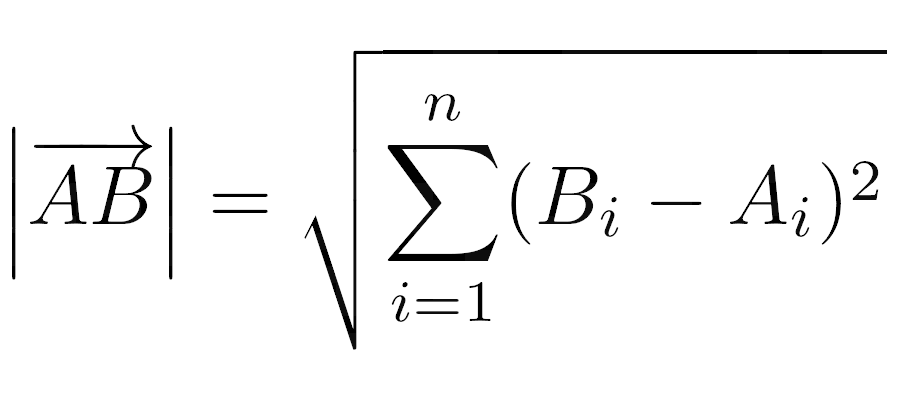
The length of a vector, also known as its magnitude, is the distance between its initial and terminal points, 𝐴 and 𝐵, which you can calculate using the Euclidean norm:

The Length of a Bound Vector as a Euclidean NormThe Length of a Bound Vector as a Euclidean Norm

This formula calculates the length of the 𝑛-dimensional vector 𝐴𝐵, by summing the squares of the differences between the coordinates of points 𝐴 and 𝐵 in each dimension indexed by 𝑖. For a free vector, the initial point, 𝐴, becomes the origin of the coordinate system—or zero—which simplifies the formula, as you only need to square the coordinates of your vector.

Recall the algebraic definition of an absolute value. For numbers, it was the square root of a number squared. Now, when you add more dimensions to the equation, you end up with the formula for the Euclidean norm, shown above. So, the absolute value of a vector is equivalent to its length!

Read the full article at https://realpython.com/python-absolute-value/ »


[ Improve Your Python With 🐍 Python Tricks 💌 – Get a short & sweet Python Trick delivered to your inbox every couple of days. >> Click here to learn more and see examples ]

Read the Docs: Read the Docs newsletter - August 2022

$
0
0

We continue to be excited about the expanded capacity we have with an additional team member. Our focus for July has been around a lot of marketing and positioning, trying to better understand how our customers view our product, and work with them to use it well.

We also had our 12th birthday just before publishing this newsletter. 🎉

New features

We’ve continued building a number of features and bug fixes in our roadmap:

  • We have more Example projects, which allow users to get started quickly with our products. We shipped an example for Jupyter Book this month, which is of growing interest to scientific and academic projects.
  • Scientific users are important for us, so we’ve put together a landing page that highlights the benefits that our scientific users are seeing.
  • We created a GitHub action that allows users to have a link to the Pull Request preview automatically added to the PR description. If users find this useful, we will continue to expand this functionality, and perhaps add it to our core platform so no configuration is needed.
  • We improved the convenience and security of our platform by making sure all invites for a team or project are seen and approved by the invited user.

You can always see the latest changes to our platforms in our Read the Docs Changelog.

Awesome documentation projects

We are collecting entries for Awesome Read the Docs Projects - please do tell us about your favorites, either by sending an email or opening a Pull Request!

  • Weblate - Weblate is a translation platform with a large documentation project with many translations and customized Read the Docs theme. Documentation aimed at all segments: users, administrators and developers. Also features an extensive Changelog.
  • TomoBank - a big list of tomographic datasets and phantoms, featuring especially tables and images and maintained by science community.
  • Uberspace - Customized sidebar and footer, adding project’s branding through custom CSS and HTML to sphinx_rtd_theme. Latest version and release date on front page.

Upcoming features

  • We are working on some improvements to our URL handling code, which will allow us to support more flexible URL configurations for projects.
  • As mentioned before, we are shifting some of our focus to frontend & marketing these next few months. We’re getting close to shipping our new landing page, which we’re excited about.
  • We’re continuing to focus on outreach for our new build customization features, so that we can continue to improve them with your feedback.
  • Our main theme sphinx_rtd_theme will soon be revived after a period of inactivity and we will do a number of smaller releases in Q3 and Q4.

Possible issues

We have unpinned Pillow for some Python versions. This could break some builds, but we haven’t receive any complaints yet.

We continue to actively deprecate jQuery from our code, as well as guide the Sphinx ecosystem through the transition.


Considering using Read the Docs for your next documentation project? Check out our documentation to get started!

Questions? Comments? Ideas for the next newsletter? Contact us!


Codementor: Why is Python a Perfect Choice for Developing Fintech Products?

$
0
0
find the top 5 reasons why Python is an ideal programming language for developing Fintech web apps.

Codementor: How to use MQTT in Python (Paho)

$
0
0
This article introduces how to use the Paho MQTT client library in the Python project, and implements connection, subscribe, messaging, etc of MQTT.

Python⇒Speed: Invasive procedures: Python affordances for performance measurement

$
0
0

When your Python code is too slow, you need to identify the bottleneck that’s causing it: you need to understand what your code is doing. Luckily, beyond pre-existing profiling tools, there are also a variety of ways you can poke and prod Python programs to get a better understanding of what they’re doing internally.

This allows you to do one-time introspection, add profiling facilities to your program that you can turn on and off, build custom tools, and in general get a better understand of what your program is doing.

Some of these affordances are quite awful, but that’s OK! Performance debugging is a different kind of coding than writing long-term maintainable code.

In this article we’ll cover:

  1. Runtime object mutation (“monkey patching”).
  2. Code patching.
  3. Runtime mutation of C types.
  4. Audit hooks.
  5. sys._current_frames().
  6. Profiling and tracing hooks.
  7. And more!
Read more...

Hynek Schlawack: Easier Crediting of Contributors on GitHub

$
0
0

GitHub has the concept of co-authors of a commit. You’ve probably seen it in the web UI, when multiple people are listed to have committed something. I want to be gracious with credit where it’s due and I’ve found ways to make it easier.

Mike Driscoll: How to Rotate and Mirror Images with Python and Pillow (Video)

Viewing all 23953 articles
Browse latest View live


Latest Images

<script src="https://jsc.adskeeper.com/r/s/rssing.com.1596347.js" async> </script>