Quantcast
Channel: Planet Python
Viewing all 24375 articles
Browse latest View live

Tryton News: Newsletter December 2018

$
0
0

@udono wrote:

This month was mainly focused on fixing bugs.
But also it is the month where we finally closed the Google Groups in favor of this forum (users can post in there language thanks to translator plugin). We still manage two mailing lists for announces and commits. The former ones are archived.

Contents:

Changes For The User

Some bugs related to the update of chart of account have been fixed. You may need to re-run the wizard to ensure your chart is in sync with the template.

The form view for the invoices and shipments on the sale and purchase form has been removed. Often the user tried to validate or post them from this view which is not always working due to some constraints from the clients design. Indeed the proper way is to open them using the relate feature which provide access to the complete workflow. The list views on the sale and purchase are just there to provide a quick summary.

After 2,5 years, the support for the series 4.0 ended as planned. If you are still using this series or any older, it is highly advise to upgrade to a supported series (the best choice to day is the LTS 5.0).

The “PieceDate” column of the FEC export has been changed for the move date. Before we used the post date but indeed the move date is closer to the definition.

With the removal in series 5.0 of the default accounts on journal, the journal cash report was broken. It was fixed by basing it on the moves of cash journal between receivable/payable and others accounts.

Now, all the tables are correctly responsive in the web client even when they are hidden behind a tab.

Changes For The Developer

An important security issue has been fixed on all supported versions. It allowed an authenticated user to guess value of fields for which he does not have read access.

In order to simplify and to enforce good practice, ModelStorage.read requires to always list the requested fields. Before if no list was provided, it returned the values of all the readable fields.

The documentation on proteus, the scripting library, is now available on proteus — tryton-proteus latest documentation

The cache is now correctly cleaned even when an exception occurs during a test case.

Posts: 1

Participants: 1

Read full topic


Test and Code: 55: When 100% test coverage just isn't enough - Mahmoud Hashemi

$
0
0

What happens when 100% test code coverage just isn't enough.
In this episode, we talk with Mahmoud Hashemi about glom, a very cool project in itself, but a project that needs more coverage than 100%.
This problem affects lots of projects that use higher level programming constructs, like domain specific languages (DSLs), sub languages mini languages, compilers, and db query languages.

Also covered:

  • awesome Python applications
  • versioning: 0-ver vs calver vs semver

Special Guest: Mahmoud Hashemi.

Sponsored By:

Support Test and Code - A Podcast about Software Testing, Software Development, and Python

Links:

<p>What happens when 100% test code coverage just isn&#39;t enough.<br> In this episode, we talk with Mahmoud Hashemi about glom, a very cool project in itself, but a project that needs more coverage than 100%.<br> This problem affects lots of projects that use higher level programming constructs, like domain specific languages (DSLs), sub languages mini languages, compilers, and db query languages.</p> <p>Also covered:</p> <ul> <li>awesome Python applications</li> <li>versioning: 0-ver vs calver vs semver</li> </ul><p>Special Guest: Mahmoud Hashemi.</p><p>Sponsored By:</p><ul><li><a rel="nofollow" href="https://testandcode.com/digitalocean">DigitalOcean</a>: <a rel="nofollow" href="https://testandcode.com/digitalocean">Get started with a free $100 credit toward your first project on DigitalOcean and experience everything the platform has to offer, such as: cloud firewalls, real-time monitoring and alerts, global datacenters, object storage, and the best support anywhere. Claim your credit today at: do.co/testandcode</a></li></ul><p><a rel="payment" href="https://www.patreon.com/testpodcast">Support Test and Code - A Podcast about Software Testing, Software Development, and Python</a></p><p>Links:</p><ul><li><a title="Announcing glom" rel="nofollow" href="https://sedimental.org/">Announcing glom</a> &mdash; Restructured Data for Python</li><li><a title="Domain-specific language - Wikipedia" rel="nofollow" href="https://en.wikipedia.org/wiki/Domain-specific_language">Domain-specific language - Wikipedia</a></li><li><a title="awesome-python-applications" rel="nofollow" href="https://github.com/mahmoud/awesome-python-applications">awesome-python-applications</a> &mdash; Free software that works great, and also happens to be open-source Python.</li><li><a title="Meld" rel="nofollow" href="http://meldmerge.org/">Meld</a> &mdash; a visual diff and merge tool targeted at developers.</li><li><a title="ZeroVer: 0-based Versioning " rel="nofollow" href="https://0ver.org/">ZeroVer: 0-based Versioning </a></li><li><a title="SemVer: Semantic Versioning " rel="nofollow" href="https://semver.org/">SemVer: Semantic Versioning </a></li><li><a title="CalVer: Calendar Versioning" rel="nofollow" href="https://calver.org/">CalVer: Calendar Versioning</a></li><li><a title="episode 27: unit, integration, and system testing - Mahmoud Hashemi" rel="nofollow" href="https://testandcode.com/27">episode 27: unit, integration, and system testing - Mahmoud Hashemi</a></li></ul>

Made With Mu: The Road to Mu 1.1

$
0
0

The next version of Mu will be 1.1. This post describes how we’re going to get there and what to expect on the way.

The first thing you should know is that 1.1 will have new features including new modes, new capabilities and new ways to configure Mu. Some of the new modes have been kindly written by new contributors. The new capabilities and ways to configure Mu are based upon valuable feedback from folks in the community. Thank you to everyone who has contributed so far.

The second thing you should know is that 1.1 will have many bug fixes. Since Mu 1.0 was released a huge number of people have started to use it and, inevitably, found and reported bugs. Thank you for all the valuable feedback, please keep it coming! We hope to address as many of the problems as possible.

The final thing you should know about is the release schedule for Mu 1.1. Very soon, a version 1.1.0.alpha.1 will be released: this will contain some of the new features and updates and will definitely contain bugs. It will be followed with a number of further alpha releases as new features are created and/or contributed to this version of Mu. When we’re happy we have all the features we want, we’ll release a version 1.1.0.beta.1. The focus of the various beta releases will be to test and fix any bugs we may encounter. However, the beta releases will be “feature complete” and represent a good preview of what version 1.1 will look like. Once there are no more known bugs, or those bugs that remain are “edge cases” that can be documented, we’ll release the final 1.1.0 version which will be available for official download. The old 1.0.* version of Mu will still be on the website, but no longer officially supported.

Such work will touch all aspects of the Mu project: the editor, the associated projects for generating resources for the editor, the documentation and the website too. It will also mean the translations will need to be checked and updated to deal with any UI changes.

Some of you may be contributors waiting for us to merge your work or respond to your suggestions. We promise we will always be respectful and supportive of your efforts. However, we may not accept all contributions. This reminds me of my work as a musician: when auditioning players for a band or orchestra you meet a huge number of talented musicians, but there may only be the need for one flute player. Any number of the musicians who auditioned could have easily played the flute part, but the person who was offered the job was the one who it was felt fitted in with the rest of the orchestra. Likewise, if we don’t merge your contribution, it’s likely that it’s because it either doesn’t quite fit with our vision for Mu, or the capabilities it provides are met in some other preferred way. We will, of course, explain our decisions via discussion on the relevant pull requests. Nevertheless, please don’t be disheartened if we decline your contribution – it’s certainly not a critique of your efforts (which we value hugely).

This is a LOT of work, and we ask you to be patient as we volunteer our time to make the next version of Mu. However, we’re a free software project developed in the open and so we would love to hear your input as work progresses. Wouldn’t it be cool to be able to say, “you see that feature? I suggested that”.

Together, we can collaborate to make Mu a better editor for beginner programmers and those who support them.

Julien Danjou: A multi-value syntax tree filtering in Python

$
0
0
A multi-value syntax tree filtering in Python

A while ago, we've seen how to write a simple filtering syntax tree with Python. The idea was to provide a small abstract syntax tree with an easy to write data structure that would be able to filter a value. Filtering meaning that once evaluated, our AST would return either True or False based on the passed value.

With that, we were able to write small rules like Filter({"eq": 3})(4) that would return False since, well, 4 is not equal to 3.

In this new post, I propose we enhance our filtering ability to support multiple values. The idea is to be able to write something like this:

>>> f = Filter(
  {"and": [
    {"eq": ("foo", 3)},
    {"gt": ("bar", 4)},
   ]
  },
)
>>> f(foo=3, bar=5)
True
>>> f(foo=4, bar=5)
False

The biggest change here is that the binary operators (eq, gt, le, etc.) now support getting two values, and not only one, and that we can pass multiple values to our filter by using keyword arguments.

How should we implement that? Well, we can keep the same data structure we built previously. However, this time we're gonna do the following change:

  • The left value of the binary operator will be a string that will be used as the key to access the keyword arguments passed to our Filter.__call__ values.
  • The right value of the binary operator will be kept as it is (like before).

We therefore need to change our Filter.build_evaluator to accommodate this as follow:

def build_evaluator(self, tree):
    try:
        operator, nodes = list(tree.items())[0]
    except Exception:
        raise InvalidQuery("Unable to parse tree %s" % tree)
    try:
        op = self.multiple_operators[operator]
    except KeyError:
        try:
            op = self.binary_operators[operator]
        except KeyError:
            raise InvalidQuery("Unknown operator %s" % operator)
        assert len(nodes) == 2 # binary operators take 2 values
        def _op(values):
            return op(values[nodes[0]], nodes[1])
        return _op
    # Iterate over every item in the list of the value linked
    # to the logical operator, and compile it down to its own
    # evaluator.
    elements = [self.build_evaluator(node) for node in nodes]
    return lambda values: op((e(values) for e in elements))

The algorithm is pretty much the same, the tree being browsed recursively.

First, the operator and its arguments (nodes) are extracted.

Then, if the operator takes multiple arguments (such as and and or operators), each node is recursively evaluated and a function is returned evaluating those nodes.
If the operator is a binary operator (such as eq, lt, etc.), it checks that the passed argument list length is 2. Then, it returns a function that will apply the operator (e.g., operator.eq) to values[nodes[0]] and nodes[1]: the former access the arguments (values) passed to the filter's __call__ function while the latter is directly the passed argument.

The full class looks like this:

import operator


class InvalidQuery(Exception):
    pass


class Filter(object):
    binary_operators = {
        u"=": operator.eq,
        u"==": operator.eq,
        u"eq": operator.eq,

        u"<": operator.lt,
        u"lt": operator.lt,

        u">": operator.gt,
        u"gt": operator.gt,

        u"<=": operator.le,
        u"≤": operator.le,
        u"le": operator.le,

        u">=": operator.ge,
        u"≥": operator.ge,
        u"ge": operator.ge,

        u"!=": operator.ne,
        u"≠": operator.ne,
        u"ne": operator.ne,
    }

    multiple_operators = {
        u"or": any,
        u"∨": any,
        u"and": all,
        u"∧": all,
    }

    def __init__(self, tree):
        self._eval = self.build_evaluator(tree)

    def __call__(self, **kwargs):
        return self._eval(kwargs)

    def build_evaluator(self, tree):
        try:
            operator, nodes = list(tree.items())[0]
        except Exception:
            raise InvalidQuery("Unable to parse tree %s" % tree)
        try:
            op = self.multiple_operators[operator]
        except KeyError:
            try:
                op = self.binary_operators[operator]
            except KeyError:
                raise InvalidQuery("Unknown operator %s" % operator)
            assert len(nodes) == 2 # binary operators take 2 values
            def _op(values):
                return op(values[nodes[0]], nodes[1])
            return _op
        # Iterate over every item in the list of the value linked
        # to the logical operator, and compile it down to its own
        # evaluator.
        elements = [self.build_evaluator(node) for node in nodes]
        return lambda values: op((e(values) for e in elements))

We can check that it works by building some filters:

x = Filter({"eq": ("foo", 1)})
assert not x(foo=1, bar=1)

x = Filter({"eq": ("foo", "bar")})
assert not x(foo=1, bar=1)

x = Filter({"or": (
    {"eq": ("foo", "bar")},
    {"eq": ("bar", 1)},
)})
assert x(foo=1, bar=1)

Supporting multiple values is handy as it allows to pass complete dictionaries to the filter, rather than just one value. That enables users to filter more complex objects.

Sub-dictionary support

It's also possible to support deeper data structure, like a dictionary of dictionary. By replacing values[nodes[0]] by self._resolve_name(values, node[0]) with a _resolve_name method like this one, the filter is able to traverse dictionaries:

ATTR_SEPARATOR = "."

def _resolve_name(self, values, name):
    try:
        for subname in name.split(self.ATTR_SEPARATOR):
            values = values[subname]
        return values
    except KeyError:
        raise InvalidQuery("Unknown attribute %s" % name)

It then works like that:

x = Filter({"eq": ("baz.sub", 23)})
assert x(foo=1, bar=1, baz={"sub": 23})

x = Filter({"eq": ("baz.sub", 23)})
assert not x(foo=1, bar=1, baz={"sub": 3})

By using the syntax key.subkey.subsubkey the filter is able to access item inside dictionaries on more complex data structure.

That basic filter engine can evolve quite easily in something powerful, as you can add new operators or new way to access/manipulate the passed data structure.

If you have other ideas on nifty features that could be added, feel free to add a comment below!

codingdirectional: Create the custom made thread class for the python application project

$
0
0

Welcome back to the part 2 of the python application project, if you miss the first part of the project then you can read it here. In this chapter we are going to print out the file name which we have selected earlier with the help of the custom made thread instance instead of print out that filename directly inside the selectFile method just like in the previous chapter.

First lets create a custom made thread class from the main Thread class then process the selected filename under it’s run method.

import threading

class Remove(threading.Thread):

   def __init__(self, massage):

      threading.Thread.__init__(self)
      self.massage = massage

   def run(self):
      print(self.massage)
      print('program terminate!')
      return

Now in the main file the program will create a new instance of the Remove thread class whenever the user has clicked on the button and selected a file from the folder.

Open a folder and select a fileOpen a folder and select a file

This is the modify version of the main file.

from tkinter import *
from tkinter import filedialog
from Remove import Remove

win = Tk() # 1 Create instance
win.title("Multitas") # 2 Add a title
win.resizable(0, 0) # 3 Disable resizing the GUI

# 4 Create a label
aLabel = Label(win, text="Remove duplicate file")
aLabel.grid(column=0, row=0) # 5 Position the label

# 6 Create a selectFile function to be used by button
def selectFile():

    filename = filedialog.askopenfilename(initialdir="/", title="Select file")
    remove = Remove(filename) # 7 create and start new thread to print the filename from the selected file
    remove.start() 

# 8 Adding a Button
action = Button(win, text="Search File", command=selectFile)
action.grid(column=0, row=1) # 9 Position the button

win.mainloop()  # 10 start GUI

The reason we need to create a thread when we search and remove the duplicate files later on in our project is because the search program will freeze up whenever we search for a very large folder which contains lots of files inside it, therefore creating a separate stand alone thread to process those files is a must.

Alright, with that we are now ready to move to the next step of our project, which is to create a search engine which will help us to remove the duplicate files on our folder.

Real Python: Building Serverless Python Apps Using AWS Chalice

$
0
0

Shipping a web application usually involves having your code up and running on single or multiple servers. In this model, you end up setting up processes for monitoring, provisioning, and scaling your servers up or down. Although this seems to work well, having all the logistics around a web application handled in an automated manner reduces a lot of manual overhead. Enter Serverless.

With Serverless Architecture, you don’t manage servers. Instead, you only need to ship the code or the executable package to the platform that executes it. It’s not really serverless. The servers do exist, but the developer doesn’t need to worry about them.

AWS introduced Lambda Services, a platform that enables developers to simply have their code executed in a particular runtime environment. To make the platform easy to use, many communities have come up with some really good frameworks around it in order to make the serverless apps a working solution.

By the end of this tutorial, you’ll be able to:

  • Discuss the benefits of a serverless architecture
  • Explore Chalice, a Python serverless framework
  • Build a full blown serverless app for a real world use case
  • Deploy to Amazon Web Services (AWS) Lambda
  • Compare Pure and Lambda functions

Free Bonus:5 Thoughts On Python Mastery, a free course for Python developers that shows you the roadmap and the mindset you'll need to take your Python skills to the next level.

Getting Started With AWS Chalice

Chalice, a Python Serverless Microframework developed by AWS, enables you to quickly spin up and deploy a working serverless app that scales up and down on its own as required using AWS Lambda.

Why Chalice?

For Python developers accustomed to the Flask web framework, Chalice should be a breeze in terms of building and shipping your first app. Highly inspired by Flask, Chalice keeps it pretty minimalist in terms of defining what the service should be like and finally making an executable package of the same.

Enough theory! Let’s start with a basic hello-world app and kick-start our serverless journey.

Project Setup

Before diving into Chalice, you’ll set up a working environment on your local machine, which will set you up for the rest of the tutorial.

First, create and activate a virtual environment and install Chalice:

$ python3.6 -m venv env
$source env/bin/activate
(env)$ pip install chalice

Follow our comprehensive guide on the Pipenv packaging tool.

Note: Chalice comes with a user-friendly CLI that makes it easy to play around with your serverless app.

Now that you have Chalice installed on your virtual environment, let’s use the Chalice CLI to generate some boilerplate code:

(env)$ chalice new-project

Enter the name of the project when prompted and hit return. A new directory is created with that name:

<project-name>/
|
├── .chalice/
│   └── config.json
|
├── .gitignore
├── app.py
└── requirements.txt

See how minimalist the Chalice codebase is. A .chalice directory, app.py, and requirements.txt is all that it requires to have a serverless app up and running. Let’s quickly run the app on our local machine.

Chalice CLI consists of really great utility functions allowing you to perform a number of operations from running locally to deploying in a Lambda environment.

Build and Run Locally

You can simulate the app by running it locally using the local utility of Chalice:

(env)$ chalice localServing on 127.0.0.1:8000

By default, Chalice runs on port 8000. We can now check the index route by making a curl request to http://localhost:8000/:

$ curl -X GET http://localhost:8000/
{"hello": "world"}

Now if we look at app.py, we can appreciate the simplicity with which Chalice allows you to build a serverless service. All the complex stuff is handled by the decorators:

fromchaliceimportChaliceapp=Chalice(app_name='serverless-sms-service')@app.route('/')defindex():return{'hello':'world'}

Note: We haven’t named our app hello-world, as we will build our SMS service on the same app.

Now, let’s move on to deploying our app on the AWS Lambda.

Deploy on AWS Lambda

Chalice makes deploying your serverless app completely effortless. Using the deploy utility, you can simply instruct Chalice to deploy and create a Lambda function that can be accessible via a REST API.

Before we begin deployment, we need to make sure we have our AWS credentials in place, usually located at ~/.aws/config. The contents of the file look as follows:

[default]aws_access_key_id=<your-access-key-id>aws_secret_access_key=<your-secret-access-key>region=<your-region>

With AWS credentials in place, let’s begin our deployment process with just a single command:

(env)$ chalice deploy
Creating deployment package.Updating policy for IAM role: hello-world-devCreating lambda function: hello-world-devCreating Rest APIResources deployed:  - Lambda ARN: arn:aws:lambda:ap-south-1:679337104153:function:hello-world-dev  - Rest API URL: https://fqcdyzvytc.execute-api.ap-south-1.amazonaws.com/api/

Note: The generated ARN and API URL in the above snippet will vary from user to user.

Wow! Yes, it is really this easy to get your serverless app up and running. To verify simply make a curl request on the generated Rest API URL:

$ curl -X GET https://fqcdyzvytc.execute-api.ap-south-1.amazonaws.com/api/
{"hello": "world"}

Typically, this is all that you need to get your serverless app up and running. You can also go to your AWS console and see the Lambda function created under the Lambda service section. Each Lambda service has a unique REST API endpoint that can be consumed in any web application.

Next, you will begin building your Serverless SMS Sender service using Twilio as an SMS service provider.

Building a Serverless SMS Sender Service

With a basic hello-world app deployed, let’s move on to building a more real-world application that can be used along with everyday web apps. In this section, you’ll build a completely serverless SMS-sending app that can be plugged into any system and work as expected as long as the input parameters are correct.

In order to send SMS, we will be using Twilio, a developer-friendly SMS service. Before we begin using Twilio, we need to take care of a few prerequisites:

  • Create an account and acquire ACCOUNT_SID and AUTH_TOKEN.
  • Get a mobile phone number, which is available for free at Twilio for minor testing stuff.
  • Install the twilio package in our virtual environment using pip install twilio.

With all the above prerequisites checked, you can start building your SMS service client using Twilio’s Python library. Let’s begin by cloning the repository and creating a new feature branch:

$ git clone <project-url>
$cd<project-dir>
$ git checkout tags/1.0 -b twilio-support

Now make the following changes to app.py to evolve it from a simple hello-world app to enable support for Twilio service too.

First, let’s include all the import statements:

fromosimportenvironasenv# 3rd party importsfromchaliceimportChalice,Responsefromtwilio.restimportClientfromtwilio.base.exceptionsimportTwilioRestException# Twilio ConfigACCOUNT_SID=env.get('ACCOUNT_SID')AUTH_TOKEN=env.get('AUTH_TOKEN')FROM_NUMBER=env.get('FROM_NUMBER')TO_NUMBER=env.get('TO_NUMBER')

Next, you’ll encapsulate the Twilio API and use it to send SMS:

app=Chalice(app_name='sms-shooter')# Create a Twilio client using account_sid and auth tokentw_client=Client(ACCOUNT_SID,AUTH_TOKEN)@app.route('/service/sms/send',methods=['POST'])defsend_sms():request_body=app.current_request.json_bodyifrequest_body:try:msg=tw_client.messages.create(from_=FROM_NUMBER,body=request_body['msg'],to=TO_NUMBER)ifmsg.sid:returnResponse(status_code=201,headers={'Content-Type':'application/json'},body={'status':'success','data':msg.sid,'message':'SMS successfully sent'})else:returnResponse(status_code=200,headers={'Content-Type':'application/json'},body={'status':'failure','message':'Please try again!!!'})exceptTwilioRestExceptionasexc:returnResponse(status_code=400,headers={'Content-Type':'application/json'},body={'status':'failure','message':exc.msg})

In the above snippet, you simply create a Twilio client object using ACCOUNT_SID and AUTH_TOKEN and use it to send messages under the send_sms view. send_sms is a bare bones function that uses the Twilio client’s API to send the SMS to the specified destination. Before proceeding further, let’s give it a try and run it on our local machine.

Build and Run Locally

Now you can run your app on your machine using the local utility and verify that everything is working fine:

(env)$ chalice local

Now make a curl POST request to http://localhost:8000/service/sms/send with a specific payload and test the app locally:

$ curl -H "Content-Type: application/json" -X POST -d '{"msg": "hey mate!!!"}' http://localhost:8000/service/sms/send

The above request responds as follows:

{"status":"success","data":"SM60f11033de4f4e39b1c193025bcd5cd8","message":"SMS successfully sent"}

The response indicates that the message was successfully sent. Now, let’s move on to deploying the app on AWS Lambda.

Deploy on AWS Lambda

As suggested in the previous deployment section, you just need to issue the following command:

(env)$ chalice deploy
Creating deployment package.Updating policy for IAM role: sms-shooter-devCreating lambda function: sms-shooter-devCreating Rest APIResources deployed:  - Lambda ARN: arn:aws:lambda:ap-south-1:679337104153:function:sms-shooter-dev  - Rest API URL: https://qtvndnjdyc.execute-api.ap-south-1.amazonaws.com/api/

Note: The above command succeeds, and you have your API URL in the output as expected. Now on testing the URL, the API throws an error message. What went wrong?

As per AWS Lambda logs, twilio package is not found or installed, so you need to tell the Lambda service to install the dependencies. To do so, you need to add twilio as a dependency to requirements.txt:

twilio==6.18.1

Other packages such as Chalice and its dependencies should not be included in requirements.txt, as they are not a part of Python’s WSGI runtime. Instead, we should maintain a requirements-dev.txt, which is applicable to only the development environment and contains all Chalice-related dependencies. To learn more, check out this GitHub issue.

Once all the package dependencies are sorted, you need to make sure all the environment variables are also shipped along and set correctly during the Lambda runtime. To do so, you have to add all the environment variables in .chalice/config.json in the following manner:

{"version":"2.0","app_name":"sms-shooter","stages":{"dev":{"api_gateway_stage":"api","environment_variables":{"ACCOUNT_SID":"<your-account-sid>","AUTH_TOKEN":"<your-auth-token>","FROM_NUMBER":"<source-number>","TO_NUMBER":"<destination-number>"}}}}

Now we’re good to deploy:

Creating deployment package.Updating policy for IAM role: sms-shooter-devUpdating lambda function: sms-shooter-devUpdating rest APIResources deployed:  - Lambda ARN: arn:aws:lambda:ap-south-1:679337104153:function:sms-shooter-dev  - Rest API URL: https://fqcdyzvytc.execute-api.ap-south-1.amazonaws.com/api/

Do a sanity check by making a curl request to the generated API endpoint:

$ curl -H "Content-Type: application/json" -X POST -d '{"msg": "hey mate!!!"}' https://fqcdyzvytc.execute-api.ap-south-1.amazonaws.com/api/service/sms/send

The above request responds as expected:

{"status":"success","data":"SM60f11033de4f4e39b1c193025bcd5cd8","message":"SMS successfully sent"}

Now, you have a completely serverless SMS sending service up and running. With the front end of this service being a REST API, it can be used in other applications as a plug-and-play feature that is scalable, secure, and reliable.

Refactoring

Finally, we will refactor our SMS app to not contain all the business logic in app.py completely. Instead, we will follow the Chalice prescribed best practices and abstract the business logic under the chalicelib/ directory.

Let’s begin by creating a new branch:

$ git checkout tags/2.0 -b sms-app-refactor

First, create a new directory in the root directory of the project named chalicelib/ and create a new file named sms.py:

(env)$ mkdir chalicelib
(env)$ touch chalicelib/sms.py

Update the above created chalicelib/sms.py with the SMS sending logic by abstracting things from app.py:

fromosimportenvironasenvfromtwilio.restimportClient# Twilio ConfigACCOUNT_SID=env.get('ACCOUNT_SID')AUTH_TOKEN=env.get('AUTH_TOKEN')FROM_NUMBER=env.get('FROM_NUMBER')TO_NUMBER=env.get('TO_NUMBER')# Create a twilio client using account_sid and auth tokentw_client=Client(ACCOUNT_SID,AUTH_TOKEN)defsend(payload_params=None):""" send sms to the specified number """msg=tw_client.messages.create(from_=FROM_NUMBER,body=payload_params['msg'],to=TO_NUMBER)ifmsg.sid:returnmsg

The above snippet only accepts the input params and responds as required. Now to make this work, we need to make changes to app.py as well:

# Core importsfromchaliceimportChalice,Responsefromtwilio.base.exceptionsimportTwilioRestException# App level importsfromchalicelibimportsmsapp=Chalice(app_name='sms-shooter')@app.route('/')defindex():return{'hello':'world'}@app.route('/service/sms/send',methods=['POST'])defsend_sms():request_body=app.current_request.json_bodyifrequest_body:try:resp=sms.send(request_body)ifresp:returnResponse(status_code=201,headers={'Content-Type':'application/json'},body={'status':'success','data':resp.sid,'message':'SMS successfully sent'})else:returnResponse(status_code=200,headers={'Content-Type':'application/json'},body={'status':'failure','message':'Please try again!!!'})exceptTwilioRestExceptionasexc:returnResponse(status_code=400,headers={'Content-Type':'application/json'},body={'status':'failure','message':exc.msg})

In the above snippet, all the SMS sending logic is invoked from the chalicelib.sms module, making the view layer a lot cleaner in terms of readability. This abstraction lets you add much more complex business logic and customize the functionality as required.

Sanity Check

After refactoring our code, let’s ensure it is running as expected.

Build and Run Locally

Run the app once again using the local utility:

(env)$ chalice local

Make a curl request and verify. Once that’s done, move on to deployment.

Deploy on AWS Lambda

Once you are sure everything is working as expected, you can now finally deploy your app:

(env)$ chalice deploy

As usual, the command executes successfully and you can verify the endpoint.

Conclusion

You now know how to do the following:

  • Build a serverless application using AWS Chalice in accordance with best practices
  • Deploy your working app on the Lambda runtime environment

Lambda services under the hood are analogous to pure functions, which have a certain behavior on a set of input/output. Developing precise Lambda services allows for better testing, readability, and atomicity. Since Chalice is a minimalist framework, you can just focus on the business logic, and the rest is taken care of, from deployment to IAM policy generation. This is all with just a single command deployment!

Moreover, Lambda services are mostly focused on heavy CPU bound processing and scale in a self-governed manner, as per the number of requests in a unit of time. Using serverless architecture allows your codebase to be more like SOA (Service Oriented Architecture). Using AWS’s other products in their ecosystem that plug in well with Lambda functions is even more powerful.


[ Improve Your Python With 🐍 Python Tricks 💌 – Get a short & sweet Python Trick delivered to your inbox every couple of days. >> Click here to learn more and see examples ]

Django Weblog: Django bugfix releases: 2.1.4 and 1.11.17

$
0
0

Today we've issued the 2.1.4 and 1.11.17 bugfix releases.

The release package and checksums are available from our downloads page, as well as from the Python Package Index. The PGP key ID used for this release is Carlton Gibson: E17DF5C82B4F9D00.

Stack Abuse: Seaborn Library for Data Visualization in Python: Part 1

$
0
0

Introduction

In the previous article, we looked at how Python's Matplotlib library can be used for data visualization. In this article we will look at Seaborn which is another extremely useful library for data visualization in Python. The Seaborn library is built on top of Matplotlib and offers many advanced data visualization capabilities.

Though, the Seaborn library can be used to draw a variety of charts such as matrix plots, grid plots, regression plots etc., in this article we will see how the Seaborn library can be used to draw distributional and categorial plots. In the next part of the article, we will see how to draw regression plots, matrix plots, and grid plots.

Downloading the Seaborn Library

The seaborn library can be downloaded in a couple of ways. If you are using pip installer for Python libraries, you can execute the following command to download the library:

pip install seaborn  

Alternatively, if you are using the Anaconda distribution of Python, you can use execute the following command to download the seaborn library:

conda install seaborn  

The Dataset

The dataset that we are going to use to draw our plots will be the Titanic dataset, which is downloaded by default with the Seaborn library. All you have to do is use the load_dataset function and pass it the name of the dataset.

Let's see what the Titanic dataset looks like. Execute the following script:

import pandas as pd  
import numpy as np

import matplotlib.pyplot as plt  
import seaborn as sns

dataset = sns.load_dataset('titanic')

dataset.head()  

The script above loads the Titanic dataset and displays the first five rows of the dataset using the head function. The output looks like this:

The dataset contains 891 rows and 15 columns and contains information about the passengers who boarded the unfortunate Titanic ship. The original task is to predict whether or not the passenger survived depending upon different features such as their age, ticket, cabin they boarded, the class of the ticket, etc. We will use the Seaborn library to see if we can find any patterns in the data.

Distributional Plots

Distributional plots, as the name suggests are type of plots that show the statistical distribution of data. In this section we will see some of the most commonly used distribution plots in Seaborn.

The Dist Plot

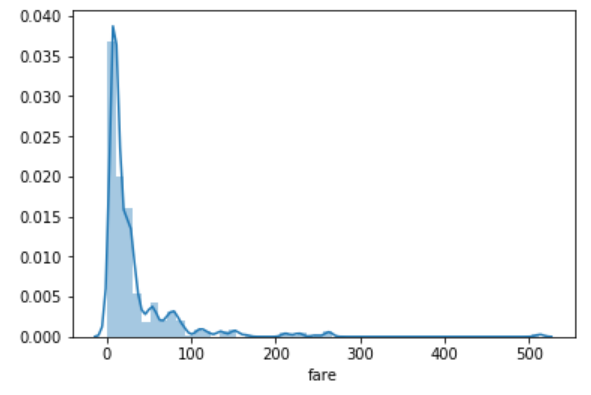
The distplot() shows the histogram distribution of data for a single column. The column name is passed as a parameter to the distplot() function. Let's see how the price of the ticket for each passenger is distributed. Execute the following script:

sns.distplot(dataset['fare'])  

Output:

You can see that most of the tickets have been solved between 0-50 dollars. The line that you see represents the kernel density estimation. You can remove this line by passing False as the parameter for the kde attribute as shown below:

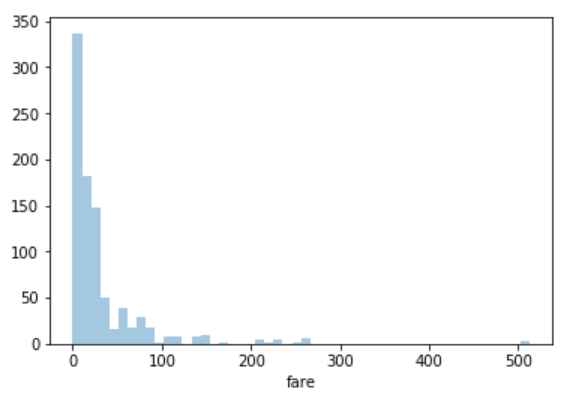
sns.distplot(dataset['fare'], kde=False)  

Output:

Now you can see there is no line for the kernel density estimation on the plot.

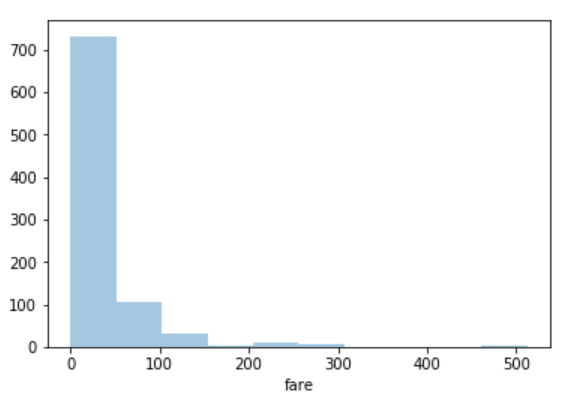
You can also pass the value for the bins parameter in order to see more or less details in the graph. Take a look at he following script:

sns.distplot(dataset['fare'], kde=False, bins=10)  

Here we set the number of bins to 10. In the output, you will see data distributed in 10 bins as shown below:

Output:

You can clearly see that for more than 700 passengers, the ticket price is between 0 and 50.

The Joint Plot

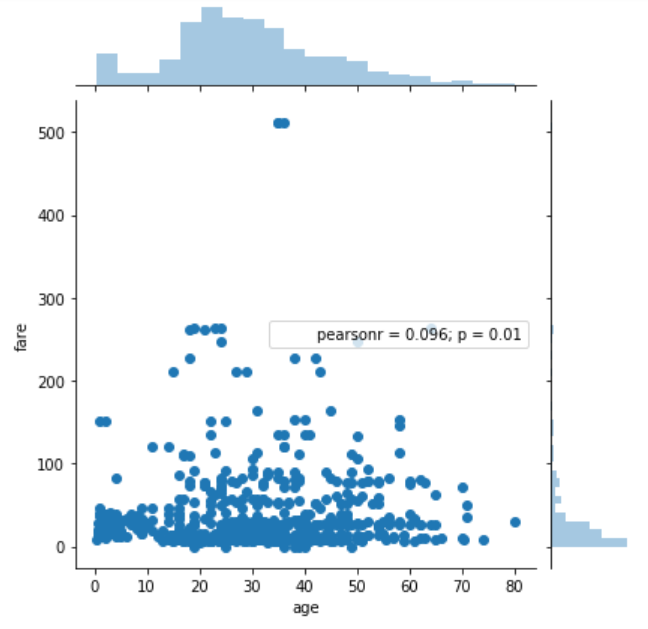
The jointplot()is used to display the mutual distribution of each column. You need to pass three parameters to jointplot. The first parameter is the column name for which you want to display the distribution of data on x-axis. The second parameter is the column name for which you want to display the distribution of data on y-axis. Finally, the third parameter is the name of the data frame.

Let's plot a joint plot of age and fare columns to see if we can find any relationship between the two.

sns.jointplot(x='age', y='fare', data=dataset)  

Output:

From the output, you can see that a joint plot has three parts. A distribution plot at the top for the column on the x-axis, a distribution plot on the right for the column on the y-axis and a scatter plot in between that shows the mutual distribution of data for both the columns. You can see that there is no correlation observed between prices and the fares.

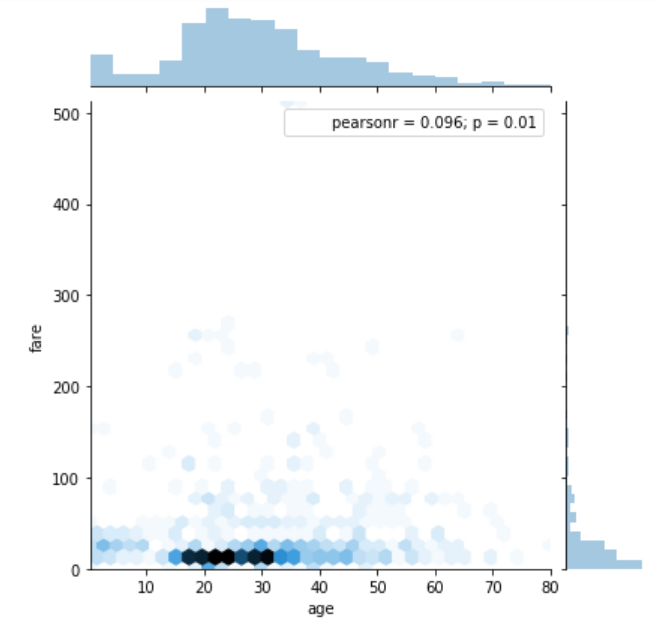
You can change the type of the joint plot by passing a value for the kind parameter. For instance, if instead of scatter plot, you want to display the distribution of data in the form of a hexagonal plot, you can pass the value hex for the kind parameter. Look at the following script:

sns.jointplot(x='age', y='fare', data=dataset, kind='hex')  

Output:

In the hexagonal plot, the hexagon with most number of points gets darker color. So if you look at the above plot, you can see that most of the passengers are between age 20 and 30 and most of them paid between 10-50 for the tickets.

The Pair Plot

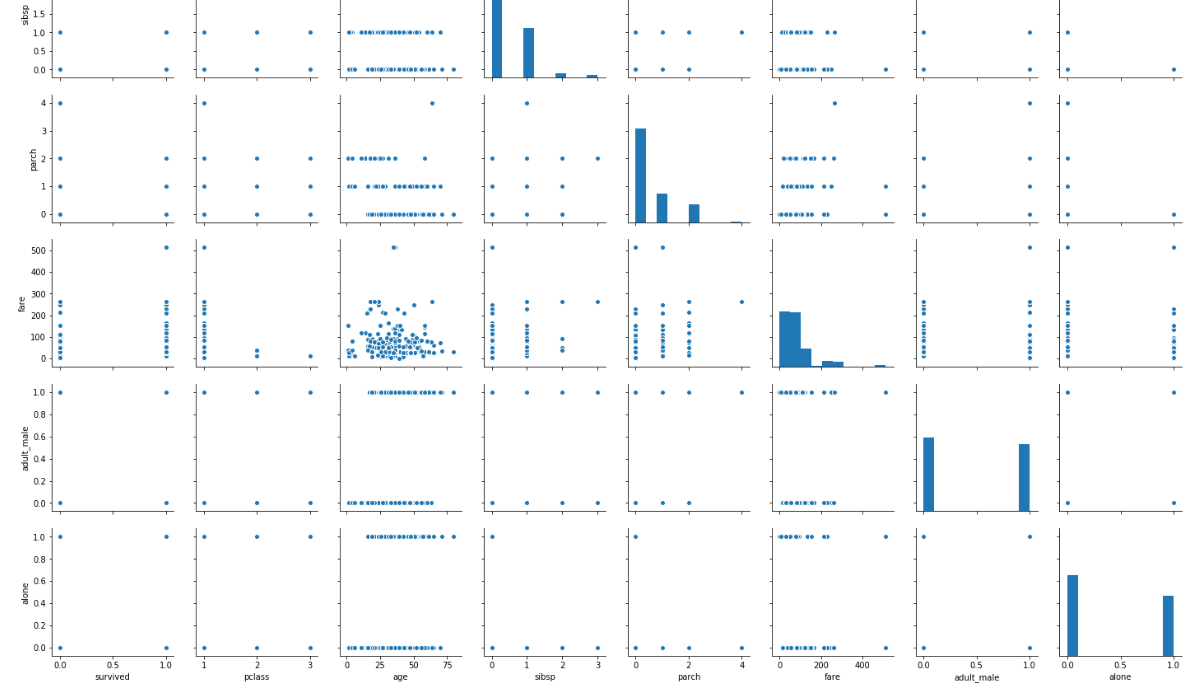
The paitplot() is a type of distribution plot that basically plots a joint plot for all the possible combination of numeric and Boolean columns in your dataset. You only need to pass the name of your dataset as the parameter to the pairplot() function as shown below:

sns.pairplot(dataset)  

A snapshot of the portion of the output is shown below:

Note: Before executing the script above, remove all null values from the dataset using the following command:

dataset = dataset.dropna()  

From the output of the pair plot you can see the joint plots for all the numeric and Boolean columns in the Titanic dataset.

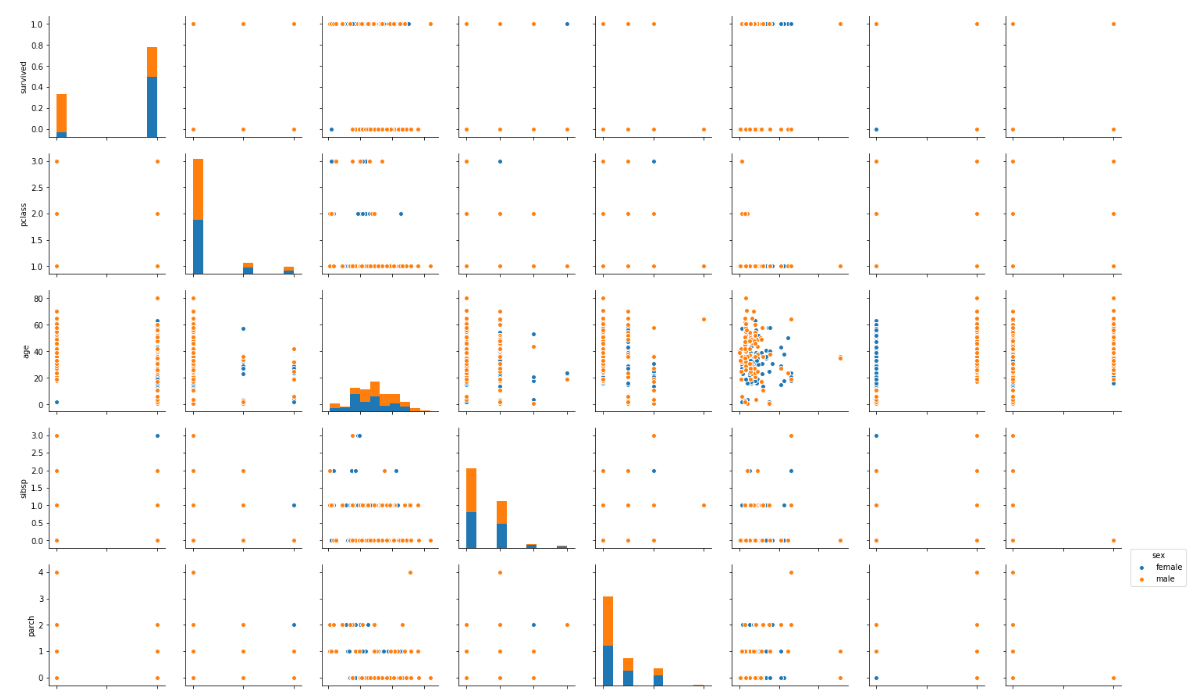
To add information from the categorical column to the pair plot, you can pass the name of the categorical column to the hue parameter. For instance, if we want to plot the gender information on the pair plot, we can execute the following script:

sns.pairplot(dataset, hue='sex')  

Output:

In the output you can see the information about the males in orange and the information about the female in blue (as shown in the legend). From the joint plot on the top left, you can clearly see that among the surviving passengers, the majority were female.

The Rug Plot

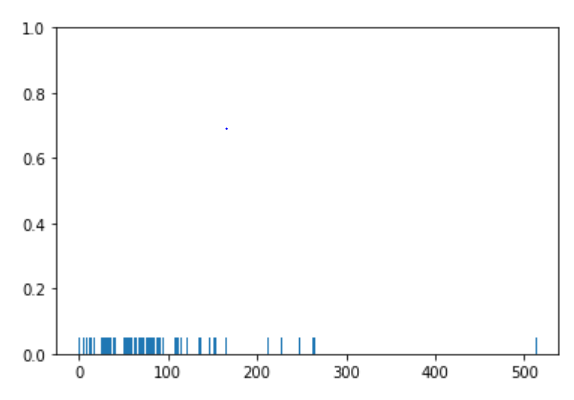
The rugplot() is used to draw small bars along x-axis for each point in the dataset. To plot a rug plot, you need to pass the name of the column. Let's plot a rug plot for fare.

sns.rugplot(dataset['fare'])  

Output:

From the output, you can see that as was the case with the distplot(), most of the instances for the fares have values between 0 and 100.

These are some of the most commonly used distribution plots offered by the Python's Seaborn Library. Let's see some of categorical plots in the Seaborn library.

Categorical Plots

Categorical plots, as the name suggests are normally used to plot categorical data. The categorical plots plot the values in the categorical column against another categorical column or a numeric column. Let's see some of the most commonly used categorical data.

The Bar Plot

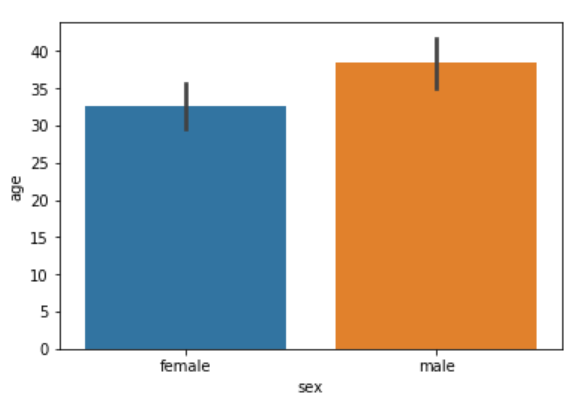
The barplot() is used to display the mean value for each value in a categorical column, against a numeric column. The first parameter is the categorical column, the second parameter is the numeric column while the third parameter is the dataset. For instance, if you want to know the mean value of the age of the male and female passengers, you can use the bar plot as follows.

sns.barplot(x='sex', y='age', data=dataset)  

Output:

From the output, you can clearly see that the average age of male passengers is just less than 40 while the average age of female passengers is around 33.

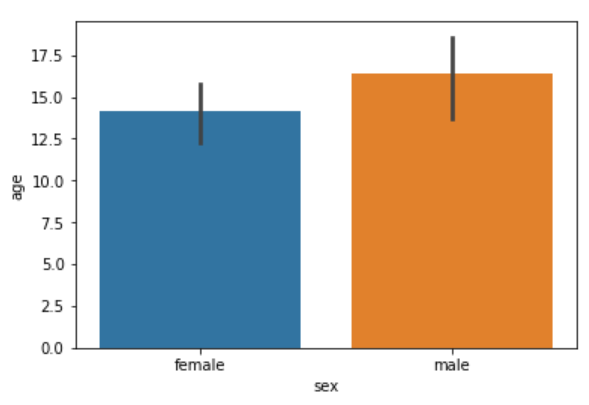
In addition to finding the average, the bar plot can also be used to calculate other aggregate values for each category. To do so, you need to pass the aggregate function to the estimator. For instance, you can calculate the standard deviation for the age of each gender as follows:

import numpy as np

import matplotlib.pyplot as plt  
import seaborn as sns

sns.barplot(x='sex', y='age', data=dataset, estimator=np.std)  

Notice, in the above script we use the std aggregate function from the numpy library to calculate the standard deviation for the ages of male and female passengers. The output looks like this:

The Count Plot

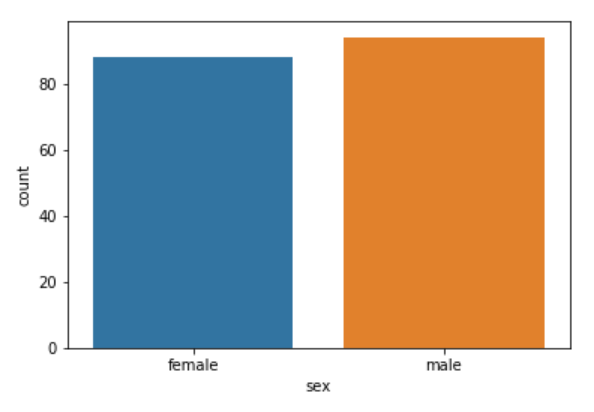
The count plot is similar to the bar plot, however it displays the count of the categories in a specific column. For instance, if we want to count the number of males and women passenger we can do so using count plot as follows:

sns.countplot(x='sex', data=dataset)  

The output shows the count as follows:

Output:

The Box Plot

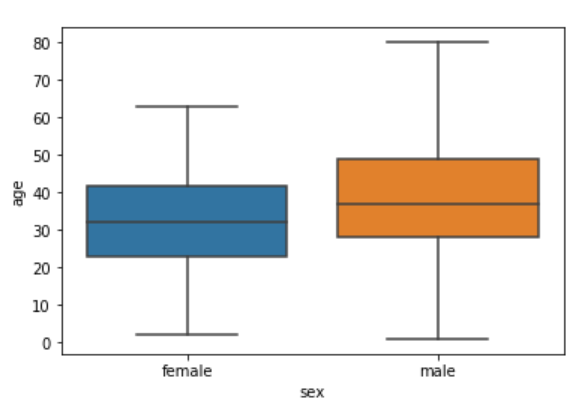
The box plot is used to display the distribution of the categorical data in the form of quartiles. The center of the box shows the median value. The value from the lower whisker to the bottom of the box shows the first quartile. From the bottom of the box to the middle of the box lies the second quartile. From the middle of the box to the top of the box lies the third quartile and finally from the top of the box to the top whisker lies the last quartile.

You can study more about quartiles and box plots at this link.

Now let's plot a box plot that displays the distribution for the age with respect to each gender. You need to pass the categorical column as the first parameter (which is sex in our case) and the numeric column (age in our case) as the second parameter. Finally, the dataset is passed as the third parameter, take a look at the following script:

sns.boxplot(x='sex', y='age', data=dataset)  

Output:

Let's try to understand the box plot for female. The first quartile starts at around 5 and ends at 22 which means that 25% of the passengers are aged between 5 and 25. The second quartile starts at around 23 and ends at around 32 which means that 25% of the passengers are aged between 23 and 32. Similarly, the third quartile starts and ends between 34 and 42, hence 25% passengers are aged within this range and finally the fourth or last quartile starts at 43 and ends around 65.

If there are any outliers or the passengers that do not belong to any of the quartiles, they are called outliers and are represented by dots on the box plot.

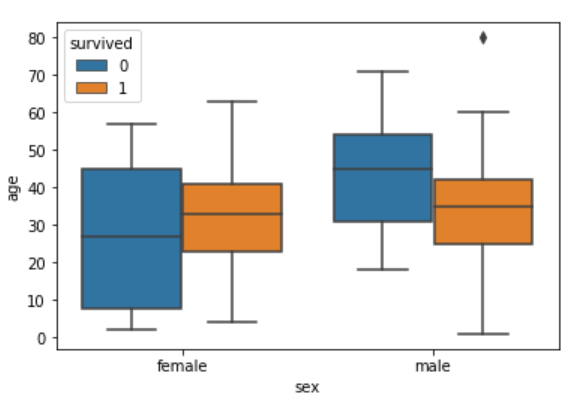
You can make your box plots more fancy by adding another layer of distribution. For instance, if you want to see the box plots of forage of passengers of both genders, along with the information about whether or not they survived, you can pass the survived as value to the hue parameter as shown below:

sns.boxplot(x='sex', y='age', data=dataset, hue="survived")  

Output:

Now in addition to the information about the age of each gender, you can also see the distribution of the passengers who survived. For instance, you can see that among the male passengers, on average more younger people survived as compared to the older ones. Similarly, you can see that the variation among the age of female passengers who did not survive is much greater than the age of the surviving female passengers.

The Violin Plot

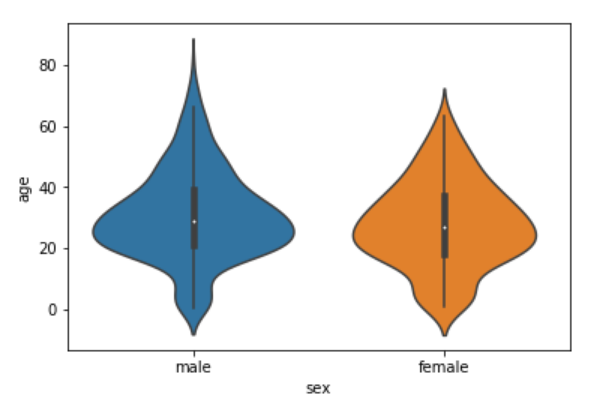
The violin plot is similar to the box plot, however, the violin plot allows us to display all the components that actually correspond to the data point. The violinplot() function is used to plot the violin plot. Like the box plot, the first parameter is the categorical column, the second parameter is the numeric column while the third parameter is the dataset.

Let's plot a violin plot that displays the distribution for the age with respect to each gender.

sns.violinplot(x='sex', y='age', data=dataset)  

Output:

You can see from the figure above that violin plots provide much more information about the data as compared to the box plot. Instead of plotting the quartile, the violin plot allows us to see all the components that actually correspond to the data. The area where the violin plot is thicker has a higher number of instances for the age. For instance, from the violin plot for males, it is clearly evident that the number of passengers with age between 20 and 40 is higher than all the rest of the age brackets.

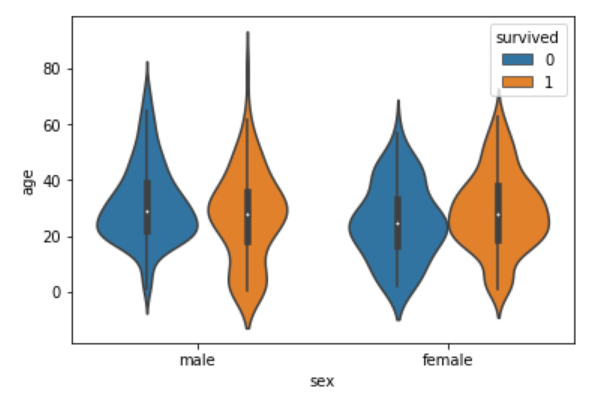
Like box plots, you can also add another categorical variable to the violin plot using the hue parameter as shown below:

sns.violinplot(x='sex', y='age', data=dataset, hue='survived')  

Now you can see a lot of information on the violin plot. For instance, if you look at the bottom of the violin plot for the males who survived (left-orange), you can see that it is thicker than the bottom of the violin plot for the males who didn't survive (left-blue). This means that the number of young male passengers who survived is greater than the number of young male passengers who did not survive. The violin plots convey a lot of information, however, on the downside, it takes a bit of time and effort to understand the violin plots.

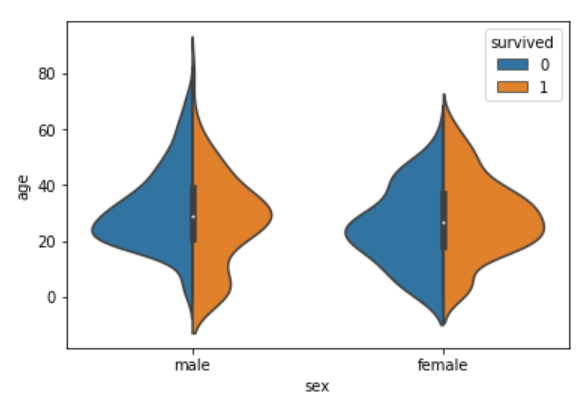
Instead of plotting two different graphs for the passengers who survived and those who did not, you can have one violin plot divided into two halves, where one half represents surviving while the other half represents the non-surviving passengers. To do so, you need to pass True as value for the split parameter of the violinplot() function. Let's see how we can do this:

sns.violinplot(x='sex', y='age', data=dataset, hue='survived', split=True)  

The output looks like this:

Now you can clearly see the comparison between the age of the passengers who survived and who did not for both males and females.

Both violin and box plots can be extremely useful. However, as a rule of thumb if you are presenting your data to a non-technical audience, box plots should be preferred since they are easy to comprehend. On the other hand, if you are presenting your results to the research community it is more convenient to use violin plot to save space and to convey more information in less time.

The Strip Plot

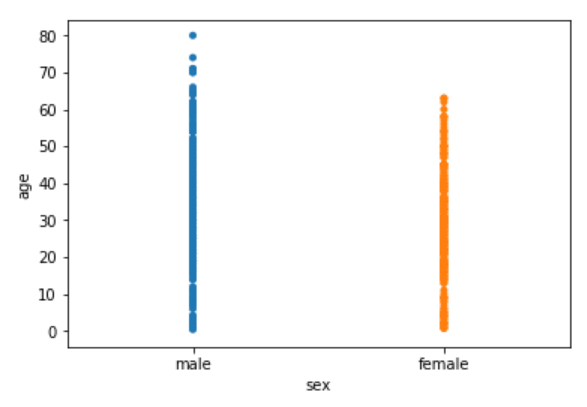
The strip plot draws a scatter plot where one of the variables is categorical. We have seen scatter plots in the joint plot and the pair plot sections where we had two numeric variables. The strip plot is different in a way that one of the variables is categorical in this case, and for each category in the categorical variable, you will see scatter plot with respect to the numeric column.

The stripplot() function is used to plot the violin plot. Like the box plot, the first parameter is the categorical column, the second parameter is the numeric column while the third parameter is the dataset. Look at the following script:

sns.stripplot(x='sex', y='age', data=dataset)  

Output:

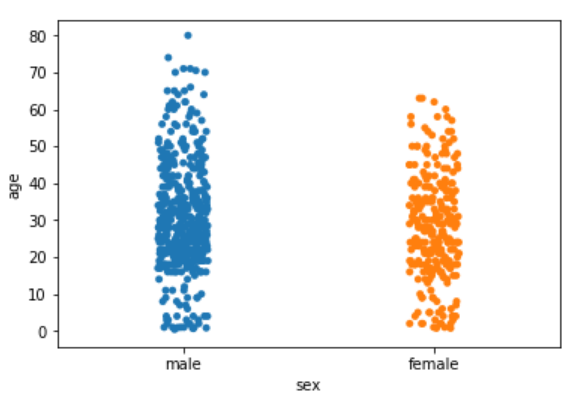
You can see the scattered plots of age for both males and females. The data points look like strips. It is difficult to comprehend the distribution of data in this form. To better comprehend the data, pass True for the jitter parameter which adds some random noise to the data. Look at the following script:

sns.stripplot(x='sex', y='age', data=dataset, jitter=True)  

Output:

Now you have a better view for the distribution of age across the genders.

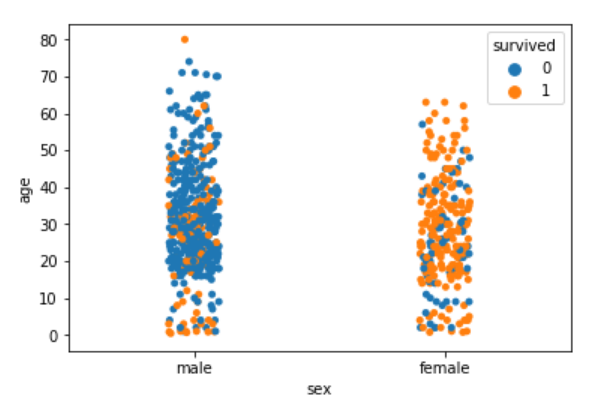
Like violin and box plots, you can add an additional categorical column to strip plot using hue parameter as shown below:

sns.stripplot(x='sex', y='age', data=dataset, jitter=True, hue='survived')  

Again you can see there are more points for the males who survived near the bottom of the plot compared to those who did not survive.

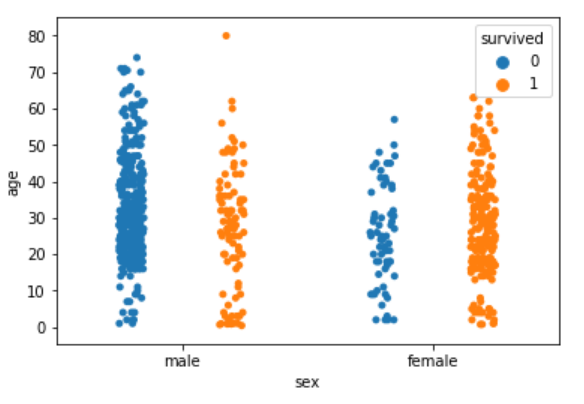
Like violin plots, we can also split the strip plots. Execute the following script:

sns.stripplot(x='sex', y='age', data=dataset, jitter=True, hue='survived', split=True)  

Output:

Now you can clearly see the difference in the distribution for the age of both male and female passengers who survived and those who did not survive.

The Swarm Plot

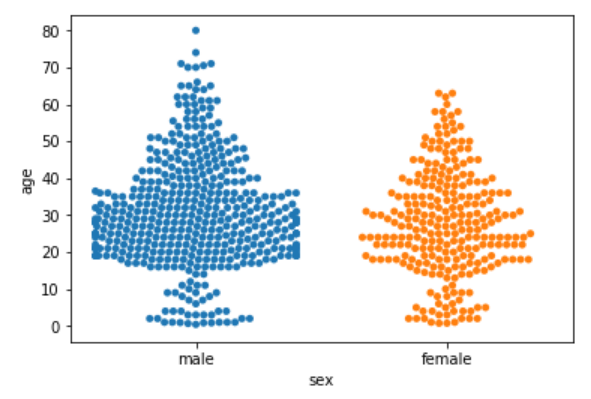
The swarm plot is a combination of the strip and the violin plots. In the swarm plots, the points are adjusted in such a way that they don't overlap. Let's plot a swarm plot for the distribution of age against gender. The swarmplot() function is used to plot the violin plot. Like the box plot, the first parameter is the categorical column, the second parameter is the numeric column while the third parameter is the dataset. Look at the following script:

sns.swarmplot(x='sex', y='age', data=dataset)  

You can clearly see that the above plot contains scattered data points like the strip plot and the data points are not overlapping. Rather they are arranged to give a view similar to that of a violin plot.

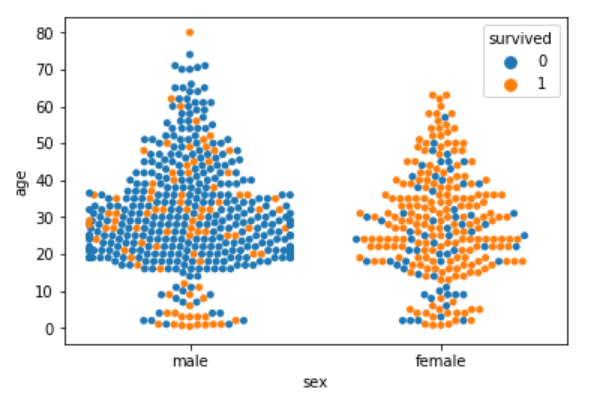
Let's add another categorical column to the swarm plot using the hue parameter.

sns.swarmplot(x='sex', y='age', data=dataset, hue='survived')  

Output:

From the output, it is evident that the ratio of surviving males is less than the ratio of surviving females. Since for the male plot, there are more blue points and less orange points. On the other hand, for females, there are more orange points (surviving) than the blue points (not surviving). Another observation is that amongst males of age less than 10, more passengers survived as compared to those who didn't.

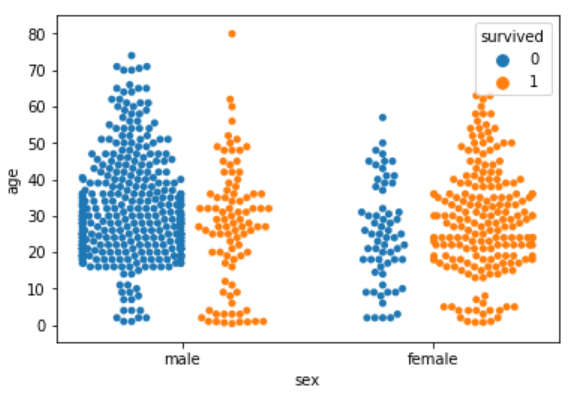
We can also split swarm plots as we did in the case of strip and box plots. Execute the following script to do so:

sns.swarmplot(x='sex', y='age', data=dataset, hue='survived', split=True)  

Output:

Now you can clearly see that more women survived, as compared to men.

Combining Swarm and Violin Plots

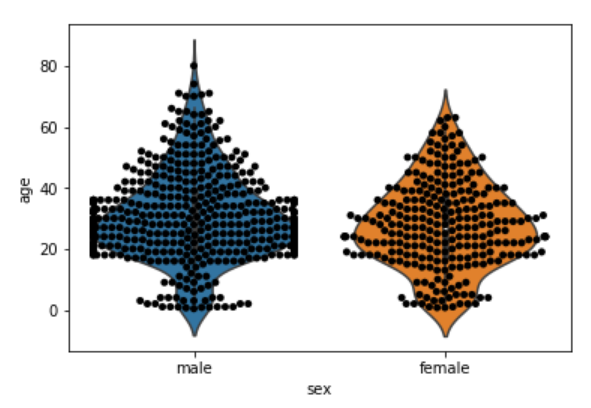
Swarm plots are not recommended if you have a huge dataset since they do not scale well because they have to plot each data point. If you really like swarm plots, a better way is to combine two plots. For instance, to combine a violin plot with swarm plot, you need to execute the following script:

sns.violinplot(x='sex', y='age', data=dataset)  
sns.swarmplot(x='sex', y='age', data=dataset, color='black')  

Output:

Conclusion

Seaborn is an advanced data visualization library built on top of Matplotlib library. In this article, we looked at how we can draw distributional and categorical plots using Seaborn library. This is Part 1 of the series of article on Seaborn. In the next article, we will see how we play around with grid functionalities in Seaborn and how we can draw Matrix and Regression plots in Seaborn.


Continuum Analytics Blog: Python Data Visualization 2018: Moving Toward Convergence

$
0
0

By James A. Bednar This post is the second in a three-part series on the current state of Python data visualization and the trends that emerged from SciPy 2018. In my previous post, I provided an overview of the myriad Python data visualization tools currently available, how they relate to each other, and their many …
Read more →

The post Python Data Visualization 2018: Moving Toward Convergence appeared first on Anaconda.

Python Software Foundation: November 2018 board meeting summary

$
0
0
On November 12th and 13th, ten of the thirteen PSF board members convened in Chicago, IL. Those who could not make it to the in-person meeting, joined via phone conferencing when possible.

In attendance were Naomi Ceder, Jacqueline Kazil, Thomas Wouters, Van Lindberg, Ewa Jodlowska, Lorena Mesa, Eric Holscher, Anna Ossowski, Christopher Neugebauer, and Jeff Triplett. Kushal Das and Marlene Mhangami connected remotely.

In continued efforts to be transparent with our community, we wanted to share what we discussed and what actions will be taken next.

Fundraising


The first discussion we had pertained to directors' involvement in fundraising.

What is being addressed?


It is common for non-profit board members to help raise resources via their various networks. In the past, our board hasn’t been very active in this area, and we’d like to change that going forward.

What are the next steps?


During the meeting, we created two board committees to get directors more involved in the fundraising process:
  • Fundraising committee: This committee will be focused on incoming sponsorships and donations. Even though this is a responsibility all directors will work on, this committee will help move things forward and provide the resources that other directors need to help with this role.
  • Outreach committee: This committee will decide if/how PSF funds will be used to help promote the PSF globally (this would be in addition to funds given via a grant/sponsorship). This group will also assist with creating resources for directors to use when attending an event to represent the PSF.

Code of Conduct


Since the Code of Conduct’s creation in 2013, the PSF has not updated nor worked on any related resources for our community to use outside of PyCon.

To better support our community, in the third quarter of 2017, the PSF created the Code of Conduct Work Group (https://wiki.python.org/psf/ConductWG/Charter). The purpose of this work group is to:
  1. Review, revise, and advise on policies relating to the PSF code of conducts and other communities that the PSF supports. This includes any #python chat community & python.org email list under PSF jurisdiction.
  2. Create a standard set of Codes of Conduct and supporting documents for multiple channels of interaction such as, but not limited to, conferences, mailing lists, slack/IRC, code repositories, and more.
  3. Develop training materials and other processes to support Python community organizers in implementing and enforcing the Code of Conduct.

What is being addressed?


At our November meeting, the board discussed certain risk exposure that was brought to our attention. This discussion is still ongoing and as soon as there is a resolution for moving forward, we will work together with the Code of Conduct Work Group to update the community.

Python in Education


What is being addressed?

At PyCon 2018, one of the directors hosted an open space about Python in Education. The goal was to hear from attendees how the PSF can help educators with any obstacles they face with introducing Python into their curriculums. Lot of data points were collected and needed to be discussed.

What are the next steps?

The board directors created a Python in Education group. This group will facilitate ways the PSF can use its resources to improve the way we support educators with introducing Python into their curriculums.

The first goal will be to curate impactful and proven open source material that educators can use globally. The group will write up a request for proposal, decide on a budget that will be allocated to accepted proposals, and market it to our community. Our intended timeline is to launch the RFP by the new year and have the deadline be before PyCon. At PyCon, we will announce accepted proposals so the work can be done during the third quarter of 2019.

Finance Committee


As the PSF continues to grow, we have to make sure that operationally we are efficient and effective, especially when it comes to our finances.

What is being addressed?

For every non-profit board, a major responsibility is to ensure that there is a group to monitor the organization’s overall financial health. Prior to now, the PSF has not had a board finance committee.

What are the next steps?

During the meeting, we created a committee that the Director of Operations and Finance Controller will report to. To start, the group will meet quarterly. Their goals will be to:
  • Oversee financial planning (PSF & PyCon budgets)
  • Monitor that adequate funds are available for financial management tasks
  • Ensure that assets are protected
  • Draft organizational fiscal policies 
  • Anticipate financial problems from external fiscal environments
  • Oversee financial record keeping
  • Relay financial health to the rest of the board
  • Ensure all legal reporting requirements are met
  • Sustain the financial committee itself by training and recruiting subsequent board members

PyCon Trademark


What is being addressed?

At our meeting in May 2018, the board directors decided that the PSF needs to improve the way we monitor the PyCon trademark. The main reason behind this decision is to protect the mark by being able to prove that we are monitoring its use, which will help avoid certain legal challenges. Additionally, it will help us ensure that all PyCons are up to community standards: Python focused, non-commercial, and have actionable code of conducts.

The process has not yet been fully implemented.

What are the next steps?

The board directors will revive the discussion with the PSF’s trademark committee. The goal is to find common ground on how the process will work. Afterwards, we will work on full transparency with the community via blogs and a message on pycon.org.

Diversity Tracking


Even though this topic was not on our initial agenda, we wanted to talk about this if time allowed. We got lucky and were able to sneak it in!

What is being addressed?

Our grants program currently does not require any tracking or reporting for diversity grants. Nor does the PSF have a policy for expectations of diversity grants. Since we want to see that the funding we give towards diversity is impactful, we wanted to discuss options for what we can do.

What are the next steps?

We will work on a policy for diversity grants that ask organizers to collect relevant diversity statistics. In addition to that, the PSF will work on a template survey so conferences can have a starting point in order to lessen the burden on volunteer organizers. Once a template and policy is in place, we will market the resource via relevant mailing lists, communication chats, and the Grants Program page.

Python Governance and Core Development


Python has recently seen the resignation of its BDFL, Guido van Rossum. This encouraged the core developers to rethink the governance of Python. Several governance proposals were created in the forms of PEPs, which the core developers will be voting December 1st, 2018 to December 16th, 2018 (Anywhere on Earth).

Even though the board is not currently involved with core development, we did discuss what has been developing with the governance discussions. We reflected on some of the discussions happening on discuss.python.org. We discussed the various PEPs such as PEP 8001, which is about the Python Governance Voting Process. We also discussed what the directors thought about the proposals for Python governance such as PEP 8010, 8011, 8012, 8013, 8014, 8015, 8016.

What’s next?


Working across the table from one another was motivational and acted as a catalyst for several initiatives. It gave us the opportunity to have in-depth conversations, establish stronger professional relationships, and create actionable tasks to help move initiatives forward beyond the two-day meeting.

We plan to host more 24-hour chat channels throughout 2019. They give us the chance to hear from community members world wide. Additionally, we will have our next in-person board meeting at PyCon 2019 on May 2nd. We look forward to updating you all on our progress then.

It is important for us to know that the PSF Board is inline with our community’s needs. If you have comments or suggestions on what was recently discussed or something completely new, please reach out to me: ewa at python dot org.

Reinout van Rees: Write drunk, test automated: documentation quality assurance - Sven Strack

$
0
0

This is my summary of the write the docs meetup in Amsterdam at the Adyen office, november 2018.

Sven's experience is mostly in open source projects (mainly Plone, a python CMS). He's also involved in https://testthedocs.org and https://rakpart.testthedocs.org, a collection of tools for documentation tests. He has some disclaimers beforehand:

  • There is no perfect setup.
  • Automated checks can only help up to a certain level.
  • Getting a CI (continuous integration) setup working is often tricky.

Before you start testing your documentation, you'll need some insight. Start with getting an overview of your documentation. Who is committing to it? Which parts are there? Which parts of the documentation are updated most often? Are the committers native speakers yes/no? Which part of the documentation has the most bug reports. So: gather statistics.

Also: try to figure out who reads your documentation. Where do they come from? What are the search terms they use to find your documentation in google? You can use these statistics to focus your development effort.

Important: planning. If your documentation in English, plan beforehand if you want it to be in UK or US English. Define style guides. If you have automatic checks, define standards beforehand: do you want a check to fail on line length yes/no? Spelling errors? Etc. How long is the test allowed to take?

A tip: start your checks small, build them up step by step. If possible, start from the first commit. And try to be both strict and friendly:

  • Your checks should be strict.
  • Your error messages should be clear and friendly.

In companies it might be different, but in open source projects, you have to make sure developers are your friends. Adjust the documentation to their workflow. Use a Makefile, for instance. And provide good templates (with cookiecutter, for instance) and good examples. And especially for programmers, it is necessary to have short and informative error messages. Don't make your output too chatty.

Standards for line lengths, paragraphs that are not too long: checks like that help a lot to keep your documentation readable and editable. Also a good idea: checks to weed out common English shortcuts ("we're" instead of "we are") that make the text more difficult to read for non-native speakers.

Programmers are used to keeping all the code's tests pass all the time. Merging code with failing tests is a big no-no. The same should be valid for the automatic documentation checks. They're just as important.

Some further tips:

  • Protect your branches, for instance, to prevent broken builds from being merged.
  • Validate your test scripts, too.
  • Keep your test scripts simple and adjustable. Make it clear how they work.
  • Run your checks in a specific order, as some checks might depend on the correctness as checked by earlier tests.
  • You can also check the html output instead of "only" checking the source files. You can find broken external links this way, for instance.

Something to consider: look at containerization. Dockers and so. This can run on both your local OS and on the continuous integration server. Everyone can use the same codebase and the same test setup. Less duplication of effort and more consistent results. The most important is that it is much easier to set up. Elaborate setups are now possible without scaring away everybody!

For screenshots, you could look at puppeteer for automatically generating your screenshots.

A comment from the audience: if you have automatic screenshots, there are tools to compare them and warn you if the images changed a lot. This could be useful for detecting unexpected errors in css or html.

Another comment from the audience: you can make a standard like US-or-UK-English more acceptable by presenting it as a choice. It is not that one of them is bad: we "just" had to pick one of them. "Your own preference is not wrong, it is just not the standard we randomly picked". :-)

Techiediaries - Django: Django TemplateView Example — URLs, GET and as_view

$
0
0

Django Templates are used to create HTML interfaces that get rendered with a Django view.

A TemplateView is a generic class-based view that helps developers create a view for a specific template without re-inventing the wheel.

TemplateView is the simplest one of many generic views provided by Django.

You can create a view for an example index.html template by simply sub-classing TemplateView and providing the template name via a template_name variable.

TemplateView is more convenient when you need to create views that display static HTML pages without context or forms that respond to GET requests.

TemplateView is simply a sub-class of the View class with some repetitive and boilerplate code that renders a Django template and sends it to the client.

Django View Example

Before looking at how to use TemplateView, let's first look at how we can create a Django view from scratch.

Let's pretend we need to create a home view. This is the required code that you need to write in the views.py file of your application

fromdjango.shortcutsimportrenderfromdjango.views.generic.baseimportViewclassHome(View):defget(self,request,*args,**kwargs):returnrender(request,"index.html")

If our app is named myapp, you need to create a templates/myapp inside myapp and then add an index.html template inside of it. The path of the index.html file should be myapp/templates/myapp/index.html.

So what does View do for us? It simply provides the get method which needs to contain any code that will be called when a GET request is sent to the associated URL.

You don't have to check for the GET request, just provide your code inside the get method.

As you can see in this example, we used extra code to render and return the index.html template using an HttpResponse.

Django TemplateView Example

Here comes the role of TemplateView. Instead of extending View, override the get method and then process the template and return an HttpResponse object using a render function. Simpy extend TemplateView.

This is the previous example rewritten to use TemplateView:

fromdjango.views.generic.baseimportTemplateViewclassHome(TemplateView):template_name='index.html'

Next, put your index.html template in the corresponding folder and you are good to go!

You don't need to override the get method and provide an implementation using render or another method. It's already done for you in TemplateView.

If you look at the implementation of TemplateView, you'll find an implementation of the get that uses the template in the template_name variable and renders it.

Since this is a common pattern, it's easily isolated and defined in its own class which can be re-used by Django developers without re-inventing the wheel.

The only requirement is that you have to use the template_name variable for specifying the template since this is the only way TemplateView can use to recognize the template you want to render.

Django Template Context with View

If you don't want your template to be completely static, you need to use Template Context.

Let's see how you can provide context to your template using a View class. This is the previous example with a simple context object that we'll be passed to the template to make it more dynamic.

fromdjango.shortcutsimportrenderfromdjango.views.generic.baseimportViewclassHome(View):defget(self,request,*args,**kwargs):context={'message':'Hello Django!'}returnrender(request,"index.html",context=context)

You simply create a context object (You can name it whatever you want) and you pass it as the second parameter of the render method.

Django Template Context with TemplateView

Let's now see the previous example with TemplateView:

fromdjango.views.generic.baseimportTemplateViewclassHome(TemplateView):template_name='index.html'defget_context_data(self,*args,**kwargs):context=super(Home.self).get_context_data(*args,**kwargs)context['message']='Hello World!'returncontext

If using TemplateView, you need to use the get_context_data method to provide any context data variables to your template.

You re-define the get_context_data method and provide an implementation which simply gets a context dict object from the parent class (in this example it's TemplateView) then augments it by passing the message data.

You can then use interpolation curly braces in your index.html template to display your context variable

<p>{{message}}</p>

Using TemplateView with URLs with as_view

After defining the sub-class of TemplateView you need to map it with an URL in the urls.py file of your project. In order to do that, you need to call the as_view method of TemplateView which returns a callable object that can be passed as the second parameter for the path method that associates URLs to views. For example:

fromdjango.urlsimportpathfrommyappimportviewsurlpatterns=[# [...]path('',views.Home.as_view())]

Using TemplateView in urls.py

For even simpler cases, you can use TemplateView directly in your URL. This provides you with a quicker way to render a template:

fromdjango.views.generic.baseimportTemplateViewfromdjango.urlsimportpathurlpatterns=[# [...]path('',TemplateView.as_view(template_name='index.html'))]

In the as_view method of TemplateView, you can pass the template name as a keyword argument.

Conclusion

The Django generic TemplateView view class enables developers to quickly create views that display simple templates without reinventing the wheel.

You simpy need to subclass TemplateView and provide a template name in the template_name variable. This template should obviously exist in your templates folder.

gamingdirectional: Create enemy missiles within the Enemy object

$
0
0

In this article we are going to edit a few game’s classes that we have created earlier, our main objective here is to detach the enemy missiles from the enemy missile manager, which means instead of putting all the enemy missiles under a single missile list inside the enemy missile manager as we have done previously, we are going to create a separate missile list and a separate missile pool...

Source

Ned Batchelder: Quick hack CSV review tool

$
0
0

Let’s say you are running a conference, and let’s say your Call for Proposals is open, and is saving people’s talk ideas into a spreadsheet.

I am in this situation. Reviewing those proposals is a pain, because there are large paragraphs of text, and spreadsheets are a terrible way to read them. I did the typical software engineer thing: I spent an hour writing a tool to make reading them easier.

The result is csv_review.py. It’s a terminal program that reads a CSV file (the exported proposals). It displays a row at a time on the screen, wrapping text as needed. It has commands for moving around the rows. It collects comments into a second CSV file. That’s it.

There are probably already better ways to do this. Everyone knows that to get answers from the internet, you don’t ask questions, instead you present wrong answers. More people will correct you than will help you. So this tool is my wrong answer to how to review CFP proposals. Correct me!

codingdirectional: List out all the files within a folder with python

$
0
0

In this article we will continue with our windows application development using tkinter, in the previous article we have created a button which when we click on it we can select a file from a folder and the program will print the name of that file on the pycharm command console. In this article we will write the program to do this.

1) Select a folder.
2) Print all the name of the files (with file extension) within that folder on the label part of our UI.

First we will edit the main file of the program so it will open up a folder instead of a file.

from tkinter import *
from tkinter import filedialog
from Remove import Remove

win = Tk() # 1 Create instance
win.title("Multitas") # 2 Add a title
win.resizable(0, 0) # 3 Disable resizing the GUI
win.configure(background='black') # 4 change background color

# 5 Create a label
aLabel = Label(win, text="Remove duplicate file", anchor="center")
aLabel.grid(column=0, row=1)
aLabel.configure(foreground="white")
aLabel.configure(background="black")

# 6 Create a selectFile function to be used by button
def selectFile():

    #filename = filedialog.askopenfilename(initialdir="/", title="Select file")
    folder = filedialog.askdirectory() # 7 open a folder then create and start a new thread to print those filenames from the selected folder
    remove = Remove(folder, aLabel) 
    remove.start()

# 8 Adding a Button
action = Button(win, text="Open Folder", command=selectFile)
action.grid(column=0, row=0) # 9 Position the button
action.configure(background='brown')
action.configure(foreground='white')

win.mainloop()  # 10 start GUI

As you can see, we have passed in the name of that folder which we have selected when we create a new Remove thread instance in the selectFile method, besides that we have also passed the label object into the Remove thread instance so we can modify it’s content later on.

Here is the modify version of the Remove thread class.

import threading
import os

class Remove(threading.Thread):

   def __init__(self, massage, aLabel):

      threading.Thread.__init__(self)
      self.massage = massage
      self.label = aLabel

   def run(self):

      text_filename = ''
      filepaths = os.listdir(self.massage)
      for filepath in filepaths:
         text_filename += filepath + '\n'
      self.label.config(text=text_filename)
      return

The program is very simple, get each file name from that selected directory, concatenates them and finally prints them on the label object.

Open a file folderOpen a file folder

Our main objective here is to create a program which will remove the duplicate files in another folder, we have already known the method to open a single file, and in this article we have learned the method to open a folder, in the next chapter we will continue to add in more methods for this particular program.


Codementor: How to Create and Deploy a Telegram Bot using Python

$
0
0
Bots are everywhere. It seems that only yesterday we did not even know about their existence; now we can barely imagine our life without them. They’ve become widely popular among numerous active...

Mike Driscoll: Python 101: Episode #36 – Creating Modules and Packages

Kushal Das: Using hexchat on Flatpak on Qubes OS AppVM

$
0
0

Flatpak is a system for building, distributing, and running sandboxed desktop applications on Linux. It uses BubbleWrap in the low level to do the actual sandboxing. In simple terms, you can think Flatpak as a as a very simple and easy way to use desktop applications in containers (sandboxing). Yes, containers, and, yes, it is for desktop applications in Linux. I was looking forward to use hexchat-otr in Fedora, but, it is not packaged in Fedora. That is what made me setup an AppVM for the same using flatpak.

I have installed the flatpak package in my Fedora 29 TemplateVM. I am going to use that to install Hexchat in an AppVM named irc.

Setting up the Flatpak and Hexchat

The first task is to add flathub as a remote for flatpak. This is a store where upstream developers package their application and publish.

flatpak remote-add --if-not-exists flathub https://flathub.org/repo/flathub.flatpakrepo

And then, I installed the Hexchat from the store. I also installed the version of the OTR plugin required.

$ flatpak install flathub io.github.Hexchat
<output snipped>

$ flatpak install flathub io.github.Hexchat.Plugin.OTR//18.08
Installing in system:
io.github.Hexchat.Plugin.OTR/x86_64/18.08 flathub 6aa12f19cc05
Is this ok [y/n]: y
Installing: io.github.Hexchat.Plugin.OTR/x86_64/18.08 from flathub
[####################] 10 metadata, 7 content objects fetched; 268 KiB transferr
Now at 6aa12f19cc05.

Making sure that the data is retained after reboot

All of the related files are now available under /var/lib/flatpak. But, as this is an AppVM, this will get destroyed when I will reboot. So, I had to make sure that I can keep those between reboots. We can use the Qubes bind-dirs for this in the TemplateVMs, but, as this is particular for this VM, I just chose to use simple shell commands in the /rw/config/rc.local file (make sure that the file is executable).

But, first, I moved the flatpak directory under /home.

sudo mv /var/lib/flatpak /home/

Then, I added the following 3 lines in the /rw/config/rc.local file.

# For flatpak
rm -rf /var/lib/flatpak
ln -s /rw/home/flatpak /var/lib/flatpak

This will make sure that the flatpak command will find the right files even after reboot.

Running the application is now as easy as the following command.

flatpak run io.github.Hexchat

Feel free to try out other applications published in Flathub, for example, Slack or the Mark Text

Eli Bendersky: Type erasure and reification

$
0
0

In this post I'd like to discuss the concepts of type erasure and reification in programming languages. I don't intend to dive very deeply into the specific rules of any particular language; rather, the post is going to present several simple examples in multiple languages, hoping to provide enough intuition and background for a more serious study, if necessary. As you'll see, the actual concepts are very simple and familiar. Deeper details of specific languages pertain more to the idiosyncrasies of those languages' semantics and implementations.

Important note: in C++ there is a programming pattern called type erasure, which is quite distinct from what I'm trying to describe here [1]. I'll be using C++ examples here, but that's to demonstrate how the original concepts apply in C++. The programming pattern will be covered in a separate post.

Types at compile time, no types at run-time

The title of this section is a "one short sentence" explanation of what type erasure means. With few exceptions, it only applies to languages with some degree of compile time (a.k.a. static) type checking. The basic principle should be immediately familiar to folks who have some idea of what machine code generated from low-level languages like C looks like. While C has static typing, this only matters in the compiler - the generated code is completely oblivious to types.

For example, consider the following C snippet:

typedefstructFrob_t{intx;inty;intarr[10];}Frob;intextract(Frob*frob){returnfrob->y*frob->arr[7];}

When compiling the function extract, the compiler will perform type checking. It won't let us access fields that were not declared in the struct, for example. Neither will it let us pass a pointer to a different struct (or to a float) into extract. But once it's done helping us, the compiler generates code which is completely type-free:

0:   8b 47 04                mov    0x4(%rdi),%eax
3:   0f af 47 24             imul   0x24(%rdi),%eax
7:   c3                      retq

The compiler is familiar with the stack frame layout and other specifics of the ABI, and generates code that assumes a correct type of structure was passed in. If the actual type is not what this function expects, there will be trouble (either accessing unmapped memory, or accessing wrong data).

A slightly adjusted example will clarify this:

intextract_cast(void*p){Frob*frob=p;returnfrob->y*frob->arr[7];}

The compiler will generate exactly identical code from this function, which in itself a good indication of when the types matter and when they don't. What's more interesting is that extract_cast makes it extremely easy for programmers to shoot themselves in the foot:

SomeOtherStructss;extract_cast(&ss);// oops

In general, type erasure is a concept that descibes these semantics of a language. Types matter to the compiler, which uses them to generate code and help the programmer avoid errors. Once everything is type-checked, however, the types are simply erased and the code the compiler generates is oblivious to them. The next section will put this in context by comparing to the opposite approach.

Reification - retaining types at run-time

While erasure means the compiler discards all type information for the actual generated code, reification is the other way to go - types are retained at run-time and used for perform various checks. A classical example from Java will help demonstrate this:

classMain{publicstaticvoidmain(String[]args){Stringstrings[]={"a","b"};Objectobjects[]=strings;objects[0]=5;}}

This code creates an array of String, and converts it to a generic array of Object. This is valid because arrays in Java are covariant, so the compiler doesn't complain. However, in the next line we try to assign an integer into the array. This happens to fail with an exception at run-time:

Exception in thread "main" java.lang.ArrayStoreException: java.lang.Integer
    at Main.main(Main.java:5)

A type check was inserted into the generated code, and it fired when an incorrect assignment was attempted. In other words, the type of objects is reified. Reification is defined roughly as "taking something abstract and making it real/concrete", which when applied to types means "compile-time types are converted to actual run-time entities".

C++ has some type reification support as well, e.g. with dynamic_cast:

structBase{virtualvoidbasefunc(){printf("basefunc\n");}};structDerived:publicBase{voidderivedfunc(){printf("derived\n");}};voidcall_derived(Base*b){Derived*d=dynamic_cast<Derived*>(b);if(d!=nullptr){d->derivedfunc();}else{printf("cast failed\n");}}

We can call call_derived thus:

intmain(){Derivedd;call_derived(&d);Baseb;call_derived(&b);}

The first call will successfully invoke derivedfunc; the second will not, because the dynamic_cast will return nullptr at run-time. This is because we're using C++'s run-time type information (RTTI) capabilities here, where an actual representation of the type is stored in the generated code (most likely attached to the vtable which every polymorphic object points to). C++ also has the typeid feature, but I'm showing dynamic_cast since it's the one most commonly used.

Note particularly the differences between this sample and the C sample in the beginning of the post. Conceptually, it's similar - we use a pointer to a general type (in C that's void*, in the C++ example we use a base type) to interact with concrete types. Whereas in C there is no built-in run-time type feature, in C++ we can use RTTI in some cases. With RTTI enabled, dynamic_cast can be used to interact with the run-time (reified) representation of types in a limited but useful way.

Type erasure and Java generics

One place where folks not necessarily familiar with programming language type theory encounter erasure is Java generics, which were bolted onto the language after a large amount of code has already been written. The designers of Java faced the binary compatibility challenge, wherein they wanted code compiled with newer Java compilers to run on older VMs.

The solution was to use type erasure to implement generics entirely in the compiler. Here's a quote from the official Java generics tutorial:

Generics were introduced to the Java language to provide tighter type checks at compile time and to support generic programming. To implement generics, the Java compiler applies type erasure to:

  • Replace all type parameters in generic types with their bounds or Object if the type parameters are unbounded. The produced bytecode, therefore, contains only ordinary classes, interfaces, and methods.
  • Insert type casts if necessary to preserve type safety.
  • Generate bridge methods to preserve polymorphism in extended generic types.

Here's a very simple example to demonstrate what's going on, taken from a Stack Overflow answer. This code:

importjava.util.List;importjava.util.ArrayList;classMain{publicstaticvoidmain(String[]args){List<String>list=newArrayList<String>();list.add("Hi");Stringx=list.get(0);System.out.println(x);}}

Uses a generic List. However, what the compiler creates prior to emitting bytecode is equivalent to:

importjava.util.List;importjava.util.ArrayList;classMain{publicstaticvoidmain(String[]args){Listlist=newArrayList();list.add("Hi");Stringx=(String)list.get(0);System.out.println(x);}}

Here List is a container of Object, so we can assign any element to it (similarly to the reification example shown in the previous section). The compiler then inserts a cast when accessing that element as a string. In this case the compiler will adamantly preserve type safety and won't let us do list.add(5) in the original snippet, because it sees that list is a List<String>. Therefore, the cast to (String) should be safe.

Using type erasure to implement generics with backwards compatibility is a neat idea, but it has its issues. Some folks complain that not having the types available at runtime is a limitation (e.g. not being able to use instanceof and other reflection capabilities). Other languages, like C# and Dart 2, have reified generics which do preserve the type information at run-time.

Reification in dynamically typed languages

I hope it's obvious that the theory and techniques described above only apply to statically-typed languages. In dynamically-typed languages, like Python, there is almost no concept of types at compile-time, and types are a fully reified concept. Even trivial errors like:

classFoo:defbar(self):passf=Foo()f.joe()# <--- calling non-existent method

Fire at run-time, because there's no static type checking [2]. Types obviously exist at run-time, with functions like type() and isinstance() providing complete reflection capabilities. The type() function can even create new types entirely at run-time.


[1]But it's most likely what you'll get to if you google for "c++ type erasure".
[2]To be clear - this is not a bug; it's a feature of Python. A new method can be added to classes dynamically at runtime (here, some code could have defined a joe method for Foo before the f.joe() invocation), and the compiler has absolutely no way of knowing this could or couldn't happen. So it has to assume such invocations are valid and rely on run-time checking to avoid serious errors like memory corruption.

PyCon: Python Education Summit - in its 7th year in 2019

$
0
0
Teachers, educators, and Pythonistas: come and share your projects, experiences, and tools of the trade in teaching coding and Python to your students. The Annual Python Education Summit is held at PyCon 2019, taking place on Thursday, May 2nd. Our call for proposals is open until January 3rdAoE, and we want to hear from you!

See https://us.pycon.org/2019/speaking/education-summit/ for more details and history about PyCon’s Education Summit.


In 2019, the Summit will have 2 sessions:

  1. Familiar from previous years, the morning session will be comprised of keynotes, talks, and lightning talks.
  2. New this year, the afternoon session will host mini-sprints
We invite you to submit proposals for both sessions.

What are Mini-Sprints?

We’re glad you asked because 2019 is the first time we are hosting them at the Education Summit. In short, they are collaborative small groups that are meant to create meaningful educational content.

Participants of the education summit will break out into groups to work on these mini sprints. All materials created during that afternoon will need to be released or made available under an open license.

For 2019, the theme for the mini-sprints will be Open Educational Resources (OER). Python community members may already know about much of the open source traditions within the software.  Open Educational Resources serve much the same purpose. Materials are published publicly and users are welcome to access and remix them. This allows students to save on the cost of textbooks, and instructors the opportunity to adapt a resource for their own need.

As a community of open source practitioners and educators, our skills are strongly aligned to make efforts like this benefit all.  As we make the argument for open source that it helps programmers develop and iterate faster, the same argument can be made that openly shared instructional materials can help educators respond faster and more consistently to the changes in the community.

Information to consider when proposing a mini-sprint

For the mini-sprints session we are looking for topics and activities that could benefit from some intensive in-person discussion and hands-on collaboration. Submit an idea for something you’d like to lead with a small group of people and work on for 1-2 hours. Our focus this year is on open educational resources (OER), materials which can be shared and adapted in the same spirit as the Python language itself. The proposals should describe the activities that will happen within the small groups.
Some topics may include:
  • Gathering best practices for teaching specific populations, tools, classroom styles, etc.
  • Drafting open educational content and resources (such as workbooks, exercises, teaching materials) for classroom use
  • Documenting active learning activities across age groups
  • Inventory and cataloging of Open Educational Resources online
These are not panels, birds of a feather, or un-conference sessions. Mini-sprint tracks should be designed to get a job done or complete the foundational exploration of a larger project.

As the proposer of the mini-sprint, you will be responsible for organizing what people work on during the sprint session. This includes a schedule of activities, identifying the skill sets needed for participants, and planning for how the project can continue on after the summit has completed.  You do not need to be an expert in the domain or task that you are proposing to be completed!

We urge anyone in this space to submit a proposal! You do not need to be an experienced speaker to apply!

Since this is the first time we are hosting mini-sprints, we want to let you know how they will be reviewed. The Education Summit organizers will be looking for the following things:
  • Alignment of the task with the education mission and appropriate scope for what can be accomplished in a mini-sprint context.  We are broadly open to all topics, but projects designed to benefit non-profit missions and open access materials will be given highest priority.
  • Description of the skills and interests needed from participants.  Remember that you’re going to have a room full of professional educators, plan on making use of that!
  • Clearly stated activities that should be completed within the sprint along with expected deliverables.
  • How do you expect this project to grow and be sustained over the next year? Imagine submitting a talk about this project for the 2020 Python Education Summit, what would you like to say about it?
The organizing committee will work with accepted sprint proposers to refine the tasks and may ask several conveners to work together if there are similar projects.

Information to consider when proposing a talk

What we look for in Education Summit talks are ideas, experiences, and best practices on how teachers and programmers have implemented instruction in their schools, communities, books, tutorials, and other educational places by using Python.
  • Have you implemented a program that you've been dying to talk about?
  • Have you tried something that failed but learned some great lessons that you can share?
  • Have you been successful implementing a particular program?

How to submit a talk or mini-sprint

  1. Submit via your dashboard at https://us.pycon.org/2019/dashboard
  2. In the submission form please indicate the submission type clearly in the beginning of the title  e.g. Talk: or Sprint:
In addition, we will have the much awaited Lightning Talks session! Lightning talks will be 5 minutes long, on a topic of interest to PyCon Education Summit attendees. It could be an education related project that you worked on, event that you participated in or tools/techniques you think other people will be interested in.

Sign-ups for lightning talks will be on the day of the event.


We hope to see you at the Education Summit in 2019 -  Hurry! January 3 is the submission deadline.


For more information about the summit, see: https://us.pycon.org/2019/speaking/education-summit


Contributing Authors: Meenal Pant and Elizabeth Wickes

Viewing all 24375 articles
Browse latest View live