Quantcast
Channel: Planet Python
Viewing all 24369 articles
Browse latest View live

Matthew Rocklin: Dask Development Log

$
0
0

This work is supported by Anaconda Inc

To increase transparency I’m trying to blog more often about the current work going on around Dask and related projects. Nothing here is ready for production. This blogpost is written in haste, so refined polish should not be expected.

Current efforts for June 2018 in Dask and Dask-related projects include the following:

  1. Yarn Deployment
  2. More examples for machine learning
  3. Incremental machine learning
  4. HPC Deployment configuration

Yarn deployment

Dask developers often get asked How do I deploy Dask on my Hadoop/Spark/Hive cluster?. We haven’t had a very good answer until recently.

Most Hadoop/Spark/Hive clusters are actually Yarn clusters. Yarn is the most common cluster manager used by many clusters that are typically used to run Hadoop/Spark/Hive jobs including any cluster purchased from a vendor like Cloudera or Hortonworks. If your application can run on Yarn then it can be a first class citizen here.

Unfortunately Yarn has really only been accessible through a Java API, and so has been difficult for Dask to interact with. That’s changing now with a few projects, including:

  • dask-yarn: an easy way to launch Dask on Yarn clusters
  • skein: an easy way to launch generic services on Yarn clusters (this is primarily what backs dask-yarn)
  • conda-pack: an easy way to bundle together a conda package into a redeployable environment, such as is useful when launching Python applications on Yarn

This work is all being done by Jim Crist who is, I believe, currently writing up a blogpost about the topic at large. Dask-yarn was soft-released last week though, so people should give it a try and report feedback on the dask-yarn issue tracker. If you ever wanted direct help on your cluster, now is the right time because Jim is working on this actively and is not yet drowned in user requests so generally has a fair bit of time to investigate particular cases.

fromdask_yarnimportYarnClusterfromdask.distributedimportClient# Create a cluster where each worker has two cores and eight GB of memorycluster=YarnCluster(environment='environment.tar.gz',worker_vcores=2,worker_memory="8GB")# Scale out to ten such workerscluster.scale(10)# Connect to the clusterclient=Client(cluster)

More examples for machine learning

Dask maintains a Binder of simple examples that show off various ways to use the project. This allows people to click a link on the web and quickly be taken to a Jupyter notebook running on the cloud. It’s a fun way to quickly experience and learn about a new project.

Previously we had a single example for arrays, dataframes, delayed, machine learning, etc.

Now Scott Sievert is expanding the examples within the machine learning section. He has submitted the following two so far:

  1. Incremental training with Scikit-Learn and large datasets
  2. Dask and XGBoost

I believe he’s planning on more. If you use dask-ml and have recommendations or want to help, you might want to engage in the dask-ml issue tracker or dask-examples issue tracker.

Incremental training

The incremental training mentioned as an example above is also new-ish. This is a Scikit-Learn style meta-estimator that wraps around other estimators that support the partial_fit method. It enables training on large datasets in an incremental or batchwise fashion.

Before

fromsklearn.linear_modelimportSGDClassifiersgd=SGDClassifier(...)importpandasaspdforfilenameinfilenames:df=pd.read_csv(filename)X,y=...sgd.partial_fit(X,y)

After

fromsklearn.linear_modelimportSGDClassifierfromdask_ml.wrappersimportIncrementalsgd=SGDClassifier(...)inc=Incremental(sgd)importdask.dataframeasdddf=dd.read_csv(filenames)X,y=...inc.fit(X,y)

Analysis

From a parallel computing perspective this is a very simple and un-sexy way of doing things. However my understanding is that it’s also quite pragmatic. In a distributed context we leave a lot of possible computation on the table (the solution is inherently sequential) but it’s fun to see the model jump around the cluster as it absorbs various chunks of data and then moves on.

Incremental training with Dask-ML

There’s ongoing work on how best to combine this with other work like pipelines and hyper-parameter searches to fill in the extra computation.

This work was primarily done by Tom Augspurger with help from Scott Sievert

Dask User Stories

Dask developers are often asked “Who uses Dask?”. This is a hard question to answer because, even though we’re inundated with thousands of requests for help from various companies and research groups, it’s never fully clear who minds having their information shared with others.

We’re now trying to crowdsource this information in a more explicit way by having users tell their own stories. Hopefully this helps other users in their field understand how Dask can help and when it might (or might not) be useful to them.

We originally collected this information in a Google Form but have since then moved it to a Github repository. Eventually we’ll publish this as a proper web site and include it in our documentation.

If you use Dask and want to share your story this is a great way to contribute to the project. Arguably Dask needs more help with spreading the word than it does with technical solutions.

HPC Deployments

The Dask Jobqueue package for deploying Dask on traditional HPC machines is nearing another release. We’ve changed around a lot of the parameters and configuration options in order to improve the onboarding experience for new users. It has been going very smoothly in recent engagements with new groups, but will mean a breaking change for existing users of the sub-project.


Gocept Weblog: Saltlabs Sprint: Zope and Plone sprint in a new location

$
0
0

After Earl Zope II is now nearly relocated to the Python 3 wonderland, gocept will move to a new head quarter in the next months. This is the right time to celebrate with a new sprint, as we have now even more space for sprinters. The new location is called the “Saltlabs”, a place for IT companies in Halle (Saale), Germany.

Sprint information

  • Date: Monday, 1st until Friday, 5th of October 2018
  • Location: Leipziger Str. 70, Halle (Saale), Germany

Sprint topics

This sprint has three main topics:

Create a final Zope 4 release

Before releasing a final version of Zope 4 we want to resolve about at least 20 issues: Some bugs have to be fixed,  some functions have to be polished and documentation has to be written resp. reviewed. On the other hand there is the re-brush of the ZMI using Bootstrap which should be completed beforehand, as it modernizes the ZMI and allows for easier customisation, but might also be backwards incompatible with certain test suites. There is an Etherpad to write down ideas, tasks, wishes and work proposals, which are not currently covered by the issue tracker.

Port Plone to Python 3

The following tasks are currently open and can be fixed at the sprint:

  • successfully run all Plone tests and even the robotframework tests on Python 3
  • Zope 4 lost the WebDAV support: find resp. create a replacement
  • document the WSGI setup and test it in a production ready environment
  • port as many as possible add-ons to Python 3 (e.g. Mosaic and Easyform)
  • work on the Migration of ZODB contents (Data.fs) to Python 3
  • improve the test setup with tox.
  • start to support Python 3.7

Polish Plone 5.2

The upcoming Plone 5.2 release will appreciate some love and care at the following items:

  • new navigation with dropdown and better performance
  • Barceloneta theme: ease the customisation and improve responsiveness
  • parallelise the tests so they run faster
  • remove Archetypes and other obsolete packages

Organisational Remarks

In order to coordinate the participation for this sprint, we ask you to join us on Meetup. We can then coordinate the catering and requirements for space.

As this sprint will be running longer than usual (five days), it is also possible to join only for a part of the week. As October 3rd is the national holiday, we are trying to organise some social event for those who are interested in having a small break.

For a better overview, please indicate your participation also on this doodle poll.


Real Python: Strings and Character Data in Python

$
0
0

In the tutorial on Basic Data Types in Python, you learned how to define strings: objects that contain sequences of character data. Processing character data is integral to programming. It is a rare application that doesn’t need to manipulate strings at least to some extent.

Here’s what you’ll learn in this tutorial: Python provides a rich set of operators, functions, and methods for working with strings. When you are finished with this tutorial, you will know how to access and extract portions of strings, and also be familiar with the methods that are available to manipulate and modify string data.

You will also be introduced to two other Python objects used to represent raw byte data, the bytes and bytearray types.

String Manipulation

The sections below highlight the operators, methods, and functions that are available for working with strings.

String Operators

You have already seen the operators + and * applied to numeric operands in the tutorial on Operators and Expressions in Python. These two operators can be applied to strings as well.

The + Operator

The + operator concatenates strings. It returns a string consisting of the operands joined together, as shown here:

>>> s='foo'>>> t='bar'>>> u='baz'>>> s+t'foobar'>>> s+t+u'foobarbaz'>>> print('Go team'+'!!!')Go team!!!

The * Operator

The * operator creates multiple copies of a string. If s is a string and n is an integer, either of the following expressions returns a string consisting of n concatenated copies of s:

s * n
n * s

Here are examples of both forms:

>>> s='foo.'>>> s*4'foo.foo.foo.foo.'>>> 4*s'foo.foo.foo.foo.'

The multiplier operand n must be an integer. You’d think it would be required to be a positive integer, but amusingly, it can be zero or negative, in which case the result is an empty string:

>>> 'foo'*-8''

If you were to create a string variable and initialize it to the empty string by assigning it the value 'foo' * -8, anyone would rightly think you were a bit daft. But it would work.

The in Operator

Python also provides a membership operator that can be used with strings. The in operator returns True if the first operand is contained within the second, and False otherwise:

>>> s='foo'>>> sin'That\'s food for thought.'True>>> sin'That\'s good for now.'False

There is also a not in operator, which does the opposite:

>>> 'z'notin'abc'True>>> 'z'notin'xyz'False

Built-in String Functions

As you saw in the tutorial on Basic Data Types in Python, Python provides many functions that are built-in to the interpreter and always available. Here are a few that work with strings:

FunctionDescription
chr()Converts an integer to a character
ord()Converts a character to an integer
len()Returns the length of a string
str()Returns a string representation of an object

These are explored more fully below.

ord(c)

Returns an integer value for the given character.

At the most basic level, computers store all information as numbers. To represent character data, a translation scheme is used which maps each character to its representative number.

The simplest scheme in common use is called ASCII. It covers the common Latin characters you are probably most accustomed to working with. For these characters, ord(c) returns the ASCII value for character c:

>>> ord('a')97>>> ord('#')35

ASCII is fine as far as it goes. But there are many different languages in use in the world and countless symbols and glyphs that appear in digital media. The full set of characters that potentially may need to be represented in computer code far surpasses the ordinary Latin letters, numbers, and symbols you usually see.

Unicode is an ambitious standard that attempts to provide a numeric code for every possible character, in every possible language, on every possible platform. Python 3 supports Unicode extensively, including allowing Unicode characters within strings.

For More Information: See Python’s Unicode Support in the Python documentation.

As long as you stay in the domain of the common characters, there is little practical difference between ASCII and Unicode. But the ord() function will return numeric values for Unicode characters as well:

>>> ord('€')8364>>> ord('∑')8721

chr(n)

Returns a character value for the given integer.

chr() does the reverse of ord(). Given a numeric value n, chr(n) returns a string representing the character that corresponds to n:

>>> chr(97)'a'>>> chr(35)'#'

chr() handles Unicode characters as well:

>>> chr(8364)'€'>>> chr(8721)'∑'

len(s)

Returns the length of a string.

len(s) returns the number of characters in s:

>>> s='I am a string.'>>> len(s)14

str(obj)

Returns a string representation of an object.

Virtually any object in Python can be rendered as a string. str(obj) returns the string representation of object obj:

>>> str(49.2)'49.2'>>> str(3+4j)'(3+4j)'>>> str(3+29)'32'>>> str('foo')'foo'

String Indexing

Often in programming languages, individual items in an ordered set of data can be accessed directly using a numeric index or key value. This process is referred to as indexing.

In Python, strings are ordered sequences of character data, and thus can be indexed in this way. Individual characters in a string can be accessed by specifying the string name followed by a number in square brackets ([]).

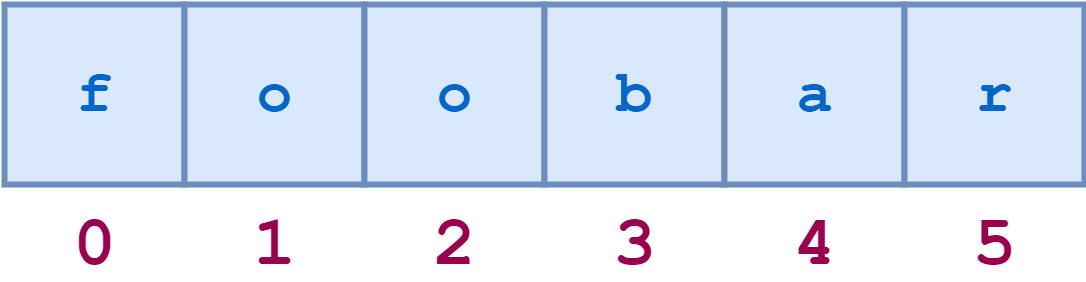
String indexing in Python is zero-based: the first character in the string has index 0, the next has index 1, and so on. The index of the last character will be the length of the string minus one.

For example, a schematic diagram of the indices of the string 'foobar' would look like this:

String index 1String Indices

The individual characters can be accessed by index as follows:

>>> s='foobar'>>> s[0]'f'>>> s[1]'o'>>> s[3]'b'>>> len(s)6>>> s[len(s)-1]'r'

Attempting to index beyond the end of the string results in an error:

>>> s[6]Traceback (most recent call last):
  File "<pyshell#17>", line 1, in <module>s[6]IndexError: string index out of range

String indices can also be specified with negative numbers, in which case indexing occurs from the end of the string backward: -1 refers to the last character, -2 the second-to-last character, and so on. Here is the same diagram showing both the positive and negative indices into the string 'foobar':

String index 2Positive and Negative String Indices

Here are some examples of negative indexing:

>>> s='foobar'>>> s[-1]'r'>>> s[-2]'a'>>> len(s)6>>> s[-len(s)]'f'

Attempting to index with negative numbers beyond the start of the string results in an error:

>>> s[-7]Traceback (most recent call last):
  File "<pyshell#26>", line 1, in <module>s[-7]IndexError: string index out of range

For any non-empty string s, s[len(s)-1] and s[-1] both return the last character. There isn’t any index that makes sense for an empty string.

String Slicing

Python also allows a form of indexing syntax that extracts substrings from a string, known as string slicing. If s is a string, an expression of the form s[m:n] returns the portion of s starting with position m, and up to but not including position n:

>>> s='foobar'>>> s[2:5]'oba'

Remember: String indices are zero-based. The first character in a string has index 0. This applies to both standard indexing and slicing.

Again, the second index specifies the first character that is not included in the result—the character 'r' (s[5]) in the example above. That may seem slightly unintuitive, but it produces this result which makes sense: the expression s[m:n] will return a substring that is n - m characters in length, in this case, 5 - 2 = 3.

If you omit the first index, the slice starts at the beginning of the string. Thus, s[:m] and s[0:m] are equivalent:

>>> s='foobar'>>> s[:4]'foob'>>> s[0:4]'foob'

Similarly, if you omit the second index as in s[n:], the slice extends from the first index through the end of the string. This is a nice, concise alternative to the more cumbersome s[n:len(s)]:

>>> s='foobar'>>> s[2:]'obar'>>> s[2:len(s)]'obar'

For any string s and any integer n (0 ≤ n ≤ len(s)), s[:n] + s[n:] will be equal to s:

>>> s='foobar'>>> s[:4]+s[4:]'foobar'>>> s[:4]+s[4:]==sTrue

Omitting both indices returns the original string, in its entirety. Literally. It’s not a copy, it’s a reference to the original string:

>>> s='foobar'>>> t=s[:]>>> id(s)59598496>>> id(t)59598496>>> sistTrue

If the first index in a slice is greater than or equal to the second index, Python returns an empty string. This is yet another obfuscated way to generate an empty string, in case you were looking for one:

>>> s[2:2]''>>> s[4:2]''

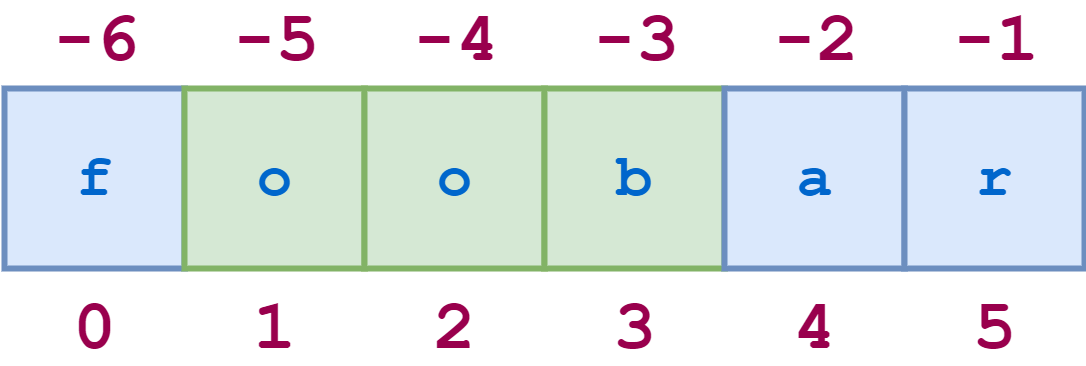
Negative indices can be used with slicing as well. -1 refers to the last character, -2 the second-to-last, and so on, just as with simple indexing. The diagram below shows how to slice the substring 'oob' from the string 'foobar' using both positive and negative indices:

String index 3String Slicing with Positive and Negative Indices

Here is the corresponding Python code:

>>> s='foobar'>>> s[-5:-2]'oob'>>> s[1:4]'oob'>>> s[-5:-2]==s[1:4]True

Specifying a Stride in a String Slice

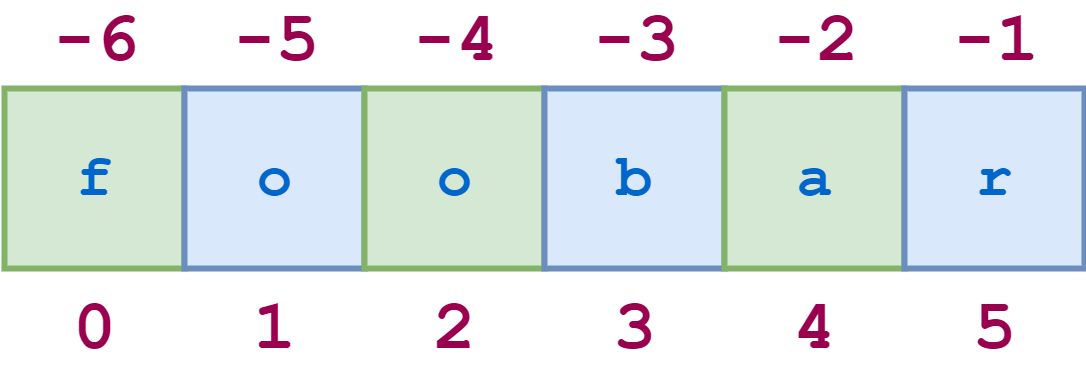
There is one more variant of the slicing syntax to discuss. Adding an additional : and a third index designates a stride (also called a step), which indicates how many characters to jump after retrieving each character in the slice.

For example, for the string 'foobar', the slice 0:6:2 starts with the first character and ends with the last character (the whole string), and every second character is skipped. This is shown in the following diagram:

String stride 1String Indexing with Stride

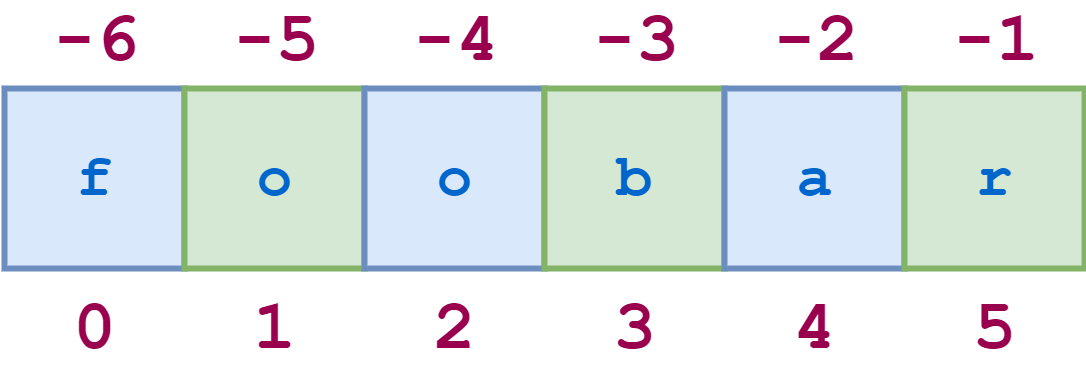
Similarly, 1:6:2 specifies a slice starting with the second character (index 1) and ending with the last character, and again the stride value 2 causes every other character to be skipped:

String stride 2Another String Indexing with Stride

The illustrative REPL code is shown here:

>>> s='foobar'>>> s[0:6:2]'foa'>>> s[1:6:2]'obr'

As with any slicing, the first and second indices can be omitted, and default to the first and last characters respectively:

>>> s='12345'*5>>> s'1234512345123451234512345'>>> s[::5]'11111'>>> s[4::5]'55555'

You can specify a negative stride value as well, in which case Python steps backward through the string. In that case, the starting/first index should be greater than the ending/second index:

>>> s='foobar'>>> s[5:0:-2]'rbo'

In the above example, 5:0:-2 means “start at the last character and step backward by 2, up to but not including the first character.”

When you are stepping backward, if the first and second indices are omitted, the defaults are reversed in an intuitive way: the first index defaults to the end of the string, and the second index defaults to the beginning. Here is an example:

>>> s='12345'*5>>> s'1234512345123451234512345'>>> s[::-5]'55555'

This is a common paradigm for reversing a string:

>>> s='If Comrade Napoleon says it, it must be right.'>>> s[::-1]'.thgir eb tsum ti ,ti syas noelopaN edarmoC fI'

Interpolating Variables Into a String

In Python version 3.6, a new string formatting mechanism was introduced. This feature is formally named the Formatted String Literal, but is more usually referred to by its nickname f-string.

The formatting capability provided by f-strings is extensive and won’t be covered in full detail here. If you want to learn more, you can check out the Real Python article Python 3’s f-Strings: An Improved String Formatting Syntax (Guide). There is also a tutorial on Formatted Output coming up later in this series that digs deeper into f-strings.

One simple feature of f-strings you can start using right away is variable interpolation. You can specify a variable name directly within an f-string literal, and Python will replace the name with the corresponding value.

For example, suppose you want to display the result of an arithmetic calculation. You can do this with a straightforward print() statement, separating numeric values and string literals by commas:

>>> n=20>>> m=25>>> prod=n*m>>> print('The product of',n,'and',m,'is',prod)The product of 20 and 25 is 500

But this is cumbersome. To accomplish the same thing using an f-string:

  • Specify either a lowercase f or uppercase F directly before the opening quote of the string literal. This tells Python it is an f-string instead of a standard string.
  • Specify any variables to be interpolated in curly braces ({}).

Recast using an f-string, the above example looks much cleaner:

>>> n=20>>> m=25>>> prod=n*m>>> print(f'The product of {n} and {m} is {prod}')The product of 20 and 25 is 500

Any of Python’s three quoting mechanisms can be used to define an f-string:

>>> var='Bark'>>> print(f'A dog says {var}!')A dog says Bark!>>> print(f"A dog says {var}!")A dog says Bark!>>> print(f'''A dog says {var}!''')A dog says Bark!

Modifying Strings

In a nutshell, you can’t. Strings are one of the data types Python considers immutable, meaning not able to be changed. In fact, all the data types you have seen so far are immutable. (Python does provide data types that are mutable, as you will soon see.)

A statement like this will cause an error:

>>> s='foobar'>>> s[3]='x'Traceback (most recent call last):
  File "<pyshell#40>", line 1, in <module>s[3]='x'TypeError: 'str' object does not support item assignment

In truth, there really isn’t much need to modify strings. You can usually easily accomplish what you want by generating a copy of the original string that has the desired change in place. There are very many ways to do this in Python. Here is one possibility:

>>> s=s[:3]+'x'+s[4:]>>> s'fooxar'

There is also a built-in string method to accomplish this:

>>> s='foobar'>>> s=s.replace('b','x')>>> s'fooxar'

Read on for more information about built-in string methods!

Built-in String Methods

You learned in the tutorial on Variables in Python that Python is a highly object-oriented language. Every item of data in a Python program is an object.

You are also familiar with functions: callable procedures that you can invoke to perform specific tasks.

Methods are similar to functions. A method is a specialized type of callable procedure that is tightly associated with an object. Like a function, a method is called to perform a distinct task, but it is invoked on a specific object and has knowledge of its target object during execution.

The syntax for invoking a method on an object is as follows:

obj.foo(<args>)

This invokes method .foo() on object obj. <args> specifies the arguments passed to the method (if any).

You will explore much more about defining and calling methods later in the discussion of object-oriented programming. For now, the goal is to present some of the more commonly used built-in methods Python supports for operating on string objects.

In the following method definitions, arguments specified in square brackets ([]) are optional.

Case Conversion

Methods in this group perform case conversion on the target string.

s.capitalize()

Capitalizes the target string.

s.capitalize() returns a copy of s with the first character converted to uppercase and all other characters converted to lowercase:

>>> s='foO BaR BAZ quX'>>> s.capitalize()'Foo bar baz qux'

Non-alphabetic characters are unchanged:

>>> s='foo123#BAR#.'>>> s.capitalize()'Foo123#bar#.'

s.lower()

Converts alphabetic characters to lowercase.

s.lower() returns a copy of s with all alphabetic characters converted to lowercase:

>>> 'FOO Bar 123 baz qUX'.lower()'foo bar 123 baz qux'

s.swapcase()

Swaps case of alphabetic characters.

s.swapcase() returns a copy of s with uppercase alphabetic characters converted to lowercase and vice versa:

>>> 'FOO Bar 123 baz qUX'.swapcase()'foo bAR 123 BAZ Qux'

s.title()

Converts the target string to “title case.”

s.title() returns a copy of s in which the first letter of each word is converted to uppercase and remaining letters are lowercase:

>>> 'the sun also rises'.title()'The Sun Also Rises'

This method uses a fairly simple algorithm. It does not attempt to distinguish between important and unimportant words, and it does not handle apostrophes, possessives, or acronyms gracefully:

>>> "what's happened to ted's IBM stock?".title()"What'S Happened To Ted'S Ibm Stock?"

s.upper()

Converts alphabetic characters to uppercase.

s.upper() returns a copy of s with all alphabetic characters converted to uppercase:

>>> 'FOO Bar 123 baz qUX'.upper()'FOO BAR 123 BAZ QUX'

Find and Replace

These methods provide various means of searching the target string for a specified substring.

Each method in this group supports optional <start> and <end> arguments. These are interpreted as for string slicing: the action of the method is restricted to the portion of the target string starting at character position <start> and proceeding up to but not including character position <end>. If <start> is specified but <end> is not, the method applies to the portion of the target string from <start> through the end of the string.

s.count(<sub>[, <start>[, <end>]])

Counts occurrences of a substring in the target string.

s.count(<sub>) returns the number of non-overlapping occurrences of substring <sub> in s:

>>> 'foo goo moo'.count('oo')3

The count is restricted to the number of occurrences within the substring indicated by <start> and <end>, if they are specified:

>>> 'foo goo moo'.count('oo',0,8)2

s.endswith(<suffix>[, <start>[, <end>]])

Determines whether the target string ends with a given substring.

s.endswith(<suffix>) returns True if s ends with the specified <suffix> and False otherwise:

>>> 'foobar'.endswith('bar')True>>> 'foobar'.endswith('baz')False

The comparison is restricted to the substring indicated by <start> and <end>, if they are specified:

>>> 'foobar'.endswith('oob',0,4)True>>> 'foobar'.endswith('oob',2,4)False

s.find(<sub>[, <start>[, <end>]])

Searches the target string for a given substring.

s.find(<sub>) returns the lowest index in s where substring <sub> is found:

>>> 'foo bar foo baz foo qux'.find('foo')0

This method returns -1 if the specified substring is not found:

>>> 'foo bar foo baz foo qux'.find('grault')-1

The search is restricted to the substring indicated by <start> and <end>, if they are specified:

>>> 'foo bar foo baz foo qux'.find('foo',4)8>>> 'foo bar foo baz foo qux'.find('foo',4,7)-1

s.index(<sub>[, <start>[, <end>]])

Searches the target string for a given substring.

This method is identical to .find(), except that it raises an exception if <sub> is not found rather than returning -1:

>>> 'foo bar foo baz foo qux'.index('grault')Traceback (most recent call last):
  File "<pyshell#0>", line 1, in <module>'foo bar foo baz foo qux'.index('grault')ValueError: substring not found

s.rfind(<sub>[, <start>[, <end>]])

Searches the target string for a given substring starting at the end.

s.rfind(<sub>) returns the highest index in s where substring <sub> is found:

>>> 'foo bar foo baz foo qux'.rfind('foo')16

As with .find(), if the substring is not found, -1 is returned:

>>> 'foo bar foo baz foo qux'.rfind('grault')-1

The search is restricted to the substring indicated by <start> and <end>, if they are specified:

>>> 'foo bar foo baz foo qux'.rfind('foo',0,14)8>>> 'foo bar foo baz foo qux'.rfind('foo',10,14)-1

s.rindex(<sub>[, <start>[, <end>]])

Searches the target string for a given substring starting at the end.

This method is identical to .rfind(), except that it raises an exception if <sub> is not found rather than returning -1:

>>> 'foo bar foo baz foo qux'.rindex('grault')Traceback (most recent call last):
  File "<pyshell#1>", line 1, in <module>'foo bar foo baz foo qux'.rindex('grault')ValueError: substring not found

s.startswith(<prefix>[, <start>[, <end>]])

Determines whether the target string starts with a given substring.

s.startswith(<suffix>) returns True if s starts with the specified <suffix> and False otherwise:

>>> 'foobar'.startswith('foo')True>>> 'foobar'.startswith('bar')False

The comparison is restricted to the substring indicated by <start> and <end>, if they are specified:

>>> 'foobar'.startswith('bar',3)True>>> 'foobar'.startswith('bar',3,2)False

Character Classification

Methods in this group classify a string based on the characters it contains.

s.isalnum()

Determines whether the target string consists of alphanumeric characters.

s.isalnum() returns True if s is nonempty and all its characters are alphanumeric (either a letter or a number), and False otherwise:

>>> 'abc123'.isalnum()True>>> 'abc$123'.isalnum()False>>> ''.isalnum()False

s.isalpha()

Determines whether the target string consists of alphabetic characters.

s.isalpha() returns True if s is nonempty and all its characters are alphabetic, and False otherwise:

>>> 'ABCabc'.isalpha()True>>> 'abc123'.isalpha()False

s.isdigit()

Determines whether the target string consists of digit characters.

s.digit() returns True if s is nonempty and all its characters are numeric digits, and False otherwise:

>>> '123'.isdigit()True>>> '123abc'.isdigit()False

s.isidentifier()

Determines whether the target string is a valid Python identifier.

s.isidentifier() returns True if s is a valid Python identifier according to the language definition, and False otherwise:

>>> 'foo32'.isidentifier()True>>> '32foo'.isidentifier()False>>> 'foo$32'.isidentifier()False

Note:.isidentifier() will return True for a string that matches a Python keyword even though that would not actually be a valid identifier:

>>> 'and'.isidentifier()True

You can test whether a string matches a Python keyword using a function called iskeyword(), which is contained in a module called keyword. One possible way to do this is shown below:

>>> fromkeywordimportiskeyword>>> iskeyword('and')True

If you really want to ensure that a string would serve as a valid Python identifier, you should check that .isidentifier() is True and that iskeyword() is False.

See Python Modules and Packages—An Introduction to read more about Python modules.

s.islower()

Determines whether the target string’s alphabetic characters are lowercase.

s.islower() returns True if s is nonempty and all the alphabetic characters it contains are lowercase, and False otherwise. Non-alphabetic characters are ignored:

>>> 'abc'.islower()True>>> 'abc1$d'.islower()True>>> 'Abc1$D'.islower()False

s.isprintable()

Determines whether the target string consists entirely of printable characters.

s.isprintable() returns True if s is empty or all the alphabetic characters it contains are printable. It returns False if s contains at least one non-printable character. Non-alphabetic characters are ignored:

>>> 'a\tb'.isprintable()False>>> 'a b'.isprintable()True>>> ''.isprintable()True>>> 'a\nb'.isprintable()False

Note: This is the only .isxxxx() method that returns True if s is an empty string. All the others return False for an empty string.

s.isspace()

Determines whether the target string consists of whitespace characters.

s.isspace() returns True if s is nonempty and all characters are whitespace characters, and False otherwise.

The most commonly encountered whitespace characters are space ' ', tab '\t', and newline '\n':

>>> ' \t\n '.isspace()True>>> '   a   '.isspace()False

However, there are a few other ASCII characters that qualify as whitespace, and if you account for Unicode characters, there are quite a few beyond that:

>>> '\f\u2005\r'.isspace()True

('\f' and '\r' are the escape sequences for the ASCII Form Feed and Carriage Return characters; '\u2005' is the escape sequence for the Unicode Four-Per-Em Space.)

s.istitle()

Determines whether the target string is title cased.

s.istitle() returns True if s is nonempty, the first alphabetic character of each word is uppercase, and all other alphabetic characters in each word are lowercase. It returns False otherwise:

>>> 'This Is A Title'.istitle()True>>> 'This is a title'.istitle()False>>> 'Give Me The #$#@ Ball!'.istitle()True

Note: Here is how the Python documentation describes .istitle(), in case you find this more intuitive: “Uppercase characters may only follow uncased characters and lowercase characters only cased ones.”

s.isupper()

Determines whether the target string’s alphabetic characters are uppercase.

s.isupper() returns True if s is nonempty and all the alphabetic characters it contains are uppercase, and False otherwise. Non-alphabetic characters are ignored:

>>> 'ABC'.isupper()True>>> 'ABC1$D'.isupper()True>>> 'Abc1$D'.isupper()False

String Formatting

Methods in this group modify or enhance the format of a string.

s.center(<width>[, <fill>])

Centers a string in a field.

s.center(<width>) returns a string consisting of s centered in a field of width <width>. By default, padding consists of the ASCII space character:

>>> 'foo'.center(10)'   foo    '

If the optional <fill> argument is specified, it is used as the padding character:

>>> 'bar'.center(10,'-')'---bar----'

If s is already at least as long as <width>, it is returned unchanged:

>>> 'foo'.center(2)'foo'

s.expandtabs(tabsize=8)

Expands tabs in a string.

s.expandtabs() replaces each tab character ('\t') with spaces. By default, spaces are filled in assuming a tab stop at every eighth column:

>>> 'a\tb\tc'.expandtabs()'a       b       c'>>> 'aaa\tbbb\tc'.expandtabs()'aaa     bbb     c'

tabsize is an optional keyword parameter specifying alternate tab stop columns:

>>> 'a\tb\tc'.expandtabs(4)'a   b   c'>>> 'aaa\tbbb\tc'.expandtabs(tabsize=4)'aaa bbb c'

s.ljust(<width>[, <fill>])

Left-justifies a string in field.

s.ljust(<width>) returns a string consisting of s left-justified in a field of width <width>. By default, padding consists of the ASCII space character:

>>> 'foo'.ljust(10)'foo       '

If the optional <fill> argument is specified, it is used as the padding character:

>>> 'foo'.ljust(10,'-')'foo-------'

If s is already at least as long as <width>, it is returned unchanged:

>>> 'foo'.ljust(2)'foo'

s.lstrip([<chars>])

Trims leading characters from a string.

s.lstrip() returns a copy of s with any whitespace characters removed from the left end:

>>> '   foo bar baz   '.lstrip()'foo bar baz   '>>> '\t\nfoo\t\nbar\t\nbaz'.lstrip()'foo\t\nbar\t\nbaz'

If the optional <chars> argument is specified, it is a string that specifies the set of characters to be removed:

>>> 'http://www.realpython.com'.lstrip('/:pth')'www.realpython.com'

s.replace(<old>, <new>[, <count>])

Replaces occurrences of a substring within a string.

s.replace(<old>, <new>) returns a copy of s with all occurrences of substring <old> replaced by <new>:

>>> 'foo bar foo baz foo qux'.replace('foo','grault')'grault bar grault baz grault qux'

If the optional <count> argument is specified, a maximum of <count> replacements are performed, starting at the left end of s:

>>> 'foo bar foo baz foo qux'.replace('foo','grault',2)'grault bar grault baz foo qux'

s.rjust(<width>[, <fill>])

Right-justifies a string in a field.

s.rjust(<width>) returns a string consisting of s right-justified in a field of width <width>. By default, padding consists of the ASCII space character:

>>> 'foo'.rjust(10)'       foo'

If the optional <fill> argument is specified, it is used as the padding character:

>>> 'foo'.rjust(10,'-')'-------foo'

If s is already at least as long as <width>, it is returned unchanged:

>>> 'foo'.rjust(2)'foo'

s.rstrip([<chars>])

Trims trailing characters from a string.

s.rstrip() returns a copy of s with any whitespace characters removed from the right end:

>>> '   foo bar baz   '.rstrip()'   foo bar baz'>>> 'foo\t\nbar\t\nbaz\t\n'.rstrip()'foo\t\nbar\t\nbaz'

If the optional <chars> argument is specified, it is a string that specifies the set of characters to be removed:

>>> 'foo.$$$;'.rstrip(';$.')'foo'

s.strip([<chars>])

Strips characters from the left and right ends of a string.

s.strip() is essentially equivalent to invoking s.lstrip() and s.rstrip() in succession. Without the <chars> argument, it removes leading and trailing whitespace:

>>> s='   foo bar baz\t\t\t'>>> s=s.lstrip()>>> s=s.rstrip()>>> s'foo bar baz'

As with .lstrip() and .rstrip(), the optional <chars> argument specifies the set of characters to be removed:

>>> 'www.realpython.com'.strip('w.moc')'realpython'

Note: When the return value of a string method is another string, as is often the case, methods can be invoked in succession by chaining the calls:

>>> '   foo bar baz\t\t\t'.lstrip().rstrip()'foo bar baz'>>> '   foo bar baz\t\t\t'.strip()'foo bar baz'>>> 'www.realpython.com'.lstrip('w.moc').rstrip('w.moc')'realpython'>>> 'www.realpython.com'.strip('w.moc')'realpython'

s.zfill(<width>)

Pads a string on the left with zeros.

s.zfill(<width>) returns a copy of s left-padded with '0' characters to the specified <width>:

>>> '42'.zfill(5)'00042'

If s contains a leading sign, it remains at the left edge of the result string after zeros are inserted:

>>> '+42'.zfill(8)'+0000042'>>> '-42'.zfill(8)'-0000042'

If s is already at least as long as <width>, it is returned unchanged:

>>> '-42'.zfill(3)'-42'

.zfill() is most useful for string representations of numbers, but Python will still happily zero-pad a string that isn’t:

>>> 'foo'.zfill(6)'000foo'

Converting Between Strings and Lists

Methods in this group convert between a string and some composite data type by either pasting objects together to make a string, or by breaking a string up into pieces.

These methods operate on or return iterables, the general Python term for a sequential collection of objects. You will explore the inner workings of iterables in much more detail in the upcoming tutorial on definite iteration.

Many of these methods return either a list or a tuple. These are two similar composite data types that are prototypical examples of iterables in Python. They are covered in the next tutorial, so you’re about to learn about them soon! Until then, simply think of them as sequences of values. A list is enclosed in square brackets ([]), and a tuple is enclosed in parentheses (()).

With that introduction, let’s take a look at this last group of string methods.

s.join(<iterable>)

Concatenates strings from an iterable.

s.join(<iterable>) returns the string that results from concatenating the objects in <iterable> separated by s.

Note that .join() is invoked on s, the separator string. <iterable> must be a sequence of string objects as well.

Some sample code should help clarify. In the following example, the separator s is the string ', ', and <iterable> is a list of string values:

>>> ', '.join(['foo','bar','baz','qux'])'foo, bar, baz, qux'

The result is a single string consisting of the list objects separated by commas.

In the next example, <iterable> is specified as a single string value. When a string value is used as an iterable, it is interpreted as a list of the string’s individual characters:

>>> list('corge')['c', 'o', 'r', 'g', 'e']>>> ':'.join('corge')'c:o:r:g:e'

Thus, the result of ':'.join('corge') is a string consisting of each character in 'corge' separated by ':'.

This example fails because one of the objects in <iterable> is not a string:

>>> '---'.join(['foo',23,'bar'])Traceback (most recent call last):
  File "<pyshell#0>", line 1, in <module>'---'.join(['foo',23,'bar'])TypeError: sequence item 1: expected str instance, int found

That can be remedied, though:

>>> '---'.join(['foo',str(23),'bar'])'foo---23---bar'

As you will soon see, many composite objects in Python can be construed as iterables, and .join() is especially useful for creating strings from them.

s.partition(<sep>)

Divides a string based on a separator.

s.partition(<sep>) splits s at the first occurrence of string <sep>. The return value is a three-part tuple consisting of:

  • The portion of s preceding <sep>
  • <sep> itself
  • The portion of s following <sep>

Here are a couple examples of .partition() in action:

>>> 'foo.bar'.partition('.')('foo', '.', 'bar')>>> 'foo@@bar@@baz'.partition('@@')('foo', '@@', 'bar@@baz')

If <sep> is not found in s, the returned tuple contains s followed by two empty strings:

>>> 'foo.bar'.partition('@@')('foo.bar', '', '')

Remember: Lists and tuples are covered in the next tutorial.

s.rpartition(<sep>)

Divides a string based on a separator.

s.rpartition(<sep>) functions exactly like s.partition(<sep>), except that s is split at the last occurrence of <sep> instead of the first occurrence:

>>> 'foo@@bar@@baz'.partition('@@')('foo', '@@', 'bar@@baz')>>> 'foo@@bar@@baz'.rpartition('@@')('foo@@bar', '@@', 'baz')

s.rsplit(sep=None, maxsplit=-1)

Splits a string into a list of substrings.

Without arguments, s.rsplit() splits s into substrings delimited by any sequence of whitespace and returns the substrings as a list:

>>> 'foo bar baz qux'.rsplit()['foo', 'bar', 'baz', 'qux']>>> 'foo\n\tbar   baz\r\fqux'.rsplit()['foo', 'bar', 'baz', 'qux']

If <sep> is specified, it is used as the delimiter for splitting:

>>> 'foo.bar.baz.qux'.rsplit(sep='.')['foo', 'bar', 'baz', 'qux']

(If <sep> is specified with a value of None, the string is split delimited by whitespace, just as though <sep> had not been specified at all.)

When <sep> is explicitly given as a delimiter, consecutive delimiters in s are assumed to delimit empty strings, which will be returned:

>>> 'foo...bar'.rsplit(sep='.')['foo', '', '', 'bar']

This is not the case when <sep> is omitted, however. In that case, consecutive whitespace characters are combined into a single delimiter, and the resulting list will never contain empty strings:

>>> 'foo\t\t\tbar'.rsplit()['foo', 'bar']

If the optional keyword parameter <maxsplit> is specified, a maximum of that many splits are performed, starting from the right end of s:

>>> 'www.realpython.com'.rsplit(sep='.',maxsplit=1)['www.realpython', 'com']

The default value for <maxsplit> is -1, which means all possible splits should be performed—the same as if <maxsplit> is omitted entirely:

>>> 'www.realpython.com'.rsplit(sep='.',maxsplit=-1)['www', 'realpython', 'com']>>> 'www.realpython.com'.rsplit(sep='.')['www', 'realpython', 'com']

s.split(sep=None, maxsplit=-1)

Splits a string into a list of substrings.

s.split() behaves exactly like s.rsplit(), except that if <maxsplit> is specified, splits are counted from the left end of s rather than the right end:

>>> 'www.realpython.com'.split('.',maxsplit=1)['www', 'realpython.com']>>> 'www.realpython.com'.rsplit('.',maxsplit=1)['www.realpython', 'com']

If <maxsplit> is not specified, .split() and .rsplit() are indistinguishable.

s.splitlines([<keepends>])

Breaks a string at line boundaries.

s.splitlines() splits s up into lines and returns them in a list. Any of the following characters or character sequences is considered to constitute a line boundary:

Escape SequenceCharacter
\nNewline
\rCarriage Return
\r\nCarriage Return + Line Feed
\v or \x0bLine Tabulation
\f or \x0cForm Feed
\x1cFile Separator
\x1dGroup Separator
\x1eRecord Separator
\x85Next Line (C1 Control Code)
\u2028Unicode Line Separator
\u2029Unicode Paragraph Separator

Here is an example using several different line separators:

>>> 'foo\nbar\r\nbaz\fqux\u2028quux'.splitlines()['foo', 'bar', 'baz', 'qux', 'quux']

If consecutive line boundary characters are present in the string, they are assumed to delimit blank lines, which will appear in the result list:

>>> 'foo\f\f\fbar'.splitlines()['foo', '', '', 'bar']

If the optional <keepends> argument is specified and is truthy, then the lines boundaries are retained in the result strings:

>>> 'foo\nbar\nbaz\nqux'.splitlines(True)['foo\n', 'bar\n', 'baz\n', 'qux']>>> 'foo\nbar\nbaz\nqux'.splitlines(1)['foo\n', 'bar\n', 'baz\n', 'qux']

bytes Objects

The bytes object is one of the core built-in types for manipulating binary data. A bytes object is an immutable sequence of single byte values. Each element in a bytes object is a small integer in the range 0 to 255.

Defining a Literal bytes Object

A bytes literal is defined in the same way as a string literal with the addition of a 'b' prefix:

>>> b=b'foo bar baz'>>> bb'foo bar baz'>>> type(b)<class 'bytes'>

As with strings, you can use any of the single, double, or triple quoting mechanisms:

>>> b'Contains embedded "double" quotes'b'Contains embedded "double" quotes'>>> b"Contains embedded 'single' quotes"b"Contains embedded 'single' quotes">>> b'''Contains embedded "double" and 'single' quotes'''b'Contains embedded "double" and \'single\' quotes'>>> b"""Contains embedded "double" and 'single' quotes"""b'Contains embedded "double" and \'single\' quotes'

Only ASCII characters are allowed in a bytes literal. Any character value greater than 127 must be specified using an appropriate escape sequence:

>>> b=b'foo\xddbar'>>> bb'foo\xddbar'>>> b[3]221>>> int(0xdd)221

The 'r' prefix may be used on a bytes literal to disable processing of escape sequences, as with strings:

>>> b=rb'foo\xddbar'>>> bb'foo\\xddbar'>>> b[3]92>>> chr(92)'\\'

Defining a bytes Object With the Built-in bytes() Function

The bytes() function also creates a bytes object. What sort of bytes object gets returned depends on the argument(s) passed to the function. The possible forms are shown below.

bytes(<s>, <encoding>)

Creates a bytes object from a string.

bytes(<s>, <encoding>) converts string <s> to a bytes object, using str.encode() according to the specified <encoding>:

>>> b=bytes('foo.bar','utf8')>>> bb'foo.bar'>>> type(b)<class 'bytes'>

Technical Note: In this form of the bytes() function, the <encoding> argument is required. “Encoding” refers to the manner in which characters are translated to integer values. A value of "utf8" indicates Unicode Transformation Format UTF-8, which is an encoding that can handle every possible Unicode character. UTF-8 can also be indicated by specifying "UTF8", "utf-8", or "UTF-8" for <encoding>.

See the Unicode documentation for more information. As long as you are dealing with common Latin-based characters, UTF-8 will serve you fine.

bytes(<size>)

Creates a bytes object consisting of null (0x00) bytes.

bytes(<size>) defines a bytes object of the specified <size>, which must be a positive integer. The resulting bytes object is initialized to null (0x00) bytes:

>>> b=bytes(8)>>> bb'\x00\x00\x00\x00\x00\x00\x00\x00'>>> type(b)<class 'bytes'>

bytes(<iterable>)

Creates a bytes object from an iterable.

bytes(<iterable>) defines a bytes object from the sequence of integers generated by <iterable>. <iterable> must be an iterable that generates a sequence of integers n in the range 0 ≤ n ≤ 255:

>>> b=bytes([100,102,104,106,108])>>> bb'dfhjl'>>> type(b)<class 'bytes'>>>> b[2]104

Operations on bytes Objects

Like strings, bytes objects support the common sequence operations:

  • The in and not in operators:

    >>> b=b'abcde'>>> b'cd'inbTrue>>> b'foo'notinbTrue
  • The concatenation (+) and replication (*) operators:

    >>> b=b'abcde'>>> b+b'fghi'b'abcdefghi'>>> b*3b'abcdeabcdeabcde'
  • Indexing and slicing:

    >>> b=b'abcde'>>> b[2]99>>> b[1:3]b'bc'
  • Built-in functions:

    >>> len(b)5>>> min(b)97>>> max(b)101

Many of the methods defined for string objects are valid for bytes objects as well:

>>> b=b'foo,bar,foo,baz,foo,qux'>>> b.count(b'foo')3>>> b.endswith(b'qux')True>>> b.find(b'baz')12>>> b.split(sep=b',')[b'foo', b'bar', b'foo', b'baz', b'foo', b'qux']>>> b.center(30,b'-')b'---foo,bar,foo,baz,foo,qux----'

Notice, however, that when these operators and methods are invoked on a bytes object, the operand and arguments must be bytes objects as well:

>>> b=b'foo.bar'>>> b+'.baz'Traceback (most recent call last):
  File "<pyshell#72>", line 1, in <module>b+'.baz'TypeError: can't concat bytes to str>>> b+b'.baz'b'foo.bar.baz'>>> b.split(sep='.')Traceback (most recent call last):
  File "<pyshell#74>", line 1, in <module>b.split(sep='.')TypeError: a bytes-like object is required, not 'str'>>> b.split(sep=b'.')[b'foo', b'bar']

Although a bytes object definition and representation is based on ASCII text, it actually behaves like an immutable sequence of small integers in the range 0 to 255, inclusive. That is why a single element from a bytes object is displayed as an integer:

>>> b=b'foo\xddbar'>>> b[3]221>>> hex(b[3])'0xdd'>>> min(b)97>>> max(b)221

A slice is displayed as a bytes object though, even if it is only one byte long:

>>> b[2:3]b'c'

You can convert a bytes object into a list of integers with the built-in list() function:

>>> list(b)[97, 98, 99, 100, 101]

Hexadecimal numbers are often used to specify binary data because two hexadecimal digits correspond directly to a single byte. The bytes class supports two additional methods that facilitate conversion to and from a string of hexadecimal digits.

bytes.fromhex(<s>)

Returns a bytes object constructed from a string of hexadecimal values.

bytes.fromhex(<s>) returns the bytes object that results from converting each pair of hexadecimal digits in <s> to the corresponding byte value. The hexadecimal digit pairs in <s> may optionally be separated by whitespace, which is ignored:

>>> b=bytes.fromhex(' aa 68 4682cc ')>>> bb'\xaahF\x82\xcc'>>> list(b)[170, 104, 70, 130, 204]

Note: This method is a class method, not an object method. It is bound to the bytes class, not a bytes object. You will delve much more into the distinction between classes, objects, and their respective methods in the upcoming tutorials on object-oriented programming. For now, just observe that this method is invoked on the bytes class, not on object b.

b.hex()

Returns a string of hexadecimal value from a bytes object.

b.hex() returns the result of converting bytes object b into a string of hexadecimal digit pairs. That is, it does the reverse of .fromhex():

>>> b=bytes.fromhex(' aa 68 4682cc ')>>> bb'\xaahF\x82\xcc'>>> b.hex()'aa684682cc'>>> type(b.hex())<class 'str'>

Note: As opposed to .fromhex(), .hex() is an object method, not a class method. Thus, it is invoked on an object of the bytes class, not on the class itself.

bytearray Objects

Python supports another binary sequence type called the bytearray. bytearray objects are very like bytes objects, despite some differences:

  • There is no dedicated syntax built into Python for defining a bytearray literal, like the 'b' prefix that may be used to define a bytes object. A bytearray object is always created using the bytearray() built-in function:

    >>> ba=bytearray('foo.bar.baz','UTF-8')>>> babytearray(b'foo.bar.baz')>>> bytearray(6)bytearray(b'\x00\x00\x00\x00\x00\x00')>>> bytearray([100,102,104,106,108])bytearray(b'dfhjl')
  • bytearray objects are mutable. You can modify the contents of a bytearray object using indexing and slicing:

    >>> ba=bytearray('foo.bar.baz','UTF-8')>>> babytearray(b'foo.bar.baz')>>> ba[5]=0xee>>> babytearray(b'foo.b\xeer.baz')>>> ba[8:11]=b'qux'>>> babytearray(b'foo.b\xeer.qux')

A bytearray object may be constructed directly from a bytes object as well:

>>> ba=bytearray(b'foo')>>> babytearray(b'foo')

Conclusion

This tutorial provided an in-depth look at the many different mechanisms Python provides for string handling, including string operators, built-in functions, indexing, slicing, and built-in methods. You also were introduced to the bytes and bytearray types.

These types are the first types you have examined that are composite—built from a collection of smaller parts. Python provides several composite built-in types. In the next tutorial, you will explore two of the most frequently used: lists and tuples.


[ Improve Your Python With 🐍 Python Tricks 💌 – Get a short & sweet Python Trick delivered to your inbox every couple of days. >> Click here to learn more and see examples ]

EuroPython: EuroPython 2018: Women's Django Workshop

$
0
0

We are pleased to host and sponsor a free Women’s Django Workshop on Monday 23rd July, from 9am-6pm.

image

EuroPython Women’s Django Workshop

What to expect

Would you like to learn about how to build websites, but don’t know where to start? A group of volunteers will lead you through HTML, CSS, Python & Django to build a blog in a one day workshop. No prior programming knowledge is needed to participate! 

How to register

If you would like to take part, apply for a spot by filling in our application form. Participation is free of charge, but does require registration.

The EuroPython Society sponsors this event, providing space, catering and making available up to 30 discounted student rate conference tickets to the workshop attendees.

Reminder: Book your EuroPython 2018 tickets soon

Please make sure you book your ticket in the coming days. We will switch to late bird rates next week.

If you want to attend the training sessions, please buy a training pass. We only have very few left and will close sales for these soon.

Enjoy,

EuroPython 2018 Team
https://ep2018.europython.eu/ 
https://www.europython-society.org/

Made With Mu: Announcing Mu 1.0.0-beta.17

$
0
0

We’re pleased to announce the availability of Mu 1.0.0-beta.17, a Python code editor for beginner programmers! This is the final beta version before a release candidate later this week and the final 1.0 release sometime next week. This version is feature complete for 1.0. Any further changes will be bug fixes or cosmetic changes rather than new features.

The full list of changes can be read in the developer documentation. However, highlights include:

  • A major re-write of how MicroPython code is flashed onto the BBC micro:bit. If there’s one thing we’d love to be tested by users, it’s this! All feedback most welcome (submit a new issue if you find a problem or discuss things via online chat).
  • The latest and greatest version of MicroPython for the BBC micro:bit.
  • Updates to the Python visual debugger (which is working really well).
  • Protection from “shadow modules”. When many new programmers first save, for example, some turtle based code they call their file turtle.py. This breaks Python in a subtle yet opaque manner for beginners. Of course, their new turtle.py file takes precedence in the import path, so where their code says import turtle it is, in fact, trying to import itself..! Not a good situation for anyone, let alone a beginner programmer. As a result, Mu will complain if you try to give a file the same name as an existing module on your Python path. We know from extensive feedback this feature will save hours of confused head-scratching for beginners and teachers.
  • We’ve also added a very simple yet remarkably useful “find and replace” dialog which you can access with the Ctrl-F hot key combination.
  • Talking of hot key combinations, if you highlight some text and press Ctrl-K it’ll be toggled between commented and uncommented. If no text is highlighted, the current line is toggled between these two states.
  • Mu has been updated to use the latest version of Qt as its GUI framework.
  • Plenty of minor fixes, tidy-ups and bugs squashed.

The next release will be a bug-fix “release candidate”. This will be a dress rehearsal for the final release which will follow soon after. Happily, most of Mu’s test, build and package infrastructure is automated. However, since this is still a process with several different components that need to be synchronised and checked (such as blog posts announcing the release and documentation updates) and some manual interventions (such as digitally signing the installers for OSX and Windows) we want to make sure we get this process right first time!

As always, feedback, bug reports and ideas would be most welcome!

Vladimir Iakolev: How I was planning a trip to South America with JavaScript, Python and Google Flights abuse

$
0
0

I was planning a trip to South America for a while. As I have flexible dates and want to visit a few places, it was very hard to find proper flights. So I decided to try to automatize everything.

I’ve already done something similar before with Clojure and Chrome, but it was only for a single flight and doesn’t work anymore.

Parsing flights information

Apparently, there’s no open API for getting information about flights. But as Google Flights can show a calendar with prices for dates for two months I decided to use it:

Calendar with prices

So I’ve generated every possible combination of interesting destinations in South America and flights to and from Amsterdam. Simulated user interaction with changing destination inputs and opening/closing calendar. By the end, I wrote results as JSON in a new tab. The whole code isn’t that interesting and available in the gist. From the high level it looks like:

constgetFlightsData=async([from,to])=>{awaitsetDestination(FROM,from);awaitsetDestination(TO,to);constprices=awaitgetPrices();returnprices.map(([date,price])=>({date,price,from,to,}));};constcollectData=async()=>{letresult=[];for(letflightofgetAllPossibleFlights()){constflightsData=awaitgetFlightsData(flight);result=result.concat(flightsData);}returnresult;};constwin=window.open('');collectData().then((data)=>win.document.write(JSON.stringify(data)),(error)=>console.error("Can't get flights",error),);

In action:

I’ve run it twice to have separate data for flights with and without stops, and just saved the result to JSON files with content like:

[{"date":"2018-07-05","price":476,"from":"Rio de Janeiro","to":"Montevideo"},{"date":"2018-07-06","price":470,"from":"Rio de Janeiro","to":"Montevideo"},{"date":"2018-07-07","price":476,"from":"Rio de Janeiro","to":"Montevideo"},...]

Although, it mostly works, in some rare cases it looks like Google Flights has some sort of anti-parser and show “random” prices.

Selecting the best trips

In the previous part, I’ve parsed 10110 flights with stop and 6422 non-stop flights, it’s impossible to use brute force algorithm here (I’ve tried). As reading data from JSON isn’t interesting, I’ll skip that part.

At first, I’ve built an index of from destinationdayto destination:

from_id2day_number2to_id2flight=defaultdict(lambda:defaultdict(lambda:{}))forflightinflights:from_id2day_number2to_id2flight[flight.from_id] \
        [flight.day_number][flight.to_id]=flight

Created a recursive generator that creates all possible trips:

def_generate_trips(can_visit,can_travel,can_spent,current_id,current_day,trip_flights):# The last flight is to home city, the end of the tripiftrip_flights[-1].to_id==home_city_id:yieldTrip(price=sum(flight.priceforflightintrip_flights),flights=trip_flights)return# Everything visited or no vacation days left or no money leftifnotcan_visitorcan_travel<MIN_STAYorcan_spent==0:return# The minimal amount of cities visited, can start "thinking" about going homeiflen(trip_flights)>=MIN_VISITEDandhome_city_idnotincan_visit:can_visit.add(home_city_id)forto_idincan_visit:can_visit_next=can_visit.difference({to_id})forstayinrange(MIN_STAY,min(MAX_STAY,can_travel)+1):current_day_next=current_day+stayflight_next=from_id2day_number2to_id2flight \
                .get(current_id,{}).get(current_day_next,{}).get(to_id)ifnotflight_next:continuecan_spent_next=can_spent-flight_next.priceifcan_spent_next<0:continueyieldfrom_generate_trips(can_visit_next,can_travel-stay,can_spent_next,to_id,current_day+stay,trip_flights+[flight_next])

As the algorithm is easy to parallel, I’ve made it possible to run with Pool.pool.imap_unordered, and pre-sort for future sorting with merge sort:

def_generator_stage(params):returnsorted(_generate_trips(*params),key=itemgetter(0))

Then generated initial flights and other trip flights in parallel:

defgenerate_trips():generators_params=[(city_ids.difference({start_id,home_city_id}),MAX_TRIP,MAX_TRIP_PRICE-from_id2day_number2to_id2flight[home_city_id][start_day][start_id].price,start_id,start_day,[from_id2day_number2to_id2flight[home_city_id][start_day][start_id]])forstart_dayinrange((MAX_START-MIN_START).days)forstart_idinfrom_id2day_number2to_id2flight[home_city_id][start_day].keys()]withPool(cpu_count()*2)aspool:forn,stage_resultinenumerate(pool.imap_unordered(_generator_stage,generators_params)):yieldstage_result

And sorted everything with heapq.merge:

trips=[*merge(*generate_trips(),key=itemgetter(0))]

Looks like a solution to a job interview question.

Without optimizations, it was taking more than an hour and consumed almost whole RAM (apparently typing.NamedTuple isn’t memory efficient with multiprocessing at all), but current implementation takes 1 minute 22 seconds on my laptop.

As the last step I’ve saved results in csv (the code isn’t interesting and available in the gist), like:

price,days,cities,start city,start date,end city,end date,details
1373,15,4,La Paz,2018-09-15,Buenos Aires,2018-09-30,Amsterdam -> La Paz 2018-09-15 498 & La Paz -> Santiago 2018-09-18 196 & Santiago -> Montevideo 2018-09-23 99 & Montevideo -> Buenos Aires 2018-09-26 120 & Buenos Aires -> Amsterdam 2018-09-30 460
1373,15,4,La Paz,2018-09-15,Buenos Aires,2018-09-30,Amsterdam -> La Paz 2018-09-15 498 & La Paz -> Santiago 2018-09-18 196 & Santiago -> Montevideo 2018-09-23 99 & Montevideo -> Buenos Aires 2018-09-27 120 & Buenos Aires -> Amsterdam 2018-09-30 460
1373,15,4,La Paz,2018-09-15,Buenos Aires,2018-09-30,Amsterdam -> La Paz 2018-09-15 498 & La Paz -> Santiago 2018-09-20 196 & Santiago -> Montevideo 2018-09-23 99 & Montevideo -> Buenos Aires 2018-09-26 120 & Buenos Aires -> Amsterdam 2018-09-30 460
1373,15,4,La Paz,2018-09-15,Buenos Aires,2018-09-30,Amsterdam -> La Paz 2018-09-15 498 & La Paz -> Santiago 2018-09-20 196 & Santiago -> Montevideo 2018-09-23 99 & Montevideo -> Buenos Aires 2018-09-27 120 & Buenos Aires -> Amsterdam 2018-09-30 460
...

Gist with sources.

Bhishan Bhandari: Flask Essentials – Handling 400 and 404 requests in Flask REST API

Mike Driscoll: My (abridged) Career in Python – Podcast.__init__ Interview

$
0
0

I was recently interviewed by Tobias Macey (@TobiasMacey) on Podcast.__init__ (@Podcast__init__) about some of the things I have done in my career as a Python programmer.

You can listen in here:

And if you missed it earlier this year, I was also on the Talk Python to Me podcast talking about the history of Python, among other topics.


Kay Hayen: Nuitka Release 0.5.31

$
0
0

This is to inform you about the new stable release of Nuitka. It is the extremely compatible Python compiler. Please see the page "What is Nuitka?" for an overview.

This release is massive in terms of fixes, but also adds a lot of refinement to code generation, and more importantly adds experimental support for Python 3.7, while enhancing support for Pyt5 in standalone mode by a lot.

Bug Fixes

  • Standalone: Added missing dependencies for PyQt5.Qt module.

  • Plugins: Added support for PyQt5.Qt module and its qml plugins.

  • Plugins: The sensible plugin list for PyQt now includes that platforms plugins on Windows too, as they are kind of mandatory.

  • Python3: Fix, for uninstalled Python versions wheels that linked against the Python3 library as opposed to Python3X, it was not found.

  • Standalone: Prefer DLLs used by main program binary over ones used by wheels.

  • Standalone: For DLLs added by Nuitka plugins, add the package directory to the search path for dependencies where they might live.

  • Fix, the vars built-in didn't annotate its exception exit.

  • Python3: Fix, the bytes and complex built-ins needs to be treated as a slot too.

  • Fix, consider if del variable must be assigned, in which case no exception exit should be created. This prevented Tkinter compilation.

  • Python3.6: Added support for the following language construct:

    d={"metaclass":M}classC(**d):pass
  • Python3.5: Added support for cyclic imports. Now a from import with a name can really cause an import to happen, not just a module attribute lookup.

  • Fix, hasattr was never raising exceptions.

  • Fix, bytearray constant values were considered to be non-iterable.

  • Python3.6: Fix, now it is possible to del __annotations__ in a class and behave compatible. Previously in this case we were falling back to the module variable for annotations used after that which is wrong.

  • Fix, some built-in type coversions are allowed to return derived types, but Nuitka assumed the excact type, this affected bytes, int, long, unicode.

  • Standalone: Fix, the _socket module was insisted on to be found, but can be compiled in.

New Features

  • Added experimental support for Python 3.7, more work will be needed though for full support. Basic tests are working, but there are are at least more coroutine changes to follow.
  • Added support for building extension modules against statically linked Python. This aims at supporting manylinux containers, which are supposed to be used for creating widely usable binary wheels for Linux. Programs won't work with statically linked Python though.
  • Added options to allow ignoring the Windows cache for DLL dependencies or force an update.
  • Allow passing options from distutils to Nuitka compilation via setup options.
  • Added option to disable the DLL dependency cache on Windows as it may become wrong after installing new software.
  • Added experimental ability to provide extra options for Nuitka to setuptools.
  • Python3: Remove frame preservation and restoration of exceptions. This is not needed, but leaked over from Python2 code.

Optimization

  • Apply value tracing to local dict variables too, enhancing the optimization for class bodies and function with exec statements by a lot.
  • Better optimization for "must not have value", wasn't considering merge traces of uninitialized values, for which this is also the case.
  • Use 10% less memory at compile time due to specialized base classes for statements with a single child only allowing __slots__ usage by not having multiple inheritance for those.
  • More immediately optimize branches with known truth values, so that merges are avoided and do not prevent trace based optimization before the pass after the next one. In some cases, optimization based on traces could fail to be done if there was no next pass caused by other things.
  • Much faster handling for functions with a lot of eval and exec calls.
  • Static optimization of type with known type shapes, the value is predicted at compile time.
  • Optimize containers for all compile time constants into constant nodes. This also enables further compile time checks using them, e.g. with isinstance or in checks.
  • Standalone: Using threads when determining DLL dependencies. This will speed up the un-cached case on Windows by a fair bit.
  • Also remove unused assignments for mutable constant values.
  • Python3: Also optimize calls to bytes built-in, this was so far not done.
  • Statically optimize iteration over constant values that are not iterable into errors.
  • Removed Fortran, Java, LaTex, PDF, etc. stuff from the inline copies of Scons for faster startup and leaner code. Also updated to 3.0.1 which is no important difference over 3.0.0 for Nuitka however.
  • Make sure to always release temporary objects before checking for error exits. When done the other way around, more C code than necessary will be created, releasing them in both normal case and error case after the check.
  • Also remove unused assignments in case the value is a mutable constant.

Cleanups

  • Don't store "version" numbers of variable traces for code generation, instead directly use the references to the value traces instead, avoiding later lookups.
  • Added dedicated module for complex built-in nodes.
  • Moved C helpers for integer and complex types to dedicated files, solving the TODOs around them.
  • Removed some Python 3.2 only codes.

Organizational

  • For better bug reports, the --version output now contains also the Python version information and the binary path being used.
  • Started using specialized exceptions for some types of errors, which will output the involved data for better debugging without having to reproduce anything. This does e.g. output XML dumps of problematic nodes.
  • When encountering a problem (compiler crash) in optimization, output the source code line that is causing the issue.
  • Added support for Fedora 28 RPM builds.
  • Remove more instances of mentions of 3.2 as supported or usable.
  • Renovated the graphing code and made it more useful.

Summary

This release marks important progress, as the locals dictionary tracing is a huge step ahead in terms of correctness and proper optimization. The actual resulting dictionary is not yet optimized, but that ought to follow soon now.

The initial support of 3.7 is important. Right now it apparently works pretty well as a 3.6 replacement already, but definitely a lot more work will be needed to fully catch up.

For standalone, this accumulated a lot of improvements related to the plugin side of Nuitka. Thanks to those involved in making this better. On Windows things ought to be much faster now, due to parallel usage of dependency walker.

Stack Abuse: The Naive Bayes Algorithm in Python with Scikit-Learn

$
0
0

When studying Probability & Statistics, one of the first and most important theorems students learn is the Bayes' Theorem. This theorem is the foundation of deductive reasoning, which focuses on determining the probability of an event occurring based on prior knowledge of conditions that might be related to the event.

The Naive Bayes Classifier brings the power of this theorem to Machine Learning, building a very simple yet powerful classifier. In this article, we will see an overview on how this classifier works, which suitable applications it has, and how to use it in just a few lines of Python and the Scikit-Learn library.

Theory Behind Bayes' Theorem

If you studied Computer Science, Mathematics, or any other field involving statistics, it is very likely that at some point you stumbled upon the following formula:

P(H|E) = (P(E|H) * P(H)) / P(E)  

where

  • P(H|E) is the probability of hypothesis H given the event E, a posterior probability.
  • P(E|H) is the probability of event E given that the hypothesis H is true.
  • P(H) is the probability of hypothesis H being true (regardless of any related event), or prior probability of H.
  • P(E) is the probability of the event occurring (regardless of the hypothesis).

This is the Bayes Theorem. At first glance it might be hard to make sense out of it, but it is very intuitive if we explore it through an example:

Let's say that we are interested in knowing whether an e-mail that contains the word sex (event) is spam (hypothesis). If we go back to the theorem description, this problem can be formulated as:

P(class=SPAM|contains="sex") = (P(contains="sex"|class=SPAM) * P(class=SPAM)) / P(contains="sex")  

which in plain English is: The probability of an e-mail containing the word sex being spam is equal to the proportion of SPAM emails that contain the word sex multiplied by the proportion of e-mails being spam and divided by the proportion of e-mails containing the word sex.

Let's dissect this piece by piece:

  • P(class=SPAM|contains="sex") is the probability of an e-mail being SPAM given that this e-mail contains the word sex. This is what we are interested in predicting.
  • P(contains="sex"|class=SPAM) is the probability of an e-mail containing the word sex given that this e-mail has been recognized as SPAM. This is our training data, which represents the correlation between an e-mail being considered SPAM and such e-mail containing the word sex.
  • P(class=SPAM) is the probability of an e-mail being SPAM (without any prior knowledge of the words it contains). This is simply the proportion of e-mails being SPAM in our entire training set. We multiply by this value because we are interested in knowing how significant is information concerning SPAM e-mails. If this value is low, the significance of any events related to SPAM e-mails will also be low.
  • P(contains="sex") is the probability of an e-mail containing the word sex. This is simply the proportion of e-mails containing the word sex in our entire training set. We divide by this value because the more exclusive the word sex is, the more important is the context in which it appears. Thus, if this number is low (the word appears very rarely), it can be a great indicator that in the cases it does appear, it is a relevant feature to analyze.

In summary, the Bayes Theorem allows us to make reasoned deduction of events happening in the real world based on prior knowledge of observations that may imply it. To apply this theorem to any problem, we need to compute the two types of probabilities that appear in the formula.

Class Probabilities

In the theorem, P(A) represents the probabilities of each event. In the Naive Bayes Classifier, we can interpret these Class Probabilities as simply the frequency of each instance of the event divided by the total number of instances. For example, in the previous example of spam detection, P(class=SPAM) represents the number of e-mails classified as spam divided by the sum of all instances (this is spam + not spam)

P(class=SPAM) = count(class=SPAM) / (count(class=notSPAM) + count(class=SPAM))  

Conditional Probabilities

In the theorem, P(A|B) represents the conditional probabilities of an event A given another event B. In the Naive Bayes Classifier, these encode the posterior probability of A occurring when B is true.

For the spam example, P(class=SPAM|contains="sex") represents the number of instances in which an e-mail is considered as spam and contains the word sex, divided by the total number of e-mails that contain the word sex:

P(class=SPAM|contains="sex") = count(class=SPAM & contains=sex) / count(contains=sex)  

Applications

The application of the Naive Bayes Classifier has been shown successful in different scenarios. A classical use case is document classification: determining whether a given document corresponds to certain categories. Nonetheless, this technique has its advantages and limitations.

Advantages

  • Naive Bayes is a simple and easy to implement algorithm. Because of this, it might outperform more complex models when the amount of data is limited.
  • Naive Bayes works well with numerical and categorical data. It can also be used to perform regression by using Gaussian Naive Bayes.

Limitations

  • Given the construction of the theorem, it does not work well when you are missing certain combination of values in your training data. In other words, if you have no occurrences of a class label and a certain attribute value together (e.g. class="spam", contains="$$$") then the frequency-based probability estimate will be zero. Given Naive-Bayes' conditional independence assumption, when all the probabilities are multiplied you will get zero.

  • Naive Bayes works well as long as the categories are kept simple. For instance, it works well for problems involving keywords as features (e.g. spam detection), but it does not work when the relationship between words is important (e.g. sentiment analysis).

Demo in Scikit-Learn

It's demo time! We will use Python 3 together with Scikit-Learn to build a very simple SPAM detector for SMS messages (for those of you that are youngsters, this is what we used for messaging back in the middle ages). You can find and download the dataset from this link.

We will need three libraries that will make our coding much easier: scikit-learn, pandas and nltk. You can use pip or conda to install these.

Loading the Data

The SMS Spam Collection v.1 is a set of SMS tagged messages that have been collected for SMS Spam research. It contains one set of SMS messages in English of 5,574 messages, tagged according being ham (legitimate) or spam. The distribution is a total of 4,827 SMS legitimate messages (86.6%) and a total of 747 (13.4%) spam messages.

If we open the dataset, we will see that it has the format [label] [tab] [message], which looks something like this:

ham    Go until jurong point, crazy.. Available only in bugis n great world la e buffet... Cine there got amore wat...

ham    Ok lar... Joking wif u oni...

spam    Free entry in 2 a wkly comp to win FA Cup final tkts 21st May 2005. Text FA to 87121 to receive entry question(std txt rate)T&C's apply 08452810075over18's

ham    U dun say so early hor... U c already then say...  

To load the data, we can use Pandas' Dataframe read_table method. This allows us to define a separator (in this case, a tab) and rename the columns accordingly:

import pandas as pd

df = pd.read_table('SMSSpamCollection',  
                   sep='\t', 
                   header=None,
                   names=['label', 'message'])

Pre-processing

Once we have our data ready, it is time to do some preprocessing. We will focus on removing useless variance for our task at hand. First, we have to convert the labels from strings to binary values for our classifier:

df['label'] = df.label.map({'ham': 0, 'spam': 1})  

Second, convert all characters in the message to lower case:

df['message'] = df.message.map(lambda x: x.lower())  

Third, remove any punctuation:

df['message'] = df.message.str.replace('[^\w\s]', '')  

Fourth, tokenize the messages into into single words using nltk. First, we have to import and download the tokenizer from the console:

import nltk  
nltk.download()  

An installation window will appear. Go to the "Models" tab and select "punkt" from the "Identifier" column. Then click "Download" and it will install the necessary files. Then it should work! Now we can apply the tokenization:

df['message'] = df['message'].apply(nltk.word_tokenize)  

Fifth, we will perform some word stemming. The idea of stemming is to normalize our text for all variations of words carry the same meaning, regardless of the tense. One of the most popular stemming algorithms is the Porter Stemmer:

from nltk.stem import PorterStemmer

stemmer = PorterStemmer()

df['message'] = df['message'].apply(lambda x: [stemmer.stem(y) for y in x])  

Finally, we will transform the data into occurrences, which will be the features that we will feed into our model:

from sklearn.feature_extraction.text import CountVectorizer

# This converts the list of words into space-separated strings
df['message'] = df['message'].apply(lambda x: ' '.join(x))

count_vect = CountVectorizer()  
counts = count_vect.fit_transform(df['message'])  

We could leave it as the simple word-count per message, but it is better to use Term Frequency Inverse Document Frequency, more known as tf-idf:

from sklearn.feature_extraction.text import TfidfTransformer

transformer = TfidfTransformer().fit(counts)

counts = transformer.transform(counts)  

Training the Model

Now that we have performed feature extraction from our data, it is time to build our model. We will start by splitting our data into training and test sets:

from sklearn.model_selection import train_test_split

X_train, X_test, y_train, y_test = train_test_split(counts, df['label'], test_size=0.1, random_state=69)  

Then, all that we have to do is initialize the Naive Bayes Classifier and fit the data. For text classification problems, the Multinomial Naive Bayes Classifier is well-suited:

from sklearn.naive_bayes import MultinomialNB

model = MultinomialNB().fit(X_train, y_train)  

Evaluating the Model

Once we have put together our classifier, we can evaluate its performance in the testing set:

import numpy as np

predicted = model.predict(X_test)

print(np.mean(predicted == y_test))  

Congratulations! Our simple Naive Bayes Classifier has 98.2% accuracy with this specific test set! But it is not enough by just providing the accuracy, since our dataset is imbalanced when it comes to the labels (86.6% legitimate in contrast to 13.4% spam). It could happen that our classifier is over-fitting the legitimate class while ignoring the spam class. To solve this uncertainty, let's have a look at the confusion matrix:

from sklearn.metrics import confusion_matrix

print(confusion_matrix(y_test, predicted))  

The confusion_matrix method will print something like this:

[[478   4]
[   6  70]]

As we can see, the amount of errors is pretty balanced between legitimate and spam, with 4 legitimate messages classified as spam and 6 spam messages classified as legitimate. Overall, these are very good results for our simple classifier.

Conclusion

In this article, we have seen a crash-course on both theory and practice of the Naive Bayes Classifier. We have put together a simple Multimodal Naive Bayes Classifier that achieves 98.2% accuracy on spam detection for SMS messages.

A. Jesse Jiryu Davis: Motor 2.0

$
0
0
To support multi-document transactions, I had to make breaking changes to Motor’s session API and release a major version bump, Motor 2.0. Since this is a major release I also deleted many helper methods and APIs that had been deprecated over time since Motor 1.0, most notably the old CRUD methods insert, update, remove, and save, and the original callback-based API. Read the Motor 2.0 Migration Guide carefully to upgrade your existing Motor application.

Kushal Das: Using podman for containers

$
0
0

Podman is one of the newer tool in the container world, it can help you to run OCI containers in pods. It uses Buildah to build containers, and runc or any other OCI compliant runtime. Podman is being actively developed.

I have moved the two major bots we use for dgplug summer training (named batul and tenida) under podman and they are running well for the last few days.

Installation

I am using a Fedora 28 system, installation of podman is as simple as any other standard Fedora package.

$ sudo dnf install podman

While I was trying out podman, I found it was working perfectly in my DigitalOcean instance, but, not so much on the production vm. I was not being able to attach to the stdout.

When I tried to get help in #podman IRC channel, many responded, but none of the suggestions helped. Later, I gave access to the box to Matthew Heon, one of the developer of the tool. He identified the Indian timezone (+5:30) was too large for the timestamp buffer and thus causing this trouble.

The fix was pushed fast, and a Fedora build was also pushed to the testing repo.

Usage

To learn about different available commands, visit this page.

First step was to build the container images, it was as simple as:

$ sudo podman build -t kdas/imagename .

I reused my old Dockerfiles for the same. After this, it was just simple run commands to start the containers.

Bhishan Bhandari: How to mess up a Python codebase coming from Java Background.

$
0
0

In python, you can make use of the augmented assignment operator to increase or decrease the value of a variable by 1. An augmented assignment is generally used to replace a statement where an operator takes a variable as one of its arguments and then assigns the result back to the same variable. It is […]

The post How to mess up a Python codebase coming from Java Background. appeared first on The Tara Nights.

Real Python: Generating Random Data in Python (Guide)

$
0
0

How random is random? This is a weird question to ask, but it is one of paramount importance in cases where information security is concerned. Whenever you’re generating random data, strings, or numbers in Python, it’s a good idea to have at least a rough idea of how that data was generated.

Here, you’ll cover a handful of different options for generating random data in Python, and then build up to a comparison of each in terms of its level of security, versatility, purpose, and speed.

I promise that this tutorial will not be a lesson in mathematics or cryptography, which I wouldn’t be well equipped to lecture on in the first place. You’ll get into just as much math as needed, and no more.

How Random Is Random?

First, a prominent disclaimer is necessary. Most random data generated with Python is not fully random in the scientific sense of the word. Rather, it is pseudorandom: generated with a pseudorandom number generator (PRNG), which is essentially any algorithm for generating seemingly random but still reproducible data.

“True” random numbers can be generated by, you guessed it, a true random number generator (TRNG). One example is to repeatedly pick up a die off the floor, toss it in the air, and let it land how it may.

Assuming that your toss is unbiased, you have truly no idea what number the die will land on. Rolling a die is a crude form of using hardware to generate a number that is not deterministic whatsoever. (Or, you can have the dice-o-matic do this for you.) TRNGs are out of the scope of this article but worth a mention nonetheless for comparison’s sake.

PRNGs, usually done with software rather than hardware, work slightly differently. Here’s a concise description:

They start with a random number, known as the seed, and then use an algorithm to generate a pseudo-random sequence of bits based on it. (Source)

You’ve likely been told to “read the docs!” at some point. Well, those people are not wrong. Here’s a particularly notable snippet from the random module’s documentation that you don’t want to miss:

Warning: The pseudo-random generators of this module should not be used for security purposes. (Source)

You’ve probably seen random.seed(999), random.seed(1234), or the like, in Python. This function call is seeding the underlying random number generator used by Python’s random module. It is what makes subsequent calls to generate random numbers deterministic: input A always produces output B. This blessing can also be a curse if it is used maliciously.

Perhaps the terms “random” and “deterministic” seem like they cannot exist next to each other. To make that clearer, here’s an extremely trimmed down version of random() that iteratively creates a “random” number by using x = (x * 3) % 19. x is originally defined as a seed value and then morphs into a deterministic sequence of numbers based on that seed:

classNotSoRandom(object):defseed(self,a=3):"""Seed the world's most mysterious random number generator."""self.seedval=adefrandom(self):"""Look, random numbers!"""self.seedval=(self.seedval*3)%19returnself.seedval_inst=NotSoRandom()seed=_inst.seedrandom=_inst.random

Don’t take this example too literally, as it’s meant mainly to illustrate the concept. If you use the seed value 1234, the subsequent sequence of calls to random() should always be identical:

>>> seed(1234)>>> [random()for_inrange(10)][16, 10, 11, 14, 4, 12, 17, 13, 1, 3]>>> seed(1234)>>> [random()for_inrange(10)][16, 10, 11, 14, 4, 12, 17, 13, 1, 3]

You’ll see a more serious illustration of this shortly.

What Is “Cryptographically Secure?”

If you haven’t had enough with the “RNG” acronyms, let’s throw one more into the mix: a CSPRNG, or cryptographically secure PRNG. CSPRNGs are suitable for generating sensitive data such as passwords, authenticators, and tokens. Given a random string, there is realistically no way for Malicious Joe to determine what string came before or after that string in a sequence of random strings.

One other term that you may see is entropy. In a nutshell, this refers to the amount of randomness introduced or desired. For example, one Python module that you’ll cover here defines DEFAULT_ENTROPY = 32, the number of bytes to return by default. The developers deem this to be “enough” bytes to be a sufficient amount of noise.

Note: Through this tutorial, I assume that a byte refers to 8 bits, as it has since the 1960s, rather than some other unit of data storage. You are free to call this an octet if you so prefer.

A key point about CSPRNGs is that they are still pseudorandom. They are engineered in some way that is internally deterministic, but they add some other variable or have some property that makes them “random enough” to prohibit backing into whatever function enforces determinism.

What You’ll Cover Here

In practical terms, this means that you should use plain PRNGs for statistical modeling, simulation, and to make random data reproducible. They’re also significantly faster than CSPRNGs, as you’ll see later on. Use CSPRNGs for security and cryptographic applications where data sensitivity is imperative.

In addition to expanding on the use cases above, in this tutorial, you’ll delve into Python tools for using both PRNGs and CSPRNGs:

  • PRNG options include the random module from Python’s standard library and its array-based NumPy counterpart, numpy.random.
  • Python’s os, secrets, and uuid modules contain functions for generating cryptographically secure objects.

You’ll touch on all of the above and wrap up with a high-level comparison.

PRNGs in Python

The random Module

Probably the most widely known tool for generating random data in Python is its random module, which uses the Mersenne Twister PRNG algorithm as its core generator.

Earlier, you touched briefly on random.seed(), and now is a good time to see how it works. First, let’s build some random data without seeding. The random.random() function returns a random float in the interval [0.0, 1.0). The result will always be less than the right-hand endpoint (1.0). This is also known as a semi-open range:

>>> # Don't call `random.seed()` yet>>> importrandom>>> random.random()0.35553263284394376>>> random.random()0.6101992345575074

If you run this code yourself, I’ll bet my life savings that the numbers returned on your machine will be different. The default when you don’t seed the generator is to use your current system time or a “randomness source” from your OS if one is available.

With random.seed(), you can make results reproducible, and the chain of calls after random.seed() will produce the same trail of data:

>>> random.seed(444)>>> random.random()0.3088946587429545>>> random.random()0.01323751590501987>>> random.seed(444)# Re-seed>>> random.random()0.3088946587429545>>> random.random()0.01323751590501987

Notice the repetition of “random” numbers. The sequence of random numbers becomes deterministic, or completely determined by the seed value, 444.

Let’s take a look at some more basic functionality of random. Above, you generated a random float. You can generate a random integer between two endpoints in Python with the random.randint() function. This spans the full [x, y] interval and may include both endpoints:

>>> random.randint(0,10)7>>> random.randint(500,50000)18601

With random.randrange(), you can exclude the right-hand side of the interval, meaning the generated number always lies within [x, y) and will always be smaller than the right endpoint:

>>> random.randrange(1,10)5

If you need to generate random floats that lie within a specific [x, y] interval, you can use random.uniform(), which plucks from the continuous uniform distribution:

>>> random.uniform(20,30)27.42639687016509>>> random.uniform(30,40)36.33865802745107

To pick a random element from a non-empty sequence (like a list or a tuple), you can use random.choice(). There is also random.choices() for choosing multiple elements from a sequence with replacement (duplicates are possible):

>>>items=['one','two','three','four','five']>>>random.choice(items)'four'>>>random.choices(items,k=2)['three','three']>>>random.choices(items,k=3)['three','five','four']

To mimic sampling without replacement, use random.sample():

>>> random.sample(items,4)['one', 'five', 'four', 'three']

You can randomize a sequence in-place using random.shuffle(). This will modify the sequence object and randomize the order of elements:

>>> random.shuffle(items)>>> items['four', 'three', 'two', 'one', 'five']

If you’d rather not mutate the original list, you’ll need to make a copy first and then shuffle the copy. You can create copies of Python lists with the copy module, or just x[:] or x.copy(), where x is the list.

Before moving on to generating random data with NumPy, let’s look at one more slightly involved application: generating a sequence of unique random strings of uniform length.

It can help to think about the design of the function first. You need to choose from a “pool” of characters such as letters, numbers, and/or punctuation, combine these into a single string, and then check that this string has not already been generated. A Python set works well for this type of membership testing:

importstringdefunique_strings(k:int,ntokens:int,pool:str=string.ascii_letters)->set:"""Generate a set of unique string tokens.    k: Length of each token    ntokens: Number of tokens    pool: Iterable of characters to choose from    For a highly optimized version:    https://stackoverflow.com/a/48421303/7954504"""seen=set()whilelen(seen)<ntokens:token=''.join(random.choices(pool,k=k))seen.add(token)returnseen

''.join() joins the letters from random.choices() into a single Python str of length k. This token is added to the set, which can’t contain duplicates, and the while loop executes until the set has the number of elements that you specify.

Resource: Python’s string module contains a number of useful constants: ascii_lowercase, ascii_uppercase, string.punctuation, ascii_whitespace, and a handful of others.

Let’s try this function out:

>>> unique_strings(k=4,ntokens=5){'AsMk', 'Cvmi', 'GIxv', 'HGsZ', 'eurU'}>>> unique_strings(5,4,string.printable){"'O*1!", '9Ien%', 'W=m7<', 'mUD|z'}

For a fine-tuned version of this function, this Stack Overflow answer uses generator functions, name binding, and some other advanced tricks to make a faster, cryptographically secure version of unique_strings() above.

PRNGs for Arrays: numpy.random

One thing you might have noticed is that a majority of the functions from random return a scalar value (a single int, float, or other object). If you wanted to generate a sequence of random numbers, one way to achieve that would be with a Python list comprehension:

>>> [random.random()for_inrange(5)][0.021655420657909374, 0.4031628347066195, 0.6609991871223335, 0.5854998250783767, 0.42886606317322706]

But there is another option that is specifically designed for this. You can think of NumPy’s own numpy.random package as being like the standard library’s random, but for NumPy arrays. (It also comes loaded with the ability to draw from a lot more statistical distributions.)

Take note that numpy.random uses its own PRNG that is separate from plain old random. You won’t produce deterministically random NumPy arrays with a call to Python’s own random.seed():

>>> importnumpyasnp>>> np.random.seed(444)>>> np.set_printoptions(precision=2)# Output decimal fmt.

Without further ado, here are a few examples to whet your appetite:

>>> # Return samples from the standard normal distribution>>> np.random.randn(5)array([ 0.36,  0.38,  1.38,  1.18, -0.94])>>> np.random.randn(3,4)array([[-1.14, -0.54, -0.55,  0.21],       [ 0.21,  1.27, -0.81, -3.3 ],       [-0.81, -0.36, -0.88,  0.15]])>>> # `p` is the probability of choosing each element>>> np.random.choice([0,1],p=[0.6,0.4],size=(5,4))array([[0, 0, 1, 0],       [0, 1, 1, 1],       [1, 1, 1, 0],       [0, 0, 0, 1],       [0, 1, 0, 1]])

In the syntax for randn(d0, d1, ..., dn), the parameters d0, d1, ..., dn are optional and indicate the shape of the final object. Here, np.random.randn(3, 4) creates a 2d array with 3 rows and 4 columns. The data will be i.i.d., meaning that each data point is drawn independent of the others.

Another common operation is to create a sequence of random Boolean values, True or False. One way to do this would be with np.random.choice([True, False]). However, it’s actually about 4x faster to choose from (0, 1) and then view-cast these integers to their corresponding Boolean values:

>>> # NumPy's `randint` is [inclusive, exclusive), unlike `random.randint()`>>> np.random.randint(0,2,size=25,dtype=np.uint8).view(bool)array([ True, False,  True,  True, False,  True, False, False, False,       False, False,  True,  True, False, False, False,  True, False,        True, False,  True,  True,  True, False,  True])

What about generating correlated data? Let’s say you want to simulate two correlated time series. One way of going about this is with NumPy’s multivariate_normal() function, which takes a covariance matrix into account. In other words, to draw from a single normally distributed random variable, you need to specify its mean and variance (or standard deviation).

To sample from the multivariate normal distribution, you specify the means and covariance matrix, and you end up with multiple, correlated series of data that are each approximately normally distributed.

However, rather than covariance, correlation is a measure that is more familiar and intuitive to most. It’s the covariance normalized by the product of standard deviations, and so you can also define covariance in terms of correlation and standard deviation:

Covariance in Scalar Form

So, could you draw random samples from a multivariate normal distribution by specifying a correlation matrix and standard deviations? Yes, but you’ll need to get the above into matrix form first. Here, S is a vector of the standard deviations, P is their correlation matrix, and C is the resulting (square) covariance matrix:

Covariance in Matrix Form

This can be expressed in NumPy as follows:

defcorr2cov(p:np.ndarray,s:np.ndarray)->np.ndarray:"""Covariance matrix from correlation & standard deviations"""d=np.diag(s)returnd@p@d

Now, you can generate two time series that are correlated but still random:

>>> # Start with a correlation matrix and standard deviations.>>> # -0.40 is the correlation between A and B, and the correlation>>> # of a variable with itself is 1.0.>>> corr=np.array([[1.,-0.40],... [-0.40,1.]])>>> # Standard deviations/means of A and B, respectively>>> stdev=np.array([6.,1.])>>> mean=np.array([2.,0.5])>>> cov=corr2cov(corr,stdev)>>> # `size` is the length of time series for 2d data>>> # (500 months, days, and so on).>>> data=np.random.multivariate_normal(mean=mean,cov=cov,size=500)>>> data[:10]array([[ 0.58,  1.87],       [-7.31,  0.74],       [-6.24,  0.33],       [-0.77,  1.19],       [ 1.71,  0.7 ],       [-3.33,  1.57],       [-1.13,  1.23],       [-6.58,  1.81],       [-0.82, -0.34],       [-2.32,  1.1 ]])>>> data.shape(500, 2)

You can think of data as 500 pairs of inversely correlated data points. Here’s a sanity check that you can back into the original inputs, which approximate corr, stdev, and mean from above:

>>> np.corrcoef(data,rowvar=False)array([[ 1.  , -0.39],       [-0.39,  1.  ]])>>> data.std(axis=0)array([5.96, 1.01])>>> data.mean(axis=0)array([2.13, 0.49])

Before we move on to CSPRNGs, it might be helpful to summarize some random functions and their numpy.random counterparts:

Python random ModuleNumPy CounterpartUse
random()rand()Random float in [0.0, 1.0)
randint(a, b)random_integers()Random integer in [a, b]
randrange(a, b[, step])randint()Random integer in [a, b)
uniform(a, b)uniform()Random float in [a, b]
choice(seq)choice()Random element from seq
choices(seq, k=1)choice()Random k elements from seq with replacement
sample(population, k)choice() with replace=FalseRandom k elements from seq without replacement
shuffle(x[, random])shuffle()Shuffle the sequence x in place
normalvariate(mu, sigma) or gauss(mu, sigma)normal()Sample from a normal distribution with mean mu and standard deviation sigma

Note: NumPy is specialized for building and manipulating large, multidimensional arrays. If you just need a single value, random will suffice and will probably be faster as well. For small sequences, random may even be faster too, because NumPy does come with some overhead.

Now that you’ve covered two fundamental options for PRNGs, let’s move onto a few more secure adaptations.

CSPRNGs in Python

os.urandom(): About as Random as It Gets

Python’s os.urandom() function is used by both secrets and uuid (both of which you’ll see here in a moment). Without getting into too much detail, os.urandom() generates operating-system-dependent random bytes that can safely be called cryptographically secure:

  • On Unix operating systems, it reads random bytes from the special file /dev/urandom, which in turn “allow access to environmental noise collected from device drivers and other sources.” (Thank you, Wikipedia.) This is garbled information that is particular to your hardware and system state at an instance in time but at the same time sufficiently random.

  • On Windows, the C++ function CryptGenRandom() is used. This function is still technically pseudorandom, but it works by generating a seed value from variables such as the process ID, memory status, and so on.

With os.urandom(), there is no concept of manually seeding. While still technically pseudorandom, this function better aligns with how we think of randomness. The only argument is the number of bytes to return:

>>> os.urandom(3)b'\xa2\xe8\x02'>>> x=os.urandom(6)>>> xb'\xce\x11\xe7"!\x84'>>> type(x),len(x)(bytes, 6)

Before we go any further, this might be a good time to delve into a mini-lesson on character encoding. Many people, including myself, have some type of allergic reaction when they see bytes objects and a long line of \x characters. However, it’s useful to know how sequences such as x above eventually get turned into strings or numbers.

os.urandom() returns a sequence of single bytes:

>>> xb'\xce\x11\xe7"!\x84'

But how does this eventually get turned into a Python str or sequence of numbers?

First, recall one of the fundamental concepts of computing, which is that a byte is made up of 8 bits. You can think of a bit as a single digit that is either 0 or 1. A byte effectively chooses between 0 and 1 eight times, so both 01101100 and 11110000 could represent bytes. Try this, which makes use of Python f-strings introduced in Python 3.6, in your interpreter:

>>> binary=[f'{i:0>8b}'foriinrange(256)]>>> binary[:16]['00000000', '00000001', '00000010', '00000011', '00000100', '00000101', '00000110', '00000111', '00001000', '00001001', '00001010', '00001011', '00001100', '00001101', '00001110', '00001111']

This is equivalent to [bin(i) for i in range(256)], with some special formatting. bin() converts an integer to its binary representation as a string.

Where does that leave us? Using range(256) above is not a random choice. (No pun intended.) Given that we are allowed 8 bits, each with 2 choices, there are 2 ** 8 == 256 possible bytes “combinations.”

This means that each byte maps to an integer between 0 and 255. In other words, we would need more than 8 bits to express the integer 256. You can verify this by checking that len(f'{256:0>8b}') is now 9, not 8.

Okay, now let’s get back to the bytes data type that you saw above, by constructing a sequence of the bytes that correspond to integers 0 through 255:

>>> bites=bytes(range(256))

If you call list(bites), you’ll get back to a Python list that runs from 0 to 255. But if you just print bites, you get an ugly looking sequence littered with backslashes:

>>> bitesb'\x00\x01\x02\x03\x04\x05\x06\x07\x08\t\n\x0b\x0c\r\x0e\x0f\x10\x11\x12\x13\x14\x15' '\x16\x17\x18\x19\x1a\x1b\x1c\x1d\x1e\x1f !"#$%&\'()*+,-./0123456789:;<=>?@ABCDEFGHIJK' 'LMNOPQRSTUVWXYZ[\\]^_`abcdefghijklmnopqrstuvwxyz{|}~\x7f\x80\x81\x82\x83\x84\x85\x86' '\x87\x88\x89\x8a\x8b\x8c\x8d\x8e\x8f\x90\x91\x92\x93\x94\x95\x96\x97\x98\x99\x9a\x9b' # ...

These backslashes are escape sequences, and \xhhrepresents the character with hex value hh. Some of the elements of bites are displayed literally (printable characters such as letters, numbers, and punctuation). Most are expressed with escapes. \x08 represents a keyboard’s backspace, while \x13 is a carriage return (part of a new line, on Windows systems).

If you need a refresher on hexadecimal, Charles Petzold’s Code: The Hidden Language is a great place for that. Hex is a base-16 numbering system that, instead of using 0 through 9, uses 0 through 9 and a through f as its basic digits.

Finally, let’s get back to where you started, with the sequence of random bytes x. Hopefully this makes a little more sense now. Calling .hex() on a bytes object gives a str of hexadecimal numbers, with each corresponding to a decimal number from 0 through 255:

>>> xb'\xce\x11\xe7"!\x84'>>> list(x)[206, 17, 231, 34, 33, 132]>>> x.hex()'ce11e7222184'>>> len(x.hex())12

One last question: how is b.hex() 12 characters long above, even though x is only 6 bytes? This is because two hexadecimal digits correspond precisely to a single byte. The str version of bytes will always be twice as long as far as our eyes are concerned.

Even if the byte (such as \x01) does not need a full 8 bits to be represented, b.hex() will always use two hex digits per byte, so the number 1 will be represented as 01 rather than just 1. Mathematically, though, both of these are the same size.

Technical Detail: What you’ve mainly dissected here is how a bytes object becomes a Python str. One other technicality is how bytes produced by os.urandom() get converted to a float in the interval [0.0, 1.0), as in the cryptographically secure version of random.random(). If you’re interested in exploring this further, this code snippet demonstrates how int.from_bytes() makes the initial conversion to an integer, using a base-256 numbering system.

With that under your belt, let’s touch on a recently introduced module, secrets, which makes generating secure tokens much more user-friendly.

Python’s Best Kept secrets

Introduced in Python 3.6 by one of the more colorful PEPs out there, the secrets module is intended to be the de facto Python module for generating cryptographically secure random bytes and strings.

You can check out the source code for the module, which is short and sweet at about 25 lines of code. secrets is basically a wrapper around os.urandom(). It exports just a handful of functions for generating random numbers, bytes, and strings. Most of these examples should be fairly self-explanatory:

>>> n=16>>> # Generate secure tokens>>> secrets.token_bytes(n)b'A\x8cz\xe1o\xf9!;\x8b\xf2\x80pJ\x8b\xd4\xd3'>>> secrets.token_hex(n)'9cb190491e01230ec4239cae643f286f'  >>> secrets.token_urlsafe(n)'MJoi7CknFu3YN41m88SEgQ'>>> # Secure version of `random.choice()`>>> secrets.choice('rain')'a'

Now, how about a concrete example? You’ve probably used URL shortener services like tinyurl.com or bit.ly that turn an unwieldy URL into something like https://bit.ly/2IcCp9u. Most shorteners don’t do any complicated hashing from input to output; they just generate a random string, make sure that string has not already been generated previously, and then tie that back to the input URL.

Let’s say that after taking a look at the Root Zone Database, you’ve registered the site short.ly. Here’s a function to get you started with your service:

# shortly.pyfromsecretsimporttoken_urlsafeDATABASE={}defshorten(url:str,nbytes:int=5)->str:ext=token_urlsafe(nbytes=nbytes)ifextinDATABASE:returnshorten(url,nbytes=nbytes)else:DATABASE.update({ext:url})returnf'short.ly/{ext}

Is this a full-fledged real illustration? No. I would wager that bit.ly does things in a slightly more advanced way than storing its gold mine in a global Python dictionary that is not persistent between sessions. However, it’s roughly accurate conceptually:

>>> urls=(... 'https://realpython.com/',... 'https://docs.python.org/3/howto/regex.html'... )>>> foruinurls:... print(shorten(u))short.ly/p_Z4fLIshort.ly/fuxSyNY>>> DATABASE{'p_Z4fLI': 'https://realpython.com/', 'fuxSyNY': 'https://docs.python.org/3/howto/regex.html'}

Hold On: One thing you may notice is that both of these results are of length 7 when you requested 5 bytes. Wait, I thought that you said the result would be twice as long? Well, not exactly, in this case. There is one more thing going on here: token_urlsafe() uses base64 encoding, where each character is 6 bits of data. (It’s 0 through 63, and corresponding characters. The characters are A-Z, a-z, 0-9, and +/.)

If you originally specify a certain number of bytes nbytes, the resulting length from secrets.token_urlsafe(nbytes) will be math.ceil(nbytes * 8 / 6), which you can prove and investigate further if you’re curious.

The bottom line here is that, while secrets is really just a wrapper around existing Python functions, it can be your go-to when security is your foremost concern.

One Last Candidate: uuid

One last option for generating a random token is the uuid4() function from Python’s uuid module. A UUID is a Universally Unique IDentifier, a 128-bit sequence (str of length 32) designed to “guarantee uniqueness across space and time.” uuid4() is one of the module’s most useful functions, and this function also uses os.urandom():

>>> importuuid>>> uuid.uuid4()UUID('3e3ef28d-3ff0-4933-9bba-e5ee91ce0e7b')>>> uuid.uuid4()UUID('2e115fcb-5761-4fa1-8287-19f4ee2877ac')

The nice thing is that all of uuid’s functions produce an instance of the UUID class, which encapsulates the ID and has properties like .int, .bytes, and .hex:

>>> tok=uuid.uuid4()>>> tok.bytesb'.\xb7\x80\xfd\xbfIG\xb3\xae\x1d\xe3\x97\xee\xc5\xd5\x81'>>> len(tok.bytes)16>>> len(tok.bytes)*8# In bits128>>> tok.hex'2eb780fdbf4947b3ae1de397eec5d581'>>> tok.int62097294383572614195530565389543396737

You may also have seen some other variations: uuid1(), uuid3(), and uuid5(). The key difference between these and uuid4() is that those three functions all take some form of input and therefore don’t meet the definition of “random” to the extent that a Version 4 UUID does:

  • uuid1() uses your machine’s host ID and current time by default. Because of the reliance on current time down to nanosecond resolution, this version is where UUID derives the claim “guaranteed uniqueness across time.”

  • uuid3() and uuid5() both take a namespace identifier and a name. The former uses an MD5 hash and the latter uses SHA-1.

uuid4(), conversely, is entirely pseudorandom (or random). It consists of getting 16 bytes via os.urandom(), converting this to a big-endian integer, and doing a number of bitwise operations to comply with the formal specification.

Hopefully, by now you have a good idea of the distinction between different “types” of random data and how to create them. However, one other issue that might come to mind is that of collisions.

In this case, a collision would simply refer to generating two matching UUIDs. What is the chance of that? Well, it is technically not zero, but perhaps it is close enough: there are 2 ** 128 or 340 undecillion possible uuid4 values. So, I’ll leave it up to you to judge whether this is enough of a guarantee to sleep well.

One common use of uuid is in Django, which has a UUIDField that is often used as a primary key in a model’s underlying relational database.

Why Not Just “Default to” SystemRandom?

In addition to the secure modules discussed here such as secrets, Python’s random module actually has a little-used class called SystemRandom that uses os.urandom(). (SystemRandom, in turn, is also used by secrets. It’s all a bit of a web that traces back to urandom().)

At this point, you might be asking yourself why you wouldn’t just “default to” this version? Why not “always be safe” rather than defaulting to the deterministic random functions that aren’t cryptographically secure ?

I’ve already mentioned one reason: sometimes you want your data to be deterministic and reproducible for others to follow along with.

But the second reason is that CSPRNGs, at least in Python, tend to be meaningfully slower than PRNGs. Let’s test that with a script, timed.py, that compares the PRNG and CSPRNG versions of randint() using Python’s timeit.repeat():

# timed.pyimportrandomimporttimeit# The "default" random is actually an instance of `random.Random()`.# The CSPRNG version uses `SystemRandom()` and `os.urandom()` in turn._sysrand=random.SystemRandom()defprng()->None:random.randint(0,95)defcsprng()->None:_sysrand.randint(0,95)setup='import random; from __main__ import prng, csprng'if__name__=='__main__':print('Best of 3 trials with 1,000,000 loops per trial:')forfin('prng()','csprng()'):best=min(timeit.repeat(f,setup=setup))print('\t{:8s}{:0.2f} seconds total time.'.format(f,best))

Now to execute this from the shell:

$ python3 ./timed.py
Best of 3 trials with 1,000,000 loops per trial:        prng()   1.07 seconds total time.        csprng() 6.20 seconds total time.

A 5x timing difference is certainly a valid consideration in addition to cryptographic security when choosing between the two.

Odds and Ends: Hashing

One concept that hasn’t received much attention in this tutorial is that of hashing, which can be done with Python’s hashlib module.

A hash is designed to be a one-way mapping from an input value to a fixed-size string that is virtually impossible to reverse engineer. As such, while the result of a hash function may “look like” random data, it doesn’t really qualify under the definition here.

Recap

You’ve covered a lot of ground in this tutorial. To recap, here is a high-level comparison of the options available to you for engineering randomness in Python:

Package/ModuleDescriptionCryptographically Secure
randomFasty & easy random data using Mersenne TwisterNo
numpy.randomLike random but for (possibly multidimensional) arraysNo
osContains urandom(), the base of other functions covered hereYes
secretsDesigned to be Python’s de facto module for generating secure random numbers, bytes, and stringsYes
uuidHome to a handful of functions for building 128-bit identifiersYes, uuid4()

Feel free to leave some totally random comments below, and thanks for reading.


[ Improve Your Python With 🐍 Python Tricks 💌 – Get a short & sweet Python Trick delivered to your inbox every couple of days. >> Click here to learn more and see examples ]
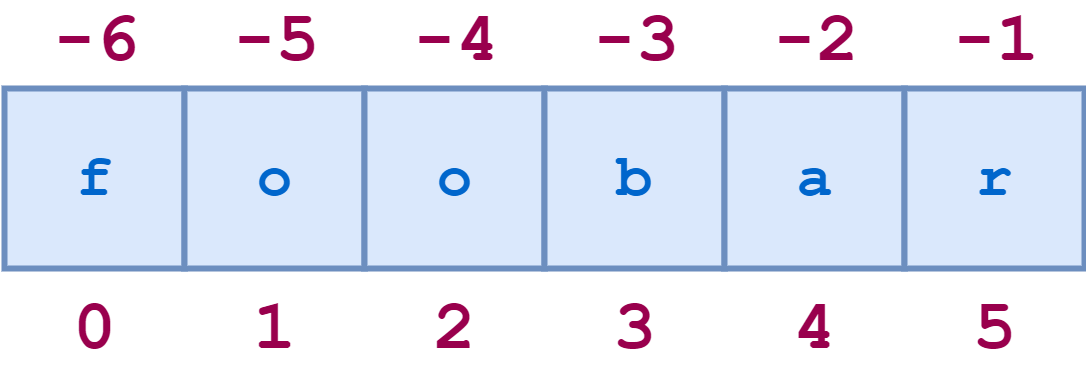
PyCharm: PyCharm 2018.2 EAP 7

$
0
0

PyCharm 2018.2 EAP 7 is out! Get it now from the JetBrains website.

In this EAP we fixed lots of bugs in various subsystems and integrated features and bug-fixes recently added to WebStorm and DataGrip.

Read the Release Notes

Interested?

Download this EAP from our website. Alternatively, you can use the JetBrains Toolbox App to stay up to date throughout the entire EAP.

If you’re on Ubuntu 16.04 or later, you can use snap to get PyCharm EAP, and stay up to date. You can find the installation instructions on our website.

PyCharm 2018.2 is in development during the EAP phase, therefore not all new features are already available. More features will be added in the coming weeks. As PyCharm 2018.2 is pre-release software, it is not as stable as the release versions. Furthermore, we may decide to change and/or drop certain features as the EAP progresses.

All EAP versions will ship with a built-in EAP license, which means that these versions are free to use for 30 days after the day that they are built. As EAPs are released weekly, you’ll be able to use PyCharm Professional Edition EAP for free for the duration of the EAP program, as long as you upgrade at least once every 30 days.


qutebrowser development blog: CVE-2018-10895: Remote code execution due to CSRF in qutebrowser

$
0
0

Description

Due to a CSRF vulnerability affecting the qute://settings page, it was possible for websites to modify qutebrowser settings. Via settings like editor.command, this possibly allowed websites to execute arbitrary code.

This issue has been assigned CVE-2018-10895.

Affected versions

The issue was introduced in v1.0.0, as …

Michael Foord: Hello World

$
0
0

As Busy as a Bee

It feels funny to be writing a “Hello World” blog entry in a new technical blog so far into my adventures with Python. January 2005 and my first entry in my Python technical blog, which marked the very early days of me discovering Python and falling in love with it, doesn’t seem so very long ago.

This was only a year or so before I started my first programming job, with a small London startup called Resolver Systems. We were building a Windows desktop spreadsheet application, using IronPython, with Python embedded as the calculation engine for the spreadsheet. I can’t find a blog entry when I first started working with the Resolver team, but in December 2006 I wrote a post Happy Birthday Resolver.

Since then I’ve had many more adventures including working freelance building web applications with Silverlight and IronPython in the browser, web application development with Django for Canonical, Go development working on a devops tool called Juju and working for Red Hat Ansible as a test engineer.

Python and the Python community has been very good to me in providing me with friendship, intellectual stimulation, a passion for engineering and a career. My involvement in the community included running Planet Python for many years, helping maintain the python.org website, becoming a Python core developer and helping maintain unittest whilst writing and contributing mock to the Python standard library plus at various points helping organise and speaking at all of PyCon in the US, EuroPython and PyCon UK. I was organiser and compere of the Python Language Summit from 2010 to 2014 and the Dynamic Languages VM Summit at PyCon 2011. I’ve lost track of the various conferences I’ve spoken about; spanning .NET, Python specific conferences and general programming like the ACCU conference. I’ve keynoted at PyCon India and PyCon New Zealand, probably the greatest privileges of my career so far.

Belfast 2006

I’m not saying any of this to boast (mostly), many of my contemporaries and those who are newer to the Python and programming communities have found as much of a passion and a sense of belonging in the Python community as I found. It’s fun to reminisce because it’s been such an enjoyable trip and one that’s far from over.

Alongside that, since 2011, I’ve done Python training on behalf of David Beazley. Teaching Python, both the introduction course and the super-advanced Python Mastery course, has been the most fun thing I’ve done professionally with Python. This is one of the reasons I’ve decided it’s time to branch out as a freelance Python programmer, trainer, contractor and consultant.

This blog entry is both a “Hello World” for the blog and for my new venture Agile Abstractions. I’m available for contract work, specialising in the automated end-to-end testing of systems.

The training courses I offer are listed here:

For custom training packages or any enquiries contact me on michael@python.org.

If you’re at EuroPython in Edinburgh this year, or PyCon UK in Cardiff, then hopefully I’ll see you there!

PyCon 2018

This website is built with Jekyll using the open source Jekyll Now and hosted on Github Pages. It’s a lovely and simple workflow for geeks to build and host websites that include a blog. It reminds me of the heady days of 2006 and my static site generator rest2web.

Techiediaries - Django: Web Development Tutorial: PHP vs. Python & Django

$
0
0

In this tutorial, we'll compare PHP and Python (Django) for web development then we'll see how to create simple demo apps with PHP and Python (using Django one of the most popular frameworks for Python).

PHP is a programming languages which has a sole purpose to create back-end web applications while Python is a general purpose programming language that can be used for web development and other fields such as data science and scientific calculations so our comparison will be between PHP and Python equipped with a web framework. The most popular web frameworks for Python are Django and Flask with Django being more popular than Flask.

In order to compare PHP with Django we need to consider many factors such as:

  • Are your a beginner or experienced developer?
  • Are looking for quick insertion in the job market? etc.

More experienced developers have more potential to quickly learn a new programming language than beginners

Both PHP and Python are popular languages. They are both extremely popular among web developers and power most of the websites on the web today.

Let's take a look at these three factors:

  • Popularity of PHP and Python with Django for web development
  • The learning curve for Python, Django and PHP
  • The available libraries and packages, learning resources and the community

Popularity

Both PHP (dominates 80% of the market)and Python are popular languages, but for web development PHP is more popular than the most popular framework for web development in Python which is Django.

Popular websites like Facebook and Wikipedia are built in PHP.

Also many popular website and apps that you use daily are using Python. For example, YouTube, Reddit, Pinterest and Instagram etc.

Learning Curve

A learning curve describes how easy or difficult the programming language is? Which simply means how easy to become familiar with the programming syntax and to start implementing requirements using the language.

Python is a lot easier than PHP since it has clear and readable syntax so for a beginner developer it would be easier to learn. Many universities in the world are using Python as the first programming language for their students.

On the other hand, PHP has a less readable and confusing syntax which makes the learning process for a beginner developer more difficult, but to be fair, once your learn and become familiar with the syntax you can start creating websites with the same ease.

Batteries and libraries

PHP has many libraries, frameworks and CMSs than Python. For example WordPress, the most popular CMS platfrom which everyone is using create a website is built in PHP. Also popular eCommerce solutions like Magento and WooCommerce are developed in PHP. Python with Django also offers many libraries a quite a few CMSs but not as equal to PHP.

Now let's see a list of pros and cons for both Python (and as a result Django) and PHP:

Let's start with Python pros and cons:

The pros and cons of PHP:

Conclusion

The best recommendation, for beginner developers is to try out both languages and then choose the one they are more comfortable with. But you need also to consider the job market and learning resources. Python is easier to learn while PHP offers you a better chance for quickly getting a job and has more learning resources around the world.

py.CheckIO: Design Patterns. Part 3

$
0
0
design patterns

This article continues the series about design patterns in relation to the Python language. In the first part, we've described Abstract Factory and Strategy, in the second - Observer and Mediator, and this part is devoted to equally useful Memento and Bridge patterns. The article will provide insight into the pros and cons of their usage, as well as show the examples of their implementation. In addition, you'll be able to solve several tasks using these patterns, which will further help you understand the principle of their operation and the area of applicability.

EuroPython: EuroPython 2018: Call for On-site Volunteers

$
0
0

Ever wanted to help out during Europython ? Do you want to *really* take part in EuroPython, meet new people and help them at the same time ?

We have just the right thing for you: apply as EuroPython Volunteer and be part of the great team that is making EuroPython 2018 a reality this year.

EuroPython Volunteers

Glad you want to help ! Please see our volunteers page for details on how to sign up:

image

EuroPython 2018 Volunteers

We are using a volunteer management app for the organization and a Telegram group for communication.

image

We have a few exciting tasks to offer such as helping out setting up and tearing down the conference space, giving out goodie bags and t-shirts, and being at the conference desk to answer all questions about EuroPython, session chairing or helping as room manager.

We also have some perks for you, to give something back. Please check our volunteers page for details.

Hope to see you there !

Enjoy,

EuroPython 2018 Team
https://ep2018.europython.eu/
https://www.europython-society.org/

Viewing all 24369 articles
Browse latest View live


<script src="https://jsc.adskeeper.com/r/s/rssing.com.1596347.js" async> </script>