Quantcast
Channel: Planet Python
Viewing all 24360 articles
Browse latest View live

Amjith Ramanujam: FuzzyFinder - in 10 lines of Python

$
0
0

Introduction:

FuzzyFinder is a popular feature available in decent editors to open files. The idea is to start typing partial strings from the full path and the list of suggestions will be narrowed down to match the desired file. 

Examples: 

Vim (Ctrl-P)

Sublime Text (Cmd-P)

This is an extremely useful feature and it's quite easy to implement.

Problem Statement:

We have a collection of strings (filenames). We're trying to filter down that collection based on user input. The user input can be partial strings from the filename. Let's walk this through with an example. Here is a collection of filenames:

When the user types 'djm' we are supposed to match 'django_migrations.py' and 'django_admin_log.py'. The simplest route to achieve this is to use regular expressions. 

Solutions:

Naive Regex Matching:

Convert 'djm' into 'd.*j.*m' and try to match this regex against every item in the list. Items that match are the possible candidates.

This got us the desired results for input 'djm'. But the suggestions are not ranked in any particular order.

In fact, for the second example with user input 'mig' the best possible suggestion 'migrations.py' was listed as the last item in the result.

Ranking based on match position:

We can rank the results based on the position of the first occurrence of the matching character. For user input 'mig' the position of the matching characters are as follows:

Here's the code:

We made the list of suggestions to be tuples where the first item is the position of the match and second item is the matching filename. When this list is sorted, python will sort them based on the first item in tuple and use the second item as a tie breaker. On line 14 we use a list comprehension to iterate over the sorted list of tuples and extract just the second item which is the file name we're interested in.

This got us close to the end result, but as shown in the example, it's not perfect. We see 'main_generator.py' as the first suggestion, but the user wanted 'migration.py'.

Ranking based on compact match:

When a user starts typing a partial string they will continue to type consecutive letters in a effort to find the exact match. When someone types 'mig' they are looking for 'migrations.py' or 'django_migrations.py' not 'main_generator.py'. The key here is to find the most compact match for the user input.

Once again this is trivial to do in python. When we match a string against a regular expression, the matched string is stored in the match.group(). 

For example, if the input is 'mig', the matching group from the 'collection' defined earlier is as follows:

We can use the length of the captured group as our primary rank and use the starting position as our secondary rank. To do that we add the len(match.group()) as the first item in the tuple, match.start() as the second item in the tuple and the filename itself as the third item in the tuple. Python will sort this list based on first item in the tuple (primary rank), second item as tie-breaker (secondary rank) and the third item as the fall back tie-breaker. 

This produces the desired behavior for our input. We're not quite done yet.

Non-Greedy Matching

There is one more subtle corner case that was caught by Daniel Rocco. Consider these two items in the collection ['api_user', 'user_group']. When you enter the word 'user' the ideal suggestion should be ['user_group', 'api_user']. But the actual result is:

Looking at this output, you'll notice that api_user appears before user_group. Digging in a little, it turns out the search user expands to u.*s.*e.*r; notice that user_group has two rs, so the pattern matches user_gr instead of the expected user. The longer match length forces the ranking of this match down, which again seems counterintuitive. This is easy to change by using the non-greedy version of the regex (.*? instead of .*) on line 4. 

Now that works for all the cases we've outlines. We've just implemented a fuzzy finder in 10 lines of code.

Conclusion:

That was the design process for implementing fuzzy matching for my side project pgcli, which is a repl for Postgresql that can do auto-completion. 

I've extracted fuzzyfinder into a stand-alone python package. You can install it via 'pip install fuzzyfinder' and use it in your projects.

Thanks to Micah Zoltu and Daniel Rocco for reviewing the algorithm and fixing the corner cases.

If you found this interesting, you should follow me on twitter

Epilogue:

When I first started looking into fuzzy matching in python, I encountered this excellent library called fuzzywuzzy. But the fuzzy matching done by that library is a different kind. It uses levenshtein distance to find the closest matching string from a collection. Which is a great technique for auto-correction against spelling errors but it doesn't produce the desired results for matching long names from partial sub-strings.


Dataquest: Should I learn Python 2 or 3?

$
0
0

Image Credit: DigitalOcean

One of the biggest sources of confusion and misinformation for people wanting to learn Python is which version they should learn.

Should I learn Python 2.x or Python 3.x?

Indeed, this is one of the questions we are asked most often at Dataquest, where we teach Python as part of our Data Science curriculum.

This post gives some context behind the question, explains the pespective, and tells you which version you should learn.

Let’s start by taking a brief look at the history.

Python 3.0 was released in 2008 (not a typo - 9 years ago!)

On December 3rd, 2008, Python released version 3.0 . What was special about this was that it was a backwards incompatible release (if you want to read more about why, I recommend this excellent post by Brett Cannon)

As a result, for anyone who was using Python 2.x at that time, migrating their project to 3.x required large changes. This not only included individual projects and applications, but also all the libraries that form part of the Python ecosystem.

As a result, the...

Django Weekly: Django Weekly 47 - Concurrency in Django models, Towards Channels 2.0 , routing in uWSGI and more

$
0
0
Worthy Read

The days of desktop systems serving single users are long gone?—?web applications nowadays are serving millions of users at the same time. With many users comes a wide range of new problems?—?concurrency problems. In this article I’m going to present two approaches for managing concurrency in Django models.
models

Detailed writeup by Andrew Godwin and the changes he is planning for Channels 2.0.
channels

Embed docs directly on your website with a few lines of code.
sponsor

I'll show you how to use uWSGI to host multiple sites and properly route traffic based on the host-name to those sites.
uWSGI

We deploy Python/Django apps to a wide variety of hosting providers at Caktus. Our django-project-template includes a Salt configuration to set up an Ubuntu virtual machine on just about any hosting provider, from scratch. We've also modified this a number of times for local hosting requirements when our customer required the application we built to be hosted on hardware they control. In the past, we also built our own tool for creating and managing EC2 instances automatically via the Amazon Web Services (AWS) APIs. In March, my colleague Dan Poirier wrote an excellent post about deploying Django applications to Elastic Beanstalk demonstrating how we’ve used that service.
aws

Learn how to build and deploy a Django API and set up a continuous integration and delivery pipeline using Semaphore and Heroku.
CI

After taking serious time and effort, you have built your own Django application. What if the website takes too much performance overhead and gets too slow after some reasonable good amount of traffic? There are a couple of features and methods for optimizing the code and improving the overall user experience.
performance

Let’s take a closer look at how to connect and fetch data from GraphQL as well as create and update records from Django ORM to graphene object type.
GraphQL


Projects

django-eraserhead - 67 Stars, 0 Fork
Provide hints to optimize database usage by deferring unused fields (and more).

django_social_login_tutorial - 13 Stars, 5 Fork
Django Social Login Tutorial

Import Python: Import Python Weekly - debugging, machine learning, data science, testing ,docker ,locust and more

$
0
0
Worthy Read

The Python subprocess module is a powerful swiss-army knife for launching and interacting with child processes. It comes with several high-level APIs like call, check_output and (starting with Python 3.5) run that are focused at child processes our program runs and waits to complete. In this post I want to discuss a variation of this task that is less directly addressed - long-running child processes.
debugging

One of the things I’ve been thinking about recently is how to do natural language processing (NLP) effectively with deep neural networks using real world language examples. An example would be to classify the youtube comment
machine learning

Embed docs directly on your website with a few lines of code.
sponsor

The Union of Concerned Scientists maintains a database of ~1000 Earth satellites. For the majority of satellites, it includes kinematic, material, electrical, political, functional, and economic characteristics, such as dry mass, launch date, orbit type, country of operator, and purpose. The data appears to have been mirrored on other satellite search websites, e.g. http://satellites.findthedata.com/ . This iPython notebook describes a sequence of interactions with a snapshot of this database using the bayeslite implementation of BayesDB, using the Python bayeslite client library. The snapshot includes a population of satellites defined using the UCS data as well as a constellation of generative probabilistic models for this population.
data science

How you can extract meaningful information from raw text and use it to analyze the networks of individuals hidden within your data set.
machine learning

Today, let’s learn how to build a simple linear regression model using Python’s Pandas and Scikit-learn libraries. Our goal is to build a model that analyses customer data and solves a problem for a (simulated) e-commerce business.
machine learning
,
scikit-learn

core-python

testing
,
docker
,
locust

The FAT Python project was started by Victor Stinner in October 2015 to try to solve issues of previous attempts of “static optimizers” for Python. Victor has created a set of changes to CPython (Python Enhancement Proposals or “PEPs”), some example optimizations and benchmarks. We’ll explore those 3 levels in this article.
optimization

machine learning

It has been a long time coming, but I am now actively migrating existing projects to Python 3. Python 3.6 specifically, because when I am done I will be able to take advantage of my new favourite feature everywhere! That feature is f-strings.
f-strings


Seashells lets you pipe output from command-line programs to the web in real-time, even without installing any new software on your machine. You can use it to monitor long-running processes like experiments that print progress to the console. You can also use Seashells to share output with friends!
project

This is the first post in a series exploring the Arrange Act Assert pattern and how to apply it to Python tests.
testing

numpy
,
pandas
,
code snippets

In this tutorial I will show you how to use Amazon Web Services (AWS) Lambda service to save the results of an API response to a PostgreSQL database on a recurring schedule.
aws lambda

matpoltlib


Jobs

Westlake, TX, United States
Python Developer with Orchestration experience using Openstack. Westlake, TX. W2 ONLY!  NO C2C.  We can transfer your Visa!  2 1/2 year contract!  


Projects

crackcoin - 392 Stars, 28 Fork
Very basic blockchain-free cryptocurrency PoC in Python.

crocs - 334 Stars, 18 Fork
Write regex using pure python class/function syntax and test it better. (Regex for humans).

django-eraserhead - 67 Stars, 0 Fork
Provide hints to optimize database usage by deferring unused fields (and more).

winton-kafka-streams - 16 Stars, 3 Fork
A Python implementation of Apache Kafka Streams

py-clui - 13 Stars, 0 Fork
This is a Python toolkit for quickly building nice looking command line interfaces.

s3-environ - 8 Stars, 0 Fork
Load environment variables from a AWS S3 file.

Ian Ozsvald: Kaggle’s Mercedes-Benz Greener Manufacturing

$
0
0

Kaggle are running a regression machine learning competition with Mercedes-Benz right now, it closes in a week and runs for about 6 weeks overall. I’ve managed to squeeze in 5 days to have a play (I managed about 10 days on the previous Quora competition). My goal this time was to focus on new tools that make it faster to get to ‘pretty good’ ML solutions. Specifically I wanted to play with:

Most of the 5 days were spent either learning the above tools or making some suggestions for YellowBrick, I didn’t get as far as creative feature engineering. Currently I’m in the top 50th percentile Now the competition has finished I’m at rank 1497 (top 37th percentile) on the leaderboard using raw features, some dimensionality reduction and various estimators, with 5 days of effort.

TPOT is rather interesting – it uses a genetic algorithm approach to evolve the hyperparameters of one or more (Stacked) estimators. One interesting outcome is that TPOT was presenting good models that I’d never have used – e.g. an AdaBoostRegressor & LassoLars or GradientBoostingRegressor & ElasticNet.

TPOT works with all sklearn-compatible classifiers including XGBoost (examples) but recently there’s been a bug with n_jobs and multiple processes. Due to this the current version had XGBoost disabled, it looks now like that bug has been fixed. As a result I didn’t get to use XGBoost inside TPOT, I did play with it separately but the stacked estimators from TPOT were superior. Getting up and running with TPOT took all of 30 minutes, after that I’d leave it to run overnight on my laptop. It definitely wants lots of CPU time. It is worth noting that auto-sklearn has a similar n_jobs bug and the issue is known in sklearn.

It does occur to me that almost all of the models developed by TPOT are subsequently discarded (you can get a list of configurations and scores). There’s almost certainly value to be had in building averaged models of combinations of these, I didn’t get to experiment with this.

Having developed several different stacks of estimators my final combination involved averaging these predictions with the trustable-model provided by another Kaggler. The mean of these three pushed me up to 0.55508. My only feature engineering involved various FeatureUnions with the FunctionTransformer based on dimensionality reduction.

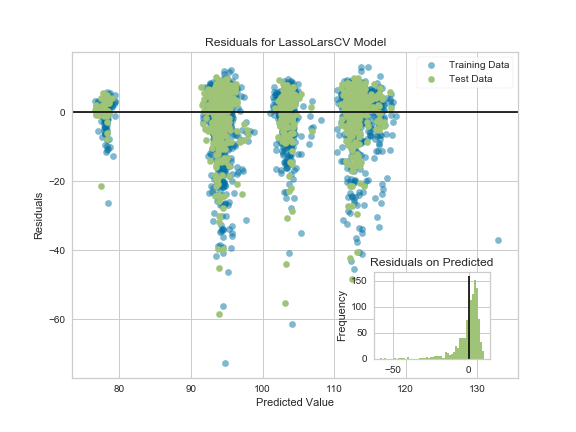
YellowBrick was presented at our PyDataLondon 2017 conference (write-up) this year by Rebecca (we also did a book signing). I was able to make some suggestions for improvements on the RegressionPlot and PredictionError along with sharing some notes on visualising tree-based feature importances (along with noting a demo bug in sklearn). Having more visualisation tools can only help, I hope to develop some intuition about model failures from these sorts of diagrams.

Here’s a ResidualPlot with my added inset prediction errors distribution, I think that this should be useful when comparing plots between classifiers to see how they’re failing:


Ian applies Data Science as an AI/Data Scientist for companies in ModelInsight, sign-up for Data Science tutorials in London. Historically Ian ran Mor Consulting. He also founded the image and text annotation API Annotate.io, co-authored SocialTies, programs Python, authored The Screencasting Handbook, lives in London and is a consumer of fine coffees.

Erik Marsja: PyCharm vs Spyder: a quick comparsion of two Python IDEs

$
0
0

If you have followed my blog you may have noticed that a lot of focus have been put on how to learn programming (particularly in Python). I have also written about Integrated Development Environments (IDEs). IDEs may, in fact, be very useful when learning how to code. When it comes to Python IDEs it may be hard to choose the best one (PyCharm vs Spyder?)

In this post I will discuss two IDEs, namely PyCharm and Spyder. The second, Spyder, is my old favorite and the one I (still) use in the lab. However, I got a suggestion in one of my blog comments  (see the comments on this post: Why Spyder is the Best Python IDE for Science) that I should test PyCharm and I did. After testing out PyCharm I started to like this IDE. In this post you will find my views on the two IDEs. E.g., I intend to answer the question; the best Python IDE; PyCharm or Spyder?

The post will divided into the following sections:

  1. Shared features of PyCharm and Spyder
  2. PyCharm
  3. Spyder
  4. PyCharm vs Spyder

In the first section (1) I will outline some shared features of PyCharm and Spyder. I will then continue with describing features that is unique to PyCharm (2) and Spyder (3). Finally, I will go on and compare the two Python IDEs (4).

Shared features of PyCharm and Spyder

I will start discussion some of the shared features of PyCharm and Spyder. First, the both IDEs are free (well, Spyder is “more” free compared to PyCharm but if you are a student or a researcher you can get the full version of PyCharm free, also) and cross-platform. This means that you can download and install both Spyder and PyCharm on your Windows, Linux, or OS-X machine. This is of course awesome! PyCharm and Spyder also have the possibility to create projects, an editor with syntax highlighting and introspection for code completion, and have support for plugins.


pycharm-best-ide-python

PyCharm

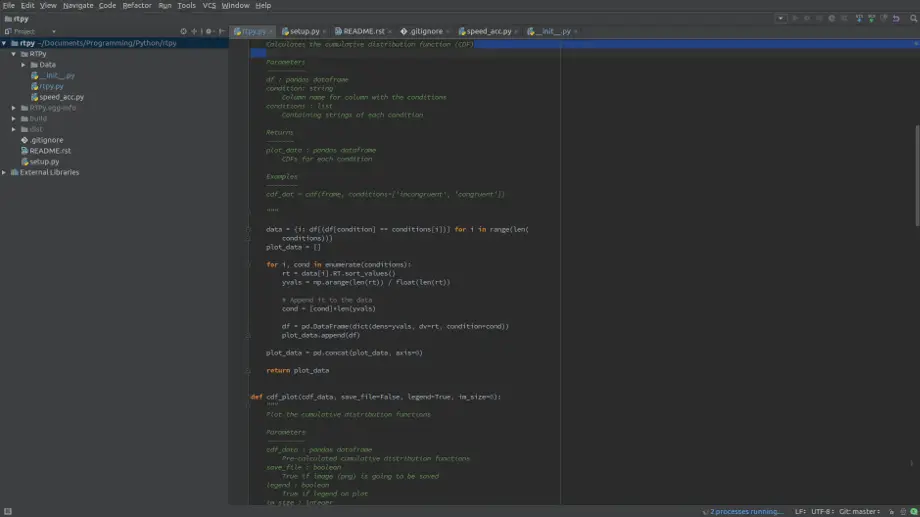
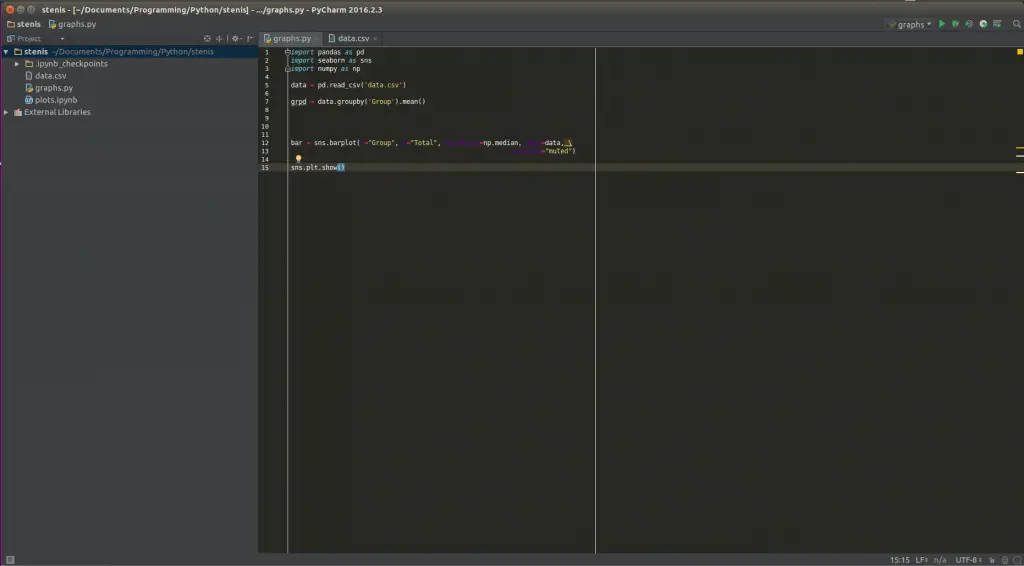
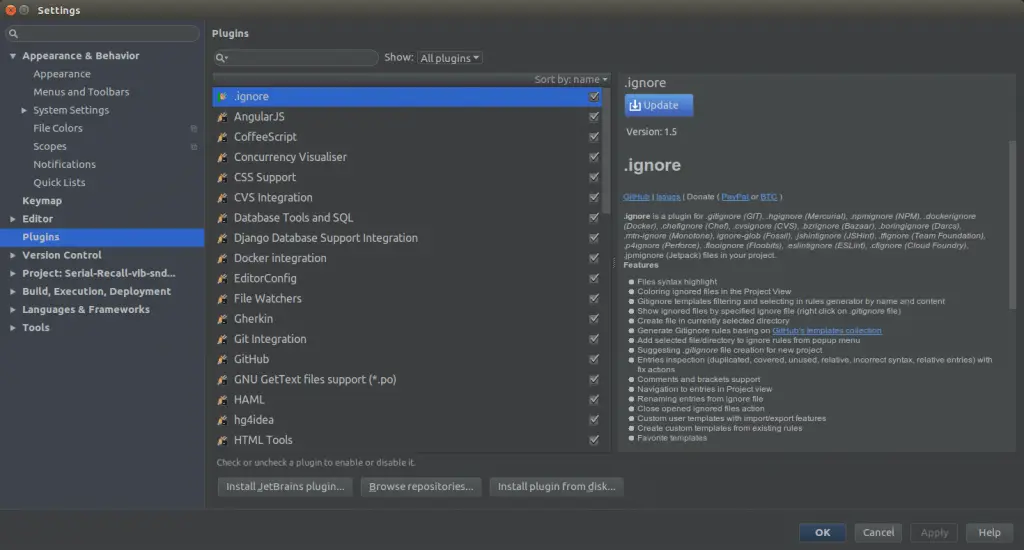
I must admit, the main thing I liked with PyCharm was that I could change the theme to a dark. I really prefer having my applications dark. That said, PyCharm of course comes with a bunch of features. I will not list all of them here but if you are interested you can read here. As I have mentioned earlier, both PyCharm and Spyder have support for plugins. However, I find it easier to find and install plugins in Pycharm. To install a plugin you just open up settings (File -> Settings) and click on “Plugins”:

PyCharm install plugins


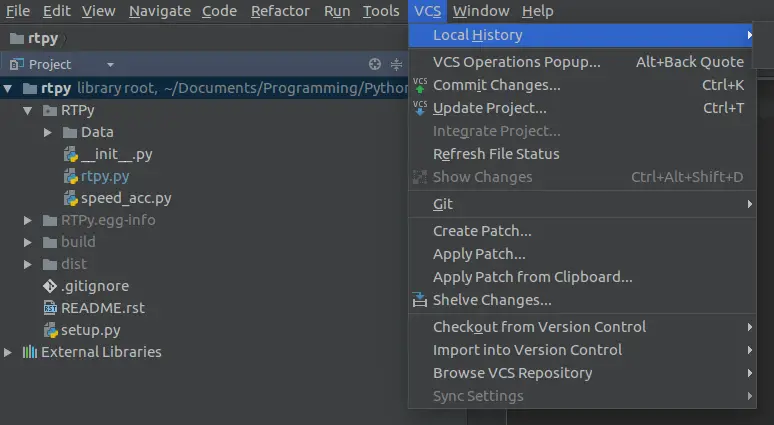
This makes it very easy to search for plugins. For instance, one can install Markdown plugins to also write Markdown files (.md) that can be uploaded to your Github page. That leads me into another GREAT future of PyCharm; support for different types of Version Control Systems (VCS: e.g., GitHub, Subversion, and Mercurial). E.g., uploading your work to GitHub is only a few click aways (if you prefer not to use command line, that is).

Another great feature is that you can set the with of your code and PyCharm will end our line and move it to next line (great if you are a lazy programmer.)

Another feature of PyCharm is that you can safely rename and delete, extract your methods, among other things. It may be very helpful if you need to rename a variable that is used on various places in your code.

One of my favorite features is that you can, much like in RStudio for R, install Python packages from within the interface. PyCharm offers an easy system to browse, download, and update 3rd party packages. If you are not only working with Python projects, PyCharm allso provides supprot for Javascript, CoffeScript, Typescript and CSS, for instance.

Spyder

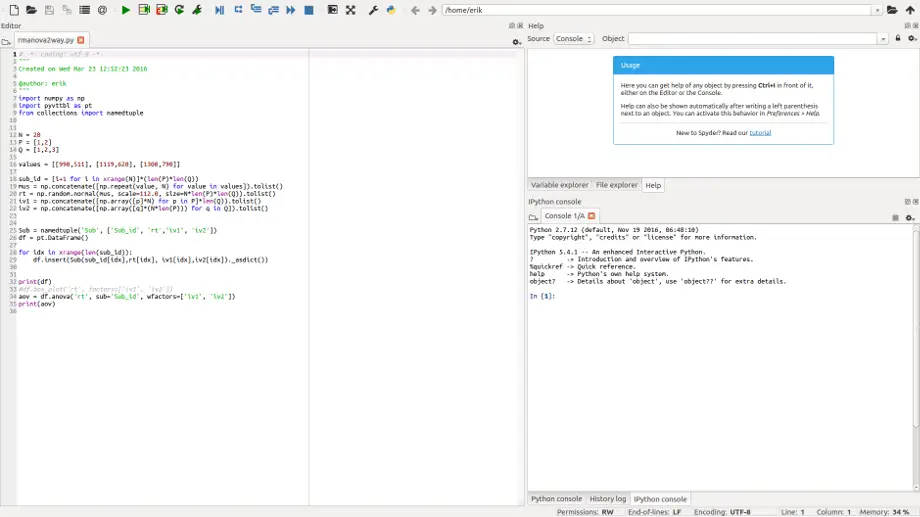
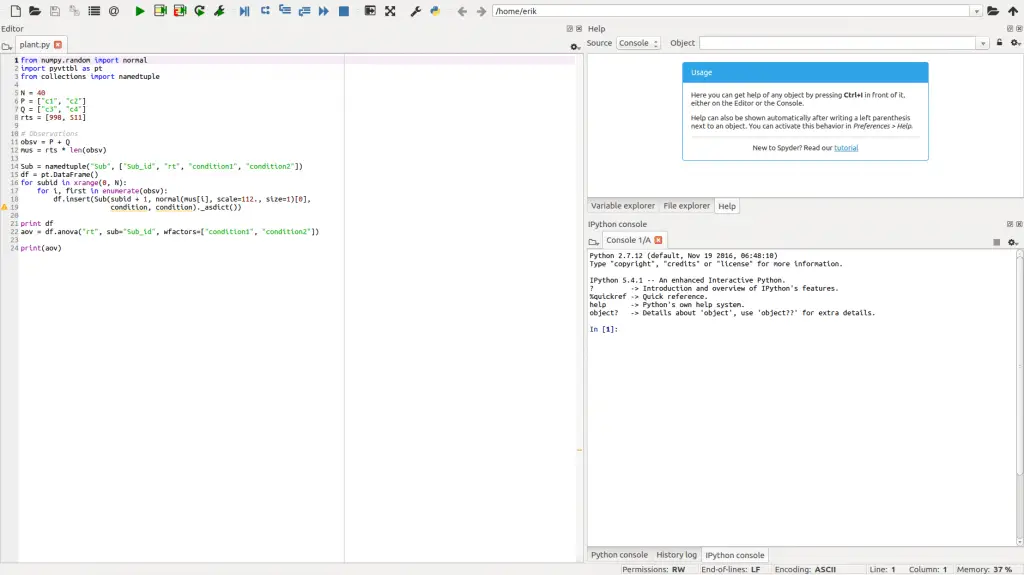
Spyder GUI

First of all, Spyder is made in for and in Python! Of course this is not a feature of the IDE itself but I like that it’s quite pure Python!

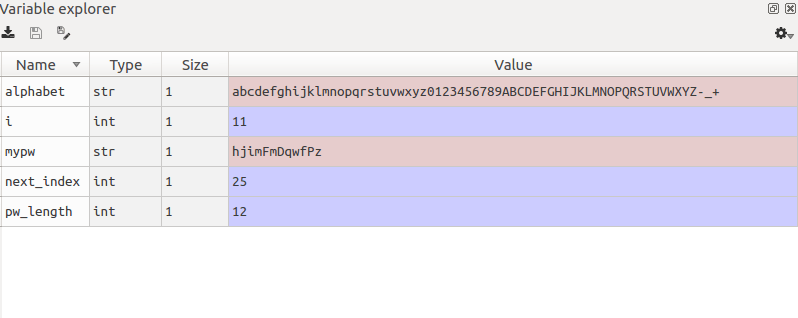
However, one of the most obvious pros with Spyder is that is much easier to install (e.g., in Ubuntu) compared to PyCharm. Whereas PyCharm must be downloaded and installed, Spyder can be installed using Pip. It is also part of many Linux distributions package manager (e.g., apt in Debian Ubuntu).  There is one thing, however, that I really like with the Spyder interface; the variable explorer.

Spyder variable explorer

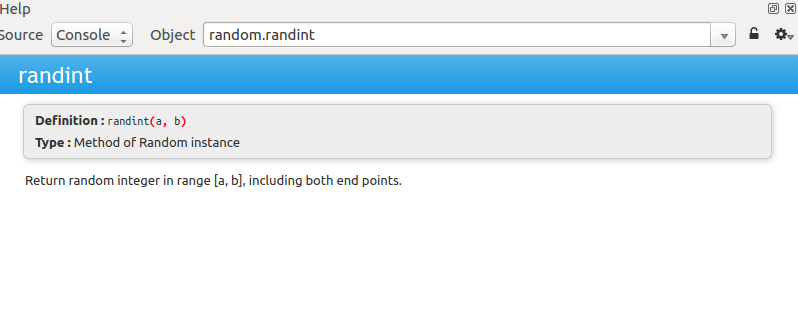
If you are getting stuck, and is not sure how to use a certain function or method, there is a section of the Spyder IDE in which you can type in the object and get the document string printed out. It can come in very handy, I think.

Spyder help/object explorer

Spyder vs Pycharm

It is easier to install Spyder (at least in Linux) but PyCharm is not that hard to install. In fact, if you are running Ubuntu you can just add a PPA (See here on how to install PyCharm this way) and install PyCharm using your favourite package manager. If you are a Windows user, you just download an installation file (Download PyCharm).

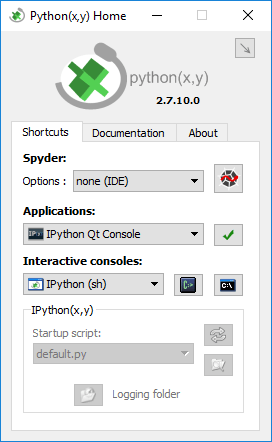
Spyder is also part of a great Python distribution Python (x, y) for Windows users. Python (x, y) is intended for scientific use, and you will get most of the Python packages that you may need (and probably more than you need!)  That is, for a Windows user, you will get most of what you need to do your Python programming AND the Spyder IDE with one installation.

Python(x, y) with Spyder IDE

PyCharms built-in support for VCS systems, such as Git and Mercurial, is also a great feature that is in favor for PyCharm. I know that some people find this attractive; they don’t have to use the command line.

Okey, which IDE do I think is the best? I think that Spyder, still, is a great IDE. PyCharm do, of course, offer a lot more features. If you are running a relatively new computer and is using Linux (e.g., Ubuntu), PyCharm may be the best (almost) free Python IDE.

On the other hand, if you are using Windows and don’t want to install a lot of Python packages by your self, Spyder is part of the great Python distribution Python (x, y). You may very well find yourself more pleased if you installed Python(x, y).

In fact, in the lab where we run Windows 10, I have installed Python (x, y) and code using Spyder but at home I tend to write in PyCharm (except, for when I do data analysis and visualizations, then I use Jupyter Notebooks, but that is a different story).

In conclusion, for scientific use maybe Spyder is the best free Python IDE (for Windows, Linux and OS-X). If you are a more general programmer or want to have a lot of features within the interface, PyCharm may be your choice!

The post PyCharm vs Spyder: a quick comparsion of two Python IDEs appeared first on Erik Marsja.

Reuven Lerner: One-day birthday sale — on July 14th, get 47% off my courses, books, and subscriptions

$
0
0

Today is my birthday!

To celebrate, I’m offering a one-day 47% sale on many of my products:

Just enter the “birthday” coupon code when buying any of these, and you’ll get 47% off.  These discounts are good for one day only — Friday, July 14th.

The post One-day birthday sale — on July 14th, get 47% off my courses, books, and subscriptions appeared first on Lerner Consulting Blog.

Python Bytes: #34 The Real Threat of Artificial Intelligence

$
0
0
<p>Sponsored by Rollbar! Get the bootstrap plan at <a href="https://pythonbytes.fm/rollbar">pythonbytes.fm/rollbar</a></p> <p><strong>Brian #1:</strong> <a href="https://julien.danjou.info/blog/python-logging-easy-with-daiquiri"><strong>Easy Python logging with daiquiri</strong></a></p> <ul> <li>Standard library logging package is non-intuitive. </li> <li>Daiquiri is better.</li> <li>Logs to stderr by default.</li> <li>Use colors if logging to a terminal.</li> <li>Support file logging.</li> <li>Use program name as the name of the logging file so providing just a directory for logging will work.</li> <li>Support syslog.</li> <li>Support journald.</li> <li>JSON output support.</li> <li>Support of arbitrary key/value context information providing.</li> <li>Capture the warnings emitted by the warnings module.</li> <li>Native logging of any exception.</li> <li>This works:</li> </ul> <pre><code> import daiquiri daiquiri.setup() logger = daiquiri.getLogger() logger.error("something wrong happened") </code></pre> <ul> <li>Also check out <a href="https://github.com/metachris/logzero/blob/master/README.rst">logzero</a></li> </ul> <p><code> from logzero import logger logger.debug("hello") logger.info("info") logger.warn("warn") logger.error("error") </code></p> <p><strong>Michael #2:</strong> <a href="https://www.nytimes.com/2017/06/24/opinion/sunday/artificial-intelligence-economic-inequality.html"><strong>The Real Threat of Artificial Intelligence</strong></a></p> <ul> <li>What worries you about the coming world of artificial intelligence?</li> <li>Too often the answer to this question resembles the plot of a sci-fi thriller. People worry that developments in A.I. will bring about the “singularity”</li> <li>This doesn’t mean we have nothing to worry about. </li> <li>On the contrary, the A.I. products that now exist are improving faster than most people realize and promise to radically transform our world, not always for the better</li> <li>AI will reshape what work means and how wealth is created, leading to unprecedented economic inequalities and even altering the global balance of power</li> <li>This kind of A.I. is spreading to thousands of domains (not just loans), and as it does, it will eliminate many jobs. Bank tellers, customer service representatives, telemarketers, stock and bond traders, even paralegals and radiologists will gradually be replaced by such software.</li> <li>Part of the answer will involve educating or retraining people in tasks A.I. tools aren’t good at. Artificial intelligence is poorly suited for jobs involving creativity, planning and “cross-domain” thinking — for example, the work of a trial lawyer. </li> <li>The solution to the problem of mass unemployment, I suspect, will involve “service jobs of love.” These are jobs that A.I. cannot do, that society needs and that give people a sense of purpose. Examples include accompanying an older person to visit a doctor, mentoring at an orphanage</li> <li>This leads to the final and perhaps most consequential challenge of A.I. The Keynesian approach I have sketched out may be feasible in the United States and China, which will have enough successful A.I. businesses to fund welfare initiatives via taxes. But what about other countries?</li> </ul> <p><strong>Brian #3:</strong> <a href="https://blog.buildo.io/the-three-laws-of-config-dynamics-1e9724593aa9"><strong>The three laws of config dynamics</strong></a></p> <ul> <li>The birth of configuration files</li> <li><strong>Law 1</strong> Config values can be transformed from one form to another, but can be neither created nor destroyed.</li> <li><strong>Law 2</strong> The total length of a config file can only increase over time.</li> <li><strong>Law 3</strong> The length of a perfect config file in a development environment is exactly equal to zero.</li> <li>Docker can help</li> </ul> <p><strong>Michael #4:</strong> <a href="https://medium.com/arcgis-api-for-python-explorers-corner/a-few-tips-to-get-you-started-with-jupyter-notebook-8f9b172d98cb"><strong>Five Tips To Get You Started With Jupyter Notebook</strong></a></p> <ul> <li>Don’t Put Your Entire Code in a Single Cell</li> <li>There are different types of cells</li> <li>Executing Cells (shift + enter)</li> <li>Explore Interactive Mapping Options (via ArcGIS)</li> <li>To explore new modules, use questions and TAB auto-complete (Object?)</li> </ul> <p><strong>Brian #5:</strong> <a href="https://m.facebook.com/notes/kent-beck/cost-of-coupling-versus-cost-of-de-coupling/1578239345542257/"><strong>Cost of Coupling Versus Cost of De-coupling</strong></a></p> <ul> <li>Two elements are coupled wrt a given change iff changing one element implies changing the other.</li> <li>Decoupled code, or loosely coupled, follows DRY principles, uses smaller components, is more modular, etc. But also has more files, more classes, handles more cases, and takes longer to write.</li> <li>There is a place for both. </li> <li>Kent describes two phases, Explore and Extract.</li> <li>Explore <ul> <li>more learning</li> <li>tracer bullets, spike projects, first drafts, happy path implementation</li> <li>coupled code, copy/paste coding, etc work fine and are faster because the design and architecture aren’t the goal, learning is the goal</li> <li>answer questions quickly</li> <li>ask better questions based on learnings</li> </ul></li> <li>Extract <ul> <li>Candidate Release, final draft, architected</li> <li>Economies of scale take over</li> <li>Return on investment</li> <li>Minimize cost of changes as code base grows.</li> </ul></li> </ul> <p><strong>Michael #6:</strong> <a href="https://pybit.es/special-100days-of-code.html"><strong>100 Days of Code at PyBites</strong></a></p> <ul> <li>The Challenge: <a href="https://medium.freecodecamp.org/join-the-100daysofcode-556ddb4579e4">Join the #100DaysOfCode</a></li> <li>Stats: <a href="https://github.com/pybites/100DaysOfCode/tree/master/100">We wrote roughly 5K lines of code</a>, divided into 100 scripts, one each day</li> <li>We <a href="https://github.com/pybites/100DaysOfCode/tree/master/007">auto-tweeted</a> our progress each day which was tracked in our <a href="https://github.com/pybites/100DaysOfCode/blob/master/LOG.md">log file</a>.</li> <li>Module Index: We ended up using exactly 100 modules as well (weird coincidence LOL)</li> <li>Showcase of 10 Utilities</li> <li>The rumors are true: our next 100 days project will be around learning Django</li> </ul> <p>Extra:</p> <ul> <li>First book review of up, <a href="http://chrisshaver64.ddns.net/bl0046">http://chrisshaver64.ddns.net/bl0046</a></li> <li>Python for Entrepreneurs has officially launch! Over 19 hours of content. Get it at <a href="https://talkpython.fm/launch">https://talkpython.fm/launch</a></li> </ul>

PyCharm: PyCharm Edu: Tips & Tricks for Most Efficient Learning, Part I

$
0
0

Today we’re entering the home stretch with the PyCharm Edu 4 RC (build 172.3460) that is now available for download and try!

Learning something new is not only about getting new knowledge or mastering new skills, it is also about building new habits and getting the most joy out of something. That’s why with this blog post we wanted to start a series of posts covering learning methods and tips and tricks designed to help you to learn more effectively and make you more comfortable and excited with learning Python in PyCharm Edu. It may also help to set up productivity habits that will be quite useful for further professional Python development with PyCharm. So, let’s start!

Make your IDE feel like home

While coding, as well as learning how to code, it is very important to feel comfortable. The development environment should suit your needs and preferences and help you to stay focused and avoid distraction. You can use the default settings but the option is there for you to easily configure your environment in a way that makes sense to you if you want to.

Use keyboard shortcuts
Go to the dark side
Stay focused with a minimalistic UI
Find any action with ease

Use keyboard shortcuts

We encourage you to use keyboard shortcuts, as they can significantly speed up your coding and even reduce the risks of Repetitive Strain Injury. PyCharm Edu is a keyboard-centric IDE. You can choose one of the pre-configured shortcut schemes, or keymap, in Preferences | Keymap:

Predefined keymaps

You can always take a closer look at the list of actions and corresponding shortcuts with the help of search:

Keymap action search

Or, you can search an action by shortcut:

Keymap shortcut search

You can also set up your own keymap if you need a customizable list of shortcuts.

Please note, that we use default Mac OS scheme (Mac OS X 10.5+) in this blog post. If you use the default keymap of your OS and want to have a nice looking cheat sheet to print out, go to Help | Keymap Reference to get it.

Go to the dark side

PyCharm Edu initially uses the default light color scheme, but you can always switch to the dark Darcula scheme. Please go to Preferences | Appearance & Behaviour | Appearance and choose Darcula as Theme under UI Options section:

Switch to Darcula theme

Or you can use Ctrl + Backquote(`) shortcut:

Switch to Darcula theme

Stay focused with a minimalistic UI

When you open your course in PyCharm Edu, you can see the main tool windows that help you get around: Project View, Editor, Task Description:

PyCharm Edu UI

But after a couple of lessons, you may want to minimize the UI and focus only on the tasks you’re going through.

Step 1: Manage tool windows

First of all, let’s hide the Project View window by clicking on the Project tool button, or with Cmd + 1 shortcut. That will give us more space for code and the task description:

Hide/show project view

We can also hide all tool buttons with the tiny screen icon at the bottom left of the window:

Tool buttons icon

To open any tool window whenever it is needed, just use the same icon:

Tool windows icon

or, invoke View | Recent Files (Cmd + E) command:

Recent files

Now we have a more clear UI:

More clear UI

Step 2: Set up the task description panel

Task description needs to be visible, to hide it completely is not advised. But still, we can make it a bit less distractive by moving it around.

If you work with two monitors, one of the best options is to switch the task description panel to a floating mode and move it to another monitor or just place it near the main IDE window. You can do so with the help of special tool window settings icon:

Floating mode

Or if you prefer you can move the panel to the left, or to the bottom:

Move to bottom

So the IDE looks like this:

Ui with task description panel at the bottom

Step 3: Switch to editor any time you want

While learning you will write new code, run it, then go back to task description, etc. So even if you’ve started with a very minimalistic UI, at some point you will need to return to that kind of view:

Not a minimalistic UI

If you want to easily go back to the editor and focus on your code, Hide All Windows command (Shift + Cmd + F12) is the best option:

Hide all windows

Just invoke it once again to show all the windows back.

Find any action with ease

I’ve started this post with an exhortation to use shortcuts. And I want to finish up with my favorite feature, to thank everyone who has reached this section :)

It is very hard to remember all the shortcuts and all the actions and productivity boosters PyCharm Edu has. But don’t worry about that. All you need to remember is just one action that rules them all, Help | Find Action command (Shift+Cmd+A). Just start typing the action you need, and get the list:

Find action

And even more, you can change your preferences just from this list. Find an option you want to change and press Enter:

Find preference option and change


There you go. Let us know how you like these features! Stay tuned to not miss the next portion of tips & tricks for more efficient learning. Share your feedback here in the comments or report your findings on YouTrack, to help us improve PyCharm Edu.


Your PyCharm Edu Team

A. Jesse Jiryu Davis: PyGotham's Call For Proposals Ends Tuesday at Noon Eastern

$
0
0

A king, coloured drawing; he is standing, wearing a golden crown and a pink robe with gold embroidery of solid lines and the fleur-de-lys and cross; over his shoulder is a green cape with a blue and white lining bearing an heraldic theme; on his feet are diamond-pattened yellow pointed shoes; in his right hand he holds a scepter that leans against his shoulder to end next to his head, and his left hand is outstretched with the palm upwards. He is bearded and has flowing collar-length hair.

I know you want to speak at PyGotham in NYC this October 6 and 7. It’s an eclectic tech conference about Python, open source, policy, and culture. It’s easy to propose a talk, and I encourage you to propose a few of them.

Illustration from “The National and Domestic History of England”, 1878.

pythonwise: Generating Power Set using Bitmap

$
0
0
I was asked to write a function that generate a power set of items. At first I wrote a recursive algorithms but then another approach came to mind. When you calculate how many subsets there are, you can say that each item in the original set can either be or not be in a subset, which means 2^n subsets. This yes/no for including can be seen as a bitmask, and since we know that there are 2^n subsets we can use the number from 0 to 2^n-1 as bitmasks.

pgcli: Release v1.7.0

$
0
0

Pgcli is a command line interface for Postgres database that does auto-completion and syntax highlighting. You can install this version using:

$ pip install -U pgcli

Features:

  • Refresh completions after COMMIT or ROLLBACK. (Thanks: Irina Truong)
  • Use dbcli's Homebrew tap for installing pgcli on macOS (issue #718) (Thanks: Thomas Roten).
  • Only set LESS environment variable if it's unset. (Thanks: Irina Truong)
  • Quote schema in SET SCHEMA statement (issue #469) (Thanks: Irina Truong)
  • Use CLI Helpers for pretty printing query results (Thanks: Thomas Roten).
  • Skip serial columns when expanding * for INSERT INTO foo(* (Thanks: Joakim Koljonen).
  • Command line option to list databases (issue #206) (Thanks: François Pietka)

Bug Fixes:

  • Fixed DSN aliases not being read from custom pgclirc (issue #717). (Thanks: Irina Truong).

Reuven Lerner: Five Python function parameters you should know and use

$
0
0

One of Python’s mantras is “batteries included.” which means that even with a bare-bones installation, you can do quite a bit. You can (and should) install packages from PyPI, but many day-to-day tasks can be accomplished with just the built-in data structures, functions, and methods.

What I’ve discovered over the years is that some of the functions and methods have useful parameters that can make our code shorter and more elegant. Here are some of the most elegant ones that I’ve found and use in my work:

1. str.split  (part 1)

One of the methods I use most often in my work is str.split. This method always returns a list, breaking the string into different elements. For example:

In [1]: s = 'abc,def,ghi'

In [2]: s.split(',')
Out[2]: ['abc', 'def', 'ghi']

In [3]: s = 'abc::def::ghi'

In [4]: s.split('::')
Out[4]: ['abc', 'def', 'ghi']

In [5]: s = 'this is a bunch of words'

In [6]: s.split(' ')
Out[6]: ['this', 'is', 'a', 'bunch', 'of', 'words']

All of this is great, and works just fine. But what if I do the following:

In [7]: s = 'abc def ghi jkl'

In [8]: s.split(' ')
Out[8]: ['abc', '', '', 'def', '', '', 'ghi', '', '', 'jkl']

Yuck!  Of course, this is one of those times that the computer does what we tell it, not what we want: We said that every time it encounters a space character, it should give us a new element in the output list. Sure enough, by having multiple space characters between the letters, we end up having lots of empty strings in our resulting list.

What’s worse is that I often use str.split to take input from users, or from files, and break it into individual elements. I’d love to break on one or more whitespace characters, ideally without reverting to the “re” module’s re.split(‘\s’).

Solution: Don’t pass any argument. The first parameter, named “sep”, has a default value of None. And when it has a value of None, str.split does indeed use one or more whitespace characters.  That’s right — str.split, when called with zero arguments, actually does more (and is often more useful) then when called with an argument:

In [10]: s = 'abc \n\n def \n\t ghi jkl\n\n'

In [11]: s.split()
Out[11]: ['abc', 'def', 'ghi', 'jkl']

2. str.split (part 2)

Let’s say you ask a user to enter their name, which you want to split into first and last names. For example:

In [13]: person = raw_input("Enter your name: ") # "input" in Python 3
Enter your name: Reuven Lerner

In [14]: first_name, last_name = person.split()

In [15]: print("First name is '{}', last name is '{}'".format(first_name, 
                                                              last_name))
First name is 'Reuven', last name is 'Lerner'

Line 14 uses Python’s unpacking; since we know that the list produced by person.split() will contain two elements, I can safely assign those two elements into two variables (first_name and last_name).

But what if the person also enters a third name?

In [16]: person = raw_input("Enter your name: ")
Enter your name: Reuven Moshe Lerner

In [17]: first_name, last_name = person.split()
---------------------------------------------------------------------------
ValueError Traceback (most recent call last)
<ipython-input-17-cf257c8e7997> in <module>()
----> 1 first_name, last_name = person.split()

ValueError: too many values to unpack

Yikes! str.split() returned a list of three elements. And you cannot assign three elements into two variables. (Fine, Python 3 does allow for this, but we won’t discuss this here.)

We can, however, tell str.split how many times it should split. This is done by passing the second, optional argument. If you want to split on all whitespace, as we saw above, then you must explicitly pass None as the first argument:

In [18]: first_name, last_name = person.split(None, 1)

In [19]: print("First name is '{}', last name is '{}'".format(first_name,
 ...: last_name))
First name is 'Reuven', last name is 'Moshe Lerner'

Remember that the second parameter is called “maxsplits”, meaning the number of times str.split should do its thing. This means that the number you give will be the index of the final element in the returned list. In other words: I call person.split(None, 1), which means that I’ll get back a list with two elements — the latter of which has an index of 1.

What if I want to split things in the other direction, such that my first and middle names are in the first variable, and just my last name in the second variable? We can use a variant of str.split called str.rsplit (“right-side split”):

In [20]: first_name, last_name = person.rsplit(None, 1)

In [21]: print("First name is '{}', last name is '{}'".format(first_name,
 ...: last_name))
First name is 'Reuven Moshe', last name is 'Lerner'

3. enumerate

“enumerate” is a built-in function that exists to let us number things as we iterate over them. For example, let’s assume that I have a string, and want to print the letters of the string:

In [22]: s = 'abc'

In [23]: for one_letter in s:
 ...: print(one_letter)
 ...:
a
b
c

What if I want to get the index of each letter, too? I can do this manually:

In [24]: s = 'abc'

In [25]: index = 0

In [26]: for one_letter in s:
 ...: print("{}: {}".format(index, one_letter))
 ...: index += 1
 ...:
0: a
1: b
2: c

Because this is such a common thing that people want to do, we can instead use enumerate, which returns an iterator that produces tuples. Each tuple contains two elements, the first of which is the index and the second of which is the element from the enumerated sequence. Because we know that each tuple will contain two elements, we can grab them with unpacking:

In [27]: for index, one_letter in enumerate(s):
…: print(“{}: {}”.format(index, one_letter))
…:
0: a
1: b
2: c

But wait, what if you are presenting this information to a non-programmer, for whom it seems weird to start numbering with zero? One solution is to send them to a programming course, but if there’s no time, then you can pass “enumerate” a second argument, the number with which numbering should start:

In [28]: for index, one_letter in enumerate(s, 1):
 ...: print("{}: {}".format(index, one_letter))
 ...:
 ...:
1: a
2: b
3: c

Of course, we can start with any number we want:

In [29]: for index, one_letter in enumerate(s, 72):
 ...: print("{}: {}".format(index, one_letter))
 ...:
 ...:
 ...:
72: a
73: b
74: c

4. int()

“int” is the integer type, widely used in Python to represent whole numbers. Many Python developers know that we can turn strings into integers by invoking the “int” function.

Of course, there’s not really an “int function.”  Instead, we’re using “int” as a class to create a new instance of int. So when I say

int('5')

I get a new instance of “int” back, with the value 5.  And when I say

int('12345')

I get back a different instance of “int”, with the value 12345.

But “int” takes a second argument, which lets us tell Python the base of the source data. For example, if I say

int('12345', 16)

then we get back 74565, because we asked Python to give us the value of 0x12345.

You can actually use any number base you want, from 1 through 36 — which is particularly useful for those of us with 36 fingers. But it’s not uncommon for my clients to be reading from files containing hexadecimal numbers. For example, let’s assume that we want to sum the hex numbers on each line of the following file:

10 20 30 4a 5b 6c
ff ef fa 00 20 3b
ab cd ef af be cd

We can do something like this:

In [35]: for one_line in open('hexnums.txt'):
 ...: print(sum([int(one_number, 16)
 ...: for one_number in one_line.split()]))

In other words:

  • We open the file, and read it line by line
  • We split each line on whitespace, resulting in a list
  • We interpret each number in hex
  • The resulting list of integers can then be passed to the “sum” function
  • We print the sum for each line

If you work with files that contain binary, octal, or hex numbers, this can really be handy. To be honest, I don’t do this very much — but I work with a number of companies that do, and for whom this is a real lifesaver.

5. dict.get

Dictionaries are everywhere in Python. They’re easy to define, and easy to work with. For example:

In [36]: d = {'a':1, 'b':2, 'c':3}

In [37]: d['a']
Out[37]: 1

In [38]: d['z']
---------------------------------------------------------------------------
KeyError Traceback (most recent call last)
<ipython-input-38-da9eddaf4274> in <module>()
----> 1 d['z']

KeyError: 'z'

Oh, right — but if you request a key that doesn’t exist, you’re going to get a KeyError exception.

Let’s write a little program that lets the user repeatedly query a dictionary. If the user gives us an empty string, then we’ll exit from the loop, but otherwise we’ll either print the value associated with the key, or give an error:

In [42]: while True:
 ...:         k = raw_input("Enter key: ")
 ...:         if not k:
 ...:             break
 ...:         elif k in d:
 ...:             print("d[{}] is {}".format(k, d[k]))
 ...:         else:
 ...:             print("{} isn't a key in d".format(k))
 ...:
Enter key: a
d[a] is 1
Enter key: b
d[b] is 2
Enter key: c
d[c] is 3
Enter key: d
d isn't a key in d
Enter key: <enter>

This works fine, and is a pretty standard way that I’ve seen people check for keys in order to avoid exceptions. But often, the dict.get method will work even better.  Basically, dict.get does the same thing as square brackets ([ ]), except that if the key doesn’t exist, it returns None. For example:

In [43]: while True:
 ...:         k = raw_input("Enter key: ")
 ...:         if not k:
 ...:             break
 ...:         else:
 ...:             print("value of d[{}] is {}".format(k, d.get(k)))
 ...:
 ...:
Enter key: a
value of d[a] is 1
Enter key: b
value of d[b] is 2
Enter key: c
value of d[c] is 3
Enter key: d
value of d[d] is None
Enter key:

Now, you might not want to display None to your users. But you can always trap for None in your code, and then tell the user that the key doesn’t exist.

But dict.get takes a second, optional parameter. If you pass a second argument, you can change the default value from None to something else. For example:

In [44]: p = {'first':'Reuven', 'last':'Lerner'}

In [45]: p.get('first')
Out[45]: 'Reuven'

In [46]: p.get('last')
Out[46]: 'Lerner'

In [47]: p.get('middle', '')
Out[47]: ''

Now I can query the dict for the “middle” key, getting an empty string if the key doesn’t exist.  Another example:

In [48]: countries = {'New York':'USA', 'London':'England', 'Moscow':'Russia'}

In [51]: countries.get('Amsterdam')

In [52]: countries.get('Amsterdam', "I don't know")
Out[52]: "I don't know"

In [53]: countries.get('New York', "I don't know")
Out[53]: 'USA'

In [54]: countries.get('Moscow', "I don't know")
Out[54]: 'Russia'

Notice that when the key does exist, there’s no difference between d[k] and d.get(k).  The question is how you want to deal with a key that doesn’t exist, and dict.get often makes life much easier in these cases.

What optional parameters do you find most useful in Python?

Also: I’m teaching three live Python courses (on functional programming, advanced objects, and decorators) in the next few weeks; early-bird tickets are still available for a limited time. Grab them now, and improve your Python fluency from your own computer.

The post Five Python function parameters you should know and use appeared first on Lerner Consulting Blog.

EuroPython Society: EuroPython 2017: Please send in your feedback

$
0
0

EuroPython 2017 is almost over and so it’s time to ask around for what we can improve next year. If you attended EuroPython 2017, please take a few moments and fill in our feedback form:

EuroPython 2017 Feedback Form

We will leave the feedback form online for a few weeks and then use the information as basis for the work on EuroPython 2018 and also post a summary of the multiple choice questions (not the comments to protect your privacy) on our website. Many thanks in advance.

Enjoy,

EuroPython 2017 Team
EuroPython Society
EuroPython 2017 Conference 

EuroPython: EuroPython 2017: Please send in your feedback

$
0
0

EuroPython 2017 is almost over and so it’s time to ask around for what we can improve next year. If you attended EuroPython 2017, please take a few moments and fill in our feedback form:

EuroPython 2017 Feedback Form

We will leave the feedback form online for a few weeks and then use the information as basis for the work on EuroPython 2018 and also post a summary of the multiple choice questions (not the comments to protect your privacy) on our website. Many thanks in advance.

Enjoy,

EuroPython 2017 Team
EuroPython Society
EuroPython 2017 Conference


Weekly Python StackOverflow Report: (lxxxii) stackoverflow python report

$
0
0

Python Insider: Python 3.6.2 is now available

$
0
0
Python 3.6.2 is now available.   Python 3.6.2 is the second maintenance release of Python 3.6, which was initially released in 2016-12 to great interest.   With the release of 3.6.2, we are now providing the second set of bugfixes and documentation updates to 3.6.  Detailed information about the changes made in 3.6.2 can be found in its change log.  See the What’s New In Python 3.6 document for more information about features included in the 3.6 series.

You can download Python 3.6.2 here.  The next maintenance release is expected to follow in about 3 months, around the end of 2017-09.

hypothesis.works articles: Moving Beyond Types

$
0
0

If you look at the original property-based testing library, the Haskell version of QuickCheck, tests are very closely tied to types: The way you typically specify a property is by inferring the data that needs to be generated from the types the test function expects for its arguments.

This is a bad idea.

Read more...

Python Software Foundation: Welcome New Board Members

$
0
0
The PSF is thrilled to welcome six new board members, chosen on June 11 during the 2017 PSF Board Election. The PSF would not be what it is without the expertise and diversity of our board, and we look forward to seeing what our new members accomplish this quarter. Read on to learn more about them and their initial goals as PSF Board Members.


Paul Hildebrandt has been a Senior Engineer with Walt Disney Animation Studios since 1996. He resides outside of Los Angeles with his wife and three boys. In his first quarter, he hopes to serve the Python community by better understanding the well-oiled machine that is the PSF and by handling regular board activity. He desires to contribute by focusing on sponsorship and corporate involvement opportunities.


Eric Holscher is co-founder of Read the Docs and Write the Docs, where he works
to elevate the status of documentation in the software industry. He has hiked 800 miles of the Pacific Crest Trail, and spends most of his spare time in the woods or traveling the world. His wish is to focus on sustainability and to create a new initiative that will bring in sponsors who are focused on the sustainability of the ecosystem such as PyPI, Read the Docs, and pip.


Marlene Mhangami is the director and co-founder of ZimboPy, an organization that teaches Zimbabwean girls how to code in Python. Through her organization she has worked with the organizers of Django Girls Chinoyi and Harare, as well as PyCon Zimbabwe to grow the use of Python locally. Her goals for the quarter are to help connect, support, and represent issues relevant to Pythonistas in Africa. She will seek to increase the number of PyCons in the region and facilitate the inclusion of women and other underrepresented groups.


Paola Katherine Pacheco is a backend Python developer and organizer of Python groups such as PyLadies Brazil, PyLadies Rio de Janeiro, Django Girls Rio de Janeiro, Pyladies Mendoza and Python Mendoza. She runs a YouTube channel where she teaches Python in Portuguese. Her goals this quarter are to energize Python events for the Brazilian and Argentine Python communities, and to increase diversity by promoting education and events to women and underrepresented groups.


Kenneth Reitz is the product owner of Python at Heroku. He is well-known for his many open source software projects, specifically Requests: HTTP for Humans. He seeks to contribute towards the PSF's continued optimization of its operations, increase its sustainability, and the sustainability of the entire Python ecosystem.

Thomas Wouters is a long-time CPython core developer and a founding PSF member. He has worked at Google since 2006, maintaining the internal Python infrastructure. His immediate goal is to get reacquainted with the PSF procedures and the matters the board attends to, both of which have changed a lot since he last served on the Board of Directors. Longer term, he would like to work on the awareness of the practical side of the Python community: the website, mailing lists, and other help channels like IRC, as well as actual code development and services like PyPI.

Kushal Das: Encrypting drives with LUKS

$
0
0

Encrypting hard drives should be a common step in our regular computer usage. If nothing else, this will help you sleep well, in case you lose your computer (theft) or that small USB disk you were carrying in your pocket. In this guide, I’ll explain how to encrypt your USB disks so that you have peace of mind, in case you lose them.

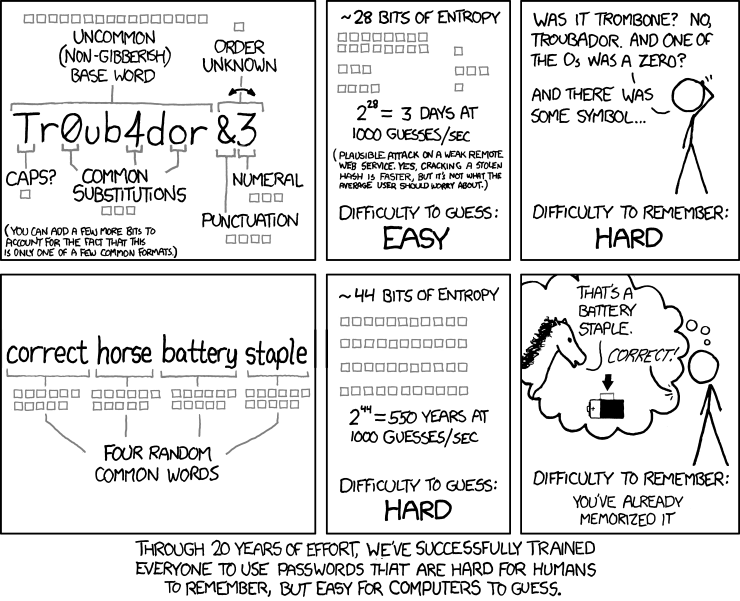
But, before we dig into the technical details, always remember the following from XKCD.

What is LUKS?

LUKS or Linux Unified Key Setup is a disk encryption specification, first introduced in 2004 by Clemens Fruhwirth. Notice the word specification; instead of trying to implement something of its own, LUKS is a standard way of doing drive encryption across tools and distributions. You can even use drives from Windows using the LibreCrypt application.

For the following example, I am going to use a standard 16 GB USB stick as my external drive.

Formatting the drive

Note: check the drive name/path twice before you press enter for any of the commands below. A mistake, might destroy your primary drive, and there is no way to recover the data. So, execute with caution.

In my case, the drive is detected as /dev/sdb. It is always a good idea to format the drive before you start using it. You can use wipefs tool to clean any signature from the device,

$ sudo wipefs -a /dev/sdb1

Then you can use fdisk tool to delete the old partitions , and create a new primary partition.

Next step is to create the LUKS partition.

$ sudo cryptsetup luksFormat /dev/sdb1

WARNING!
========
This will overwrite data on /dev/sdb1 irrevocably.

Are you sure? (Type uppercase yes): YES
Enter passphrase: 
Verify passphrase:

Opening up the encrypted drive and creating a filesystem

Next, we will open up the drive using the passphrase we just gave, and create a filesystem on the device.

$ sudo cryptsetup luksOpen /dev/sdb1 reddrive
Enter passphrase for /dev/sdb1
$ ls -l /dev/mapper/reddrive
lrwxrwxrwx. 1 root root 7 Jul 17 10:18 /dev/mapper/reddrive -> ../dm-5

I am going to create an EXT4 filesystem on here.
Feel free to create which ever filesystem you want.

$ sudo mkfs.ext4 /dev/mapper/reddrive -L reddrive
mke2fs 1.43.4 (31-Jan-2017)
Creating filesystem with 3815424 4k blocks and 954720 inodes
Filesystem UUID: b00be39d-4656-4022-92ea-6a518b08f1e1
Superblock backups stored on blocks: 
        32768, 98304, 163840, 229376, 294912, 819200, 884736, 1605632, 2654208

Allocating group tables: done                            
Writing inode tables: done                            
Creating journal (16384 blocks): done
Writing superblocks and filesystem accounting information: done   

Mounting, using, and unmounting the drive

The device is now ready to use. You can manually mount it with the mount command. Any of the modern desktops will ask you to unlock using the passphrase if you connect the device (or try to double click on the file browser).

I will show the command line option. I will create a file hello.txt as an example.

$ sudo mount /dev/mapper/reddrive /mnt/red
$ su -c "echo hello > /mnt/red/hello.txt"
Password:
$ ls -l /mnt/red
total 20
-rw-rw-r--. 1 root root     6 Jul 17 10:26 hello.txt
drwx------. 2 root root 16384 Jul 17 10:21 lost+found
$ sudo umount /mnt/red
$ sudo cryptsetup luksClose reddrive

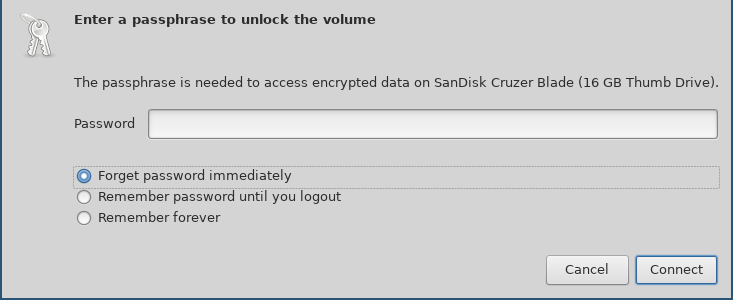
When I attach the drive to my system, the file browser asks me to unlock it using the following dialog. Remember to choose forget immediately so that the file browser forgets the password.

On passphrases

The FAQ entry on cryptsetup page, give us hints and suggestions about passphrase creation.

If paranoid, add at least 20 bit. That is roughly four additional characters for random passphrases and roughly 32 characters for a random English sentence.

Key slots aka different passphrases

In LUKS, we get 8 different key slots (for passphrases) for each device(partition). You can see them using luksDump sub-command.

$ sudo cryptsetup luksDump /dev/sdb1 | grep Slot
Key Slot 0: ENABLED
Key Slot 1: DISABLED
Key Slot 2: DISABLED
Key Slot 3: DISABLED
Key Slot 4: DISABLED
Key Slot 5: DISABLED
Key Slot 6: DISABLED
Key Slot 7: DISABLED

Adding a new key

The following command adds a new key to the drive.

$ sudo cryptsetup luksAddKey /dev/sdb1 -S 5
Enter any existing passphrase: 
Enter new passphrase for key slot: 
Verify passphrase:

You will have to use any of the existing passphrases to add a new key.

$  sudo cryptsetup luksDump /dev/sdb1 | grep Slot
Key Slot 0: ENABLED
Key Slot 1: DISABLED
Key Slot 2: DISABLED
Key Slot 3: DISABLED
Key Slot 4: DISABLED
Key Slot 5: ENABLED
Key Slot 6: DISABLED
Key Slot 7: DISABLED

Removing a passphrase

Remember that removing a passphrase is based on the passphrase itself, not by the key slot number.

$ sudo cryptsetup luksRemoveKey /dev/sdb1
Enter passphrase to be deleted: 
$ sudo cryptsetup luksDump /dev/sdb1 | grep Slot
Key Slot 0: ENABLED
Key Slot 1: DISABLED
Key Slot 2: DISABLED
Key Slot 3: DISABLED
Key Slot 4: DISABLED
Key Slot 5: DISABLED
Key Slot 6: DISABLED
Key Slot 7: DISABLED

Now in case you don’t know the passphrase, then you can use luksKillSlot.

$ sudo cryptsetup luksKillSlot /dev/sdb1 3
Enter any remaining passphrase:

Overview of the disk layout

The disk layout looks like the following. The header or phdr contains various details like magic value, version, cipher name, following the 8 keyblocks (marked as kb1, kb2.. in the drawing), and then the encrypted bulk data block. We can see all of those details in the C structure.

struct luks_phdr {
        char            magic[LUKS_MAGIC_L];
        uint16_t        version;
        char            cipherName[LUKS_CIPHERNAME_L];
        char            cipherMode[LUKS_CIPHERMODE_L];
        char            hashSpec[LUKS_HASHSPEC_L];
        uint32_t        payloadOffset;
        uint32_t        keyBytes;
        char            mkDigest[LUKS_DIGESTSIZE];
        char            mkDigestSalt[LUKS_SALTSIZE];
        uint32_t        mkDigestIterations;
        char            uuid[UUID_STRING_L];

        struct {
                uint32_t active;

                /* parameters used for password processing */
                uint32_t passwordIterations;
                char     passwordSalt[LUKS_SALTSIZE];

                /* parameters used for AF store/load */
                uint32_t keyMaterialOffset;
                uint32_t stripes;
        } keyblock[LUKS_NUMKEYS];

        /* Align it to 512 sector size */
        char                _padding[432];
};

Each (active) keyblock contains an encrypted copy of the master key. When we enter the passphrase, it unlocks the master key, that in turn unlocks the encrypted data.

But, remember, all of this is of no use if you have a very simple passphrase. We have another XKCD to explain this.

I hope this post encourages you to use encrypted drives more. All of my computers have their drives encrypted; (I do that while installing the Operating System.) This means, without decrypting the drive you can not boot the system properly. On a related note, remember to turn off your computer completely, (not hibernation or suspend mode) when you’re traveling.

Viewing all 24360 articles
Browse latest View live


<script src="https://jsc.adskeeper.com/r/s/rssing.com.1596347.js" async> </script>