At some point in your Python coding journey, you learn that you should use a context manager to open files. Python context managers make it easy to close your files once you’re done with them:
withopen("hello.txt",mode="w")asfile:file.write("Hello, World!")The with statement initiates a context manager. In this example, the context manager opens the file hello.txt and manages the file resource as long as the context is active. In general, all the code in the indented block depends on the file object being open. Once the indented block either ends or raises an exception, then the file will close.
If you’re not using a context manager or you’re working in a different language, then you might explicitly close files with the try… finally approach:
try:file=open("hello.txt",mode="w")file.write("Hello, World!")finally:file.close()The finally block that closes the file runs unconditionally, whether the try block succeeds or fails. While this syntax effectively closes the file, the Python context manager offers less verbose and more intuitive syntax. Additionally, it’s a bit more flexible than simply wrapping your code with try… finally.
You probably use context managers to manage files already, but have you ever wondered why most tutorials and four out of five dentists recommend doing this? In short, why is it important to close files in Python?
In this tutorial, you’ll dive into that very question. First, you’ll learn about how file handles are a limited resource. Then you’ll experiment with the consequences of not closing your files.
Free Download:Get a sample chapter from CPython Internals: Your Guide to the Python 3 Interpreter showing you how to unlock the inner workings of the Python language, compile the Python interpreter from source code, and participate in the development of CPython.
In Short: Files Are Resources Limited by the Operating System
Python delegates file operations to the operating system. The operating system is the mediator between processes, such as Python, and all the system resources, such as the hard drive, RAM, and CPU time.
When you open a file with open(), you make a system call to the operating system to locate that file on the hard drive and prepare it for reading or writing. The operating system will then return an unsigned integer called a file handle on Windows and a file descriptor on UNIX-like systems, including Linux and macOS:
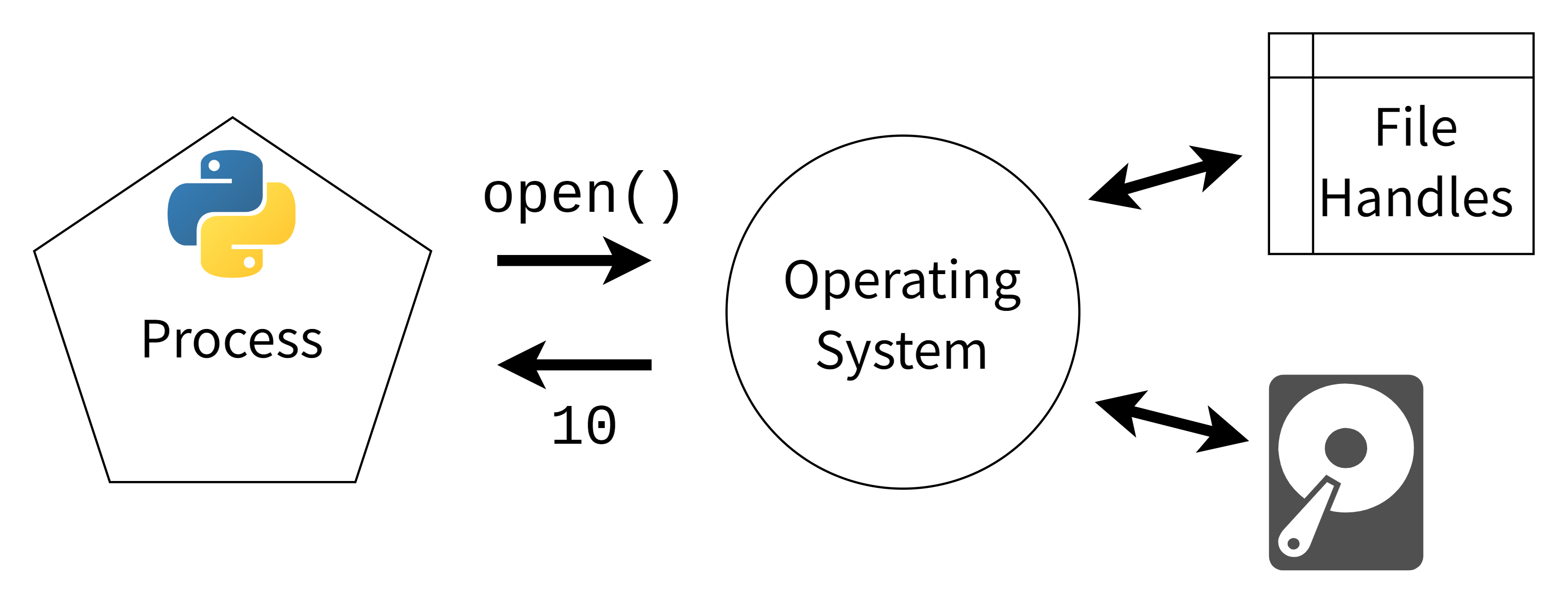 A Python process making a system call and getting the integer 10 as the file handle
Once you have the number associated with the file, you’re ready to do read or write operations. Whenever Python wants to read, write, or close the file, it’ll make another system call, providing the file handle number. The Python file object has a .fileno() method that you can use to find the file handle:
>>> withopen("test_file.txt",mode="w")asfile:... file.fileno()...4The .fileno() method on the opened file object will return the integer used by the operating system as a file descriptor. Just like how you might use an ID field to get a record from a database, Python provides this number to the operating system every time it reads or writes from a file.
Read the full article at https://realpython.com/why-close-file-python/ »
[ Improve Your Python With 🐍 Python Tricks 💌 – Get a short & sweet Python Trick delivered to your inbox every couple of days. >> Click here to learn more and see examples ]